# Euler Docs
> Modular lending infrastructure for configurable markets and vaults.
## FAQ
### Start
#### What is Euler?
Euler is modular onchain lending infrastructure. EVK vaults each hold one underlying asset and can lend it to eligible borrowers. Explicit collateral relationships connect vaults into markets, while the EVC coordinates accounts, sub-accounts, controllers, operators, and batched actions.
EulerEarn vaults provide a separate aggregation layer: users hold one Earn share position while configured roles allocate the deposited asset among enabled strategies.
#### Where should I start?
* To understand the protocol, read [Vaults](/learn/vaults) and [Markets](/learn/markets).
* To supply, borrow, use Earn, or manage a position, start with [Use](/use/getting-started).
* To integrate contracts or data, start with [Build](/build).
* To launch or operate vaults and markets, start with [Curate](/curate).
#### What is the difference between a vault and a market?
A vault is an ERC-4626 contract for one underlying asset, with its own configuration and roles. A market is the set of collateral and liability relationships between vaults. The liability vault controls which collateral vaults it accepts and applies the relevant oracle route, LTVs, caps, and account checks.
Related: [Vault types](/learn/vault-types) and [Markets](/learn/markets).
### Use Euler
#### What should I check before supplying or borrowing?
For supply, check the vault asset, available liquidity, caps, fees, governor or curator, interest-rate model, and any reward source. For borrowing, also check accepted collateral, oracle routes, borrow and liquidation LTVs, liquidation settings, and the position's health after the transaction.
#### How do I assess vault risk?
Review the vault together with its connected market: assets, collateral relationships, liquidity, caps, oracle routes, interest-rate model, LTVs, liquidation settings, hooks, governance, and addresses authorized to change configuration. These checks do not remove smart-contract, oracle, liquidity, collateral, governance, or total-loss risk.
#### How does EulerEarn work?
An Earn vault accepts one asset and issues ERC-4626 shares. Configured roles manage enabled strategies, caps, queues, allocation, and fees. Before depositing, review those roles, the strategy set, current allocation, withdrawal liquidity, loss accounting, and fees.
#### Who controls a vault or market?
Authority is deployment-specific. Review the onchain governor, curator, allocator, guardian, operator, timelock, and fee-recipient addresses, then inspect the exact permissions assigned to each. A role label alone does not establish authority.
Related: [Managing positions](/use/managing-positions), [EulerEarn](/use/euler-earn), and [Curators](/learn/curators).
### Launch and operate
#### How do I create a vault or market?
Choose the asset and market topology, then do the rest in the [Toolbox](/curate/toolbox): create the market or add its vaults, configure collateral relationships, oracle routes, IRMs, caps, LTVs, liquidation settings, hooks, and governance, claim and label the vaults, and read the deployed state back. Use the [Launch toolkit](/launch) for the sequence and [Curate](/curate) for operating guidance.
#### How do I launch an Earn vault?
Define the deposit asset, strategy set, roles, caps, supply and withdrawal queues, allocation process, fees, liquidity plan, labels, and user-facing disclosures. Start with the [Earn launch guide](/curate/vaults/euler-earn/introduction).
#### How do I choose an oracle route?
Identify the base asset, quote asset, and unit of account; then review the adapter, data source, update behavior, decimals, route precedence, manipulation resistance, and failure behavior. ERC-4626 share resolution is optional and should be used only when the vault conversion is the intended and reviewed pricing path.
Related: [The Toolbox](/curate/toolbox), [Oracle adapters and routes](/curate/oracle-routes), and [Governance contracts](/curate/governance-contracts).
### Integrate
#### Which data source should I use?
Use the [Data API](/build/data-querying/euler-v3-api) for indexed and historical data, [lens contracts](/build/data-querying/lens-contracts) for aggregated onchain reads, and direct contract calls or simulation for execution-sensitive state. Use [vault metadata](/build/data-querying/perspectives) for display context; metadata and known-vault status are not safety verdicts.
#### How should I build transactions?
Use the [Euler SDK](/build/sdk) for app-level planning, approvals, simulation, and execution. Use the [EVC integration guide](/build/evc/integration-guide) for lower-level batching, sub-accounts, controllers, collateral, operators, and permits. Verify chain, addresses, calldata, state changes, approvals, and post-transaction health before signing.
#### Where are contract addresses and ABIs?
Use [Contract addresses](/build/contract-addresses) and the [Euler interfaces repository](https://github.com/euler-xyz/euler-interfaces). Confirm the target chain, deployment version, bytecode, and interface before constructing a call.
### Security
#### Where do I find audits or report a vulnerability?
Use the [audit index](/security/audits) to identify reports for the exact component and revision. Follow the current [Cantina bounty page](/security/bug-bounty) for scope, testing rules, eligibility, and submission instructions. Never test against production contracts or user funds unless the controlling rules expressly authorize the exact action.
## Glossary
### Core protocol components
| Term | Definition |
| --------------- | --------------------------------------------------------------------------------------------------------------------------------------------------------------------------------------------------------------------------------------------------------------------------------------------- |
| **EVC** | The Ethereum Vault Connector (EVC) is the account coordination layer used by Euler-compatible vaults. It handles batching, collateral checks, sub-accounts, operator permissions, and controller relationships across vaults. |
| **EVK** | The Euler Vault Kit (EVK) is the framework for creating Euler credit vaults. EVK vaults are ERC-4626 vaults with lending and borrowing logic, one underlying asset, and configurable parameters such as caps, oracles, interest-rate models, collateral relationships, hooks, and governance. |
| **EPO** | The Euler Price Oracle (EPO) is a modular onchain pricing system. Oracle adapters and components implement the `IPriceOracle` interface and can be composed into the pricing routes used by Euler vaults and oracle routers. |
| **IRM** | Interest Rate Model (IRM) is a contract that provides a vault's borrow-rate input from vault state or another configured rule. Supply APY is derived from borrow APY, utilization, fees, and vault accounting rather than being set independently by the IRM. |
| **Hook Target** | A contract that can check, restrict, or block selected vault operations before they execute. Hook Targets are configured per vault and should be reviewed for the specific operations they affect. |
### Financial metrics
| Term | Definition |
| ---------------- | -------------------------------------------------------------------------------------------------------------------------------------------------------------------------------------------------------------------------------------------------------------------------------------------------------------------------------------------------------------------------------- |
| **Health score** | Health score represents the buffer between an account's risk-adjusted collateral value and its liabilities. At raw onchain values, the standard EVK no-violation comparison requires risk-adjusted collateral to be greater than liability; equality can enter liquidation calculation. A displayed value of 1 may be rounded, so consult raw values and transaction simulation. |
| **TTL** | Time to Liquidation. An estimate of how long it would take for an account to reach the liquidation threshold if prices stayed the same while interest continued accruing at current rates. |
| **NAV** | Net Asset Value (NAV) represents the total value of a user's account, measured as the total value of their deposits minus the total value of their debts. |
| **APY** | Annual Percentage Yield (APY) is an annualized rate with a stated compounding convention. EVK base supply and borrow rates are displayed as APY; reward campaigns generally provide APR estimates, even when an interface adds them to an APY breakdown. |
| **ROE** | Return on Equity (ROE) is an annualized estimate of net rate exposure divided by equity, where Euler account and portfolio calculations use Net Asset Value: supplied value minus borrowed value. ROE can change with rates, rewards, intrinsic yield, prices, and position size and is not realized profit. |
| **LTV** | Loan-to-Value (LTV) compares debt value with collateral value. A configured borrow LTV limits new borrowing for a collateral-vault pair; current position LTV describes the account's present ratio. |
| **Utilization** | The share of an EVK vault's assets currently borrowed: `borrows / (cash + borrows)`. Many utilization-based IRMs increase borrow rates as utilization rises. |
### Risk management
| Term | Definition |
| ------------------------------------------------------------- | -------------------------------------------------------------------------------------------------------------------------------------------------------------------------------------------------------------------------------------------------------------------------------------------------------------------------------------------------------------------- |
| **Liquidation** | Standard EVK liquidation transfers selected debt from the violated account to the liquidator and transfers collateral in the other direction at the calculated discount. The resulting liquidator account must pass the applicable controller, collateral, vault, and EVC checks. |
| **Liquidation discount (sometimes called liquidation bonus)** | The liquidation discount determines how much collateral a standard EVK liquidator can receive when taking over selected debt from a liquidatable account; the configured maximum and account health bound the discount. |
| **Isolated Risk** | A market structure where risk is scoped by vault and market configuration. Isolation can limit direct risk propagation between configured market sets, but connected collateral, oracle routes, liquidity, governance, and market conditions can still create dependencies. |
| **Curator** | The person or organisation managing a vault within its assigned permissions. In the Euler app, the Curator label identifies an entity matched to the EVK governor address or EulerEarn Owner address. This display label is distinct from EulerEarn's onchain Curator role; review the [deployed roles and permissions](/use/euler-earn#roles-and-responsibilities). |
| **Market** | EVK vaults linked on chain by collateral relationships: a vault that lends accepts other vaults as collateral at set LTVs. Each vault keeps its own oracle router and governor. See [Markets](/learn/markets). |
| **Product (curator)** | A curator's named group of vaults on one chain, published by Euler as labels. It changes nothing on chain; EVK vaults are listed in the Euler app through their product. Not to be confused with Euler's product lines (EVK, EulerEarn, EulerSwap). See [Markets and products](/curate/toolbox#markets-and-products). |
| **Governor** | The address allowed to change a vault or an oracle router: a wallet, a Safe, or a governor contract. |
| **Governor suite** | A governor contract with its admin timelock (which alone grants and revokes roles) and wildcard timelock (which may change any setting after its delay), deployed together from Euler's factory. See [Governance](/curate/toolbox/governance). |
### Technical terms
| Term | Definition |
| ---------------------------------------- | --------------------------------------------------------------------------------------------------------------------------------------------------------------------------------------------------------- |
| **ERC-4626** | A tokenized vault standard that provides a unified interface for yield-bearing vaults. Euler V2 vaults are ERC-4626 compliant, making them compatible with other DeFi protocols. |
| **Rehypothecation** | The use of deposited assets as collateral while they remain supplied to a vault. Whether a deposit can support borrowing depends on the connected vaults and collateral configuration. |
| **Batching (multicall-style execution)** | EVC batching groups calls into one execution context and can defer configured account-status checks until the end of the batch; individual calls can still revert and the final account checks must pass. |
| **Permit2** | An approval mechanism that can let users authorize token transfers through signatures where supported by the integration and wallet flow. |
### Protocol features
| Term | Definition |
| --------------------------- | -------------------------------------------------------------------------------------------------------------------------------------------------------------------------------------------------------------------------------------------------------------- |
| **Non-borrowable Vault** | A vault where deposited assets can be used as collateral but cannot be borrowed from that vault. |
| **Cross-collateralization** | The ability to use assets from one vault as collateral to borrow from another vault, enabled by the EVC. |
| **Sub-accounts** | Virtual accounts within the EVC that allow users to manage multiple positions with different risk parameters. |
| **Operator** | An address authorized by an EVC account owner to perform ordinary actions on a selected account with broad authority. Operator authorization is account-level rather than a set of granular permissions; owner-only EVC administration remains with the owner. |
### Read next
* [Vaults](/learn/vaults)
* [Introduction](/introduction)
* [Reference](/reference)
## Euler - The Modular Lending Platform
By Euler Labs
### Introduction
Euler is a flexible platform for decentralized lending and borrowing, designed to adapt and grow with the evolving world of DeFi. Euler’s modular design and institutional-grade security empower builders to create and manage custom lending markets in a fully permissionless way, tailored precisely to their needs.
At the product layer, Euler v2 is a system of ERC-4626 vaults built using a custom-built vault development kit, called the EVK, and chained together using the EVC. The vault kit is agnostic about governance, upgradability, oracles, and much else. Different vault classes support different use-cases, giving users freedom through choice and modularity. Euler v2 will launch with several initial classes of vaults built on the EVK. Builders can customise and integrate these as they wish, or design their own vaults with just a few clicks.
**Escrowed collateral** vaults hold deposits that can be used as collateral for taking out loans from other vaults, but do not earn their depositors interest because they do not allow borrowing. They are ungoverned.
**Governed** vaults hold deposits that can both be used as collateral and borrowed, earning depositors additional yield. A DAO, curator, or individual manages these vaults, controlling risk, interest rates, loan-to-value, and other risk parameters. They are suited for passive lenders who trust the governor's management.
**Ungoverned** vaults have fixed parameters with no active governor to manage risk, making them suited to lenders who prefer to manage their own risk. They come in two types:
* **0x** ungoverned vaults have zero exposure to governance through their collaterals
* **nzx** ungoverned vaults have non-zero exposure to governance because they may accept collateral with governance exposure
**Yield aggregator** vaults are a special class of governed vaults that aggregate passive lender assets that can be directed by the vault governor to flow into any underlying ERC4626 vault, including both ungoverned or governed Euler vaults, but also external vaults like sDAI. The vault governor manages risk/reward by altering flows into underlying vaults with different properties.
#### Synthetic assets
The modular architecture of Euler v2 enables not only vanilla lending and borrowing via vaults, but also the creation of collateralized debt positions and synthetic assets. These can benefit from deep collateral liquidity inside Euler, advanced risk management and trading features provided by the EVC, and be bolstered by FeeFlow (see below). As well as synthetic assets already planned for governance by Euler DAO, the architecture of Euler enables the creation of a product class where new synthetic assets can be created in a permissionless fashion. More will be revealed about Euler synthetics in the near future.
#### Reward Streams: permissionless rewards without staking
RewardStreams is an innovative open-source module empowering projects to seamlessly stream rewards to users of new markets in a permissionless manner. This module is a robust and adaptable implementation of the billion-dollar algorithm, enabling the simultaneous distribution of multiple reward tokens.
Unlike traditional methods, users can subscribe to receive their preferred rewards without the need to transfer their vault shares to a staking smart contract. This unique feature allows suppliers to earn rewards while concurrently taking out loans, presenting a dynamic and efficient approach to incentivizing and engaging users.
#### Fee Flow: reverse Dutch auctions for fees
FeeFlow is a new and powerful open-source module that provides the Euler DAO with greater control over fees generated on Euler markets, maximising ecosystem growth. This powerful tool enables the auctioning of fees to accumulate assets such as ETH, stETH, USDC, or potentially even EUL, amplifying the DAO's financial flexibility. Alternatively, these fees can be utilised to acquire DAO-backed synthetic assets, providing organic demand and helping to stabilise the asset. In this scenario, the synthetic asset becomes a valuable instrument within Euler's market ecosystem, creating new and diverse trading opportunities
FeeFlow employs a reverse Dutch auction mechanism, periodically auctioning off fees by systematically reducing the auction price as fees accumulate. In Euler v2, vault creators can set fees, ensuring a passive income stream while sharing a portion with the Euler DAO in a decentralised, efficient, and MEV-resistant manner. This innovative approach enables the DAO to convert fees from various assets into a unified, accumulated token.
#### Free Market Liquidations
Euler v2 allows more advanced vault creators to customise and design their own liquidation flow, but the EVK comes equipped with Euler v1’s innovative reverse Dutch auction liquidation flow as standard. This mechanism was popular with borrowers and traders on Euler v1, where bonuses for liquidators on large loans were \<0.7%, the cheapest of any DeFi lending protocol. This not only protects borrowers, but also helps protect lenders by maintaining the solvency of pools. Ultimately, the less collateral paid to MEV bots by borrowers, the better.
### Ethereum Vault Connector (EVC)
The EVC is an interoperability layer and powerful primitive enabling vault creators in the Euler ecosystem to bootstrap new lending products easily by connecting vaults together and recognizing existing deposits in far away vaults as collateral. Whilst a key module inside Euler v2, the EVC is an open-source project supported by Euler Labs that anyone can launch products on. The white paper and development documentation can be found at evc.wtf.
One of the goals of the EVC is to abstract away many of the features common to all credit-based protocols in order to let developers focus on product features tailored to specific types of users. In this way it helps developers build their own lending protocols, stablecoins, yield aggregators, margin trading apps, and much else. In the long run, it is expected to usher in a wave of innovation in lending as it supports lending products backed not only ERC20 tokens, but also irregular asset classes, such as RWAs, NFTs, IOUs, synthetics, and more. Growth of vaults designed to work with the EVC expands the Euler ecosystem and leads to more flexibility for lenders and borrowers alike. This leads to higher yields and powerful network effects over the long term.
#### Account Managers for advanced trading and risk management
For developers building on the EVC, it provides a range of important features for more advanced users of lending protocols out of the box. These include multicall-like batching, flash liquidity for efficient refinancing of loans, simulations, gasless transactions, and more.
One of the powerful features of the EVC is account manager functionality implemented through a smart contract called an operator. Operators can be smart contracts or EOAs that can be delegated responsibility to act on a user’s behalf. Amongst other use cases, this feature can be used to implement advanced trading and risk management strategies, including conditional orders like stop-loss and take-profit, custom liquidation flows, or intent-based systems. Developers can build their own operator smart contracts to implement risk management and position automation strategies and make them available to users as separate products.
The EVC is a multicall contract with a special user authentication layer. It allows any external contracts to be called without needing adaptor contracts. This not only means that all the functionality is accessible to both EOAs and smart contract wallets, but also allows for limitless expansion of the ecosystem through the development of new EVC-compatible products in a permissionless fashion.
Although the EVC allows only one outstanding liability at any given time, it provides each address with 256 virtual addresses (“sub-accounts”), which provide a gas-efficient way for users to isolate and manage risk without the need to maintain multiple separate wallet accounts.
#### Collateral direct from a user’s wallet
An alternative path to creating a collateral-only asset is to create an ERC20Collateral token, which is a simple extension to the ERC20 token standard to enforce compatibility with the EVC. Project making use of this extension can unlock an entirely new wave of composability. Users are no longer required to deposit their tokens into vaults in order to use them as collateral, they can do so directly from their wallet. This helps them retain their governance rights and other token privileges, whilst also helping avoid generating unnecessary taxable events.
Whenever the user's balance decreases (outgoing transfer/token burn), the token contract calls into the EVC to check whether the outstanding loan rules are not violated. With an addition of a simple modifier which routes transfer calls through the EVC, mentioned account status checks can be deferred until the end of a batch of multiple operations, allowing a user to freely use their tokens within a batch as long as their account is solvent at the end. ERC20Collateral also makes the token compatible with EVC sub-accounts system out of the box.
### Use-cases and examples
#### Leverage by chaining LRT/LST/ETH vaults
* Create an vault for each major LST allowing all major LRTs as collateral.
* Create a WETH vault that allows each of those major LSTs and each of the LRTs as collateral.
* Use-case: LRTs depositors borrow LSTs, and LRTs + LSTs depositors borrow WETH, swap, re-deposit, and leverage their yield.
Consequence: this special Euler WETH vault has the highest demand for borrowing of any vault in DeFi.
#### Leveraged liquidity provision
* Create a WETH vault and a LST vault that allow WETH/LST LP as collateral.
* Use-case: LP token holders borrow more WETH and LST against their LP tokens and deposit into an AMM to get more LP tokens.
* Consequence: LP token holders can leverage their LP positions whilst using simple, gas-efficient AMM protocols.
#### Impermanent loss hedge
* Create a WETH/USDC LP token vault that allows WETH and USDC as collateral.
* Use-case: WETH and USDC token holders can borrow LP tokens to hedge or go short.
* Consequence: LP token holders earn additional yield on their tokens, helping compensate against impermanent loss.
#### USD carry trades
* Create a custom vault pair that allows USDC to borrow USDT, and USDT to borrow USDC on high leverage.
* Use-case: if USDC APY is higher than USDT APY, users can deposit USDC, borrow USDT, swap to USDC, and re-deposit to carry out a carry trade.
* Consequence: users can hedge exposure to stablecoin depeg risk, carry out interest rate arbitrage, and profit from carry trades.
#### Margin-trading real-world assets
* Create a vault for USDC allowing a high-yielding RWAs as collateral, using hooks to enable secondary-transfer restrictions to be observed.
* Use-case: RWA depositors borrow USDC at lower yield, swap to more RWA, and re-deposit, looping to go long.
* Consequence: Margin trading on real-world assets as RWA depositors can leverage their yield and earn the interest rate spread on leverage
### Long-term picture
The ability to lend and borrow digital assets is the foundation on which DeFi is built. Lending protocols are typically composed with decentralised exchanges (DEXs) in order to hedge risk and construct leveraged positions. In this way, borrowers pay interest to lenders, forming the foundation for capital markets in DeFi. Whilst lenders today have many options from which to earn sustainable and passive forms of yield, the trading experience for borrowers and traders remains remarkably poor.
Monolithic lending protocols restrict borrowing with limited asset selections and conservative, one-size-fits-all loan-to-value (LTV) requirements, and then punish traders with heavy fines when they face liquidation. Meanwhile, isolated lending markets offer more flexibility, but often fragment liquidity and increase net costs for traders by disallowing rehypothecation and therefore extra yield on collateral. Moreover, in many cases traders are forced to navigate multiple protocols, governance systems, and user interfaces, paying leveraged fees to each along the way. Together, these market constraints and inefficiencies mean that many traders end up turning to CeFi platforms and relying on perpetual futures markets to put on trades, rather than using decentralised spot markets. This means lower yields for DeFi lenders and, consequently, lower liquidity in less capital efficiency in DeFi across the board.
Euler v2 is a modular lending platform that aims to fix these problems and become the primary liquidity layer for DeFi. Monolithic lending protocols like Aave v3 help foster greater capital efficiency because they pool collateral used for different purposes together and enable rehypothecation. However, they only allow new collateral types to be added under restrictive economic conditions and typically only via governance actions. Isolated lending protocols like Compound v3 or Morpho Blue tend to allow greater flexibility in collateral use, but tend to fragment collateral and prevent rehypothecation, leading to lower capital efficiency.
Euler’s modular architecture helps to solve the liquidity fragmentation problem associated with isolated pools by allowing permissionless creation of vaults that can use any other vault in the broader ecosystem as collateral. This ability to connect together different types of vaults from different product lines via the EVC provides unparalleled flexibility and modularity for lenders, borrowers, builders, traders, and more.
Thanks to the modular design of the system, this can all be achieved without compromising on security or risk management. Vault-chaining via the EVC promises to enable new yield opportunities available nowhere else in DeFi today. With time, whole new product lines can be innovated and brought into the ecosystem helping to power vast network effects. Real-world assets, non-fungible tokens, IOUs for un-collateralised lending, peer-to-peer lending, oracle-free lending, and much more, are all possible directions for the growth of the ecosystem. With this design, together with other developments yet to be announced, Euler aims to become a global liquidity layer and one-stop shop for lending, borrowing, and trading on EVM-based networks.
### Acknowledgements
With special thanks to Certora, Alberto Cuesta Cañada, Christoph Michel, and StErMi for helpful feedback on some of the mechanisms described herein.
## Reference
Use this index to find Euler's canonical sources. For executable behavior, rely on deployed contracts and the relevant versioned repository.
| Need | Canonical source |
| ----------------------------------------- | ------------------------------------------------------------------------------------------------------------------------------------ |
| Deployment addresses | [Contract addresses](/build/contract-addresses) and the [Euler interfaces repository](https://github.com/euler-xyz/euler-interfaces) |
| ABIs and Solidity interfaces | [Euler interfaces](https://github.com/euler-xyz/euler-interfaces) and the relevant versioned contract repository |
| Indexed API schemas | [Euler Data API V3](/build/data-querying/euler-v3-api) and its [OpenAPI document](https://v3.euler.finance/v3/openapi.json) |
| Current aggregated onchain reads | [Lens contracts](/build/data-querying/lens-contracts) |
| Display metadata and known-vault status | [Vault metadata](/build/data-querying/perspectives) and [labels](/curate/vaults/labeling) |
| EUL token addresses and routes | [EUL addresses](/EUL/addresses) and [Multichain](/EUL/multichain) |
| Governance proposals and treasury context | [DAO proposals](/euler-dao/proposals) and [DAO treasury](/euler-dao/treasury) |
| Security review scope | [Audit index](/security/audits) and the linked report for the exact component and revision |
For concepts and historical context, use the [Glossary](/glossary) and [Lite paper](/lite-paper). For task-oriented navigation, start with [Learn](/learn/vaults), [Use](/use/getting-started), [Build](/build), or [Curate](/curate).
## Coming from Aave or Morpho?
If you know Aave or Morpho, Euler's core actions will feel familiar: supply, borrow, monitor account health, repay, and withdraw. The main difference is how lending markets are assembled.
The comparison below is about protocol structure, not relative risk or performance.
* Aave is built around shared lending markets, with asset-specific controls and risk settings applied inside those markets.
* Morpho is built around immutable market definitions, often paired with curator-managed vault allocation.
* Euler is built around isolated vaults that can connect into configurable markets. Each market defines its collateral, caps, oracle routes, LTVs, hooks, and governance.
On Aave, you typically start from a reserve or market. On Morpho, you start from a market or vault. On Euler, start from a vault, then inspect how it connects to other vaults. The vault view shows the asset, accepted collateral, governor, oracle, interest-rate model, and limits that define the position.
### Quick translation
| If you know\... | In Euler, think... |
| ------------------ | ------------------------------------------------------------------------------------------------------------------------------------ |
| Aave reserve | A lending vault for one asset. |
| Aave market | A group of connected lending vaults. |
| Morpho Blue market | A lending relationship between a loan asset, collateral asset, oracle, rate model, and LTV. |
| MetaMorpho vault | The closest analogue is an EulerEarn vault: one user position with allocation across configured strategies. |
| Account health | A controller checks each Euler account against the collateral enabled for that account. Sibling sub-accounts are checked separately. |
### How Aave, Morpho, and Euler compare
| Question | Aave | Morpho | Euler |
| --------------------------- | ------------------------------------------------------------------------------- | ----------------------------------------------------------------------------------------- | ------------------------------------------------------------------------------------------------------------------------------------------------------------- |
| What is the starting point? | A shared lending market with listed reserves. | An isolated market definition, often accessed through vaults. | Isolated vaults that can connect into configurable markets. |
| How are assets added? | Assets are listed through governance or market-specific configuration. | Markets are defined by loan asset, collateral asset, oracle, rate model, and LTV choices. | Curators or builders deploy and configure vaults for assets, then connect them as supply, borrow, or collateral assets with the relevant parameters. |
| How is risk isolated? | Risk settings apply across the market and its listed assets. | Each isolated market has its own risk settings, and vaults may allocate across markets. | Risk can be isolated at the vault or market level, while collateral can still compose where configured. |
| How does collateral work? | Listed assets can be enabled as collateral within a market. | Each market pairs a loan asset with a collateral asset. | Vaults can accept other vault positions as collateral, so curators and builders can choose which vaults support which borrowing markets. |
| What should users inspect? | Reserve configuration, caps, rates, collateral settings, and liquidation rules. | Market parameters, vault allocation, curator choices, oracle, rate model, and LTV. | Vault asset, collateral relationships, governor or curator depending on configuration, caps, LTVs, oracle routes, hooks, liquidity, and liquidation settings. |
### Where to start
| Goal | Start here |
| ----------------------- | ------------------------------------------------------------------------------------------------------------ |
| Supply or borrow | [Use Euler](/use/getting-started), then review [Vaults](/learn/vaults) and [Markets](/learn/markets). |
| Use an Earn vault | [EulerEarn](/use/euler-earn). |
| Launch a lending market | [Curate](/curate) and the [EVK introduction](/curate/vaults/evk/introduction). |
| Create an Earn vault | [EulerEarn vaults](/curate/vaults/euler-earn/introduction). |
| Build an integration | [Build](/build), the [Euler SDK](/build/sdk), and the [EVC integration guide](/build/evc/integration-guide). |
## Protocol introduction
**Euler V2** is a modular lending protocol built around independent vaults. Suppliers can lend assets, borrowers can use accepted collateral to borrow, and curators can assemble markets for different assets and risk preferences. EulerEarn adds single-asset vaults that allocate deposits across configured strategies.
The protocol is permissionless: using the **Euler Vault Kit (EVK)**, anyone can deploy a configurable lending vault for an ERC20 asset. A market is formed by connecting vaults and choosing which collateral relationships, price oracles, interest-rate models, caps, and risk parameters apply. This design supports anything from a single collateral-and-debt pair to a larger cluster of connected vaults without forcing every user into one shared pool.
### What you can do
* **Supply:** deposit an asset into an EVK lending vault or EulerEarn vault and receive ERC-4626 shares.
* **Borrow:** provide collateral in a separate account and borrow from a vault that accepts it.
* **Multiply:** use the app's prepared borrow-and-swap flow to build a leveraged position where a route is available.
* **Curate:** deploy and configure vaults, connect collateral, and manage supported parameters.
* **Build:** integrate with EVK vaults and coordinate multi-vault actions through the EVC.
### Key concepts
* [**Euler Vault Kit (EVK):**](/learn/vaults) The smart contract framework used to create and manage individual lending and borrowing vaults. Each EVK vault is an ERC-4626 vault with borrowing logic.
* **Vaults:** Lending vaults for a specific underlying asset. Users deposit assets and receive shares. Deposits may serve as collateral where another vault accepts them. Some vaults are **non-borrowable**, meaning deposits can be used as collateral but cannot be borrowed from that vault.
* [**Oracles:**](/learn/price-oracles) Price feed contracts used for collateral valuation, debt valuation, and liquidation checks. Euler V2 supports multiple oracle types, including Chainlink, Pyth, Redstone, and Chronicle, with custom configurations per vault or router.
* [**Interest-rate models (IRMs):**](/learn/interest-rates#irm-types) Configured models that provide a vault's borrow-rate input according to the model's logic. Supplier returns are derived from borrower interest, utilisation, fees, and vault accounting. Not every IRM is utilisation-based.
* **Hook Targets:** Optional contracts that can check, restrict, or block selected vault operations before actions such as deposit, borrow, or liquidation. Hooks call designated **Hook Target** contracts, such as `HookTargetAccessControl` or `HookTargetAccessControlKeyring`, that implement the configured logic.
* [**Ethereum Vault Connector (EVC):**](/build/evc) A core contract that acts as an alternate entry point for EVK vaults. The EVC coordinates cross-vault actions, batching, deferred checks, sub-accounts, operator permissions, and [permit-based execution (EIP-712)](https://eips.ethereum.org/EIPS/eip-712).
* **Controller (EVC Context):** When a user borrows from a vault via the EVC, they designate that vault (or another contract) as a Controller for their EVC account. This grants the Controller authority over the user's enabled collateral set within the EVC, allowing it to enforce the borrowing vault's rules (e.g., prevent collateral withdrawal, seize collateral via `controlCollateral` during liquidation).
* **Risk Management:** V2 uses isolated vaults and markets, vault-to-vault loan-to-value factors, caps, oracle configuration, and liquidation mechanisms. A vault's risk profile depends on its live configuration and market conditions.
### Euler V2 vs v1
While sharing the goal of efficient lending and borrowing, Euler V2 differs significantly from earlier versions:
* **Architecture:** Earlier versions had a single, monolithic pool for all assets with cross-collateralization. V2 uses **isolated, permissionlessly deployable vaults** via the EVK.
* **Risk:** Earlier shared-pool exposure is replaced by vault-specific assets, collateral links, oracle routes, LTVs, caps, and governance settings. Risk follows those settings and any connected collateral relationships.
* **Asset Listing:** Earlier versions combined permissionless listing with governance-managed risk tiers. V2 keeps listing permissionless through **permissionless vault creation** for any ERC20, with risk parameters set by the vault creator instead of governance.
* **Oracles:** V2 introduces a configurable oracle framework supporting multiple providers and per-vault or per-router configurations.
* **Modularity:** V2 lets IRMs, oracles, hook targets, and governance models be tailored per market.
### Lending position mechanics
1. A supplier deposits an underlying asset into an EVK vault and receives ERC-4626 shares. Withdrawals depend on the vault's available liquidity and contract limits.
2. A borrower enables accepted collateral in an EVC account and designates a liability controller. The liability vault values collateral and debt through its configured oracle route and enforces borrow LTV, liquidation LTV, caps, and account checks.
3. Borrower interest accrues to the liability vault according to its interest-rate model. Suppliers receive the corresponding vault accounting, after configured fees, while available liquidity changes as assets are borrowed or repaid.
4. If the account no longer satisfies the liability vault's collateral requirements, it can become eligible for liquidation. See [Liquidations](/learn/liquidations) for the mechanism and [Portfolio and liquidation](/use/portfolio#liquidation-risk) for monitoring guidance.
### Continue
* To supply or use Earn vaults: [Use Euler](/use/getting-started).
* To integrate contracts, data, or transactions: [Build](/build).
* To configure vaults, collateral, or governance: [Curate](/curate).
* To review position failure modes and security controls: [Liquidations](/learn/liquidations) and [Security and risk](/security).
* To inspect scoped evidence for a particular contract version or commit: [Audit reports](/security/audits).
## Launch toolkit
Launching includes more than deploying contracts. The deployed configuration, governance, metadata, integrations, monitoring, and user-facing risk context all need an owner and a verification step.
This checklist is non-exhaustive. It is not certification or a substitute for reviewing the contracts and live deployment.
### Launch sequence
| Step | Decide and verify | Start with |
| --------------------------- | ------------------------------------------------------------------------------------------------------------------------------------------------------------------------------------------------------------------------------------------------------ | ----------------------------------------------------------------------------------------------------------------------------------------------------------------------------------------------------------- |
| 1. Define the product | Choose EVK market, standalone vault, vault cluster, or Earn vault; identify intended users and dependencies. | [Products](/products), [Vault types](/learn/vault-types), [Markets](/learn/markets) |
| 2. Design the configuration | For EVK, select assets, collateral relationships, oracle routes, IRM, caps, LTVs, liquidation settings, hooks, and fees. For Earn, select the asset, strategies, roles, caps, queues, allocation process, liquidity plan, and fees. | [Curate](/curate), [EVK introduction](/curate/vaults/evk/introduction), [Earn introduction](/curate/vaults/euler-earn/introduction) |
| 3. Deploy | Create the market or add its vaults in the Toolbox; use reviewed scripts for large clusters; use the Earn deployment guide for an Earn vault. | [Create a market or add a vault](/curate/toolbox/market-ops-create), [EVK deployment](/curate/vaults/evk/deployment-and-management), [Earn deployment](/curate/vaults/euler-earn/deployment-and-management) |
| 4. Assign control | Set governors, timelocks, emergency roles, allocators, curators, fee recipients, and operational ownership. | [Governance in the Toolbox](/curate/toolbox/governance), [Governance contracts](/curate/governance-contracts), [Pause and upgrade](/security/pause-and-upgrade) |
| 5. Verify deployed state | Read addresses, bytecode, assets, routes, parameters, roles, queues, and permissions from the target chain; simulate representative actions. The Toolbox reads every change back at the receipt block and shows Euler's configuration check per vault. | [Open a market](/curate/toolbox/market-ops), [Contract addresses](/build/contract-addresses), [Data querying](/build/data-querying) |
| 6. Publish context | Claim your vaults and set their labels, product, notices, and links in the Toolbox; Euler publishes them. | [Labels and metadata](/curate/vaults/labeling), [Publishing and versions](/curate/toolbox/publishing) |
| 7. Test integrations | Check app discovery, deposits, borrows, repayments, withdrawals, liquidations, allocation, monitoring, and failure paths that apply. | [Build](/build), [Euler SDK](/build/sdk) |
| 8. Handoff operations | Record owners for monitoring, parameter changes, governance execution, incident response, communications, and post-launch verification. | [Risk & Analytics dashboard](/use/risk-dashboard), [Emergency pause](/curate/toolbox/emergency), [Security](/security) |
### Final review
Before making the deployment available to users, confirm:
* **Market risk:** collateral exposure, oracle behavior, caps, LTVs, liquidity, liquidation incentives, hooks, fees, and connected-vault dependencies.
* **Control:** current role holders, selector permissions, timelocks, upgradeability, pause paths, signer policy, and recovery limits.
* **User context:** asset and product labels, governance disclosures, reward and APY sources, withdrawal constraints, deprecation notices, and support ownership.
* **Execution:** representative transactions simulate successfully against the intended chain and addresses, with expected approvals, calldata, events, and post-state.
For Earn-specific roles, strategies, queues, caps, fees, and allocation checks, use the [EulerEarn launch guide](/curate/vaults/euler-earn/introduction). For EulerSwap 2, verify the exact version and connected deployment before applying version-specific controls.
## Agents and LLMs
Euler documentation is available below in formats optimized for agents. Verify live state and simulate any transaction before execution.
### Agent-readable docs
| Endpoint | Use |
| ------------------ | -------------------------------------------------------------------- |
| `/llms.txt` | Compact route and mechanism index. Start here. |
| `/llms-pages.json` | Resolve pages by route, audience, task, mechanism, and risk context. |
| `/llms-full.txt` | Full generated docs context after selecting a task or area. |
| [`/faq`](/faq) | Concise answers and task routing for common questions. |
Loading order:
1. Load `/llms.txt` and select the relevant docs pages.
2. Load `/llms-full.txt` only when broader context is needed.
3. Read current indexed and onchain state on the target chain.
4. Simulate the complete action and require the intended signer to review final calldata.
### Euler agent skills
Install the core vault skill:
```bash
npx add-skill euler-xyz/agent-skills --skill euler-vaults
```
Install all Euler skills:
```bash
npx add-skill euler-xyz/agent-skills --skill euler-vaults --skill euler-irm-oracles --skill euler-earn --skill euler-advanced --skill euler-data
```
| Skill | Use |
| ------------------- | ---------------------------------------------------------------------- |
| `euler-vaults` | Vault operations, EVC orchestration, architecture, risk, and security. |
| `euler-irm-oracles` | Oracle adapters, EulerRouter configuration, and IRM selection. |
| `euler-earn` | Earn creation, strategies, roles, queues, and allocation. |
| `euler-advanced` | Hooks, flash loans, debt transfer, Fee Flow, and EUL rewards. |
| `euler-data` | Lens contracts, subgraphs, interfaces, and deployment data. |
### Primary repositories
| Repository | Scope |
| --------------------------------------------------------------------------------- | ---------------------------------------------------------------- |
| [Agent skills](https://github.com/euler-xyz/agent-skills) | Installable Euler context for coding agents. |
| [Euler Vault Kit](https://github.com/euler-xyz/euler-vault-kit) | EVK credit-vault contracts. |
| [Ethereum Vault Connector](https://github.com/euler-xyz/ethereum-vault-connector) | Account coordination, batching, operators, and permits. |
| [Euler Price Oracle](https://github.com/euler-xyz/euler-price-oracle) | Oracle adapters, routing, and quote interfaces. |
| [Euler interfaces](https://github.com/euler-xyz/euler-interfaces) | Deployment addresses, ABIs, and interfaces. |
| [Euler SDKs](https://github.com/euler-xyz/euler-sdks) | TypeScript SDK packages and examples. |
| [EVK periphery](https://github.com/euler-xyz/evk-periphery) | Lenses, factories, governors, perspectives, and other periphery. |
| [EulerEarn](https://github.com/euler-xyz/euler-earn) | Earn vault contracts and allocation roles. |
| [EulerSwap](https://github.com/euler-xyz/euler-swap) | EulerSwap contracts. |
| [Liquidation bot v3](https://github.com/euler-xyz/liquidation-bot-v3) | Reference liquidation monitoring and execution implementation. |
### Agent action checklist
| Action | Start with | Verify before acting |
| ------------------------- | ------------------------------------------------------------------------------------------------------------------ | ------------------------------------------------------------------------------------------------------------------------------------ |
| Supply | [Supply](/use/supply-assets), [review](/use/supply-review), [SDK](/build/sdk) | Chain, vault, asset, account, allowance or Permit2 path, cap, hooks, expected shares, post-state |
| Borrow | [Borrow](/use/borrow-assets), [risk](/use/borrow-risk), [SDK](/build/sdk) | Controller, collateral, oracle route, caps, liquidity, borrow and liquidation LTVs, rate, health after borrow |
| Withdraw or redeem | [Manage positions](/use/managing-positions), [SDK](/build/sdk) | Shares, assets owed, liquidity, debt, controller, health after withdrawal, strategy queue where relevant |
| Use EulerEarn | [Earn user guide](/use/euler-earn), [integrator guide](/build/earn-integrator-guide) | Asset, share decimals, strategies, allocation, roles, fees, caps, queues, liquidity, loss accounting |
| Build an EVC batch | [EVC integration](/build/evc/integration-guide), [SDK](/build/sdk) | Account, controller, collateral, item order, approvals, simulation, final status checks |
| Configure an EVK vault | [Launch](/launch), [The Toolbox](/curate/toolbox) | Asset, oracle and unit, IRM, caps, LTVs, liquidation settings, hooks, governor, timelock, labels |
| Configure an oracle route | [Oracle adapters and routes](/curate/oracle-routes), [Price Oracles](/learn/price-oracles) | Base, quote, unit, adapters, precedence, share conversion, freshness, manipulation and failure behavior |
| Configure hooks | [Hooks implementation](/curate/vaults/evk/hooks-custom-logic), [Hooks concept](/learn/hooks) | Hooked operations, address, access control, revert behavior, reentrancy, gas, upgrade and emergency process, tests |
| Operate EulerSwap | [EulerSwap 2](/curate/euler-swap) | Exact version and deployment, pool and LP account, authority, parameters, expiry, fees, liquidity, LTVs, oracle routes, quote limits |
| Resolve metadata | [Vault metadata](/build/data-querying/perspectives), [labels](/curate/vaults/labeling) | Chain, vault, metadata response, known-vault response, onchain roles, criteria and source scope |
| Resolve contracts | [Contract addresses](/build/contract-addresses), [Euler interfaces](https://github.com/euler-xyz/euler-interfaces) | Chain, address source, ABI, bytecode, version, proxy or implementation status |
Never infer execution safety from labels, APY, a successful simulation alone, or a previous deployment. Read the current target state and review the final transaction.
## Products
Euler's core building block is the vault. EVK vaults can stand alone or connect into lending markets, while EulerEarn vaults allocate deposits across approved strategies. The Euler app, the SDK, and the Data API provide different ways to use or build on these products; the app is open source and can be self-hosted.
This page is about Euler's product lines. A curator's **product** in the Toolbox is something else: a named group of that curator's vaults on one chain; see [Markets and products](/curate/toolbox#markets-and-products).
Vaults can form isolated collateral-debt pairs, pooled borrow markets with selected collateral, or cross-collateralized clusters. Each market configures its own collateral relationships, oracles, interest-rate models, hooks, caps, governance, and liquidation parameters.
### Product lines
EVK vaults are the primitive the rest of the stack is built from: isolated markets connect them for lending and borrowing, and EulerEarn allocates deposits across them.
The building blockEVK vaults
ERC-4626 lending vaults with borrow support, hooks, caps, governance, and configurable collateral relationships. Every Euler market and Earn product is built from these vaults.
EVK vaults connected into collateral and borrow markets with scoped risk. Use them for asset-specific lending, tokenized asset markets, and markets with custom collateral, oracle, cap, and LTV configuration.
### Explore the mechanics
* [Markets](/learn/markets): isolated pairs, multi-collateral markets, and cross-collateralized clusters.
* [Price Oracles](/learn/price-oracles): valuation routes and units of account.
* [Interest Rate Models](/learn/interest-rates): how vault borrow rates respond to utilization or time.
* [Hooks](/learn/hooks): operation-specific policy checks and custom logic.
* [Curate](/curate): deployment, configuration, governance, and operations.
## Annual Percentage Yield
Annual Percentage Yield (APY) expresses a rate as an annualized percentage using an assumed compounding method. On Euler, displayed rates can combine borrower-funded lending yield, an asset's intrinsic yield, and campaign rewards. These components have different sources and risks, and all can change.
### Annualization
If `r_p` is the rate for one compounding period and `n` is the number of periods in a year:
```text
APY = (1 + r_p)^n - 1
```
Before comparing rates, check whether each source reports APR or APY, its compounding convention and sampling time, and whether it includes fees, intrinsic yield, or rewards.
### EVK lending and borrowing rates
EVK interest-rate models return a per-second compounded borrow rate called SPY, scaled by `1e27`. Euler's `Utils` lens uses an average Gregorian year of `365.2425 × 86,400` seconds:
```text
borrow APY = (1 + borrow SPY)^seconds_per_year − 1
utilization = borrows / (cash + borrows)
supply APY = borrow APY × utilization × (1 − interestFee)
```
Here, `borrow SPY` is the unscaled per-second rate and `interestFee` is the normalized fee fraction. The IRM supplies the borrow-rate input; utilization, fees, and vault accounting determine the supplier rate. High supply APY can indicate high utilization and limited withdrawal liquidity.
### Rate components
* **Lending APY:** interest paid by borrowers, after the effect of utilization and the configured interest fee.
* **Intrinsic APY:** yield produced by the underlying asset or its protocol rather than EVK borrowing.
* **Reward APR:** the estimated annualized value of a campaign. It is not compounded by the EVK vault.
* **Borrow APY:** the annualized cost of debt from the liability vault's rate model.
An interface may combine these into a headline or net rate. Adding APR and APY percentage points is a display convention; it does not make campaign rewards protocol-compounded yield.
### What to verify
* Separate lending, intrinsic, borrowing, and reward components.
* Check the rate timestamp, annualization method, utilization, liquidity, IRM, and live fee configuration.
* Confirm campaign eligibility, funding, vesting, claimability, and whether rewards are already included.
* Account separately for token-price changes, slippage, gas, external fees, taxes, and redemption constraints.
* For debt positions, review oracle and liquidation risk; APY does not include liquidation losses.
### Sources
* [EVK periphery `Utils` lens](https://github.com/euler-xyz/evk-periphery/blob/master/src/Lens/Utils.sol)
* [Euler SDK APY example](https://github.com/euler-xyz/euler-sdks/blob/main/packages/euler-v2-sdk/examples/vaults/fetch-apys-example.ts)
### Read next
* [Interest rates](/learn/interest-rates)
* [Rewards](/use/rewards)
* [Return on equity](/use/return-on-equity)
## Borrow assets
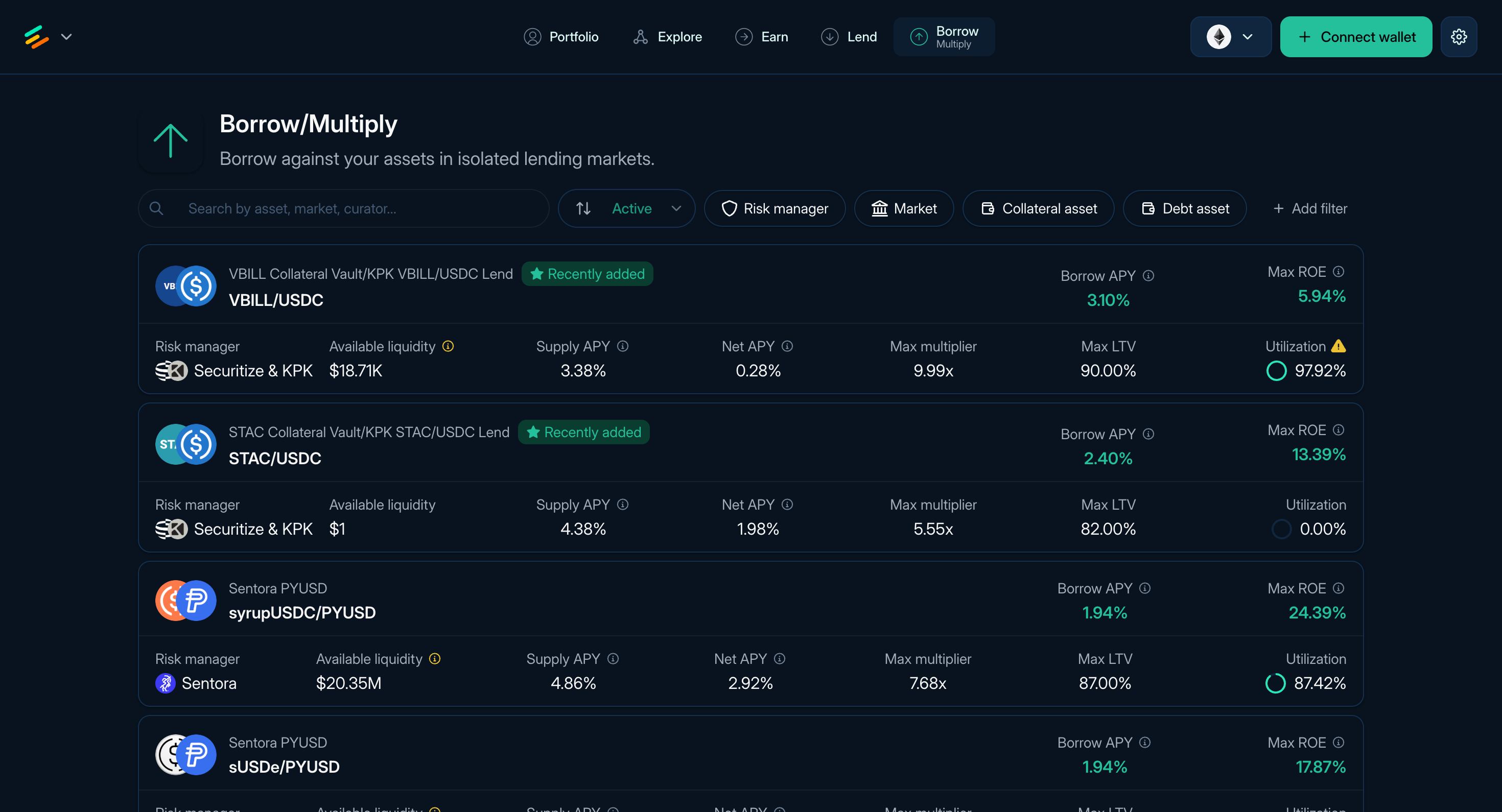
**Figure 1:** The Borrow page of Euler
Borrowing on Euler lets you use accepted collateral to borrow from a liability vault. Borrowing starts from **Borrow**. After you open a position, it appears in **Portfolio** under Positions.
:::info
Multiply is available directly from the Borrow page. After selecting a borrow pair, use the tabs at the top of the pair page to switch between **Borrow** and **Multiply**.
:::
### What borrowing does
When you borrow:
* You supply or select collateral accepted by the borrow vault.
* The borrow vault records debt through the Ethereum Vault Connector, or EVC.
* Borrowing capacity depends on collateral value, the oracle route, borrow LTV, available liquidity, and caps. Liquidation LTV separately determines when the position becomes eligible for liquidation.
* Borrowers pay interest based on the vault's [Interest Rate Model](/learn/interest-rates#interest-rate-models).
* The position can become liquidatable if collateral no longer supports the debt.
:::warning
Borrowing involves liquidation risk. Monitor health score, LTV, rates, oracle behavior, collateral price, debt price, and available liquidity after opening a position.
:::
### Find a borrow pair
The **Borrow** page ([app.euler.finance/borrow](https://app.euler.finance/borrow)) lists available collateral and debt pairs.
Each row shows the curator, collateral asset, debt asset, Supply APY, Borrow APY, Net APY, Max ROE, maximum multiplier, Max LTV, utilization, and available liquidity. Sort or filter the table, then open a pair to review details.
:::warning
Review the specific pair before borrowing. Relevant fields include collateral asset, debt asset, curator, oracle route, Max LTV, Liquidation LTV, utilization, borrow cap, available liquidity, and liquidation discount.
:::
### Borrow flow
1. Choose a pair from **Borrow**.
2. Enter the debt asset amount.
3. Select collateral from wallet assets or an existing deposited balance where supported.
4. Approve token spending if your wallet asks.
5. Review borrowed amount, collateral amount, health score, LTV, liquidation price where shown, oracle route, rates, liquidity, token approvals, and gas estimate.
6. Confirm the transaction in your wallet.
The borrowed asset is sent according to the app flow, and the position appears in Portfolio.
Read next: [Borrow review and risk](/use/borrow-risk), [Portfolio and liquidation](/use/portfolio#liquidation-risk), and [Managing positions](/use/managing-positions).
## Borrow review and risk
Use this page before opening or changing a Borrow position. Borrowing creates debt, and the position must keep enough risk-adjusted collateral to remain valid.
### Pair and position details
Borrow and Multiply share the same pair details page. Use the **Borrow** and **Multiply** tabs at the top to switch between forms.
Review:
* **Supply APY:** displayed annualized rate for the collateral asset.
* **Borrow APY:** displayed annualized base interest cost for the debt asset; inspect any intrinsic-yield or reward-APR adjustments separately in the breakdown.
* **Max ROE:** app estimate for the configured pair. It is not a forecast.
* **LLTV:** liquidation loan-to-value ratio.
* **Liquidity:** available liquidity for borrowing.
* **Oracle:** price route used for the pair.
* **Collateral and debt vault details:** risk parameters, curator, exposure, utilization, caps, and related metadata.
Open the rate breakdown to distinguish the base lending or borrowing rate from any intrinsic APY and reward APR included in the displayed rate.
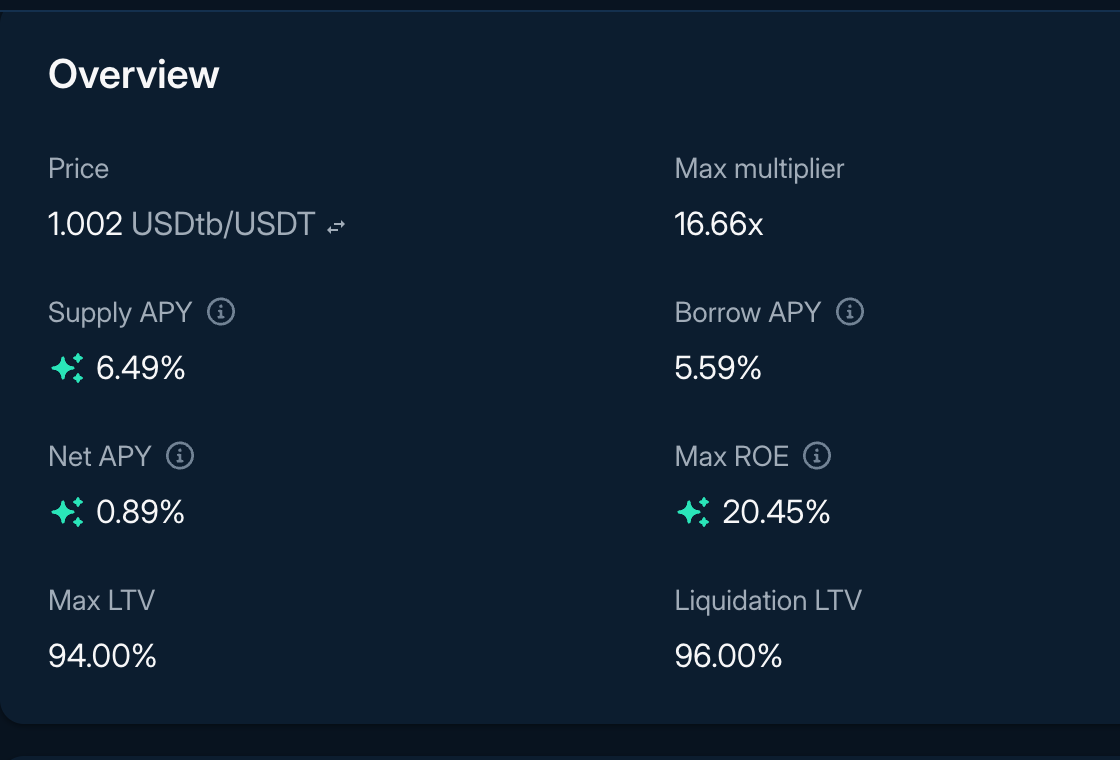
**Figure 1:** APY breakdown
### After borrowing
Borrow positions appear under the Positions tab in Portfolio. Monitor:
* Health score and liquidation price where shown.
* Current LTV versus liquidation LTV.
* Collateral price, debt price, oracle updates, and rate changes.
* Borrow liquidity, withdrawal liquidity, and caps.
* Available actions such as repay, borrow more, add collateral, withdraw excess collateral, and swap-based actions where supported.
### Liquidation risk
A standard EVK account can enter liquidation when, at raw onchain values, its risk-adjusted collateral is not greater than its liability. A displayed health score may be rounded.
To reduce risk, keep a buffer above liquidation, repay debt, add collateral, reduce leverage, or close the position before health falls too far.
For the liquidation process and monitoring guidance, read [Portfolio and liquidation](/use/portfolio#liquidation-risk). See also [Borrow assets](/use/borrow-assets) and [Liquidations](/learn/liquidations).
## EulerEarn
EulerEarn lets you deposit one asset into a vault that allocates across a configured set of strategies, including Euler lending vaults and, where enabled, external ERC-4626 strategies. Instead of choosing and rebalancing several strategies yourself, you hold one ERC-4626 share position while the Earn vault's Curator and Allocators manage its strategy set and allocations within onchain limits.
This can simplify how you access a curated group of strategies, but the vault you choose still matters. Its manager, strategies, caps, queues, fees, recent performance, and available withdrawal liquidity can differ from other Earn vaults.
### At a glance
* **You deposit:** one underlying asset, such as the token named on the vault page.
* **You receive:** ERC-4626 shares representing your claim on that Earn vault.
* **The vault allocates:** across enabled strategies, subject to strategy caps and the configured supply and withdrawal queues.
* **Configured roles manage it:** the Owner, Curator, Allocators, and Guardian have different powers.
* **You can monitor:** recent APY, current allocations, management addresses, fees, rebalancing activity, and available liquidity.
### How Earn works
1. You deposit the vault's underlying asset and receive shares.
2. Configured roles enable strategies, set caps and queues, and move assets among strategies within the vault's rules.
3. Interest and other strategy results flow into the Earn vault's accounting. A configured performance fee can mint shares to the fee recipient.
4. To withdraw, the vault uses its withdrawal queue to recover assets from strategies. The amount available now can be lower than the accounting value of your shares.
### Roles and responsibilities
Roles are hierarchical in the documented implementation: the Owner can perform Curator, Allocator, and Guardian actions, while the Curator can also perform Allocator actions. A vault can have more than one Allocator.
* **Owner:** assigns roles and controls high-level settings, including fees and metadata.
* **Curator:** manages strategy caps and can perform allocation and queue actions.
* **Allocator:** sets queues and reallocates assets among enabled strategies within their caps.
* **Guardian:** can revoke specific pending cap, strategy-removal, Guardian, and timelock actions. The Guardian is not a general veto over all vault activity.
* **Fee recipient:** receives performance-fee shares when a fee is configured. This address is not a management role by itself.
After the applicable timelock, action-specific acceptance methods such as `acceptCap`, `acceptGuardian`, and `acceptTimelock` can be called by anyone. Check the current role addresses, pending actions, and timelock onchain when these details are material to your decision.
Earn vaults require a strategy to be recognized by the configured factory before it can be enabled or its cap increased. That check applies to those configuration changes; it does not continuously approve every allocation made within an existing cap.
### Read the vault page
Use the vault page to understand what you are depositing into:
* **Total assets or supply:** the vault's accounting value. This is not necessarily the amount available for immediate withdrawal.
* **Liquidity or maximum withdrawal:** a point-in-time view of assets currently withdrawable through the configured queue.
* **Recent APY:** annualized historical performance over the displayed window, not a forecast. Check whether the interface includes rewards and fees.
* **Exposure:** the strategies to which assets are currently allocated, including allocation amount or percentage where shown.
* **Management:** the Owner, Curator, Guardian, Allocator, fee recipient, fee, and timelock fields surfaced by the interface.
* **Rebalancing and activity:** indexed records of allocation changes and user deposits or withdrawals.
* **Addresses:** the underlying token and Earn vault contracts for the selected network.
Labels and metadata help with discovery, but they do not replace checking the vault address and live configuration.
### Deposit
1. Open **Earn** in the app and connect your wallet on the intended network.
2. Compare vaults by underlying asset, manager, recent APY, exposure, fees, and liquidity.
3. Open a vault and review its strategies, roles, caps, queues, pending actions, and recent allocation activity.
4. Enter an amount and review the expected shares and current deposit limit.
5. Approve the underlying token if prompted, then check the chain, target contract, amount, receiver, and allowance in your wallet before confirming.
A token approval or permit can require a separate signature or transaction. Previewed shares and limits can also change before execution.
### Withdraw
1. Open the vault or your position and select **Withdraw**.
2. Compare the accounting value of your shares with the amount currently available to withdraw.
3. Enter an amount, review the receiver and transaction, and confirm it in your wallet.
Withdrawals depend on the liquidity available through the withdrawal queue. A strategy can be fully utilized, subject to its own withdrawal limit, or temporarily unable to return assets. If the full amount is unavailable, a smaller withdrawal may work, but future liquidity is not assured.
### Losses and withdrawal shortfalls
An Earn vault tracks both assets represented by strategy shares and a `lostAssets` accounting value. If a strategy realizes a shortfall or is force-removed while assets remain in it, the amount represented by the vault and the amount currently withdrawable can fall.
The displayed share conversion does not always show that effect immediately because recognized gaps can remain in reported `totalAssets()`. Check `lostAssets`, represented strategy assets, and `maxWithdraw` together rather than treating an unchanged displayed share value as evidence that no loss occurred.
For the contract-level accounting and recovery paths, review the [EulerEarn source repository](https://github.com/euler-xyz/euler-earn).
### Fees and performance
An Earn vault can charge a performance fee, paid by minting shares to its configured fee recipient under the vault's accounting. Check the current fee and recipient for the specific vault.
Recent APY can reflect lending rates, rewards, allocation changes, fees, and the selected measurement window. It is most useful for understanding what happened over that period; it does not tell you what the next period will produce.
### Before depositing
Review:
* the underlying asset and vault contract address;
* the Curator, Allocators, Owner, Guardian, and their permissions;
* enabled strategies, caps, supply queue, and withdrawal queue;
* recent allocation and management activity;
* current withdrawable liquidity and any recorded `lostAssets`;
* performance fee and fee recipient; and
* strategy, oracle, market, smart-contract, and role dependencies.
### Troubleshooting
* **Approval or deposit fails:** verify network, token and vault addresses, balance, gas, allowance or Permit2 expiry, current deposit limit, and the decoded revert.
* **Displayed APY changes sharply:** check the measurement window, vault size, allocation changes, rewards, and data freshness.
* **Withdrawal reverts:** refresh the current maximum withdrawal, inspect queue and strategy liquidity, verify your share balance and receiver, and preserve the exact revert for diagnosis.
* **Accounting value differs from withdrawable amount:** inspect `lostAssets`, strategy assets, queue liquidity, and strategy limits.
### Technical resources
* [EulerEarn integrator guide](/build/earn-integrator-guide)
* [EulerEarn audits](/security/earn-audits)
* [EulerEarn contracts and source](https://github.com/euler-xyz/euler-earn)
## Getting Started with Euler V2
Use the Euler app to supply assets, deposit into EulerEarn, borrow against collateral, or open a Multiply position.
### Connecting Your Wallet
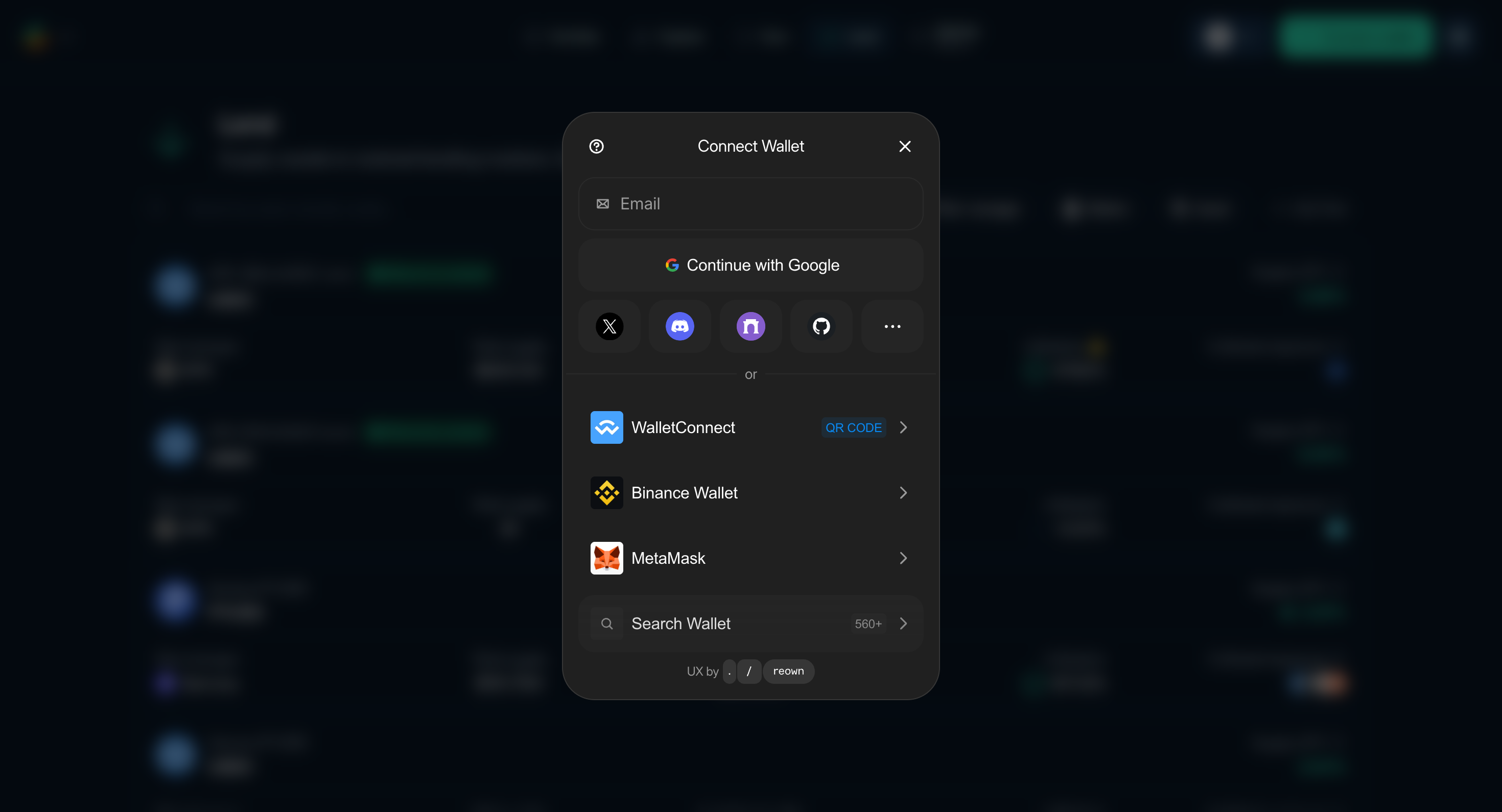
**Figure 1:** Connect a Wallet modal upon clicking the "Connect" button on the top right
1. Open the [Euler app](https://app.euler.finance/).
2. Select **Connect** in the top-right corner and choose a supported browser or WalletConnect wallet.
3. Verify the account and network before approving the connection.
### Understanding the Interface
The main navigation contains:
* **Portfolio:** Review Net APY, ROE, supplied and borrowed value, net asset value, positions, deposits, claimable rewards, and account activity.
* **Explore:** Browse available Euler markets and opportunities.
* **Earn:** Find EulerEarn vaults that allocate deposits across configured strategies.
* **Lend:** Find lending vaults and compare Supply APY, curator, exposure, utilization, and available liquidity.
* **Borrow:** Find collateral/debt pairs. After opening a pair, switch between the **Borrow** and **Multiply** forms.
#### Key Concepts from UI
* **Accounts:** Direct deposits use your main account (`0`). The app generally opens each Borrow or Multiply position in a separate EVC sub-account.
* **Collateral source:** A position can use assets from your wallet or an eligible deposited balance.
* **Batched actions:** The app can combine compatible position actions into one atomic transaction. An approval or permit may still require a separate wallet prompt.
* **Vaults and pairs:** Lending uses individual vaults. Borrow and Multiply use a collateral-vault/debt-vault pair.
* **LTVs:** **Borrow LTV** determines borrowing power. **Liquidation LTV (LLTV)** determines when a position becomes eligible for liquidation.
* **Health score:** A Borrow or Multiply position may become eligible for liquidation when its health score reaches 1 or below.
* **Risk management:** Review the current curator, oracle, LTVs, caps, and other configurable parameters before using a market.
#### Where Do My Positions and Deposits Live?
The app stores different workflows separately:
* **Direct deposits:** Live in your main wallet address (account `0`).
* **Borrow/Multiply positions:** The Euler app generally opens each position in a separate sub-account (account 1, 2, 3, etc.), which is a unique address linked to your wallet.
Sub-accounts share the first 19 bytes of the owner address and differ in the final byte. The app manages their selection during normal use.
Continue to [Supply assets](/use/supply-assets), [Borrow assets](/use/borrow-assets), [Multiply](/use/multiply-strategies), or [EulerEarn](/use/euler-earn).
## Manage Multiply
Multiply positions appear alongside Borrow positions under **Portfolio > Positions**. Monitor them more closely than unleveraged positions because price, rate, liquidity, and swap execution changes have a larger effect on equity.
### What to monitor
* **Health score and liquidation price:** keep a buffer above liquidation.
* **Net rate or ROE:** app estimates can change after rates, rewards, or utilization change.
* **Collateral and debt prices:** adverse moves can reduce equity quickly.
* **Borrow and withdrawal liquidity:** low liquidity can affect opening, changing, or closing a position.
* **Swap execution:** entry, increase, repay, and close actions may depend on routing, price impact, and slippage.
### Transaction summary
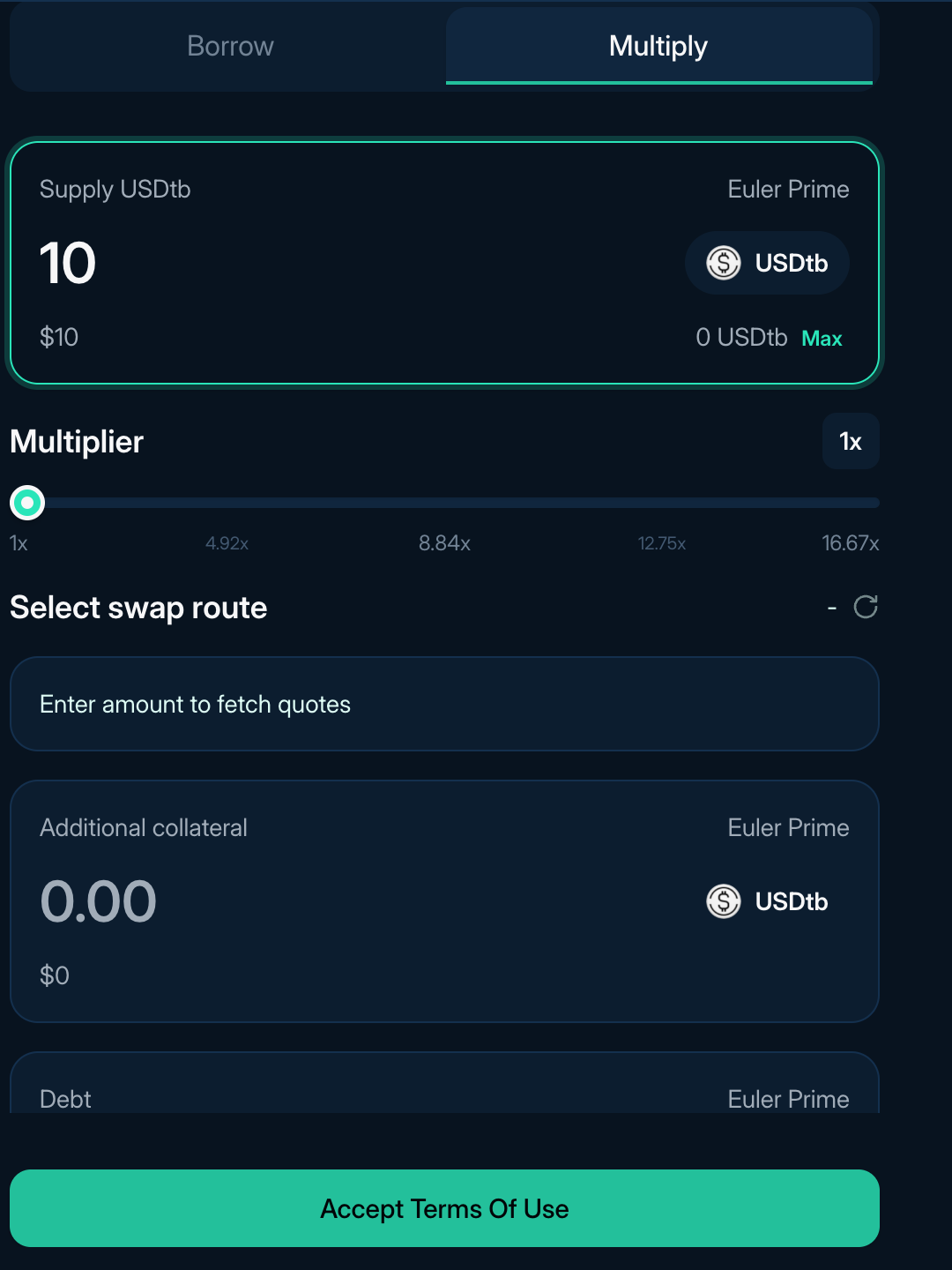
**Figure 1:** Transaction summary in the Multiply form
Before signing, review expected amounts, route, price impact, slippage tolerance, gas estimate, token approvals, and resulting position health.
**Slippage** is the allowed difference between quote and execution. If execution moves beyond the tolerance, the transaction reverts.
**Price impact** is the effect your trade size has on execution price. Larger swaps can receive worse prices.
**Leveraged price impact** counts swap impact against margin rather than notional exposure. A small price impact on the full swap can be a larger percentage of your initial collateral.
### Available actions
* **Multiply:** increase exposure by borrowing, swapping, and adding collateral.
* **Repay:** reduce debt or unwind part of the loop.
* **Supply collateral:** add more collateral directly to the position.
* **Withdraw collateral:** remove excess collateral if the position remains valid.
Management actions can involve multiple protocol and swap steps. Review [Portfolio and liquidation](/use/portfolio#liquidation-risk), [Strategy profitability](/use/strategy-profitability), and [Managing positions](/use/managing-positions) before using or changing a Multiply position.
## Open Multiply

**Figure 1:** The Borrow page of Euler
Multiply is the leveraged position flow inside the Borrow page. It builds a larger collateral position by borrowing the debt asset, swapping it for more collateral, and supplying that collateral back into the position. Where a route is available, the app prepares these actions as a batch. A token approval or permit may still require a separate wallet prompt.
:::info
After selecting a borrow pair, toggle between the **Borrow** and **Multiply** forms at the top of the pair page. There is no separate Strategies entry point.
:::
### What Multiply does
When you choose a multiplier, the app estimates the sequence needed to borrow the debt asset, swap it into more collateral, and supply that collateral back into the position.
This lets you choose a target multiplier without manually repeating the borrow, swap, and supply loop. It increases exposure to the collateral asset, but it also adds debt and makes the position more sensitive to price moves, rates, liquidity, and swap execution.
### Find a Multiply pair
The **Borrow** page ([app.euler.finance/borrow](https://app.euler.finance/borrow)) lists collateral and debt pairs that can be opened as Borrow or Multiply positions where supported.
Each row can show the curator, asset pair, Borrow APY, Supply APY, Net APY, Max ROE, maximum multiplier, Max LTV, utilization, and available liquidity. Open a pair, then select the **Multiply** tab.
The Borrow and Multiply forms share the same pair page. Before choosing a pair, compare the collateral and debt assets, curator, current Supply and Borrow APYs, Max LTV and Liquidation LTV, oracle route, available liquidity, estimated Max ROE, and maximum multiplier. Headline rates and limits can change with vault and market conditions.
### Open a Multiply position
1. Select the **Multiply** tab on the pair page.
2. Enter the collateral amount you want to start with.
3. Set the multiplier.
4. Review multiplier, ROE, current price, liquidation price where shown, LTV, health score, swap route, expected amounts, price impact, slippage tolerance, gas estimate, and token approvals.
5. Confirm the transaction in your wallet.

**Figure 2:** The Multiply form on a Borrow pair page
### Review the swap
The transaction summary should show the debt amount being swapped, expected collateral received, route, price impact, and slippage tolerance.
* **Slippage tolerance** is the maximum adverse difference the transaction accepts between the quote and execution. If execution would return less than the permitted minimum, the transaction should revert.
* **Price impact** is the effect of the trade size on its execution price. Multiply swaps the borrowed amount needed to reach the target position, so the swap can be large relative to the margin you supplied.
### After opening
Multiply positions appear under **Positions** in Portfolio alongside Borrow positions. Use the position page to add collateral, repay debt, change the multiplier, or close the position where supported. See [Manage Multiply](/use/multiply-management) for the metrics and swap details to monitor.
:::warning
Multiply uses leverage. A smaller adverse price, rate, liquidity, or swap-execution move can affect the position faster than an unleveraged position. A positive displayed ROE does not include every cost or establish that the position will remain profitable.
:::
Read next: [Manage Multiply](/use/multiply-management), [Strategy profitability](/use/strategy-profitability), and [Portfolio and liquidation](/use/portfolio#liquidation-risk).
## Portfolio and liquidation
Portfolio is the main dashboard for your Euler activity. Use it after supplying, borrowing, opening a Multiply position, depositing into EulerEarn, or claiming rewards.
### Portfolio
The Portfolio header summarizes:
* **Net APY:** estimated net annualized return across the portfolio.
* **ROE:** estimated return on portfolio equity.
* **Total supplied:** supplied assets, including deposits and collateral inside positions.
* **Total borrowed:** borrowed assets across Borrow and Multiply positions.
* **Net asset value:** supplied value minus debt value in Euler.
Portfolio has four main areas:
* **Positions:** Borrow and Multiply positions. Each position shows collateral and debt assets, net asset value, ROE, multiplier where relevant, health score, current price, liquidation price where shown, and a link to the position detail page.
* **Deposits:** EulerEarn and direct lending deposits that are not automatically collateral for Borrow or Multiply positions. Rows show the asset, supplied amount, supply value, Supply APY, and available actions such as Supply, Withdraw, and Asset swap.
* **Rewards:** claimable rewards and their estimated market value. Reward eligibility and display timing depend on campaign rules and data-indexing updates. Verify the active campaign and claimable amount with the linked distributor before including rewards in position accounting.
* **Activity:** recent Euler activity for the viewed account.
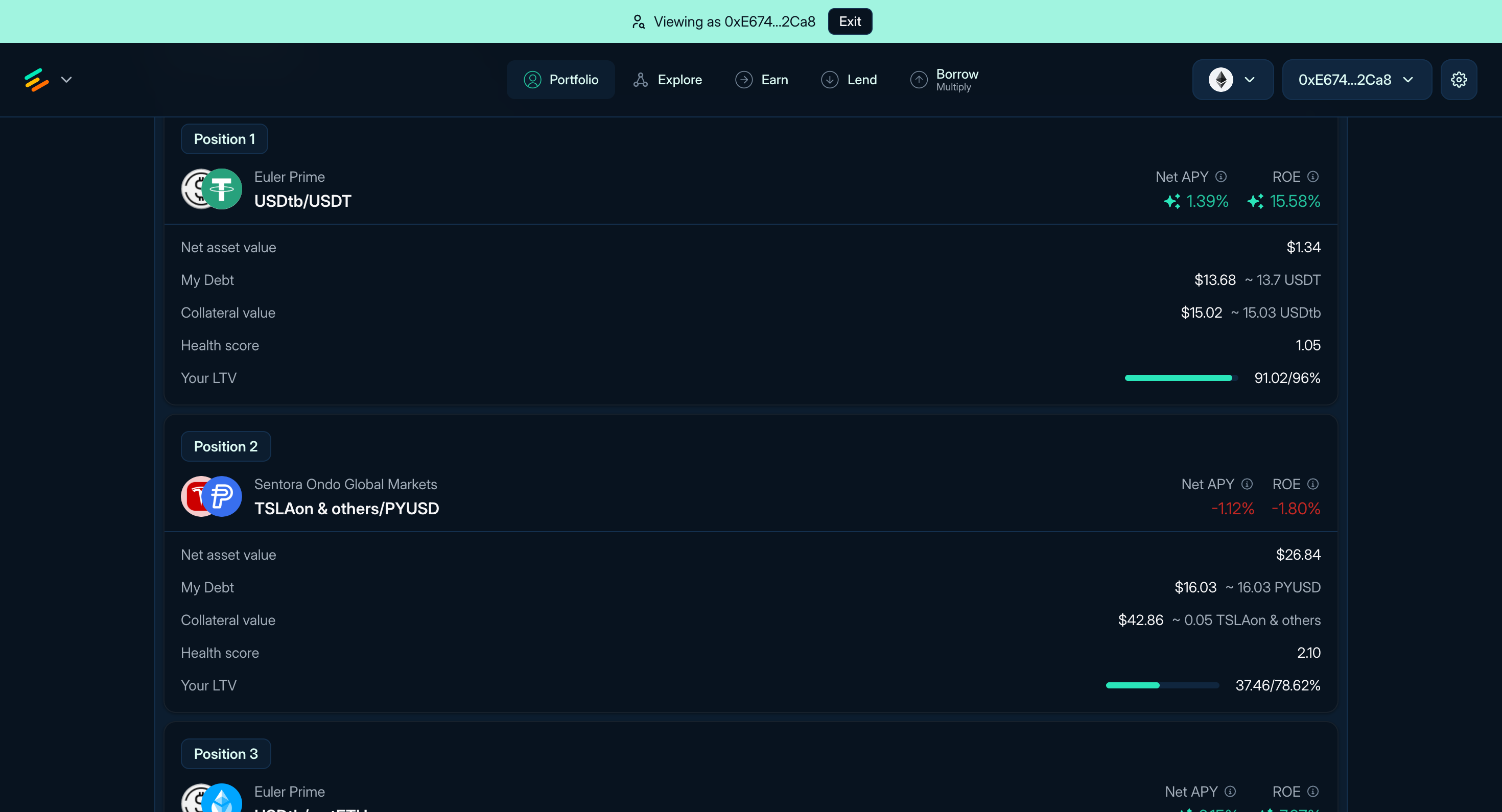
**Figure 1:** Borrow and Multiply positions in Portfolio
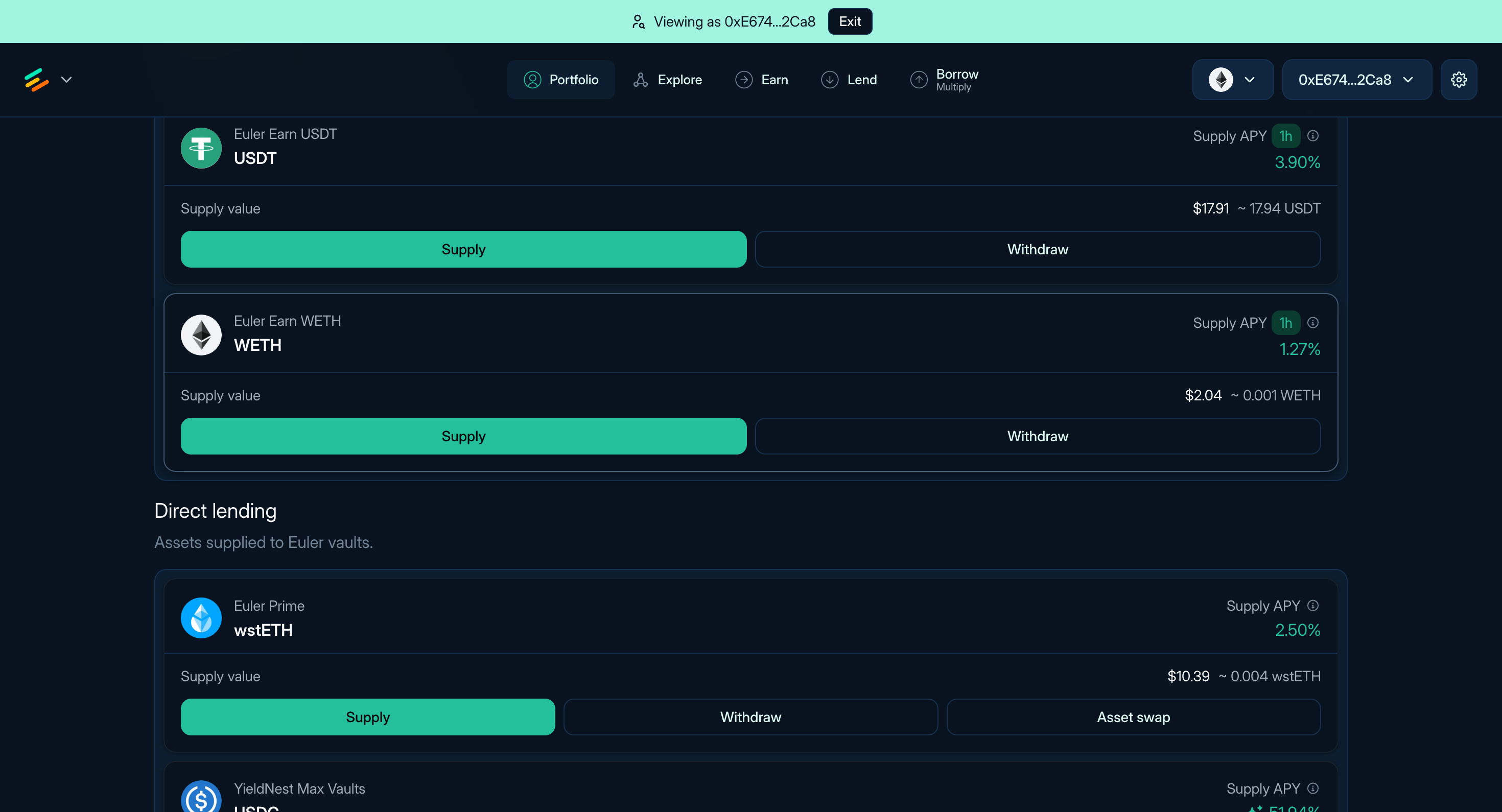
**Figure 2:** Earn and direct lending deposits in Portfolio
The position detail page is where you add collateral, withdraw collateral, borrow more, repay debt, use Multiply, swap collateral, transfer shares, or disable collateral where the account remains valid.
### Liquidation risk
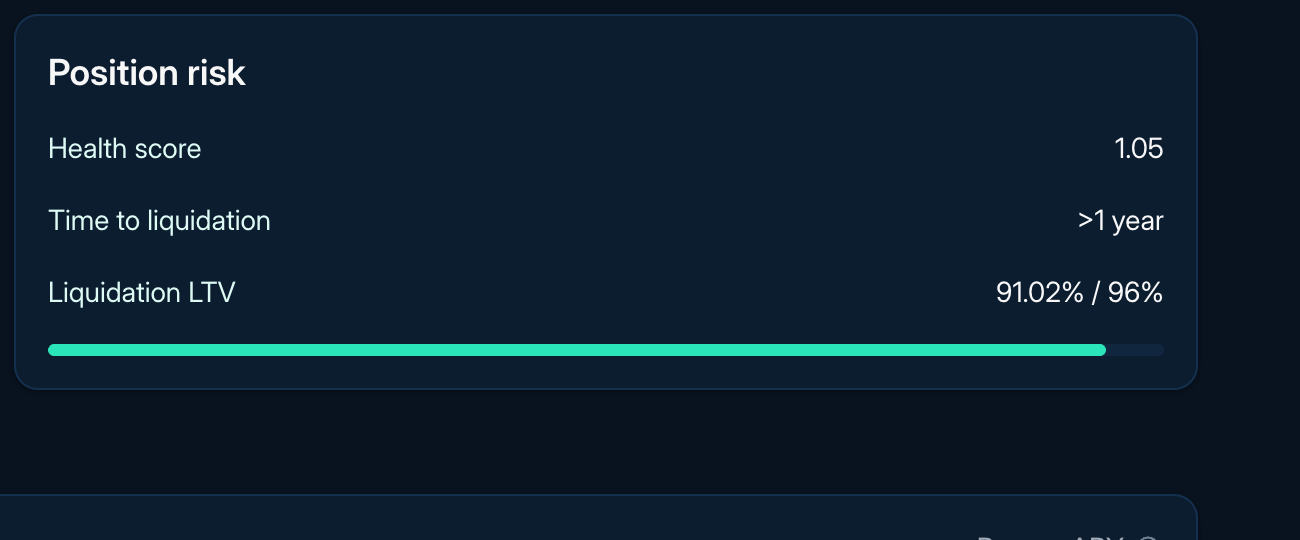
**Figure 3:** Position health display
A standard EVK account can enter liquidation when, at raw onchain values, its risk-adjusted collateral is not greater than its liability. A health score displayed as 1 may be rounded, so consult raw values and transaction simulation. During liquidation, a liquidator takes over selected debt and receives collateral at the current liquidation discount. The resulting liquidator account must satisfy the applicable controller, collateral, vault, and EVC checks.
A position can become liquidatable when risk-adjusted collateral falls relative to liabilities because of price or oracle changes, interest accrual, or parameter changes. Limited liquidity can make it harder or more expensive to reduce risk or unwind, but it does not itself determine account status. If a position remains below the threshold after one liquidation, it can be liquidated again.
To reduce liquidation risk:
* Keep health score above 1 with a buffer that fits the volatility and liquidity of the position.
* Watch liquidation price where shown, LTV, Liquidation LTV (LLTV), collateral price, debt price, rates, and available liquidity.
* Add collateral, repay debt, reduce leverage, or close the position before health falls too far.
* Treat third-party alerts as helpful but not guaranteed.
Euler uses a reverse Dutch auction style liquidation discount. A position only slightly below the threshold generally receives a smaller discount, while a deeply unhealthy position can offer a larger discount up to the vault's configured maximum. For the mechanism-level explanation, read [Liquidations](/learn/liquidations).
### Rewards and rEUL
Rewards appear in Portfolio when reward data is available. Claimable reward tokens show token amount, estimated market value, and claim actions.
If you claim rEUL, Portfolio shows the amount, accrued EUL amount, and maturity information. For details, read [Reward EUL](/EUL/reward-eul).
Read next: [Managing positions](/use/managing-positions), [Borrow](/use/borrow-assets), [Multiply](/use/multiply-strategies), and [Troubleshooting](/use/troubleshooting).
## Rewards
Rewards are campaign incentives for selected activities such as supplying, borrowing, providing collateral, or looping. They are separate from vault interest, so a position can have both a base rate and a reward rate.
Check the eligible action and account, campaign period, funding, reward token, caps, distributor, claim route, and whether the app already includes rewards in APY or ROE. Campaigns can change or end and may require opt-in or a claim.
The app shows campaigns from Merkl, Incentra, Fuul, and Turtle. Each distributor applies its own rules; Merkl, the most common, is described below, and the same checks apply to the others.
### Merkl campaigns
[Merkl](https://app.merkl.xyz/) is a separate campaign and distribution system. Campaigns define eligible actions and calculate entitlements under their own rules. Verify the network, vault, action, period, methodology, token, caps, and claimable amount with the linked distributor.
### rEUL
rEUL is a reward instrument used by selected campaigns, not another name for Merkl rewards. Its vesting, early-redemption, and forfeiture rules are separate from campaign eligibility. See [Reward EUL](/EUL/reward-eul) before valuing it.
### Rewards in APY and ROE
Campaigns generally report reward **APR** based on estimated token value and eligible balances. It is not compounded by the EVK vault. Euler's ROE calculation can value eligible supply and borrow rewards and divide their rate contribution by NAV.
Before including rewards, verify eligibility for the address or sub-account, campaign funding and limits, token liquidity and vesting, and whether the displayed rate already includes them. Gas, taxes, token-price changes, and claim or redemption constraints can reduce realized value.
Euler SDK reward actions include `LEND`, `BORROW`, `BORROW_COLLATERAL`, and `LOOPING`. Eligibility can also depend on collateral, multiplier range, whitelist, or blacklist, so a headline APR may differ from the connected account's rate.
### Sources
* [Euler SDK reward attribution](https://github.com/euler-xyz/euler-sdks/blob/main/packages/euler-v2-sdk/docs/rewards-service.md)
### Read next
* [Annual percentage yield](/use/annual-percentage-yield)
* [Return on equity](/use/return-on-equity)
* [Interest rates](/learn/interest-rates)
## Risk & Analytics dashboard
Use the [Risk & Analytics dashboard](https://risk.euler.finance/analytics) to compare Euler markets and investigate borrowing, liquidity, and liquidation risk.
### Choose a view
| View | Use it to |
| --------------------------------------------------------------- | ----------------------------------------------------------------------------- |
| [Analytics](https://risk.euler.finance/analytics) | Track supply, borrowing, liquidity, utilization, and Earn TVL by chain. |
| [Explore metrics](https://risk.euler.finance/analytics/explore) | Inspect metric history and compare up to five vaults where supported. |
| [Open Interest](https://risk.euler.finance/open-interest) | See which collateral supports borrowing across assets and vaults. |
| [Accounts](https://risk.euler.finance/accounts) | Inspect positions, health, and liquidation observations from configured bots. |
| [Vaults](https://risk.euler.finance/vaults) | Find affected borrowers, blocked liquidations, and bot blacklist status. |
| [Oracles](https://risk.euler.finance/oracles) | Check bot-observed prices, freshness, and dependent accounts and value. |
### Explore metrics
On **Analytics**, choose a chain and time range, then select a metric card to see its history. Cards show current totals, which can differ from the latest historical chart value.
In **Explore metrics**, choose a metric and chain or vault scope. Available controls vary by metric. Use **View data table** for exact values, **Copy link** to share your selection, and chart help for definitions and exclusions.
Keep these definitions in mind:
* **Net Supplied** is deposits minus withdrawals. It excludes borrowing, repayments, and liquidations.
* **Supply APY** and **Borrow APY** are base rates. **Rewards APR** shows uncompounded incentives separately.
* **Borrower Count** counts indexed accounts with debt, including subaccounts—not unique people across vaults.
* **Open Interest** measures collateral-covered debt, not gross borrowing.
### Check coverage and freshness
Analytics uses **Euler Data API V3**; bot pages use **liquidation bot** observations. Coverage and update times can differ.
* Gaps mean missing data. Partial totals include only available data.
* Check coverage notes and refresh warnings: history may be incomplete and displayed data may be stale.
* Liquidation history records protocol events; blocked liquidations are bot-reported execution problems.
### Related guides
* [Liquidation bot](/build/liquidation-bot)
* [Euler Data API V3](/build/data-querying/euler-v3-api)
* [Curate](/curate)
## Spy mode
**Spy Mode** is an advanced, read-only feature that lets you view the Euler app through another address. It is useful for reviewing public positions, studying account structure, or helping another user troubleshoot what they see in the app.
### How to activate spy mode
Add `?spy=` followed by the Ethereum address to the end of the app URL in your browser:
```text
https://app.euler.finance/portfolio?spy=0x1234...
```
Replace the example address with the address you want to view.
### What you can see
When Spy Mode is active, you can view public account information for that address, including:
* Portfolio overview, including supplied assets and debt
* Active Borrow and Multiply positions
* Deposit and collateral allocations
* Currently claimable rewards
Spy Mode is read-only. You can inspect the viewed address, but you cannot sign transactions, move funds, or modify that address's positions.
### Common uses
* **Support:** Help another user understand their portfolio without needing access to their wallet.
* **Strategy Review:** Inspect public positions to understand how an account is structured.
* **Research:** Review how addresses use Euler across supplied assets, debt positions, and rewards.
### Read next
* [Getting started](/use/getting-started)
* [Managing positions](/use/managing-positions)
* [Troubleshooting](/use/troubleshooting)
## Strategy Profitability
A displayed APY or projected ROE does not determine the realized outcome of a position. Supply and borrow rates, incentives, swap execution, gas costs, price movement, and liquidation can each affect the result. The sections below show how to review those components separately.
### Understanding strategy costs
A leveraged position can incur costs when it is opened, managed, and unwound. The exact path depends on the assets held, route availability, partial management actions, and whether debt is repaid from another source.
#### Swap costs
A typical full open-and-unwind position uses an entry swap to convert borrowed assets into collateral and a later exit swap to obtain the debt asset for repayment. Where swaps are used, review these components:
1. **Price impact:** Larger trades can receive a worse average execution price because they consume available liquidity. Compare the live routes and quotes shown for the exact swap size.
2. **Route fees:** A route may include fees charged by its DEX, pool, or aggregator. There is no universal fee range. Use the live quote and transaction details, and do not count an all-in execution difference again as a separate fee.
3. **Slippage tolerance:** This is the maximum execution movement permitted by the transaction. A wider tolerance can expose a transaction to worse execution or MEV; a narrower tolerance can cause it to revert during ordinary market movement.
4. **Notional exposure:** Swap costs apply to the amount actually swapped, not only to the position's initial equity. Leverage can make that amount materially larger, but the relationship depends on the specific route and position state.
#### Gas costs
Network and route conditions affect transaction costs. Gas can be particularly material for small or short-lived positions, frequent management, and multi-transaction workflows. Estimate it from the exact transaction path rather than applying one fixed amount.
#### Dynamic rates and incentives
Interest rates, APY, ROE, and reward estimates are snapshots. They can change with:
* vault utilization and available liquidity;
* the configured IRM and governor actions;
* reward-program terms and publication cadence;
* collateral and debt prices; and
* position balances as interest accrues.
### Analyzing a position
Separate cash flows and valuation assumptions rather than relying on one headline percentage.
#### Reward timing
Merkl reward eligibility, calculation, publication, and UI display can update on different schedules. A new position may show no rewards before a campaign update, but rewards should not be assumed until they are published as claimable under the campaign's rules. Check the active campaign and distributor data before including rewards in an outcome estimate.
#### Price and accounting inputs
The UI's Net Asset Value calculations use market prices, which can differ from execution prices, protocol oracle prices used for health checks, and a stablecoin's target peg.
For a reproducible estimate:
1. Record the underlying collateral and debt amounts, timestamp, chain, and position account.
2. State the valuation source for each asset. If an at-peg stablecoin scenario is useful, show it separately from observed market value.
3. Include accrued supply and borrow interest, currently claimable rewards, any previously claimed rewards tracked separately, entry and exit execution, route fees, gas, and any liquidation loss.
4. Distinguish realized cash flows from current mark-to-market values and forecast assumptions.
### Factors to monitor
* **Rates and rewards:** current supply and borrow rates, reward terms, and changes to the configured IRM or campaign.
* **Execution:** depth and quotes for the intended swap size, route fees, slippage bounds, and gas estimates.
* **Account risk:** health, LTV, liquidation thresholds, oracle prices, available liquidity, and sensitivity to collateral, debt, and rate changes.
* **Time horizon:** setup and unwind costs can dominate short holding periods, while rates, rewards, and market conditions can change over longer periods.
Any projected result is an estimate based on stated assumptions, not a forecast or a suitability assessment.
## Review and monitor supplied assets
Use this page after [supplying to a vault](/use/supply-assets), including an Earn vault. Vault state can change after deposit, so check Portfolio and the vault page before adding, withdrawing, or using the deposit as collateral.
### Find and compare vaults
The **Lend** page lists direct lending vaults. Compare the underlying asset and market, curator, current Supply APY, total supply, collateral exposure, utilization, and available liquidity. Open a vault to inspect its collateral relationships and live parameters rather than choosing from the headline rate alone.
### What to monitor
* **Supply APY:** displayed annualized rate. Open its breakdown to distinguish base lending APY from any intrinsic APY or reward APR. Each component can change independently.
* **Utilization:** how much supplied liquidity is currently borrowed. High utilization can increase rates and reduce available withdrawals.
* **Available liquidity:** assets available for withdrawal or borrowing.
* **Exposure:** collateral vaults connected to the supplied vault.
* **Governor and parameters:** who can manage selected settings, plus caps, fees, oracle routes, and liquidation settings.
* **Rewards:** active incentive APR estimates may be added to a headline rate and can change independently from the vault's base APY.
* **Earn allocation:** for Earn vaults, review strategy exposure, allocator activity, management roles, fees, and withdrawable liquidity.

**Figure 1:** Supply APY breakdown
### Deposits as a collateral source
Direct lending deposits are not automatically collateral for an existing Borrow or Multiply position. When opening a supported position, the app can use a deposited balance as the collateral source and prepare the actions that move or supply it into the separate position account. Review the source account, destination account, supplied amount, approvals, resulting LTV, health, and wallet prompt before signing.
### Withdrawing or changing exposure
Withdrawals depend on available vault liquidity and require a blockchain transaction. You may not be able to withdraw the full amount immediately if most assets in the vault are borrowed.
From Portfolio, direct lending deposits can support:
* **Supply:** add more assets to the same vault.
* **Withdraw:** remove assets when liquidity is available.
* **Asset swap:** exchange one deposited asset for another through the app's swap route where supported.
#### Earn withdrawals
For an Earn vault, withdrawability depends on the vault's cash, the liquidity and withdrawal behavior of allocated strategies, the withdrawal queue, allocation state, and any realized loss. Check the current `maxWithdraw` or `maxRedeem` result for the account before assuming the displayed share balance can be withdrawn immediately. A withdrawal may traverse configured strategies in queue order and can return less underlying than an earlier valuation if a strategy has recognized losses.
Read next: [Supply assets](/use/supply-assets), [Portfolio and liquidation](/use/portfolio), [Vaults](/learn/vaults), and [Markets](/learn/markets).
## Troubleshooting
Record the network, page URL, vault and account addresses, intended action, and exact error before changing settings or retrying. Never share a seed phrase, private key, password, or signing secret.
### Common errors
#### `E_AccountLiquidity`
**Meaning:** The requested action would leave the account above the permitted borrow LTV or otherwise fail its account-status check. A position can remain below its liquidation LTV and still be unable to take a risk-increasing action.
**Action:** Reduce the borrow or withdrawal, add eligible collateral, or repay debt. Review the controller vault, enabled collateral, current oracle values, borrow LTV, and liquidation LTV before retrying.
#### `E_InsufficientCash`
**Meaning:** The vault does not have enough available underlying liquidity for the requested withdrawal or borrow. This can also affect collateral-to-repay flows when the source vault lacks liquidity.
**Action:** Reduce the amount or wait for liquidity to return. Check the target vault's available liquidity before resubmitting.
#### `E_RepayTooMuch`
**Meaning:** The requested repayment exceeds the current debt amount after interest and rounding.
**Action:** Use **Max** when available or submit an amount below the displayed total debt.
#### `E_SupplyCapExceeded` or `E_BorrowCapExceeded`
**Meaning:** The requested action would exceed the relevant vault cap.
**Action:** Reduce the amount or wait for capped supply or capped borrows, respectively, to fall. A curator may be able to change a cap only if the deployed roles authorize it.
#### Multiple wallet extensions active
Multiple extensions can compete for the wallet-provider connection and signing request. Disable extensions you are not using, refresh the page, reconnect the intended wallet, and retry.
#### RPC issues
An unavailable or stale RPC can prevent simulation, reads, or transaction submission. Switch to another RPC you trust, confirm the wallet is on the intended network, and check whether a transaction hash was produced before retrying.
#### Gasless signatures unsupported
Some wallets handle the typed-data signatures used for gasless (Permit2) approvals poorly. If signature prompts fail or approvals stall, open **Settings** using the gear button in the top-right corner and disable **Gasless signatures** to fall back to standard approval transactions, then retry the flow.
### Basic checks
1. Reconnect the wallet and confirm the account and network.
2. Refresh the page after disabling conflicting extensions or changing RPC.
3. Inspect the wallet error and browser console; remove secrets before sharing logs.
4. If a transaction hash exists, inspect its status and revert data on the relevant explorer.
5. Recheck vault liquidity, caps, oracle state, account health, and approvals because state may have changed.
### Reporting an issue
Report issues and get user support in the [Euler community Discord](https://discord.euler.finance). If the issue is security related, report it through the [bug bounty](/security/bug-bounty) instead — never disclose a potential vulnerability publicly.
Include:
* action, page URL, and approximate time;
* network, public account or sub-account, and vault address;
* transaction hash, simulation result, and exact error;
* wallet, browser, device, and versions;
* redacted screenshots; and
* relevant console or network errors with API keys, authorization headers, cookies, RPC credentials, and personal information removed.
### Read next
* [Managing positions](/use/managing-positions)
* [Portfolio and liquidation](/use/portfolio#liquidation-risk)
* [Data querying](/build/data-querying)
## Managing positions
Position management happens in **Portfolio**. Direct lending and Earn deposits appear under Deposits; Borrow and Multiply positions appear under Positions with their own detail pages. Leveraged positions require closer monitoring because rates, prices, liquidity, and swap execution have a larger effect on equity.
### How to manage a Borrow or Multiply position
1. Open **Portfolio > Positions** and select the position.
2. Choose the action you want to take.
3. Review the resulting balances, debt, LTV, health score, and token approvals. For swaps, also check expected amounts, route, price impact, and slippage tolerance.
4. Confirm the transaction in your wallet.
### Managing deposits
For direct lending deposits, the available actions can include:
* **Supply:** Add more assets to the vault.
* **Withdraw:** Remove assets when liquidity is available.
* **Asset swap:** Exchange one deposited asset for another through the app's swap route where supported.
### Deposits as a collateral source
Direct lending deposits are not automatically collateral for an existing position. A supported Borrow or Multiply flow can use a deposit as its collateral source; see [Supply review](/use/supply-review#deposits-as-a-collateral-source).
### Managing Borrow/Multiply positions
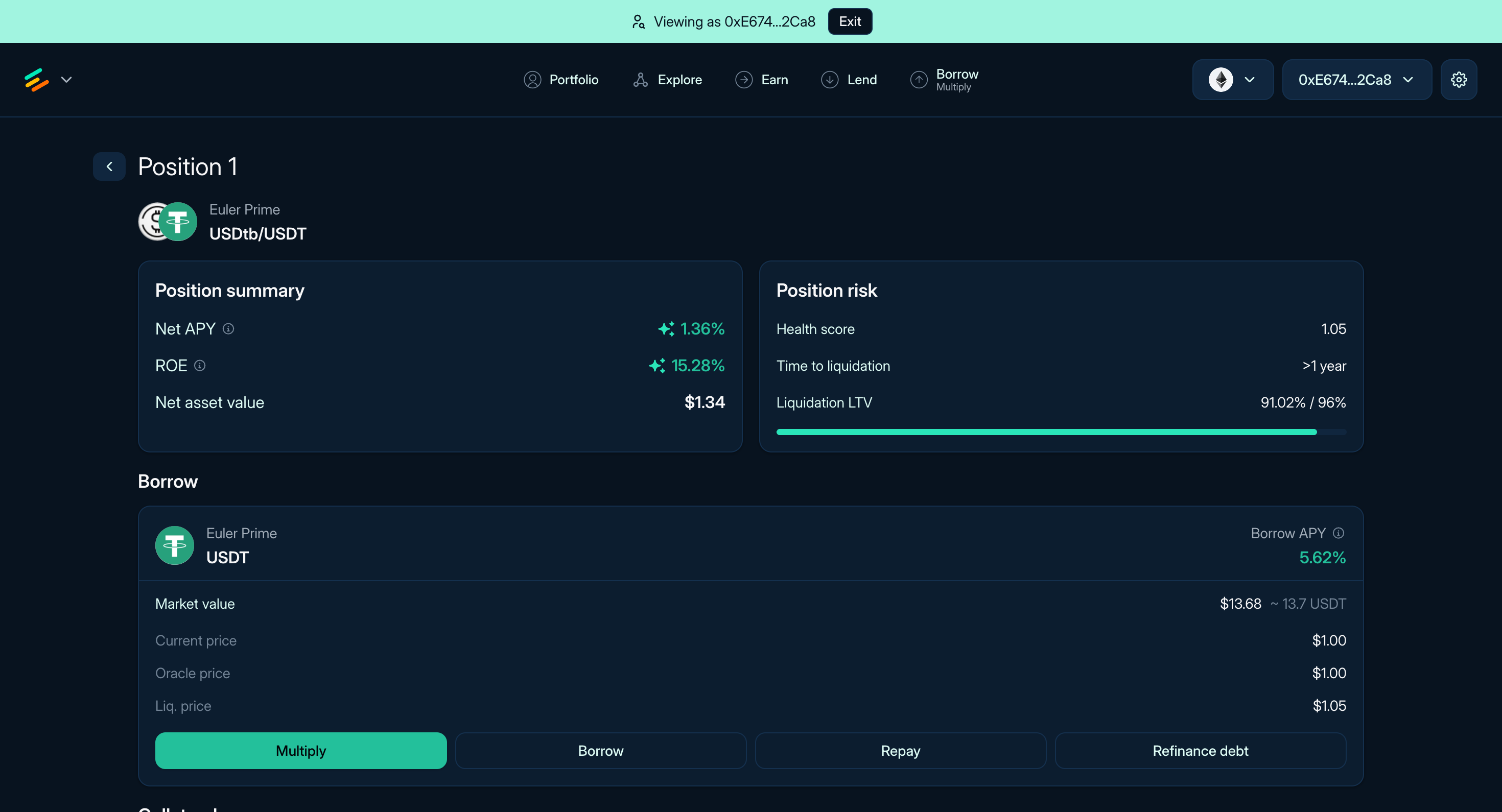
**Figure 1:** The Position page of a USDC/USDT position
For your Borrow or Multiply positions, you have access to these actions in the UI:
#### Leverage and debt management
* **Multiply:** Increase exposure by borrowing, swapping, and adding collateral through the Multiply flow.
* **Repay:** Reduce debt by paying back borrowed assets from wallet assets, deposits, or collateral where supported.
* **Borrow:** Borrow additional assets against existing collateral when LTV and liquidity allow it.
#### Collateral management
* **Supply:** Add more collateral to your position.
* **Withdraw:** Remove collateral if the remaining position stays within LTV limits and liquidity is available.
* **Collateral Swap:** Exchange current collateral for a different asset through the app's swap route.
* **Transfer:** Transfer collateral shares to another account if the position remains valid.
* **Disable Collateral:** Stop using a specific asset as collateral if the position remains valid.
For liquidation mechanics, read [Portfolio and liquidation](/use/portfolio#liquidation-risk). For rate calculations, read [Interest rates](/learn/interest-rates) and [Strategy profitability](/use/strategy-profitability).
## Return on equity
Return on Equity (ROE) combines supply income and borrowing cost into an annualized estimate relative to a position's equity. It is useful for Borrow and Multiply positions, where a supply or borrow rate alone shows only one side.
Euler defines equity as supplied market value minus borrowed market value, also called Net Asset Value (NAV). ROE estimates rate exposure, not realized profit. Rates, rewards, prices, eligibility, execution costs, and liquidation risk can change.
### Base formula
Let `S` be supplied value, `B` borrowed value, `r_s` supply APY, and `r_b` borrow APY:
```text
equity = S − B
ROE = ((S × r_s) − (B × r_b)) / (S − B)
```
Supply and debt must use the same quote currency and price timestamp. ROE is undefined or not economically meaningful when equity is zero or negative.
A calculation divided by supplied value is net APY, not ROE:
```text
net APY = ((S × r_s) − (B × r_b)) / S
```
### Multiplier form
For multiplier `M = S / (S − B)`:
```text
ROE = (M × r_s) − ((M − 1) × r_b)
```
For a single collateral and debt pair where current `LTV = B / S`, `M = 1 / (1 − LTV)`. The position's current LTV is not its configured borrow limit.
### Example
For $1,000 supplied at 7.5% APY and $800 borrowed at 4.5% APY:
```text
equity = $1,000 − $800 = $200
multiplier = $1,000 / $200 = 5
ROE = (($1,000 × 7.5%) − ($800 × 4.5%)) / $200
= 19.5%
```
The same net rate amount is 3.9% when divided by the $1,000 supplied value. Leverage magnifies both positive and negative rate differences because equity is smaller than total supplied value.
### Rewards and intrinsic yield
Euler's SDK can include several contributions before dividing by equity:
```text
base lending = supplied value × base supply APY
base borrowing = −borrowed value × base borrow APY
supply rewards = supplied value × eligible LEND APR
borrow rewards = borrowed value × eligible BORROW or BORROW_COLLATERAL APR
loop rewards = equity × eligible LOOPING APR
intrinsic = supplied intrinsic yield − borrowed intrinsic yield
ROE = included contributions / equity
```
Campaign APR is an estimate, may depend on the connected account and campaign rules, and does not compound through the vault. See [Rewards](/use/rewards).
### Comparing ROE
Confirm that figures use NAV as equity, the same price timestamp and annualization conventions, and comparable rate, reward, and intrinsic-yield components. Check whether reward eligibility is account-specific and whether gas, swaps, slippage, taxes, external fees, and liquidation losses are excluded.
**Max ROE** applies rates to a modeled maximum multiplier. It is not a forecast or a promise that the position can be opened or maintained at that size.
### Sources
* [Euler SDK account and portfolio computed properties](https://github.com/euler-xyz/euler-sdks/blob/main/packages/euler-v2-sdk/docs/account-computed-properties.md)
* [Euler SDK reward attribution](https://github.com/euler-xyz/euler-sdks/blob/main/packages/euler-v2-sdk/docs/rewards-service.md)
### Read next
* [Annual percentage yield](/use/annual-percentage-yield)
* [Rewards](/use/rewards)
* [Strategy profitability](/use/strategy-profitability)
* [Liquidations](/learn/liquidations)
## Supply assets
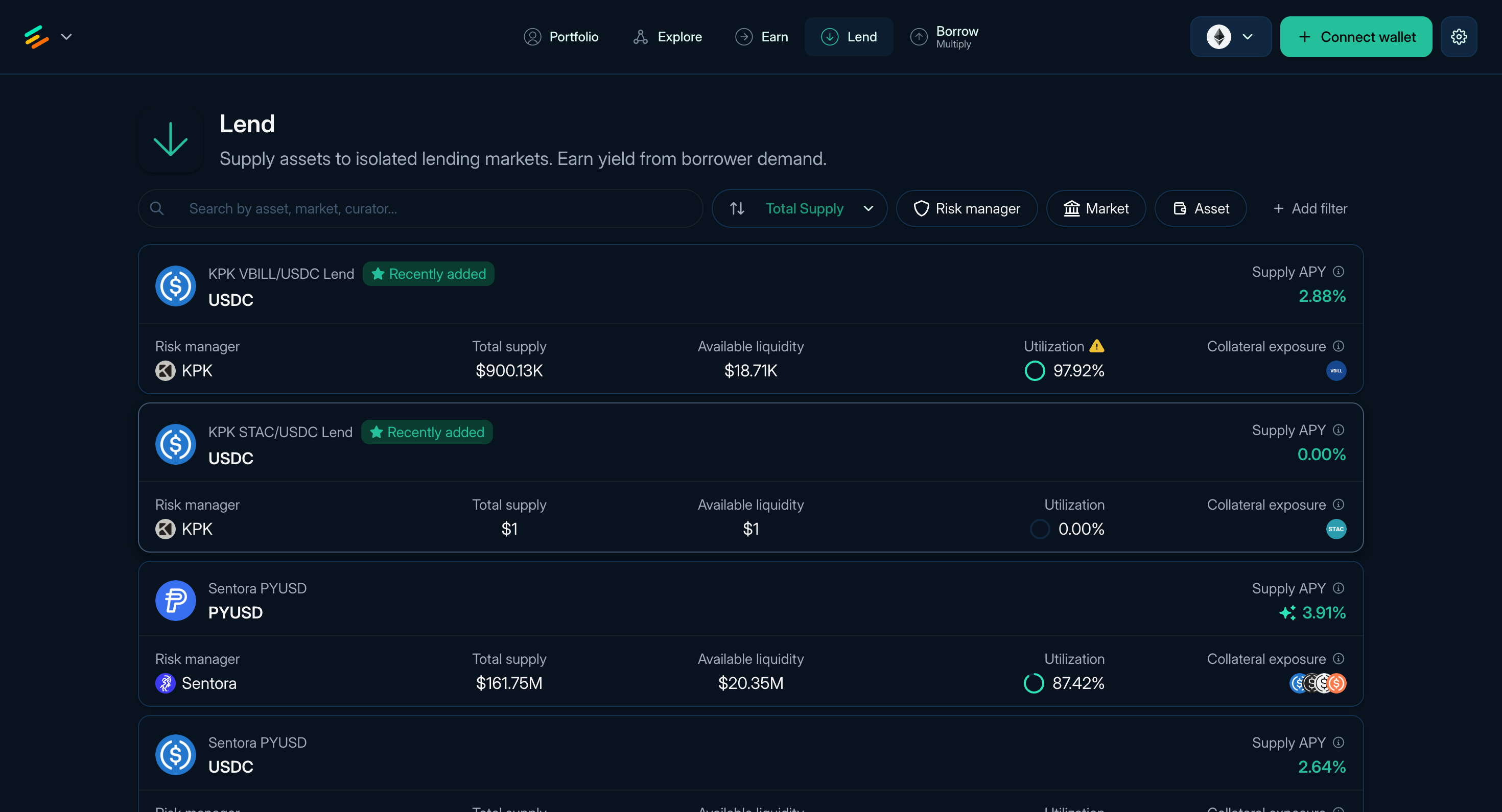
**Figure 1:** The Lend page of Euler
Supplying assets on Euler means depositing tokens into a vault. Most supply flows deposit into lending vaults, where borrowers may use available liquidity and suppliers receive vault shares that track their claim on the vault's assets. EulerEarn is also a vault-based supply flow: users deposit one asset into an Earn vault and hold shares while the vault allocates across its configured strategies.
Portfolio groups direct deposits under **Deposits**. They are separate from collateral supplied inside a Borrow or Multiply position, although deposited assets can be selected as a collateral source when opening a new position.
### What supplying does
When you supply assets:
* The vault mints shares to your account.
* Borrowers may borrow from that vault if borrowing is enabled and liquidity is available.
* Borrowers pay interest according to the vault's [Interest Rate Model](/learn/interest-rates#interest-rate-models).
* The vault share price changes as interest, fees, losses, and other configured mechanics apply.
The displayed **Supply APY** is an annualized rate based on current or recent conditions. It can change with utilization, rewards, intrinsic yield, vault parameters, and market conditions.
### Find a vault
The **Lend** page ([app.euler.finance/lend](https://app.euler.finance/lend)) lists available lending vaults for supplying assets. The **Earn** page lists Earn vaults, which are single-position ERC-4626 vaults for curated strategy allocation.
Each row shows the asset, market name where available, curator, Supply APY, total supply, collateral exposure, utilization, and available liquidity. Sort or filter the table, then open a vault to review its live details.
:::warning
Supplying is not principal-protected. A position can lose value through bad debt, oracle or market failure, smart-contract failure, governance or configuration changes, or an impaired underlying asset. Available liquidity may also limit or delay withdrawal. Review the vault, collateral configuration, oracle route, caps, governance, current liquidity, and APY breakdown before supplying.
:::
### Supply flow
1. Choose a vault from **Lend** or a vault details page.
2. Enter the amount to supply.
3. Approve token spending if your wallet asks. Euler uses gasless Permit2 signatures by default; to fall back to standard approval transactions, open **Settings** using the gear button in the top-right corner and disable **Gasless signatures**.
4. Review deposit amount, expected shares, APY, token approval, curator, exposure, utilization, liquidity, and caps.
5. Confirm the transaction in your wallet.
After the transaction confirms, the supplied asset appears in **Portfolio** under Deposits.
Read next: [EulerEarn](/use/euler-earn), [Review and monitor supplied assets](/use/supply-review), [Portfolio and liquidation](/use/portfolio), and [Managing positions](/use/managing-positions).
## Application Security
### Network Security
#### HSTS
`app.euler.finance` returns an HTTP Strict Transport Security (HSTS) header, which instructs supporting browsers to use HTTPS for the origin.
#### DNSSEC
`euler.finance` publishes a DNSSEC delegation record, enabling resolvers to validate signed DNS data for the zone.
#### DDoS Protection
`app.euler.finance` is served through Cloudflare's edge network. Cloudflare provides DDoS protection for applications proxied through its network.
### Application Layer Security
#### Content Security Policy (CSP)
`app.euler.finance` returns a Content Security Policy (CSP) that restricts permitted resource origins and script execution. CSP can reduce risk from some content-injection attacks, including cross-site scripting.
#### Email Security
`euler.finance` and `euler.xyz` publish SPF and DMARC records. These records help receiving mail systems evaluate authorized senders and specify how authentication failures should be handled.
### Further Security Resources
* See [Euler Protocol audits](/security/audits) for component-specific security reviews.
* See the [Bug Bounty Program](/security/bug-bounty) to report a vulnerability.
## Security review and verification record
:::tip[Deployed Code Verification]
Euler verifies security-relevant deployments at the **bytecode level**. Onchain bytecode is matched to a build from an exact source commit, then compared with the latest audited baseline. Browse the [per-chain reports](https://github.com/euler-xyz/euler-interfaces/tree/master/verify) or reproduce them with [euler-verifier](https://github.com/euler-xyz/euler-verifier) and public RPC endpoints.
:::
Euler has commissioned audits and focused reviews across its core contracts, oracles, periphery, integrations, and applications. The record also includes formal verification, fuzzing, penetration tests, and security competitions.
### Security competitions and Capture the Flag contests
* [**$1.25M Cantina Security Competition**](https://cantina.xyz/competitions/41306bb9-2bb8-4da6-95c3-66b85e11639f) — More than 600 participants reviewed the scoped contracts. No high- or medium-severity findings were identified; low-severity and informational findings were rewarded, with $200,000 allocated to researchers.
* [**$3.5M Hats Finance CTF Challenge**](https://hatsfinance.medium.com/join-the-ultimate-3-5m-euler-ctf-challenge-powered-by-hats-finance-1a4e8396907b) — Approximately $3.5 million in live funds was placed in Euler markets. After 13 days, no funds were compromised.
### Review records
| Date | Scope | Review type | Security firm | Report URL |
| ----------------- | --------------------------------------------------- | --------------------------- | ---------------------------------- | --------------------------------------------------------------------------------------------------------------------------------------------------------------------------------------------------------- |
| July 2026 | EVK Periphery - MigrationHelper & SwapVerifier | Security review | Enigma Dark | [Enigma Dark SwapVerifier Update Report](https://github.com/euler-xyz/evk-periphery/blob/master/audits/Enigma%20Dark%20SwapVerifier%20update.pdf) |
| 11 May 2026 | EVC - Set size increase | Security review | yAudit | [yAudit EVC Set Size Increase Report](https://github.com/euler-xyz/ethereum-vault-connector/blob/v1.0.1+polygon/audits/Euler%20yAudit%20report%20\(set%20size%20increase\).pdf) |
| March 2026 | EPO & EVK Periphery (Oracle, Hook, SwapVerifier) | Security review | BailSec | [BailSec EVK Periphery Oracle Hook SwapVerifier Report](https://github.com/euler-xyz/evk-periphery/blob/master/audits/BailSec%20EVK%20Periphery%20Oracle%20Hook%20SwapVerifier.pdf) |
| 10 March 2026 | CoW Protocol: Euler Integration | Security review | Cantina | Report pending publication |
| 24 February 2026 | Euler Lite (Web2 Pentest) - AI | Penetration test | FailSafe | Private report |
| 4 February 2026 | Layer Credit | Security review | yAudit | Private report |
| 4 February 2026 | EVK Swap Verifier Update | Security review | yAudit | [yAudit SwapVerifier Update Report](https://github.com/euler-xyz/evk-periphery/blob/80306d40645e0d5be78ade613d35d29e551ff75f/audits/yAudit%20SwapVerifier%20update.pdf) |
| 18 November 2025 | EVK Periphery - SWARM - AI | Security review | FailSafe | Private report |
| 14 October 2025 | Crosschain Fee Flow & Auxiliary Contracts (PR 361) | Security review | Cantina | [Cantina Crosschain Fee Flow and Auxiliary Contracts Report](https://github.com/euler-xyz/evk-periphery/blob/master/audits/Cantina%20Crosschain%20Fee%20Flow%20and%20Auxiliary%20Contracts.pdf) |
| 14 October 2025 | ERC20Synth & Auxiliary Contracts | Security review | Electisec | [Electisec ERC20Synth and Auxiliary Contracts Report](https://github.com/euler-xyz/evk-periphery/blob/master/audits/Electisec%20ERC20Synth%20and%20auxiliary%20contracts.pdf) |
| August 2025 | HookTargetMarketStatus | Security review | CD Security | [CD Security HookTargetMarketStatus Report](https://github.com/euler-xyz/evk-periphery/blob/master/audits/CD%20Security%20HookTargetMarketStatus.pdf) |
| 13 June 2025 | IRMLinearKinky | Security review | Supremacy | [Supremacy IRMLinearKinky Report](https://github.com/euler-xyz/evk-periphery/blob/master/audits/Supremacy%20IRMLinearKinky.pdf) |
| June 2025 | EUL ERC20 | Security review | BailSec | [BailSec EUL ERC20 Report](https://github.com/euler-xyz/evk-periphery/blob/master/audits/BailSec%20EUL%20ERC20.pdf) |
| 22 April 2025 | CapRiskSteward | Security review | MixBytes | [MixBytes CapRiskSteward Report](https://github.com/euler-xyz/evk-periphery/blob/master/audits/MixBytes%20CapRiskSteward.pdf) |
| 22 April 2025 | HookTargetStakeDelegator | Security review | MixBytes | [MixBytes HookTargetStakeDelegator Report](https://github.com/euler-xyz/evk-periphery/blob/master/audits/MixBytes%20HookTargetStakeDelegator.pdf) |
| 11 March 2025 | GovernorAccessControlEmergencyFactory | Security review | Electisec | [Electisec GovernorAccessControlEmergencyFactory Report](https://github.com/euler-xyz/evk-periphery/blob/master/audits/Electisec%20GovernorAccessControlEmergencyFactory.pdf) |
| 18 February 2025 | EPO (PR#78, PR#79) | Security review | Electisec | [Electisec EPO Report](https://github.com/euler-xyz/euler-price-oracle/blob/master/audits/Euler_Price_Oracle_Electisec_Report.pdf) |
| 5 February 2025 | Adaptive IRM | Security review | Electisec | [Electisec Adaptive IRM Report](https://github.com/euler-xyz/evk-periphery/blob/master/audits/Electisec%20Adaptive%20IRM.pdf) |
| 4 February 2025 | setLTV | Security review | Electisec | [Electisec setLTV Report](https://github.com/euler-xyz/euler-vault-kit/blob/master/audits/Electisec_setLTV_report.pdf) |
| 23 January 2025 | EVK Periphery - LayerZero OFT adapters | Security review | Paladin Blockchain Security | [Paladin LayerZero Adapters Report](https://github.com/euler-xyz/evk-periphery/blob/master/audits/Paladin%20LayerZero%20Adapters.pdf) |
| 23 January 2025 | EVK | Security review | Cantina (solo review by M4rio.eth) | [M4rio.eth SetLTV Report](https://github.com/euler-xyz/euler-vault-kit/blob/master/audits/M4rio.eth_setLTV_report.pdf) |
| December 2024 | EVK Periphery - ERC20 Burnable Mintable | Security review | BailSec | [BailSec ERC20BurnableMintable Report](https://github.com/euler-xyz/evk-periphery/blob/master/audits/BailSec%20ERC20BurnableMintable.pdf) |
| 13 November 2024 | Euler V2 | Security competition review | Cantina | [Cantina CodeCompetition Report](https://github.com/euler-xyz/ethereum-vault-connector/blob/master/audits/Euler%20Cantina%20Code%20Competition%20report.pdf) |
| October 2024 | EVK Periphery - rEUL wrapped locked token | Security review | CD Security | [CD Security rEUL ERC20 wrapped locked token Report](https://github.com/euler-xyz/evk-periphery/blob/03127c4e0428d993f94afd8fbfb46147d0319991/audits/CDSecurity%20ERC20%20Wrapper%20Locked.pdf) |
| 21 October 2024 | EVK Periphery - CompatCheck Polygon and Avalanche | Security review | yAudit | [yAudit Compatibility Polygon and Avalanche Report](https://github.com/euler-xyz/evk-periphery/blob/a6e08f772228187f97dbb44e615b396e69f17852/audits/yAudit_Euler_Deployment_Polygon_Avalanche_Report.pdf) |
| 21 October 2024 | EVK Periphery - custom liquidator & selector access | Security review | yAudit | [yAudit EVK Custom Liquidator & Selector Access Control Report](https://github.com/euler-xyz/evk-periphery/blob/master/audits/yAudit%20EVK%20Custom%20Liquidator%20%26%20Selector%20Access%20Control.pdf) |
| 4 October 2024 | EVK Periphery - rEUL | Security review | yAudit | [yAudit rEUL ERC20 wrapped locked token Report](https://github.com/euler-xyz/evk-periphery/blob/03127c4e0428d993f94afd8fbfb46147d0319991/audits/yAudit%20rEUL%20ERC20%20Wrapper%20Locked.pdf) |
| 18 September 2024 | EVK Periphery Forta Firewall hooks | Security review | yAudit | [yAudit - EVK Periphery - Forta Firewall hooks Report](https://github.com/euler-xyz/evk-periphery/blob/master/audits/yAudit%20Euler%20Hook%20Target%20Firewall.pdf) |
| 17 September 2024 | EPO - PendleOracle | Security review | yAudit | [yAudit EPO PendleOracle Report](https://github.com/euler-xyz/euler-price-oracle/blob/master/audits/Euler_Price_Oracle_yAudit_PendleOracle_Report.pdf) |
| 6 September 2024 | EPO | Security review | yAudit | [yAudit EPO Update review Report](https://github.com/euler-xyz/euler-price-oracle/blob/master/audits/Euler_Price_Oracle_yAudit_OracleUpdate_Report.pdf) |
| August 2024 | EVK | Security review | Certora | [Certora EVK Report](https://github.com/euler-xyz/euler-vault-kit/blob/master/audits/Certora_EVK_report.pdf) |
| 12 August 2024 | Web2 infrastructure | Penetration test | Ruptura | Private report |
| 9 August 2024 | EVK Periphery - Vault Pause Guardian | Security review | yAudit | [yAudit - EVK Periphery - Vault Pause Guardian Report](https://github.com/euler-xyz/evk-periphery/blob/master/audits/yAudit%20EVK%20Periphery%20Guardians.pdf) |
| July 2024 | Euler V2 | Security review | yAudit | [yAudit CodeCompetition Fixes review](https://github.com/euler-xyz/ethereum-vault-connector/blob/master/audits/Euler%20yAudit%20Code%20Competition%20Fixes%20report.pdf) |
| 5 July 2024 | EVK | Security review | Spearbit | [Spearbit EVK Report](https://github.com/euler-xyz/euler-vault-kit/blob/master/audits/Spearbit_EVK_report.pdf) |
| 28 June 2024 | Origami Oracle Adapters | Security review | yAudit | [yAudit Origami Oracle Adapters Report](https://github.com/euler-xyz/origami-oracle-adapters/blob/master/audits/yAudit_origami_oracles.pdf) |
| 26 June 2024 | EVK Periphery | Security review | yAudit | [yAudit EVK Periphery Report](https://github.com/euler-xyz/evk-periphery/blob/master/audits/yAudit%20EVK%20Periphery.pdf) |
| 18 June 2024 | EVC | Security review | ChainSecurity | [ChainSecurity EVC Report](https://github.com/euler-xyz/ethereum-vault-connector/blob/master/audits/Euler%20ChainSecurity%20report.pdf) |
| 18 June 2024 | EVK | Security review | ChainSecurity | [ChainSecurity EVK Report](https://github.com/euler-xyz/euler-vault-kit/blob/master/audits/ChainSecurity_EVK_report.pdf) |
| 14 June 2024 | Synths | Security review | OpenZeppelin | [OpenZeppelin Synths Report](https://github.com/euler-xyz/euler-vault-kit/blob/master/audits/OpenZeppelin_Synths_report.pdf) |
| 20 May 2024 | EPO | Security review | Spearbit | [Spearbit EPO Report](https://github.com/euler-xyz/euler-price-oracle/blob/master/audits/Euler_Price_Oracle_Spearbit_Report_DRAFT.pdf) |
| 20 May 2024 | EVK | Security review | Omniscia | [Omniscia EVK Report](https://omniscia.io/reports/euler-finance-vault-kit-66000e2fe7dba400187a4aed/) |
| 17 May 2024 | EVC | Security review | Spearbit | [Spearbit EVC Report](https://github.com/euler-xyz/ethereum-vault-connector/blob/master/audits/Euler%20Spearbit%20report.pdf) |
| 17 May 2024 | EVK | Security review | OpenZeppelin | [OpenZeppelin EVK Report](https://github.com/euler-xyz/euler-vault-kit/blob/master/audits/OpenZeppelin_EVK_report.pdf) |
| 17 May 2024 | EPO | Security review | OpenZeppelin | [OpenZeppelin Oracle Report](https://github.com/euler-xyz/euler-price-oracle/blob/master/audits/Euler_Price_Oracle_OpenZeppelin_Report.pdf) |
| 16 May 2024 | EVC | Security review | Omniscia | [Omniscia EVC Report](https://omniscia.io/reports/euler-finance-ethereum-vault-connector-6602c8d3423c1b0018ff01b6/) |
| 16 May 2024 | Reward Streams | Security review | MixBytes | [MixBytes Reward Streams Report](https://github.com/euler-xyz/reward-streams/blob/master/audits/Euler%20MixBytes%20report.pdf) |
| 15 May 2024 | EPO | Security review | ChainSecurity | [ChainSecurity Oracle Report](https://github.com/euler-xyz/euler-price-oracle/blob/master/audits/Euler_Price_Oracle_ChainSecurity_Report.pdf) |
| 10 May 2024 | EPO | Security review | Omniscia | [Omniscia EPO Report](https://omniscia.io/reports/euler-finance-evk-price-oracles-660812035fc1c30018641b22/) |
| 9 May 2024 | Reward Streams | Security review | Hunter Security | [Hunter Security Reward Streams Report](https://github.com/euler-xyz/reward-streams/blob/master/audits/Euler%20Hunter%20Security%20report.pdf) |
| 5 May 2024 | Euler V2 | Security review | yAudit | [yAudit Euler V2 Report](https://github.com/euler-xyz/euler-vault-kit/blob/master/audits/yAudit_EVK_report.pdf) |
| 16 April 2024 | EVC | Security review | OpenZeppelin | [OpenZeppelin EVC Report](https://github.com/euler-xyz/ethereum-vault-connector/blob/master/audits/Euler%20OpenZeppelin%20report.pdf) |
| 1 April 2024 | Euler V2 | Security review | Spearbit VCISO cmichel - EulerV2 | Report not publicly available |
| March 2024 | EVK | Fuzzing | Enigma Dark | [Enigma Dark EVK Fuzzing Report](https://github.com/euler-xyz/euler-vault-kit/blob/master/audits/EnigmaDark_EVK_report.pdf) |
| 27 February 2024 | FeeFlow | Security review | Team Omega | [Team Omega FeeFlow Report](https://github.com/euler-xyz/fee-flow/blob/main/audits/FeeFlow%20Team%20Omega%20Report.pdf) |
| 21 February 2024 | FeeFlow | Security review | OtterSec | [OtterSec FeeFlow Report](https://github.com/euler-xyz/fee-flow/blob/main/audits/FeeFlow%20Ottersec%20Report.pdf) |
| 6 February 2024 | FeeFlow | Security review | Zellic | [Zellic FeeFlow Report](https://github.com/euler-xyz/fee-flow/blob/main/audits/FeeFlow%20Zellic%20Report.pdf) |
| 5 February 2024 | Euler V2 | Formal verification | Certora Formal Verification | Report not publicly available |
| 30 January 2024 | EVC | Security review | Trail of Bits | [Trail of Bits EVC Report](https://github.com/euler-xyz/ethereum-vault-connector/blob/master/audits/Euler%20Trail%20of%20Bits%20report.pdf) |
| 10 January 2024 | EVC | Security review | Hunter Security | [Hunter Security EVC Report](https://github.com/euler-xyz/ethereum-vault-connector/blob/master/audits/Euler%20Hunter%20Security%20report.pdf) |
| December 2023 | Euler V2 (EVC & EVK) | Security review | Alberto Cuesta Cañada | Report not publicly available |
| December 2023 | EVC | Formal verification | Certora | [Certora EVC Report](https://github.com/euler-xyz/ethereum-vault-connector/blob/master/audits/Euler%20Certora%20report.pdf) |
| 19 December 2023 | EVC | Security review | yAudit | [yAudit EVC Report](https://github.com/euler-xyz/ethereum-vault-connector/blob/master/audits/Euler%20yAudit%20report%20\(EVC\).pdf) |
| 1 October 2023 | Euler V2 | Security review | Spearbit VCISO cmichel\&StErMi | Report not publicly available |
### Read next
* [Monitoring, pause, and upgrade](/security/pause-and-upgrade#monitoring-and-response)
* [Bug bounty](/security/bug-bounty)
## Bug bounty
### Up to $7.5 million for a qualifying finding
Euler runs a live Cantina bug bounty covering the Euler Vault Kit (EVK), Ethereum Vault Connector (EVC), Euler Price Oracle (EPO), supporting components, EulerEarn, EulerSwap, and the web interface.
[View the live bounty, scope, and terms on Cantina](https://cantina.xyz/bounties/4d285eee-602e-440a-845e-25e155cec26a)
### Submitting a finding
Document the affected component, impact, reproduction steps, and any required proof of concept. Submit through the [official Cantina bounty page](https://cantina.xyz/bounties/4d285eee-602e-440a-845e-25e155cec26a) and follow its responsible-disclosure process.
For qualifying emergency action during an active or imminent exploit, review Euler's [SEAL Safe Harbor](/security/seal-safe-harbor).
## EulerEarn security reviews
| Date | Scope | Review type | Reviewer | Report URL |
| ------------ | --------- | ------------------- | ------------------ | ------------------------------------------------------------------------------------------------------------------------ |
| Jul 30, 2025 | EulerEarn | Audit | Pashov Audit Group | [Pashov Audit Group EulerEarn](https://github.com/euler-xyz/euler-earn/blob/master/audits/Pashov_Audit_Group_report.pdf) |
| Jul 2025 | EulerEarn | Formal verification | Certora | [Certora EulerEarn](https://github.com/euler-xyz/euler-earn/blob/master/audits/Certora_EulerEarn_report.pdf) |
| Jul 2025 | EulerEarn | Audit | Sigma Prime | [Sigma Prime EulerEarn](https://github.com/euler-xyz/euler-earn/blob/master/audits/Sigma_Prime_EulerEarn_report.pdf) |
### Read next
* [Audits](/security/audits)
* [Bug bounty](/security/bug-bounty)
## Pause and upgrade mechanisms
Euler deployments can use factory-level pause and upgrade controls, vault-level governors, or immutable configurations. The available response depends on the contracts and roles selected for that deployment.
The canonical upgradeable EVK factory uses a `FactoryGovernor` to separate pause, unpause, and upgrade authority. Other factories and vaults can use different arrangements, so verify the relevant addresses and roles onchain.
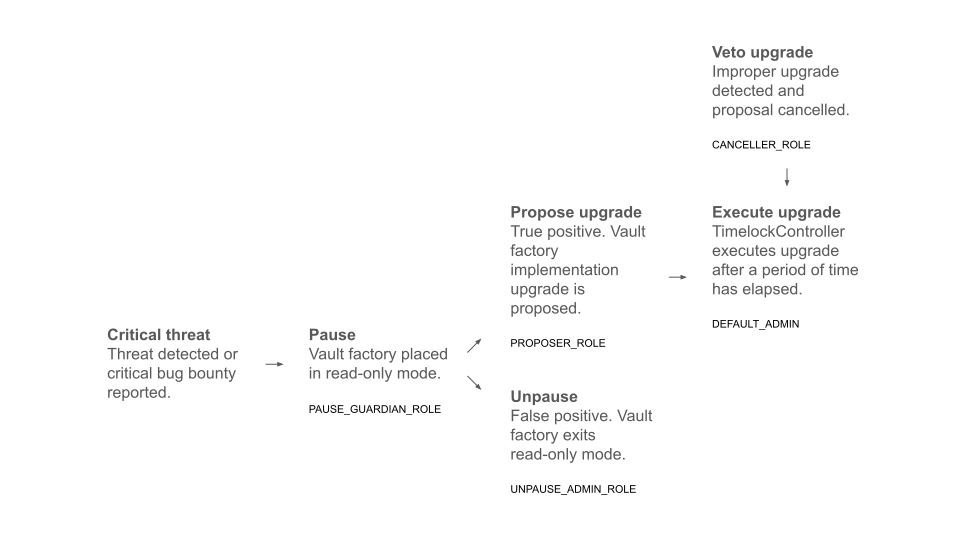
### Factory-level controls
An EVK factory can assign its `upgradeAdmin` to a [`FactoryGovernor`](/build/periphery/factory-governor). In that arrangement:
* `PAUSE_GUARDIAN_ROLE` can install a `ReadOnlyProxy` around the current implementation, causing state-changing calls through affected upgradeable vault proxies to revert while views remain available.
* `UNPAUSE_ADMIN_ROLE` can restore the implementation retained by the latest read-only proxy.
* `DEFAULT_ADMIN_ROLE` can use `adminCall` to call the factory, including calls that change its implementation.
A factory action applies to upgradeable vaults that resolve their implementation through that factory. It does not apply to immutable vaults or contracts outside the factory.
### Vault-level controls
EVK contracts are governance agnostic. A vault's governor can be any address: an EOA or multisig holding direct control over every governable setting, or a purpose-built governance contract with selector-specific, wildcard, timelocked, or emergency permissions. Whether any such controls are used is a choice made by each vault's curator, not a protocol guarantee — verify the actual arrangement onchain rather than assuming one. Depending on the configuration, authorized callers may lower LTVs or caps, replace the IRM, or pause selected operations through a hook.
Vault governance and factory governance are separate. The EVault's oracle or router address and unit of account are creation-time proxy metadata. If the configured oracle is a router, its routes can be changed only through that router's own governance.
### Timelocks
Some deployments route governance actions through a `TimelockController`; many do not, and a governor holding direct, undelayed control is a common configuration. Where a timelock is used, its proposer can queue an operation, cancellers can cancel it, and an executor can execute it after the delay. An open executor role allows any address to execute an operation once it is ready; it does not allow that address to create or modify the proposal.
Emergency and selector-specific roles can follow different timing. Review the exact role assignments and permissions rather than assuming a change is delayed at all, or that every change uses the same delay.
### Monitoring and response
Monitoring responsibilities are split. Platform-level monitoring focuses on critical, implementation-level threats to the EVK contracts themselves; a confirmed threat of that kind can lead to a factory-level pause of upgradeable vaults. Monitoring of individual vaults and markets — oracle behavior, governance and role changes, liquidity, positions, and contract events — is the responsibility of each vault's curator and of the integrators building on those vaults. Euler does not guarantee or supervise how individual vaults and markets are managed. Alerts should map to a named owner and a response available under the deployed contracts.
A response might include a factory pause for implementation-level issues, a vault-governance action by the vault's own governor, or user and integrator communication. Immutable vaults may have no governor-controlled pause or upgrade path.
For a specific deployment, verify:
1. the factory, implementation, governor, and timelock addresses;
2. current role membership and selector permissions;
3. delays, proposers, cancellers, and executors;
4. emergency actions and whether they bypass a timelock;
5. recent events and pending operations; and
6. the exit, repayment, and liquidation behavior available during a pause.
### Read next
* [Factory Governor](/build/periphery/factory-governor)
* [Governor contracts](/build/periphery/governors)
## SEAL Safe Harbor
Euler has a [SEAL (Security Alliance) Whitehat Safe Harbor registry entry](https://safeharbor.securityalliance.org/database/euler) linking its agreement and onchain registry transaction. The agreement and registry define the covered actions, contracts, chains, recovery addresses, protections, and rewards.
### When It Applies
Use Euler's [bug bounty program](/security/bug-bounty) for responsible disclosure. Safe Harbor is for qualifying action during an active or imminent exploit; it does not authorize routine testing on production systems.
### How It Works
To qualify, a whitehat must follow the agreement and registry requirements, act only within the listed scope, and return rescued assets to the designated recovery address within 72 hours.
### Accountability & Rewards
The registry lists Cantina KYC, a 10% bounty, a $2.5 million individual cap, a $2.5 million aggregate cap, and non-retainability. Review the current registry and agreement before acting.
## Securitize integration reviews
| Date | Scope | Review type | Security firm | Report URL |
| ---------------- | --------------------------------------------------------- | --------------- | ------------------ | ------------------------------------------------------------------------------------------------------------------------------------------------------------------------------------- |
| September 2026 | ERC4626EVCCollateralSecuritize V2 & PendleUniversalOracle | Security review | Enigma Dark | [Enigma Dark ERC4626EVCCollateralSecuritize Update Report](https://github.com/euler-xyz/evk-periphery/blob/master/audits/Enigma%20Dark%20ERC4626EVCCollateralSecuritize%20update.pdf) |
| 21 November 2025 | ERC4626 & Vault Securitize | Security review | yAudit | [yAudit ERC4626 and Vault Securitize Report](https://github.com/euler-xyz/evk-periphery/blob/master/audits/yAudit%20ERC4626%20and%20Vault%20Securitize.pdf) |
| 8 November 2025 | ERC4626 & Vault Securitize | Security review | Pashov Audit Group | [Pashov Group ERC4626 and Vault Securitize Report](https://github.com/euler-xyz/evk-periphery/blob/master/audits/Pashov%20Group%20ERC4626%20and%20Vault%20Securitize.pdf) |
### Read next
* [Audits](/security/audits)
* [Bug bounty](/security/bug-bounty)
## EulerSwap security reviews
### EulerSwap live CTF competition
During the [**$500K EulerSwap Live CTF**](https://cantina.xyz/competitions/a188a03f-4631-4b58-82ce-a5818a6df332) in June 2025, no contestant removed the posted USDC/USDT liquidity from the mainnet competition deployment.
### Audit reports
| Date | Scope | Review type | Security firm | Report URL |
| ------------------ | --------- | --------------- | --------------- | --------------------------------------------------------------------------------------------------------------------------------------- |
| September 18, 2025 | EulerSwap | Security review | Cantina Managed | [Cantina Managed EulerSwap September 18](https://github.com/euler-xyz/euler-swap/blob/master/audits/report-cantinacode-euler-0901.pdf) |
| May 26, 2025 | EulerSwap | Security review | Cyfrin | [Cyfrin EulerSwap](https://github.com/euler-xyz/euler-swap/blob/master/audits/2025-05-26-cyfrin-eulerswap-v2.0.pdf) |
| May 3, 2025 | EulerSwap | Security review | Cantina | [Cantina Managed EulerSwap May 3](https://github.com/euler-xyz/euler-swap/blob/master/audits/report-cantinacode-uniswap-euler-0422.pdf) |
| March 31, 2025 | EulerSwap | Security review | ChainSecurity | [ChainSecurity EulerSwap](https://github.com/euler-xyz/euler-swap/blob/master/audits/ChainSecurity_EulerSwap_audit.pdf) |
| March 29, 2025 | EulerSwap | Security review | Cantina | [Cantina Managed EulerSwap Mar 29](https://github.com/euler-xyz/euler-swap/blob/master/audits/report-euler-swap-050325.pdf) |
| March 2, 2025 | EulerSwap | Security review | Fuzzland | [Fuzzland EulerSwap](https://github.com/euler-xyz/euler-swap/blob/master/audits/eulerswap-audit-report.pdf) |
### Read next
* [Audits](/security/audits)
* [Bug bounty](/security/bug-bounty)
## Curators
Curators configure or operate selected vault parameters. Their responsibilities vary by vault type, governance model, and role assignment.
Curator authority depends on the deployed contracts and assigned roles. Parameter and allocation decisions can affect collateral eligibility, LTVs, caps, oracle routes, liquidation settings, liquidity, fees, and user-facing metadata. Users should review each role address and its exact permissions before supplying, borrowing, or using an Earn vault.
### Credit vault risk management
In credit vaults, configured governors or other authorized roles can manage supported parameters that affect depositors and borrowers. The goal is to define collateral and debt relationships that are understandable, monitorable, and consistent with the intended market design.
#### Collateral selection
Collateral selection defines which vault shares can support borrowing from a liability vault. Curators should review asset liquidity, volatility, oracle availability, market depth, legal or access constraints where relevant, and correlation with the borrowed asset. Poor collateral selection can expose depositors to bad debt, especially if the collateral becomes hard to price or liquidate.
#### Loan-to-value management
Once collateral assets are selected, the role authorized by the vault sets loan-to-value (LTV) ratios. These ratios come in two forms: the maximum LTV, which caps how much users can borrow, and the liquidation LTV, which determines when a position becomes eligible for liquidation. The liquidation LTV is typically set higher than the maximum LTV, providing a buffer against immediate liquidations even if prices move against borrowers who have taken out maximum loans.
Where authorized, a role can adjust some LTV ratios over time through LTV ramping. Ramping can make liquidation LTV changes gradual, but the chosen duration and target still affect borrowers. Users should monitor pending or active LTV changes.
#### Pricing and oracle selection
Pricing affects borrow capacity, liquidations, and vault accounting. The configured oracle route values both collateral and debt assets for the controller's checks. While USD is common as a unit of account, other units such as ETH may be used when appropriate for the assets involved.
Euler's oracle-agnostic design lets the authorized role configure supported oracle providers and router configurations. Examples include Chainlink, Pyth, Redstone, Chronicle, and custom oracle routes where appropriate. Each route has tradeoffs, including data freshness, liquidity sensitivity, manipulation resistance, and operational complexity.
#### Supply and borrow caps
To manage risk exposure effectively, curators can implement supply and borrow caps. These caps limit how much of an asset can be deposited or borrowed, providing an additional layer of risk control. While these caps can be temporarily exceeded within a transaction batch, if a cap remains exceeded when checks run, the system only allows operations that do not increase the violation relative to the start of the batch.
#### Advanced controls
Available controls depend on the vault contracts and assigned roles. A governor may configure supported vault parameters and a hook target; the hook enforces only its programmed checks. Pause, guardian, curator, allocator, fee-recipient, cap, oracle, and other powers may belong to different addresses. Document each deployed role and timelock instead of assuming that one “curator” controls every capability.
### Earn vault risk management
In Earn vaults, curators manage which strategies can receive allocations and may set strategy caps or related constraints. Earn vaults can allocate to Euler lending vaults and, where configured, other ERC-4626 strategies.
#### Strategy management
Curators can enable or disable specific strategies, influencing where deposits may be allocated. They should monitor strategy risk, liquidity, caps, rates, withdrawal behavior, and market conditions before making allocation changes.
#### Liquidity management
Earn vault configuration can define supply and withdrawal queues. These queues affect how deposits are allocated and how withdrawals are sourced. Liquidity in an Earn vault depends on the idle balance, strategy liquidity, caps, and withdrawal queue behavior.
#### User protection
Timelocks can give users time to observe pending role or parameter changes. Timelocks do not make a vault risk-free, but they can make governance changes easier to monitor.
### Security considerations
Role labels do not grant authority beyond the deployed contracts, but authorized parameter and allocation changes can materially affect user outcomes. Poor collateral selection, overly aggressive LTVs, weak oracle routes, high caps, insufficient liquidity, or unclear governance controls can increase bad debt, liquidation, or withdrawal risk.
Before using a curator-managed vault, review:
* Curator or governor identity.
* Role permissions and timelocks.
* Accepted collateral and connected markets.
* Oracle routes and fallback behavior.
* Supply caps, borrow caps, borrow LTV, and liquidation LTV.
* Liquidation discount and cool-off settings.
* Earn vault allocation queue, withdrawal queue, strategy caps, and fees.
* Recent or pending parameter changes.
For curator workflows, use [Curate](/curate).
## Operators
### Introduction
An operator is an address—an EOA or smart contract—that an account owner authorises through the EVC to act for a selected account or sub-account. Operator permission is broad and binary for that account; it is not the same as a limited token allowance.
### Understanding Operators
The operator system lets an account owner authorise an operator address for a specific sub-account. An operator can then perform account actions wherever EVC operator authentication is accepted. The account owner retains owner-only EVC administration, including changing operator authorisation.
### Operators in production: EulerSwap
[EulerSwap](/curate/euler-swap) is built directly on this feature. Each EulerSwap pool is a contract that the liquidity provider installs as an EVC operator for their Euler account; the pool factory refuses to deploy a pool whose operator authorisation is not in place. When a swap executes, the pool uses that operator authority to act on the account — withdrawing supplied inventory from its lending vaults and, where configured, borrowing the remaining output against the account's collateral — so liquidity is provided just-in-time without the pool holding reserves. The owner keeps EVC administration throughout, and revoking the operator is how a pool is decommissioned.
### Potential Features
The operator system enables several other capabilities that can be implemented to enhance the user experience and enable more sophisticated interactions with the protocol:
**Automated Trading Strategies**: Operators could be used to implement automated trading systems that execute trades based on predefined conditions. This could include features like stop-loss orders, take-profit targets, or trailing stops without requiring manual intervention.
**Position Management**: EOAs or smart contracts could be authorized to manage positions, enabling more complex strategies that might involve multiple steps or require precise timing. This would be particularly useful for professional traders or automated trading systems.
**Risk Management**: The system could support automated risk management features like dynamic collateral rebalancing, automated deleveraging during high volatility, or portfolio-wide stop-loss mechanisms.
### Scope and Revocation
**Binary permissions:** Operator permission is binary for each selected sub-account. The operator may perform any account action for which EVC operator authentication is accepted, including actions that move shares, withdraw assets, create debt, or batch calls. This does not transfer owner-only EVC administration, such as changing operator authorization or owner security modes.
**Revocation:** The account owner can revoke operator authorization through the applicable EVC owner action. Revocation stops later authorized actions but does not reverse actions the operator already completed.
**Review requirements:** Verify the operator address, intended sub-account, supported actions, and revocation process before authorizing it. Ordinary account actions can materially change or empty the position.
### Best Practices
* Delegate only the sub-accounts the operator needs.
* Use separate sub-accounts for unrelated operators or strategies.
* Review operator settings periodically and revoke permissions that are no longer needed.
* Prefer services with clear documentation, verifiable contract addresses, and an explained security and revocation model.
* Monitor operator activity as part of monitoring the underlying position.
### Read next
* [Sub-accounts](/learn/sub-accounts)
* [EVC](/build/evc)
* [EVC integration](/build/evc/integration-guide)
## Sub-accounts
The Ethereum Vault Connector (EVC) gives one wallet 256 account IDs, each represented by a derived address. A sub-account can hold its own collateral, controller, and liability state while remaining under the same controlling wallet.
This lets users keep positions separate without maintaining another signing key and native gas balance for each one. For example, a user can keep a USDC/WETH borrow in one sub-account, a separate Multiply position in another, and authorize an operator for only one of them. EVC-aware integrations can also batch supported actions across sub-accounts.
:::warning
**Never send regular assets directly to a sub-account address.** Apart from the primary account (ID 0, the wallet's own address), sub-account addresses have no private key, so no transaction can ever be signed from them: ordinary ERC-20 tokens or ETH transferred straight to a sub-account address are permanently unrecoverable. The exception is EVK vault share tokens, which the owner can move out of a sub-account through the EVC. Fund sub-accounts only through the app or an EVC-aware integration.
:::
### Why use separate sub-accounts?
* Keep collateral and debt for unrelated positions separate.
* Use different controllers or collateral sets without combining every position.
* Grant an [operator](/learn/operators) access to one position without authorizing it for all positions.
* Manage several positions from one wallet and, where supported, batch their actions through the EVC.
Sub-accounts separate account state, but they do not create a new owner. A compromised owner or shared operator can still affect every account it controls, and different positions may still share vault, oracle, and market dependencies.
### Important considerations
**Derived account identities**: Sub-account addresses are derived EVC account identities. They are intended for EVC-aware vault and external-contract flows, including use as an on-behalf-of account. Do not send ordinary ERC-20 tokens directly to a derived sub-account address, and do not assume a non-EVC-aware contract recognizes its relationship to the owner. Use an integration that explicitly supports EVC sub-accounts.
**Position isolation:** Review each position separately and also consider the wallet's total exposure across sub-accounts.
**Batched actions:** The EVC can batch compatible actions, but token approvals, controller rules, authentication, and final account checks still apply.
### Read next
* [Euler V2 introduction](/introduction)
* [Build](/build)
* [Curate](/curate)
## Vault types
Euler uses different vault configurations for different jobs. An EVK vault can be governed, use the canonical escrow configuration, or be finalized without an active vault governor. An EulerEarn vault holds one underlying asset and allocates it across configured ERC-4626 strategies.
These names describe how a vault is intended to operate; they do not establish who controls every connected contract. Authority is deployment-specific. Review the live vault, factory and implementation, oracle router, collateral vaults, hooks, and assigned roles before deciding which settings can change.
### Quick comparison
| Type | What it does | Deployment-specific authority to review | What to check |
| ----------------------------- | -------------------------------------------------------------------------------------------------------------------------------- | ----------------------------------------------------------------------------------------------------------------------------- | ---------------------------------------------------------------------------------------------------------------------- |
| Governed EVK vault | Lends one asset under parameters that can be managed after deployment. | The active vault governor and any separate roles governing connected contracts. | Governor, caps, collateral list, oracle, IRM, LTVs, liquidation settings, hooks, fees, and timelocks. |
| Escrow vault | Holds one asset in the canonical non-borrowable, ungoverned EVK configuration so its shares can be used as collateral elsewhere. | There is no vault governor. Governors of liability vaults set the LTVs, oracle, and liquidation terms applied to its shares. | Perspective verification, underlying asset, accepting liability vaults, and their LTVs. |
| Finalized or ungoverned vault | Has no active vault governor to change EVault-governed parameters. | Any remaining factory upgrade authority and governance of dependencies such as oracle routers or connected collateral vaults. | Finalization status, implementation, collateral, oracle route, caps, liquidity, and liquidation behavior. |
| EulerEarn vault | Accepts one asset and allocates it across enabled ERC-4626 strategies. | The Owner, Curator, Allocators, Guardian, factory checks, and any strategy-specific roles. | Strategies, caps, supply and withdrawal queues, role permissions, liquidity, fees, timelocks, and withdrawal behavior. |
### Governed EVK vaults
A governed EVK vault has an active governor that can update supported vault parameters. Depending on the deployment, those parameters can include collateral relationships, supply and borrow caps, the interest-rate model, oracle configuration, fees, hooks, or liquidation settings.
The governor controls only the actions authorized by the deployed EVault. Connected contracts can have different owners or governors. Before using a governed vault, identify each role address, its exact permissions, applicable timelocks, and recent or pending changes.
### Escrow vaults
An escrow vault is a specific configuration verified by the Escrowed Collateral Perspective, not a generic name for every vault with borrowing disabled. A canonical escrow vault:
* Is the perspective-recognized singleton escrow vault for its underlying asset.
* Its underlying asset is not another vault deployed by that EVK factory.
* Has no vault governor, oracle, unit of account, interest-rate model, supply or borrow caps, hooks, configuration flags, fee receiver, collateral LTVs, liquidation discount, or liquidation cool-off time.
These properties make it a simple, reusable collateral container. It cannot be borrowed from and does not earn borrower-paid lending interest. Each liability vault that accepts the escrow shares has its own governor, LTVs, oracle, and liquidation settings.
### Finalized or ungoverned vaults
A finalized or ungoverned vault has no active vault governor, so the parameters controlled by EVault governance cannot be updated. Changing those parameters generally requires a new vault deployment.
This does not make every dependency or market condition immutable. A separately governed oracle router, collateral vault, or hook can retain its own authority. A vault deployed behind an upgradeable beacon can also retain factory-level implementation risk unless that authority is removed for the specific deployment. Oracle prices, liquidity, collateral volatility, utilization, adaptive rate behavior, and liquidation conditions can continue to change.
### EulerEarn vaults
EulerEarn vaults pool one underlying asset into one ERC-4626 share position and allocate capital across configured ERC-4626 strategies. Strategies can include Euler lending vaults and, where enabled, external ERC-4626 vaults.
Review an Earn vault as both a share vault and an allocation system. Check its Owner, Curator, Allocators, Guardian, factory requirements, enabled strategies, caps, supply and withdrawal queues, fees, timelocks, `lostAssets`, and available withdrawal liquidity. Each underlying strategy adds its own contracts, governance, oracle, liquidity, and market dependencies.
### Labels and discovery
Vault labels are set by curators in the [Toolbox](/curate/toolbox), published by Euler through the Euler Data API, and served through [public known-vault endpoints](/build/data-querying/perspectives).
:::warning[Known does not mean safe]
"Known" is discovery metadata, not a safety endorsement or ongoing monitoring. Euler's checks on a vault's configuration and labels decide whether it is listed. External governors can change governed-vault parameters; finalized and canonical escrow vaults have no active vault governor. Inspect live roles and configuration before using a vault.
:::
### Who Runs the Markets
Euler Labs does not run or govern any governed EVK vault. External governors and curators manage governed vaults; finalized, ungoverned, and canonical escrow vaults have no active vault governor. Use the [known-vault endpoints](/build/data-querying/perspectives) and live onchain roles to identify who controls each vault.
### Read next
* [Euler V2 introduction](/introduction)
* [Vault metadata](/build/data-querying/perspectives)
* [Liquidations](/learn/liquidations)
* [Curators](/learn/curators)
## Vaults
Vaults are the building blocks of Euler. An **EVK vault** creates a lending market for one underlying asset under its own configuration. An **EulerEarn vault** gives a user one deposit position while allocating the same underlying asset among enabled strategies. Both issue ERC-4626 shares, but they solve different problems.
Use an EVK vault when you want to supply directly to a particular lending vault, borrow from it, or use its shares as accepted collateral in another vault. Use an Earn vault when you prefer one share position whose configured roles manage allocation across a set of strategies.
### EVK vaults
EVK vaults extend [ERC-4626](https://eips.ethereum.org/EIPS/eip-4626) with lending and borrowing functionality. Each vault holds one underlying asset; suppliers receive vault shares, and borrower interest accrues to the vault subject to its configured fees. Unlike many strategy vaults, an EVK vault's core yield source is borrowing from that vault rather than an external investment strategy.
:::note
While vaults can be interacted with directly, the recommended approach is to use the [**Ethereum Vault Connector (EVC)**](/build/evc) as the primary entry point. The EVC provides batching, sub-accounts, simulations, and other features for multi-step account flows.
:::
The architecture of an EVK vault consists of several key components working together:
* **Underlying Asset**: The ERC-20 token held by the vault, with each vault holding exactly one type of asset
* **EVault**: The primary entry point contract implementing common vault logic:
* Tracks deposits and borrows
* Validates position health
* Permits liquidations
* Uses static modules for code organization
* **Price Oracle**: Uses the vault's configured oracle route to value collateral and liability for onchain account checks
* **IRM (Interest Rate Model)**: Determines borrowing rates to incentivize or discourage borrowing based on market conditions
* **ProtocolConfig**: Global protocol-level configuration supporting fee destinations and splits. Euler protocol fees are currently set to zero.
* **DToken**: A read-only ERC-20 interface for debt amounts, making debt modifications visible in block explorers and trackable by tax-accounting software
#### Governance and risk management
EVK vaults can be either governed or finalized (ungoverned), offering different approaches to risk management:
Governed vaults are actively managed by a governor or curator who can adjust parameters like accepted collateral, borrowing limits, and pricing models as market conditions evolve. This approach can reduce the amount of parameter management a user performs directly, but it also means users depend on the curator's decisions and operating process.
Finalized vaults have their vault-level governor revoked, so EVault parameters controlled by that governor can no longer be changed. Other authority is deployment-specific: a separately governed oracle router or connected collateral vault can still change, and a vault deployed behind an upgradeable beacon can still depend on the factory's upgrade administrator. Review the deployed contracts and every connected role before treating a vault as fixed.
### Earn vaults
Earn vaults are designed for users who want one position with allocation across configured strategies instead of manually moving assets among individual lending vaults or other ERC-4626 strategies. Built on the ERC-4626 standard, they accept one deposited asset and issue shares that represent the user's claim on the Earn vault.
Curators and allocators manage the strategy set, caps, queues, rebalancing, and liquidity plan within the vault's configured permissions. This delegates day-to-day allocation decisions while keeping allocations and role addresses visible onchain. Users still need to choose the Earn vault and evaluate its manager, strategies, fees, and withdrawal liquidity.
#### Key features
Earn vaults provide a single deposit and withdrawal interface while allocation happens inside the vault. Configured roles can manage allocations only through actions authorized by the deployed contracts. Outcomes still depend on strategy performance, fees, liquidity, allocation decisions, role permissions, and market conditions.
### Vault composition
One of Euler's main vault design features is the ability to compose vaults together. By linking EVK vaults as collateral for one another, creators can design various forms of markets. These can range from simple isolated collateral-debt pairs to complex, cross-collateralized clusters.
Curators and asset managers can layer Earn vaults on top of EVK vaults to allocate deposits across selected strategies. This composability enables more complex products, but each layer adds dependencies that users and curators should review.
For more detailed information about the implementation and technical specifications, please refer to the [Euler Vault Kit repository](https://github.com/euler-xyz/euler-vault-kit).
## Hooks
Hooks are optional policy checks attached to an EVK vault. They let a vault apply additional rules to selected operations—such as deposit, withdraw, transfer, borrow, repay, or liquidation—without changing the vault's core accounting logic. Common uses include access control, emergency pauses, exposure limits, and other market-specific invariants.
A vault's hook configuration contains a **hook target** contract and a bitfield identifying the **hooked operations**. When a selected operation runs, the vault calls the hook target with the operation's calldata and caller context. If the hook returns successfully, the vault continues; if it reverts, the entire operation reverts. Operations not selected in the bitfield bypass the hook. A separate vault-status hook can check post-transaction conditions when the EVC completes a batch.
The hook target becomes part of the vault's security and availability boundary. Users and integrators should review which operations are hooked, the target's code and privileged roles, whether it can be upgraded or paused, and whether a failure could block repayments, withdrawals, or liquidations.
### Common patterns
Access policyPermissioned deposits or borrows
Restrict selected actions to approved users, institutions, market makers, or borrowers with an assigned credit line.
A hook can enforce an onchain allowlist or credential state, but it does not itself verify identity or establish legal eligibility.
Emergency responsePause or circuit breaker
Block risky operations during an oracle incident, liquidity stress event, exploit response, or asset-specific disruption.
Design pauses narrowly when possible so de-risking actions, such as repay, can remain available.
Market invariantUtilization or exposure caps
Run a post-condition check at vault status time to prevent utilization, exposure, or concentration from moving beyond a configured bound.
Useful for utilization ceilings, per-account limits, issuer exposure, or collateral-count limits.
Position qualityMinimum debt or dust prevention
Reject transactions that would create positions too small to monitor, repay, or liquidate economically.
Avoid broad rules that accidentally block repayments, liquidations, or account cleanup flows.
Permissioned assetRWA transfer and redemption controls
For tokenized asset markets, hooks can enforce specified onchain conditions supplied by an allowlist, credential contract, issuer, or other system.
Whether the condition source satisfies KYC, KYB, sanctions, accreditation, jurisdiction, issuer, or transfer-agent requirements depends on the offchain process and responsible parties. A hook does not itself establish legal or regulatory compliance.
### Designing hook policies
Hook policies should be specific about which operation they control and what happens when the policy fails. Common patterns include:
* **Deposit-only restrictions**: allow anyone to withdraw or repay, but restrict new deposits or borrows to approved accounts.
* **Borrow restrictions**: allow public supply while limiting debt creation to approved borrowers or configured credit lines.
* **Transfer restrictions**: restrict vault-share transfers when the share token represents exposure to a permissioned or RWA-backed product.
* **Status-check restrictions**: enforce post-transaction invariants such as utilization ceilings, exposure limits, or per-account concentration limits.
* **Emergency restrictions**: temporarily block risky actions while allowing de-risking actions such as repay or withdraw where appropriate.
Operators should test hooks against normal user flows, liquidations, EVC batches, sub-accounts, and integrator assumptions. A hook that is too broad can accidentally block required actions or make a vault behave differently from a standard ERC-4626 integration.
### Implementation details
When a hooked operation runs, the vault calls the hook target with the same `msg.data` and trailing caller context. Ordinary operation hooks receive the EVC-authenticated caller; the final vault-status hook receives `address(evc)` and therefore carries no authenticated-account identity in that trailer. The hook target must satisfy `IHookTarget.isHookTarget()`; it can handle selected selectors in explicit functions or a fallback and return successfully or revert. It does not need to implement the full vault interface.
For more detailed information about the implementation and examples, please refer to the [EVK Periphery repository](https://github.com/euler-xyz/evk-periphery/tree/master/src/HookTarget).
### Read next
* [Advanced concepts](/introduction)
* [RWA Vaults](/build/rwa-vaults)
* [Hooks and custom logic](/curate/vaults/evk/hooks-custom-logic)
* [Build](/build)
* [Curate](/curate)
## Interest Rate Models
Interest rates are how Euler balances lenders who want yield with borrowers who want liquidity. Borrowers pay interest on outstanding debt, lenders receive yield from that interest, and each vault uses its configured Interest Rate Model (IRM) to decide the current borrow rate.
The most important input is usually utilization: how much of the supplied liquidity is currently borrowed. When utilization rises, liquidity becomes scarcer, so borrowing normally becomes more expensive.
### The common pattern
Vault stateSupply, borrows, utilization, and the current point in time.
Interest Rate ModelThe vault's configured rule for turning state into a borrow rate.
Market ratesBorrow cost, lender yield, and any configured vault-level fee.
### IRM types
Euler supports several IRM styles. The diagrams below use utilization on the horizontal axis and borrow rate on the vertical axis, except the cyclical model, which changes by time instead of utilization.
Linear KinkGentle until the kink, steep after it
Rates climb steadily while a vault has normal spare liquidity. After the kink, the slope gets much steeper to discourage over-utilization.
Low utilizationKinkHigh utilization
Linear KinkyA smoother curve with aggressive tail risk pricing
Rates still respond to utilization, but the post-kink region bends upward. The shape parameter controls how hard the rate accelerates near full utilization.
Linear startShapeSteeper tail
Adaptive CurveThe curve moves when utilization stays off target
The vault has a target utilization. If utilization stays above target, the model moves rates up over time. If it stays below target, rates drift down within configured bounds.
Below targetTargetAbove target
Fixed Cyclical BinaryTwo fixed rates that alternate on a schedule
This model is time-based rather than utilization-based. It switches between a primary rate and a secondary rate for special market designs.
Primary rateTimeSecondary rate
The comparison above summarizes the supported model shapes. For constructor parameters, units, and deployment checks, use [Interest-rate models](/curate/interest-rate-models).
### Fee structure
Euler does not currently charge protocol fees. In April 2026, Fee Flow was turned off and Euler protocol fees were set to 0% across live and future deployments. The DAO can reintroduce protocol fees through future governance. See [Reduce Euler Protocol Fees to Zero](https://forum.euler.finance/t/proposal-reduce-euler-protocol-fees-to-zero/1835/1).
Curators and vault governors can still configure vault-level fees where supported by the vault. For EVK vaults, the `interestFee` parameter can allocate a portion of borrower interest to the configured fee receiver.
EVK interest fees are denominated in vault shares. This means that unwithdrawn curator fees continue to participate in changes to the vault's asset-per-share value.
### Rate dynamics in practice
For utilization-responsive IRMs, higher borrowing demand can produce the following feedback loop:
1. Utilization increases
2. Interest rates rise
3. Borrowers face higher costs
4. Lenders earn higher yields
5. If a vault-level fee is configured, the fee receiver accrues more fees
The loop can continue until supply, borrowing, or market conditions establish a new equilibrium. Time-based models such as Fixed Cyclical Binary do not derive their rate from utilization.
### Read next
* [APY](/use/annual-percentage-yield)
* [ROE](/use/return-on-equity)
* [Rewards](/use/rewards)
* [Price Oracles](/learn/price-oracles)
## Liquidations
Euler's standard liquidation mechanism is among the most efficient in DeFi because it avoids paying a large fixed liquidation bonus. Its reverse Dutch auction starts at zero discount at the liquidation threshold and increases linearly only as health worsens, allowing competition to clear positions at the lowest bonus the market will accept.
### Low bonuses through price discovery
The auction is the main source of efficiency. Position transfer provides an additional capital-efficiency advantage for liquidators.
Reverse Dutch auctionThe bonus starts at zero
Euler does not grant a large fixed bonus. The discount starts at zero at the threshold and rises linearly with the health shortfall until a liquidator executes or the configured maximum is reached.
Zero at thresholdLowest viable bonusMaximum cap
Additional efficiencyDebt and collateral move together
After the auction determines the bonus, the liquidator inherits selected debt and receives discounted collateral in one operation. No full repayment asset is required upfront.
No upfront repaymentPosition movesManage debt afterward
Unlike a fixed-bonus system, Euler does not overpay liquidators for positions that are only slightly unhealthy. Competition can settle them close to the threshold with minimal collateral loss, while deeper shortfalls offer progressively more incentive. Position transfer then lowers the capital required to execute.
### How it works
Euler compares the account's risk-adjusted collateral with its liability:
```text
health = risk-adjusted collateral value / liability value
```
When risk-adjusted collateral no longer exceeds liability, the account is eligible for liquidation. A displayed health value may be rounded, so raw values and transaction simulation are more reliable near the threshold.
During liquidation:
1. The liquidator chooses a liability and an enabled collateral asset.
2. The liquidator takes over some or all of the account's debt.
3. The liquidator receives collateral at a discount that increases as health falls, up to the vault's configured maximum.
4. The transfer is capped by the debt and collateral actually available, and the liquidator's resulting account must pass its required checks.
The liquidator must enable the liability vault as a controller and enable the received vault shares as collateral. Because the available collateral caps the transaction, a liquidator cannot receive more collateral than the unhealthy account holds.
### What affects the outcome
* **Liquidation LTV** determines when collateral no longer sufficiently covers the debt.
* **Maximum liquidation discount** limits the incentive available to liquidators.
* **Cool-off time**, when configured, delays liquidation after the account's last successful status check.
* **Market liquidity** should be checked for both the collateral and debt assets. Liquidators need to sell or hedge received collateral and manage or repay inherited debt; thin liquidity can make liquidation unattractive even when an account is eligible.
* **Oracle prices, gas, and slippage** affect whether a liquidation is practical and profitable.
If liquidation exhausts an account's collateral and qualifying debt remains, the vault can socialize the remaining loss across depositors only when that behavior is enabled and the contract's conditions are met.
:::warning
Oracle values may differ from secondary-market prices. Borrowers should keep a safety margin above the liquidation threshold and understand the oracle route, liquidation LTV, maximum discount, and available liquidity for their position.
:::
### Liquidation bot
A liquidation opportunity is not guaranteed profit. Liquidators must account for the inherited debt, collateral liquidity, oracle behavior, gas, slippage, and the health of their resulting account.
Developers can start with the [liquidation bot guide](/build/liquidation-bot), which links to Euler's open-source liquidation infrastructure and EVC flow.
### Read next
* [Review borrow risk](/use/borrow-risk)
* [Portfolio and liquidation risk](/use/portfolio#liquidation-risk)
* [Markets](/learn/markets)
## Markets
A market on Euler is not one shared pool with one fixed risk model. It is a set of explicit vault relationships. The liability vault acting as controller decides which vault shares it accepts as collateral and applies the oracle route, LTVs, caps, and account checks for debt in that vault.
This makes Euler markets flexible. A market can be a simple isolated pair, a multi-collateral borrow market, or a cross-collateralized cluster where several vaults both lend and serve as collateral.
### How markets fit together
VaultsEach vault holds one underlying asset and can define supply, borrow, cap, fee, oracle, and governance settings.
RelationshipsCollateral and borrow links define which vaults can support debt in other vaults.
PositionsUsers supply, borrow, and manage collateral while the EVC coordinates the applicable controller checks.
The [Ethereum Vault Connector](/build/evc) coordinates authenticated calls, batching, controllers, collateral, operators, and sub-accounts. Solvency is enforced by the applicable controller vault's checks; the EVC does not create borrowing relationships or guarantee solvency independently.
### Market designs
The diagrams below show common market shapes. Green arrows show collateral support, amber arrows show borrowing direction, and dashed lines represent extra dependencies that can improve capital efficiency while increasing review requirements.
Simple pairOne collateral vault, one borrow vault
The most isolated design. One asset backs borrowing from one lending vault, which keeps the market easy to reason about.
ETH collateral vaultPairUSDC borrow vault
Rehypothecated pairBoth vaults can lend and back borrowing
Each side can be used as collateral for the other side. Supplied assets can earn yield while also supporting a borrow position.
Vault ATwo-wayVault B
Multiple collateralMany collateral vaults support one borrow vault
A single lending vault can accept several collateral assets, reducing liquidity fragmentation and creating more borrowing options.
ETH, DAI, UNICollateral setUSDC borrow vault
Cross-collateralized clusterSeveral vaults can lend and collateralize each other
This is more capital-efficient, but risk can travel across the cluster if one asset, oracle, or vault configuration fails.
ETHClusterstETH / USDC
Custom marketMarket creators can compose vaults in many shapes
Euler can connect new vaults to existing vaults, isolate specific assets, or create specialized clusters. Each added connection should be reviewed for caps, LTVs, oracles, liquidity, hooks, monitoring, and governance.
New vaultsComposable linksExisting markets
### What to review
Before using or launching a market, review the relationships between vaults:
| Area | Why it matters |
| ----------------------------- | ----------------------------------------------------------------------- |
| Collateral links | Define which assets can support borrowing and where risk can travel. |
| LTVs and liquidation settings | Determine borrowing capacity and liquidation behavior. |
| Oracles | Price collateral and debt for account health checks. |
| Caps | Limit supply or borrow exposure in a vault. |
| Liquidity | Affects withdrawals, borrowing availability, and liquidation execution. |
| Governance and monitoring | Determine who can update parameters and respond to market changes. |
### Creating a market
To learn how markets work in more technical detail and how to deploy your own versions of any of those described here, visit [Curate](/curate). You'll find guides on configuring vault parameters, adding custom hooks, implementing advanced functionality, and governing vault risk.
## Price Oracles
Price oracles convert token balances into a common unit of account for collateral valuation, borrow capacity, and liquidation checks.
Oracle flowFrom market prices to your position health
Price sourcesMarket feeds, exchange rates, and configured reference prices publish values for assets.
Oracle routeEuler follows the route selected for the vault and converts assets into a common reference.
Your positionThe configured vault oracle values collateral and liability for borrow-capacity and liquidation checks.
Collateral valueWhat your supplied assets count for
Debt valueWhat your borrowed assets count against
Health checksWhether the account remains above liquidation thresholds
### Why prices matter
Oracle prices affect the numbers users see and the rules the protocol enforces.
| Area | What the oracle helps determine |
| ----------------------------------------------------------------------------------------------- | ------------------------------------------------------------------ |
| Collateral value | How much your supplied collateral is worth for a specific market |
| Debt value | How much your borrow position is worth in the same reference terms |
| Borrow capacity | Whether you can borrow more without crossing the market's limits |
| Liquidation checks | Whether a position has fallen below the required collateral level |
| Informational prices in an interface may use different sources from the vault's onchain oracle. | |
### Adapters, providers, and routers
The oracle system is modular, so it can support additional price sources without changing vault logic. The Euler Price Oracle library separates two roles:
* **Adapters** connect to one external feed or onchain pricing system and normalize its output. Adapters in the library are immutable, ungoverned, bidirectional contracts with observable configuration.
* **`EulerRouter`** maps asset pairs to providers, can resolve approved ERC-4626 shares through `convertToAssets`, and can send unresolved pairs to a fallback provider. Its configuration can remain governed or be finalized by revoking its governor.
The router's fallback is not automatic failover for a broken primary feed. It is consulted only when no pair-specific provider resolves the request after any configured vault-share conversion. If a configured provider reverts, the router propagates that error rather than switching to the fallback.
The library supports feeds such as Chainlink, Chronicle, Pyth, and RedStone, as well as onchain and rate-based sources. Curators deploy adapter instances for the feeds their markets need — the [Toolbox](/curate/oracle-routes) deploys the available adapter types; see the [Euler Price Oracle repository](https://github.com/euler-xyz/euler-price-oracle) for the implementations.
### Route examples
A vault requests a quote in its configured unit of account. The router selects the price source for that asset pair.
Case 1Direct feed
A major asset can often be priced from a direct provider route, such as ETH to USD.
Check the provider, heartbeat, staleness behavior, and unit of account.
Case 2Vault share pricing
If collateral is a vault share, the route first converts shares into the underlying asset value.
Check what drives the share exchange rate and whether the share vault has its own risks.
Case 3CrossAdapter route
A CrossAdapter can chain two bidirectional providers through a shared asset.
Check both providers and the shared asset. CrossAdapter returns mid-point quotes and does not support distinct bid/ask pricing.
### Price sources are not all the same
Markets can use different pricing approaches based on their assets and risk model.
| Pricing approach | Plain-English meaning | User-facing trade-off |
| ------------------------- | ------------------------------------------------------------------------------------------------------------ | -------------------------------------------------------------------------------------------------------------- |
| Market-based prices | Prices are informed by active markets and liquidity. | They can track current markets closely, but may move quickly during volatile periods. |
| Reference or fixed prices | A configured reference is used, such as treating a stable asset as close to one dollar. | This can reduce noise, but may lag reality if the asset moves away from the reference. |
| Exchange-rate prices | A token is valued through its relationship to another asset, such as a share token and its underlying asset. | This is useful for yield-bearing or wrapped assets, but users should understand what drives the exchange rate. |
| Derived routes | A price is calculated through one or more intermediate assets. | This can make more markets possible, but each step adds a dependency. |
### Unit of account
A unit of account is the common reference used to compare collateral and debt. It may be USDC, ETH, WBTC, or another asset. The oracle route converts both sides of a position into that unit before borrow capacity and liquidation checks are evaluated.
### ERC-4626 share pricing
`EulerRouter` can price an ERC-4626 share by calling `convertToAssets`, then routing from the underlying asset to the requested quote asset.
Only vaults with suitable exchange-rate accounting should use this path. ERC-4626 does not require `convertToAssets` to resist manipulation, and its result does not account for liquidity, fees, slippage, or withdrawal restrictions.
### CrossAdapter
`CrossAdapter` chains two providers through a shared asset. For example, it can quote `wstETH/USD` through `wstETH/stETH` and `stETH/USD`. Both providers must support both directions. `CrossAdapter` uses `getQuote` and does not provide separate bid and ask amounts.
### What users should check
* Which asset is used as collateral and which asset is borrowed?
* What oracle route or price source is shown for that pair?
* Does the price source follow fast-moving market prices, a configured reference, or an exchange rate?
* How much room does the position have before liquidation?
* Is the market curated, and who can update parameters such as oracle routes or risk settings?
### When prices can feel different
Vault oracle prices can differ from exchange or aggregator prices because of update schedules, reference prices, exchange-rate routes, or conservative risk settings. Check the vault's configured route when evaluating collateral values and borrow limits.
### For builders and curators
Inspect configured routes onchain with the [Lens contracts](/build/data-querying/lens-contracts), use the [Oracle adapters and routes](/curate/oracle-routes) guide to configure them, and see the [Euler Price Oracle repository](https://github.com/euler-xyz/euler-price-oracle) for implementation details.
## DAO proposals
Euler governance can use several systems, each with a different role:
1. **Forum:** public discussion and review.
2. **Snapshot:** offchain signed voting under the Euler space's current strategies and rules.
3. **Safe, timelock, or governor execution:** the transaction that changes contract state or moves assets.
A Snapshot result normally records an offchain governance signal. Onchain execution is a separate step unless the proposal uses a specifically configured execution module.
### Create a proposal
* Open a [forum](https://forum.euler.finance/) thread describing the motivation, requested actions, risks, and executable calldata where applicable.
* Check the live [Euler Snapshot space](https://snapshot.org/#/s\:eulerdao.eth) for the current proposal threshold, voting strategies, quorum, voting period, and delegation behavior.
* Identify the Safe, governor, timelock, module, or other executor that would carry out the decision.
* Before signing, read the executable calldata with [Batch Viz](/build/batch-viz): it unwraps a Safe transaction or a timelock schedule into the calls it contains.
* Create the proposal in the system appropriate to that decision.
* After voting, link the execution transaction. If no transaction follows, label the result as a signaling vote.
### Read next
* [DAO treasury](/euler-dao/treasury)
* [EUL overview](/EUL/overview)
## Treasury
The DAO holds EUL tokens in the Treasury. EUL token holders can participate in governance, while transactions from the Treasury require approval under its multisig signing policy.
The address for the Treasury is: [0xC7C5aFDB61e08BE3e2FB09098412b5706EB5c550](https://etherscan.io/address/0xC7C5aFDB61e08BE3e2FB09098412b5706EB5c550).
### New issuance
The [Ethereum EUL token contract](https://etherscan.io/address/0xd9fcd98c322942075a5c3860693e9f4f03aae07b#code) allows its `ADMIN_ROLE` holder to mint 2.718% of total supply no more than once every 365 days. Minted tokens are sent to the address returned by the contract's `treasury()` function.
That address is the Legacy Treasury: [0x25Aa4a183800EcaB962d84ccC7ada58d4e126992](https://etherscan.io/address/0x25Aa4a183800EcaB962d84ccC7ada58d4e126992).
### Read next
* [EUL overview](/EUL/overview)
* [DAO proposals](/euler-dao/proposals)
* [Fee Flow](/EUL/fee-flow)
## Attack vectors
This page is a non-exhaustive threat-review framework, not a security certification or complete launch checklist. For each dependency, document the failure mode, tests, monitoring, mitigations, and incident response for the exact deployment.
### Oracle manipulation and stale prices
A manipulated, stale, unavailable, incorrectly scaled, or misrouted oracle can distort borrowing power and liquidation. Test route precedence, decimals, update cadence, stale-data behavior, bounds, fallbacks, and governance changes. Monitor every dependency in the configured quote path.
### ERC-4626 conversion and donation attacks
Share-price conversion can be manipulated or economically unrealizable. `convertToAssets` can omit redemption liquidity, fees, slippage, gates, and user restrictions. Test donation/inflation scenarios, rounding at small supply, nested-vault recursion, and stressed redemption before using share conversion in solvency pricing.
See [Donation attacks](/curate/vaults/evk/donation-attacks) and [Oracle adapters and routes](/curate/oracle-routes).
### Malicious assets, hooks, and callbacks
Tokens can have transfer fees, rebases, callbacks, nonstandard return values, blacklists, freezes, or upgradeable behavior. Hooks can revert operations, call external systems, or introduce new state and availability dependencies. Test deposits, withdrawals, borrows, repayments, transfers, liquidations, and EVC batches against each relevant behavior.
### Governance and role compromise
A compromised or misconfigured governor, guardian, operator, allocator, or oracle-router role can change only its authorized settings, but those settings may materially affect users. Inventory permissions, timelocks, emergency bypasses, ownership, upgrade paths, and signer security. Monitor role and parameter changes from deployed state.
### Caps, LTVs, IRMs, and liquidation settings
Incorrect units or assumptions can create excessive borrowing power, extreme rates, unavailable liquidity, or ineffective liquidation. Simulate boundary utilization, oracle moves, cap exhaustion, LTV ramps, rate extremes, cool-off periods, and maximum liquidation discounts. Verify raw contract units rather than copying UI display values.
### Liquidity and liquidation failure
A position can be liquidatable while collateral cannot be sold, transferred, or redeemed, or while the liability vault lacks necessary liquidity. Test liquidator eligibility, swap depth, slippage, oracle-update requirements, restricted tokens, and stressed withdrawals. Monitor account health, usable liquidity, liquidation participation, and failed transactions separately.
### Correlation, recursion, and bad debt
Correlated collateral and liability assets can fail together. Nested vaults and cross-collateral relationships add recursive dependencies, while shared liability or collateral vaults can transmit stress beyond an apparently isolated pair. Model common-dependency failures and document the vault's configured bad-debt handling.
### Review output
Record the exact contracts, versions, chain, parameters, role addresses, assumptions, tests, monitors, alerts, and response owner. Re-run the review when any dependency or configuration changes.
### Read next
* [Launch toolkit](/launch)
* [Vault types](/learn/vault-types)
* [Liquidations](/learn/liquidations)
* [Governance contracts](/curate/governance-contracts)
## Governance Contracts
Governance contracts are essential for secure, flexible, and upgradeable management of Euler Vault Kit (EVK) vaults and oracle routers. They enable fine-grained control over vault operations, risk parameters, and emergency responses, balancing the need for rapid intervention with robust user protection.
### Key Principles
Governance contracts in Euler are designed for security and flexibility, but their deployment and management require careful attention. Governance contracts are deployed from existing, audited factories, as described below. The [Toolbox](/curate/toolbox) manages the vaults and routers that sit under them: Market Ops reads which contract governs each component, offers the ways in that a governor contract exposes (the admin timelock, the wildcard timelock, the cap risk steward) and lets the operator choose, hands transactions to a Safe, and schedules them on a timelock. **Tools → Governance** deploys a governor suite (the governor contract with its admin and wildcard timelocks) from Euler's factory, an optional cap risk steward, and later role changes through the admin timelock. See [Governance: governors, timelocks, Safes](/curate/toolbox/governance). Teams that manage large clusters from code can use [euler-vault-scripts](https://github.com/euler-xyz/euler-vault-scripts).
To ensure consistent and secure governance across all protocol components, governor contracts should be installed not only on vaults but also on the oracle router. This approach provides fine-grained control and robust protection for both lending markets and their associated price feeds.
### Recommended Architecture
The recommended governance suite is illustrated below. It features dual timelocks (admin and wildcard), a risk steward, guardian, and emergency roles, all allowing for the operations to be (optionally) batched via the EVC. This architecture enables:
* Time-delayed governance for transparency and user protection
* Emergency response capabilities for rapid risk mitigation
* Role separation for operational and administrative security
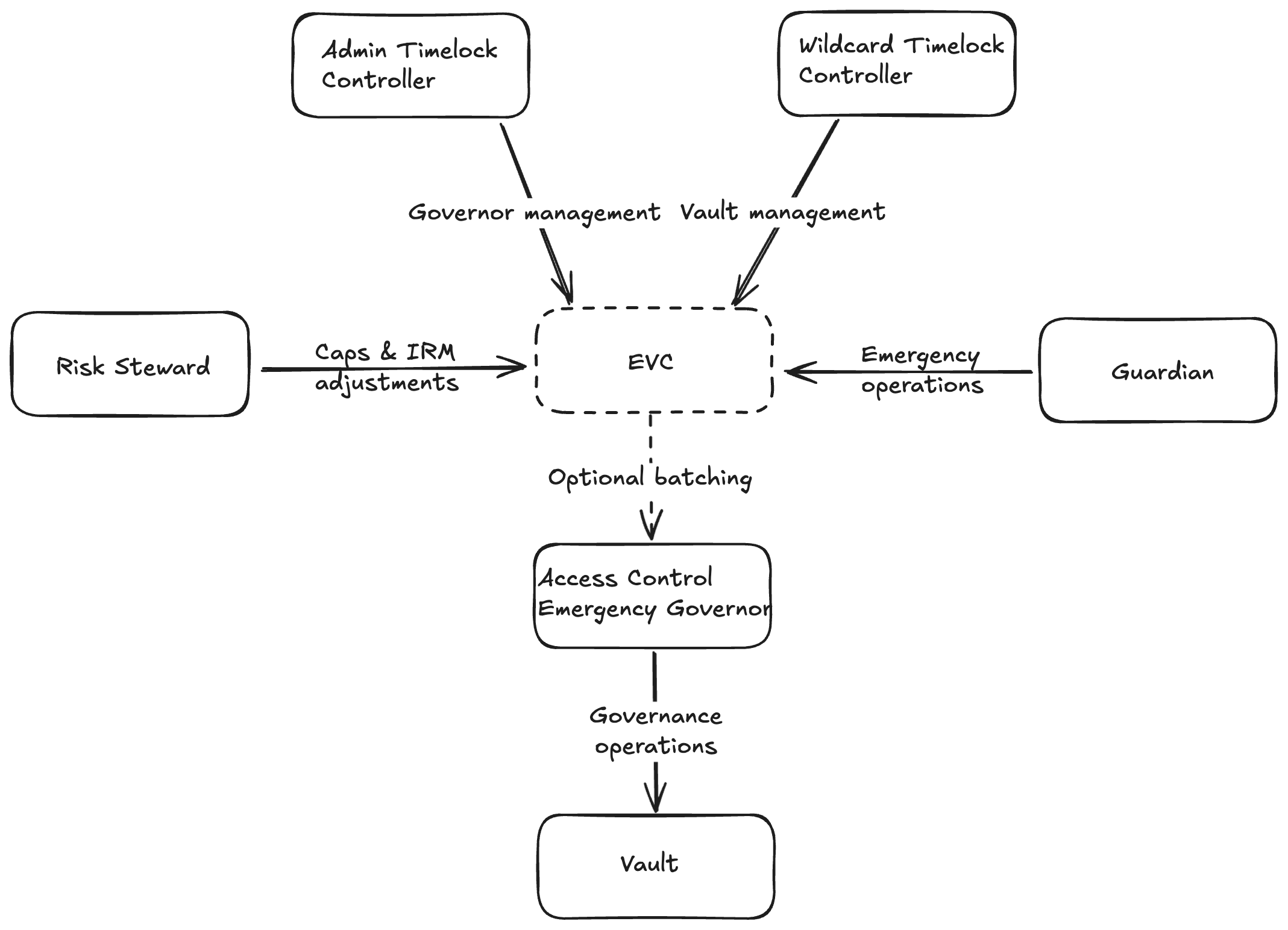
### Components
* **`GovernorAccessControlEmergencyV2`:** Selector-based access control contracts for fine-grained permissioning and emergency actions.
* **`CapRiskSteward`:** Specialized risk management contract that allows authorized users to adjust supply and borrow caps within predefined safety limits and cooldowns, and to update interest rate models (IRMs) only to those deployed by a recognized factory.
* **`GovernorAccessControlEmergencyFactoryV2`:** Factory for deploying the full governance suite, including timelocks and emergency roles.
* **`CapRiskStewardFactory`:** Factory for deploying CapRiskSteward contracts that work alongside selector-based governors for delegated, but limited, risk management that can bypass timelock controllers.
### Deployment & Management
#### Deployment Process
1. Prepare timelock parameters:
* Set `minDelay` (minimum 1 day) for both admin and wildcard timelocks
* Define proposers, cancellers, and executors for each timelock
* Identify emergency guardians for rapid response capabilities
2. Deploy through `GovernorAccessControlEmergencyFactoryV2`:
* Call `deploy` with the prepared parameters
* Record the addresses of deployed contracts
3. Install governance:
* Set the `GovernorAccessControlEmergencyV2` as governor for your vault(s)
* Install the same governor on your oracle router
* If using `CapRiskSteward` for delegated risk management:
* Deploy `CapRiskSteward` via `CapRiskStewardFactory`, providing the governor access control contract, IRM factory addresses and the admin address
* Grant `setInterestRateModel.selector` and `setCaps.selector` roles to the `CapRiskSteward` on the governor contract
* Assign the wildcard role on the `CapRiskSteward` to a multisig or other trusted address
## Interest-rate models
An interest-rate model (IRM) calculates an EVK vault's borrow rate as utilization changes. The supply rate follows from borrowing, utilization, fees, and vault accounting. Model choice affects borrower costs, supplier returns, utilization, and available liquidity.
Contract parameters use per-second rate units, while interfaces commonly display annualized values. Verify the required units and conversion before using a displayed percentage in a deployment transaction.
### IRM types
The models below are examples rather than an exhaustive list. Check the model address, source, factory, network, deployment inputs, and current interface support before assigning one to a vault.
#### Linear Kink IRM
A two-slope utilization curve increases linearly to a kink and then more steeply above it. `EulerKinkIRMFactory.deploy` takes `baseRate`, `slope1`, `slope2`, and `kink`.
The curve does not adapt automatically. A governed vault can replace its IRM if market conditions or its mandate change; a finalized (ungoverned) vault cannot.
#### Linear Kinky IRM
This model uses a nonlinear post-kink shape. Factory inputs include `baseRate`, `slope`, `shape`, `kink`, and `cutoff`. Test how the shape and cutoff affect rates across the full utilization range.
#### Adaptive Curve IRM
An adaptive model changes its rate over time in response to utilization relative to a target. This can reduce the need for manual updates, while making the current rate dependent on past utilization. Verify the exact preset or deployment and its configured bounds.
#### Fixed Cyclical Binary IRM
This model alternates between `primaryRate` and `secondaryRate` according to `primaryDuration`, `secondaryDuration`, and `startTimestamp`. Borrow costs change with time even when utilization is unchanged.
### Deploy and assign in the Toolbox
Market → **Configuration → Interest-rate model** lists the models this browser deployed and each vault's current model. **Add IRM**:
| Family | You set | Preview |
| ------------------ | ------------------------------------------------------------------------------------ | ------------------- |
| **Kink** | Base APY, kink APY, max APY, kink utilization | Rate curve |
| **Kinky** | Base APY, kink APY, cutoff APY, kink utilization, shape | Rate curve |
| **Adaptive** | Target utilization, starting APR, min and max APR, curve steepness, adjustment speed | Rate curve at start |
| **Fixed cyclical** | Fixed rate and period, repayment rate and window | Schedule over time |
Enter yearly percentages. The Toolbox converts them to the contract's per-second units and previews them before deploying. Pick the vaults under **Apply to**. Deployment goes through Euler's factory (wallet or Safe). The model is read back and checked, then the assignment is staged as an ordinary change ([Change settings](/curate/toolbox/market-ops-changes)).
**Tools → Interest-rate models** deploys a model before a market exists. Assign it from a market's Configuration later.
### Review before assignment
Before assigning or replacing an IRM:
* verify its address, source version, network, and factory;
* inspect the raw parameters and derive representative displayed rates;
* simulate zero, target or kink, stressed, and near-full utilization;
* assess the effect on borrowing, withdrawals, refinancing, and liquidations;
* identify who can replace the vault's IRM and whether changes are delayed; and
* monitor unexpected rates and utilization after deployment.
A recognized factory helps identify how a model was deployed. The chosen parameters and resulting rate curve still need to be evaluated for the vault.
### Read next
* [Interest rates](/learn/interest-rates)
* [Launch toolkit](/launch)
* [Governance contracts](/curate/governance-contracts)
* [Attack vectors](/curate/attack-vectors)
## Oracle adapters and routes
A vault needs a price for every collateral and liability asset in its unit of account. Two contracts provide it:
* an **oracle adapter** wraps one price source (Chainlink, Pyth, …) and quotes one pair;
* the **router** (`EulerRouter`) is the vault's oracle: for each pair, it picks an adapter, prices a tokenised vault's shares through the asset it holds, or uses a fallback.
A vault's router and unit of account are fixed at creation. The routes on the router can be changed by the router's governor.
### Where
Market → **Configuration → Price routes**: each vault's current route, adapter, unit and live quote. The market's **Overview** shows the routes grouped by router. A vault whose oracle is an adapter set directly, with no router, is shown as such; there is no route to set.
### Deploy an adapter
From a market, **Configuration → Price routes → Deploy adapter**. Before a market exists, **Tools → Oracle adapters**:
1. **Vault**: whose asset needs a price.
2. **Adapter**: from the catalogue. The options are Chainlink, Chainlink for infrequent feeds, Chronicle, Pyth, Pendle (PT and LP tokens), fixed rate, rate provider, and cross adapter (two adapters chained). Known feeds for the asset and chain are under **Start from a known configuration**.
3. **Check**: Euler's adapter assessment runs on your configuration before deployment.
4. **Deploy**: from an ordinary wallet (adapters have no factory, so a Safe cannot). The Toolbox predicts the address, deploys, waits for the receipt, reads the contract back and compares it with the review, quote included.
| Source | Extra step |
| ------------- | ---------------------------------------------------------------------------------------------------------------------------------------------------------------------------------------------------- |
| **Chronicle** | Ask Chronicle to add the adapter to the feed's reader list. Until then, the deployment shows **Waiting for authorization**. **Read the chain again** checks once Chronicle has done it. |
| **Pyth** | A Pyth price is fresh only after an update is pushed on chain. If the feed is stale, the Toolbox checks the quote with a simulated update and says so: push a price update before the route is used. |
| **Pendle** | The Pendle market must keep enough price observations for the adapter's TWAP window. The Toolbox offers to raise the observation buffer, in steps, and previews the price the adapter will report. |
### Set the route
**Price routes**: asset, unit of account, adapter. A collateral that is itself a tokenised vault goes under **Resolved vaults**. Review, simulate and sign like any other change ([Change settings](/curate/toolbox/market-ops-changes)). The router's governor signs.
An adapter deployed under **Tools → Oracle adapters** is kept in this browser's deployments and offered when you set a route.
### Review a route
Check decimals, staleness limits, bounds, failure behaviour, and, for a resolved vault, whether its shares redeem at the reported value. `convertToAssets` is an accounting value, not a redeemable one. Recheck after every governance change.
### Read next
* [Price oracles](/learn/price-oracles)
* [Interest-rate models](/curate/interest-rate-models)
* [Attack vectors](/curate/attack-vectors)
## Curate on Euler
Create and operate EVK markets, EulerEarn vaults, and EulerSwap pools. These guides cover deployment, configuration, governance, metadata, and ongoing management. For EVK markets and for labels, the work happens in the [Toolbox](/curate/toolbox).
### Choose what you run
| What you run | Start here | Operations |
| ----------------------------- | --------------------------------------------------------------------------------------------------------------------- | -------------------------------------------------------------------------------------------------------------------------------- |
| EVK market, vault, or cluster | [The Toolbox](/curate/toolbox); [deployment scripts](/curate/vaults/evk/deployment-and-management) for large clusters | Assets, collateral graph, oracle routes, IRM, caps, LTVs, liquidation settings, hooks, fees, governance, and labels |
| EulerEarn vault | [Earn introduction](/curate/vaults/euler-earn/introduction) | Strategies, roles, caps, queues, allocation, liquidity, fees, loss accounting, and metadata |
| EulerSwap pool | [EulerSwap 2](/curate/euler-swap) | Pool version, LP account, vault pair, manager and hook authority, parameters, fees, liquidity, quotes, and decommissioning state |
| Metadata and discovery | [Labels and metadata](/curate/vaults/labeling) | Claim vaults, group them into products, name your organisation; Euler publishes; metadata is not a safety verdict |
| Governance or response | [Governance in the Toolbox](/curate/toolbox/governance), [Governance contracts](/curate/governance-contracts) | Role membership, selectors, timelocks, upgradeability, pause paths, signer policy, and recovery limits |
### Shared tools
* [The Toolbox](/curate/toolbox) — create and operate EVK markets, label vaults and products, deploy oracle adapters and interest-rate models, read transactions before signing.
* [Risk & Analytics dashboard](/use/risk-dashboard) — inspect market trends, borrowing exposure, and liquidation-bot observations.
* [Launch toolkit](/launch) — plan a production launch and operational handoff.
* [Oracle adapters and routes](/curate/oracle-routes) and [interest-rate models](/curate/interest-rate-models) — configure pricing and rates.
* [Labels and metadata](/curate/vaults/labeling) — make vaults and products discoverable.
* [Governance contracts](/curate/governance-contracts) — assign and manage permissions.
* [Attack vectors](/curate/attack-vectors) — review common risks before launch.
Before deploying, verify contract addresses, parameters, permissions, and monitoring on the target chain. Use [Build](/build) for SDK, API, and direct contract integrations.
## Labels and metadata
A label is what Euler apps show next to a vault, a product or a curator: its name, logo, description and notice.
Labels change nothing on chain, and they aren't a safety verdict.
Until Euler publishes a vault's label, apps show the vault as unknown and unverified, hide it by default, and warn users who interact with it. Escrow vaults are the exception: apps recognise them without a label. Whether a labelled vault is listed also depends on Euler's checks; see [Known vaults](/build/data-querying/perspectives).
You edit labels under **Curator → Labels** in the [Toolbox](/curate/toolbox).
### What you manage under Labels
| Piece | What it is |
| ---------------------- | ------------------------------------------------------------------------------------------------------------------------------------------------------ |
| **Profile** | Your organisation as users see it: name, description, links and logo. |
| **Verified addresses** | Addresses Euler has confirmed are yours. Every vault claim is checked on chain against them. Euler adds or removes them; a team admin can rename them. |
| **Product** | A named group of your vaults on one chain, with a logo, description, website and optional portfolio notice. |
| **Vault** | A vault's name and labels, deprecation state and **Discovery status**. EVK and Securitize vaults are listed through a product. |
| **Earn vault** | An EulerEarn vault, labelled on its own. It never joins a product. |
A few rules about products:
* Each product is on one chain, and its product ID can't be changed.
* Vaults use the product's name, description and notice unless you give them their own. If a product has no website or logo, it uses the ones from your profile.
* If a product's vaults are ungoverned, the product locks after its first save.
* Only Euler can move a product to another curator.
### Products and markets
A product is a label; a market is on chain. Keep **one product per market**: Market Ops uses a product's vaults to decide what belongs to the market, so every vault in a market, including ones you add later, belongs in the same product. See [Markets and products](/curate/toolbox#markets-and-products).
### Claim a vault
Claiming a vault links it to your labels. Euler checks on chain that one of your verified addresses governs it: the governor of an EVK vault, or the owner of an EulerEarn vault. If the check fails, nothing changes.
**Labels → Vaults → Claim a vault**: the chain, the vault's address, and optionally the product it joins. You can add it to a product later. Claiming doesn't name the vault; you do that on the vault's own page. To claim vaults straight into a product, use **Add vault** on the product's page.
You can't claim:
* **A vault whose governor was renounced.** Euler assigns it. It stays hidden until the assignment is checked.
* **An escrow vault.** It always shows as escrowed collateral.
You can claim several vaults at once; each is checked separately. Market creation offers to claim the new vaults.
An EulerEarn vault can also be claimed from its page under **Curator → Earn**: **Claim in Labels** on its **Overview** opens the claim with the vault filled in. Once it is claimed, its label page offers **Open in Earn**.
### Deprecate
Deprecating a vault or product adds a **Deprecated** badge and your reason wherever it appears. Nothing changes on chain. The vault is removed from the lend, borrow and explore tables until it's listed again under **Discovery**. You can undo deprecation.
### Discovery status
Visible, Warning, Hidden or Not listed yet, with the reason. Decided by two checks that run on their own:
* **Configuration check**: Euler's review of the on-chain configuration.
* **Consistency check**: the labels against the chain and the product.
A claimed EVK or Securitize vault outside any product is not listed; those are listed through their product. Earn vaults are listed on their own.
### Saved and published
Every edit saves to your draft straight away. It shows **Not published yet** or **Unpublished changes** until Euler publishes it. See [Publishing and versions](/curate/toolbox/publishing).
### Descriptions
Keep descriptions factual, with no endorsements. Say what the vault or product is and who configures it:
```text
An EVK lending product for selected assets, configured by Example DAO.
```
### The old way
The `euler-labels` GitHub repository and its pull-request process are legacy. The file format is kept for forks of the Euler app: [Label file format](/build/data-querying/label-file-format).
## Deployment and management of EVK vaults
| Path | Best for | Notes |
| --------------------------------------------------------------------------- | --------------------------------------------------------------------------------------------------------------------------------------------------- | --------------------------------------------------------------------------------------------------------------------------------------------------------------------------------------------------------------------------------------------------------------------------------------- |
| **[The Toolbox](/curate/toolbox)** | Everything a curator does day to day: create a market, add a vault, change caps, LTVs, rate models, routes, hooks, fees; transfer governance; pause | Stages, simulates, re-reads the chain before signing, reads back after the receipt. Signs from a wallet, a Safe or a timelock and works with [governor contracts](/curate/governance-contracts). Deploys adapters and rate models from inside the market; labels the vaults you create. |
| **[euler-vault-scripts](https://github.com/euler-xyz/euler-vault-scripts)** | Teams that define large clusters in code and want repeatable, reviewed deployments | Solidity scripts for assets, LTVs, oracles, caps, IRMs; applies only the differences on update; compatible with Safes, timelocks and risk stewards. See the [scripts guide](./euler-vault-scripts). |
The Creator UI at create.euler.finance redirects to the Toolbox. Whatever deployed a market, the Toolbox opens it by any vault address and manages it from there.
Start with [Open a market](/curate/toolbox/market-ops) or [Create a market or add a vault](/curate/toolbox/market-ops-create).
## Donation attacks
### Introduction
This scenario illustrates a worst-case hypothetical attack on a lending protocol that relies on exchange-rate manipulation of ERC-4626 vaults. Specifically, it focuses on a protocol that lists an ERC-4626 share token as both collateral and a borrowable asset, and uses the vault's share-to-asset conversion to value those shares in terms of the underlying asset.
This scenario depends on the exact assumptions below. Exploring it helps identify mitigations that can reduce similar risks in other configurations.
The described sequence requires direct donations to change the share conversion consumed by lending valuation. EVK's internal cash accounting breaks that assumption for an EVK vault's own shares. It does not make every ERC-4626 collateral or oracle integration safe: external share vaults, oracle routes, recursive collateral paths, liquidity, and redeemability can introduce different risks.
### Attack
#### Initial Setup
**System Configuration**:
* ERC-4626 Vault: Allows depositing ABC to receive wABC
* Lending Protocol: Uses the ABC/wABC exchange rate to value wABC
* Collateral & Borrowing Rules:
* wABC as Collateral to borrow USDC: 0.8 LTV (80% of wABC value can be borrowed)
* USDC as Collateral to borrow wABC: 0.8 LTV (80% of USDC value can be borrowed)
#### Required attack conditions
The numerical sequence previously shown here did not reconcile share supply, account balances, collateral, and debt. The mechanism is clearer when stated as the conditions an attacker would need:
1. **Manipulable share conversion:** unsolicited underlying transfers must increase the share-to-asset conversion used by the lending protocol's valuation path.
2. **Useful market relationships:** the affected share token must be accepted in collateral or borrowing relationships that let the attacker turn the manipulated valuation into extractable assets.
3. **Concentrated share supply:** the attacker must be able to reduce effective outstanding share supply enough that a donation materially changes the conversion rate, while retaining or controlling shares that benefit from the change.
4. **Sufficient liquidity and limits:** available liquidity, supply caps, borrow caps, LTVs, and liquidation constraints must permit the position and extraction path.
5. **Economic viability:** assets extracted must exceed donations, financing costs, swap costs, transaction fees, liquidation losses, and any flash-loan fee.
If any required condition fails, this exact path fails. A complete assessment must trace the vault's actual accounting, share ownership, oracle route, connected markets, caps, liquidity, and every asset movement. ERC-4626 conformance alone neither proves nor disproves exposure.
### Prevention Strategies
#### 1. Prevent Exchange Rate Manipulation
The attack relies on manipulating the exchange rate within an ERC-4626 vault. Under the exact accounting assumption described here, internal balance tracking that excludes unsolicited transfers from the share conversion removes the required manipulable-conversion condition. Integrators must verify the actual vault accounting and oracle path rather than infer this property from ERC-4626 conformance.
#### 2. Avoid Vulnerable Vaults as Collateral
For ERC-4626 vaults where the exchange rate can be altered by donations, a simple mitigation strategy is to:
* Avoid listing these vaults as collateral or
* Prevent them from being borrowable in the lending protocol
Under the example's assumptions, either measure removes one of the required collateral or borrow relationships. Other market relationships can create different paths.
#### 3. Implement Supply and Borrow Caps
If vulnerable ERC-4626 vaults must be used as collateral and borrowing assets, additional safeguards can reduce the risk:
* Set conservative supply and borrow caps that do not exceed the total circulating supply of the vault's share tokens
* Caps can bound exposure and increase attack cost under the configured limits, but do not by themselves prove that an attack is unprofitable
#### 4. Use a Wrapped Exchange Rate Oracle
A carefully designed wrapped exchange rate oracle can bound extreme or rapid reported exchange-rate changes:
* Cap exchange rate increases within a set threshold
* Limit the rate of change within a single block, potentially breaking this exact atomic sequence
* This can force a multi-block strategy and add market risk without proving the broader configuration safe
**Important Note**: Some existing wrapped exchange rate oracles may still be vulnerable to this type of attack. For example, certain price feeds from third-party oracle providers report the redemption price of an asset. However, this redemption price might internally use the ERC-4626 exchange rate, which can be manipulated through donation attacks.
### Conclusion
This hypothetical attack demonstrates how exchange rate manipulation in ERC-4626 vaults can be exploited to target lending protocols that allow vulnerable vaults as both collateral and borrowable assets.
For an EVK vault's own shares, internal cash accounting breaks the direct-donation assumption used in this example. This is a mitigation of the described mechanism under its stated assumptions, not a guarantee for external ERC-4626 collateral, oracle routing, liquidity, redemption restrictions, caps, or recursive dependencies. Supply and borrow caps can bound exposure but do not establish unprofitability or safety.
## Cluster deployment and management using scripts
The [`euler-vault-scripts`](https://github.com/euler-xyz/euler-vault-scripts) repository provides a script-based framework for deploying, configuring, and managing clusters of EVK vaults. It is intended for advanced users, DAOs, and protocol developers who need automation and support for complex, governed markets.
### What is a cluster?
A cluster is a collection of vaults that accept each other as collateral and share a common governor. Clusters are defined and managed in Solidity scripts, enabling programmable and reproducible market deployments that can be reviewed before execution.
### Key features
* Automated deployment and delta management
* Support for Safe multisigs, timelocks, and risk stewards
* Batching, emergency operations, and governance contract integration
### Defining a cluster: example
Below are annotated snippets from a typical cluster script (`Cluster.s.sol`).
#### 1. Define cluster assets
```solidity
function defineCluster() internal override {
// List the assets for which vaults will be deployed
cluster.assets = [WETH, USDC, USDT, sUSDS];
}
```
*This sets up the vaults in your cluster. Each asset will have its own vault. Do not define more than one vault per asset.*
#### 2. Configure cluster parameters
```solidity
function configureCluster() internal override {
// Set the governor addresses for vaults and oracle routers
cluster.oracleRoutersGovernor = getDeployer();
cluster.vaultsGovernor = getDeployer();
// Set the unit of account (e.g., USD)
cluster.unitOfAccount = USD;
// Percentage values use 1e4 = 100%.
cluster.feeReceiver = address(0);
cluster.interestFee = 0.1e4; // 10%
cluster.maxLiquidationDiscount = 0.15e4; // 15%
cluster.liquidationCoolOffTime = 1; // seconds
// Set hooks, config flags, etc. as needed
cluster.hookTarget = address(0);
cluster.hookedOps = 0;
cluster.configFlags = 0;
}
```
*This block configures governance, risk, and operational parameters for the cluster. You can override parameters per asset if needed.*
#### 3. Set oracle providers
```solidity
// Assign oracle adapters or external vaults for each asset
cluster.oracleProviders[WETH ] = "0x10674C8C1aE2072d4a75FE83f1E159425fd84E1D";
cluster.oracleProviders[USDC ] = "0x6213f24332D35519039f2afa7e3BffE105a37d3F";
cluster.oracleProviders[USDT ] = "0x587CABe0521f5065b561A6e68c25f338eD037FF9";
cluster.oracleProviders[sUSDS] = "ExternalVault|0xD0dAb9eDb2b1909802B03090eFBF14743E7Ff967";
```
*Assets used in priced borrowing relationships need the required quote route. Use `ExternalVault|` only when the intended route should consume a reviewed ERC-4626 `convertToAssets` conversion and no direct pair oracle should take precedence. Apply the manipulation, decimals, redeemability, liquidity, and recursive-dependency checks in [Oracle adapters and routes](/curate/oracle-routes).*
Deploy your own oracle adapters for the intended routes — the [Toolbox](/curate/oracle-routes) deploys the available adapter types — rather than reusing adapters discovered onchain. If you do reuse one, verify chain, address, source, update behavior, governance, and suitability for the intended route first.
#### 4. Set supply and borrow caps
```solidity
cluster.supplyCaps[WETH ] = 10_000;
cluster.supplyCaps[USDC ] = 10_000_000;
cluster.supplyCaps[USDT ] = 10_000_000;
cluster.supplyCaps[sUSDS] = 10_000_000;
cluster.borrowCaps[WETH ] = 9_000;
cluster.borrowCaps[USDC ] = 9_000_000;
cluster.borrowCaps[USDT ] = 9_000_000;
cluster.borrowCaps[sUSDS] = type(uint256).max; // no cap
```
*Caps control the maximum supply and borrowable amounts for each vault.*
#### 5. Assign interest rate models (IRMs)
```solidity
uint256[4] memory irmETH = [uint256(0), uint256(194425692), uint256(41617711740), uint256(3865470566)];
uint256[4] memory irmUSD = [uint256(0), uint256(399976852), uint256(39767751304), uint256(3865470566)];
cluster.kinkIRMParams[WETH ] = irmETH;
cluster.kinkIRMParams[USDC ] = irmUSD;
cluster.kinkIRMParams[USDT ] = irmUSD;
```
*Interest rate models are set per asset. Use the provided scripts/utilities or the [Toolbox](/curate/interest-rate-models) to deploy and preview interest-rate models as needed.*
#### 6. Configure LTVs and liquidation parameters
```solidity
// Liquidation LTV matrix: columns = liability vaults, rows = collateral vaults
cluster.ltvs = [
// WETH USDC USDT sUSDS
[uint16(0.00e4), 0.85e4, 0.85e4, 0.00e4], // WETH
[uint16(0.87e4), 0.00e4, 0.95e4, 0.00e4], // USDC
[uint16(0.87e4), 0.95e4, 0.00e4, 0.00e4], // USDT
[uint16(0.87e4), 0.95e4, 0.95e4, 0.00e4] // sUSDS
];
```
#### 7. Configure spread LTV
```solidity
// Set the spread LTV for the entire cluster
cluster.spreadLTV = 0.02e4; // 2% spread
```
*The spread LTV represents the difference between the liquidation threshold and the maximum LTV for all assets in the cluster. This creates a buffer zone before liquidation can occur, but it does not prevent liquidations during price moves, oracle updates, liquidity changes, or execution delays.*
### Environment setup and running scripts
#### Prerequisites
1. Install Foundry:
```bash
curl -L https://foundry.paradigm.xyz | bash
foundryup
```
2. Clone the repository:
```bash
git clone https://github.com/euler-xyz/euler-vault-scripts.git
cd euler-vault-scripts
```
3. Prepare the `.env` file using `.env.example` as a template. Define the RPC URLs for all the chain IDs you need. If you plan to submit transactions through Safe, define `SAFE_API_KEY` as described in the current repository README. Treat that README as the source of truth for current environment variables and command options.
4. Install dependencies:
```bash
./install.sh
```
5. Compile the contracts:
```bash
forge clean && forge compile
```
#### Running scripts
The scripts are experimental and provided as-is. Pin and review the repository revision you use, test the complete cluster configuration and scripts, run the documented dry run, and independently review every generated transaction and Safe payload before production execution. A successful dry run does not validate asset, oracle, liquidity, governance, cap, LTV, fee, or liquidation-risk choices.
Use the `ExecuteSolidityScript.sh` script to run the management script:
```bash
./script/ExecuteSolidityScript.sh script/clusters/[CLUSTER_FILE] [options]
```
Replace `[CLUSTER_FILE]` with your cluster-specific file name (e.g., `Cluster.s.sol`).
##### Important options:
* `--dry-run`: Simulates the script without executing transactions
* `--rpc-url URL|CHAIN_ID`: Required if `DEPLOYMENT_RPC_URL` not defined in `.env`
* `--account ACCOUNT` or `--ledger`: Required if `DEPLOYER_KEY` not defined in `.env`
* `--batch-via-safe`: Creates a batch payload file for Safe multisig execution
* `--safe-address SAFE_ADDRESS`: Authorized Safe multisig address
* `--timelock-address`: Schedules transactions in the timelock controller
* `--risk-steward-address`: Executes transactions via the risk steward contract
##### Example commands:
Initial deployment:
```bash
./script/ExecuteSolidityScript.sh ./script/clusters/Cluster.s.sol --account DEPLOYER --rpc-url 1
```
Managing a deployed cluster with governance contracts:
```bash
./script/ExecuteSolidityScript.sh ./script/clusters/Cluster.s.sol --batch-via-safe --safe-address DAO --timelock-address wildcard --rpc-url 1
```
#### Important notes
* Always use `--dry-run` first, then inspect the target chain, callers, destinations, calldata, values, role paths, and resulting state before signing
* Environment variables in `.env` take precedence over command line arguments
* After deployment, commit the generated `.json` files in the scripts directory as they serve as the deployed contracts addresses cache
### Further reading and references
* [euler-vault-scripts README](https://github.com/euler-xyz/euler-vault-scripts/blob/master/README.md)
* [Cluster.s.sol example](https://github.com/euler-xyz/euler-vault-scripts/blob/master/script/clusters/Cluster.s.sol)
### Read next
* [Curate](/curate)
* [Launch toolkit](/launch)
* [Final review](/launch#final-review)
## Hooks and custom logic
The [**Euler Vault Kit (EVK)**](/curate/vaults/evk/overview) provides a flexible hooking system that allows vault governors to extend vault functionality or restrict certain operations. This guide explains how hooks work and provides examples of common use cases.
### Hook system overview
Hooks are implemented through a hook configuration that consists of two parameters:
* The hook target: The address of a contract that implements the hook logic
* The hooked operations: A bitfield that specifies which operations should trigger the hook
When a hooked operation is invoked, the vault will:
1. Check if the operation is enabled in the hooked ops bitfield
2. Call the hook target with the same `msg.data` that was provided to the vault
3. Append the EVC-authenticated caller as trailing calldata
4. Revert the operation if the hook call fails
#### Hook target implementation
Every hook target contract must implement the `isHookTarget()` function, which returns a special function selector (magic value). This function checks that the contract is coded to be a hook target. Depending on the use case, `isHookTarget()` can be further strengthened by checking whether the calling address is a proxy deployed by a recognized EVault factory. Example implementation can be as follows:
```solidity
function isHookTarget() external view returns (bytes4) {
if (eVaultFactory.isProxy(msg.sender)) return this.isHookTarget.selector;
else return 0;
}
```
### Example use cases
#### Access control
The [`HookTargetAccessControl`](https://github.com/euler-xyz/evk-periphery/blob/master/src/HookTarget/HookTargetAccessControl.sol) contract demonstrates how to implement role-based access control for vault operations. This is useful for:
* Restricting deposits to whitelisted addresses
* Limiting borrowing to specific users
* Implementing KYC/AML requirements
* Implementing KYB or entity-level eligibility requirements
* Enforcing allowlists for permissioned or RWA-backed vaults
* Creating permissioned vaults for institutional users
Access-control hooks are commonly used when eligibility is determined offchain and then published onchain through roles, allowlists, credential registries, or a custom policy contract. The hook should check the EVC-authenticated account appended to calldata, not only `msg.sender`, because vault operations may be routed through EVC batches, operators, or integration contracts.
#### Circuit breakers
Hooks can be used as vault-level circuit breakers for selected operations. A circuit-breaker hook can revert when a configured condition is active, such as:
* Pausing new deposits or borrows during oracle, liquidity, or asset incidents
* Blocking transfers of vault shares during an issuer or transfer-agent event
* Disabling flash loans or other high-risk actions during an exploit response
* Enforcing utilization, exposure, or concentration ceilings during status checks
* Allowing de-risking actions such as repay or withdraw while blocking actions that increase exposure
Design circuit breakers narrowly. Broad pauses can protect against some incidents, but they can also interrupt normal operations, integrations, liquidations, or user exits if they are applied to the wrong operation set.
#### Compliance and RWA controls
For tokenized asset and RWA markets, hooks can encode operation-level rules that match the vault's eligibility and transfer assumptions. Common examples include:
* Requiring KYC/KYB approval before `deposit`, `mint`, `borrow`, or `transfer`
* Checking jurisdiction, sanctions, accreditation, investor-type, or entity-status registries
* Enforcing per-account exposure limits or minimum position sizes
* Restricting vault-share transfers to approved recipients
* Blocking new exposure when the underlying asset, issuer, custodian, oracle, or redemption process is paused
Hooks gate only selected hooked EVK operations using configured onchain conditions. They do not by themselves perform legal review, identity verification, KYC/KYB, sanctions screening, issuer administration, transfer-agent processing, determine legal eligibility, or make a vault or market compliant. Those outcomes depend on external data and processes, governance, and the exact operations covered. Document policy sources, stale-data and provider failures, upgrades, bypasses, privileged roles, revocation, and emergency behavior before launching a permissioned or RWA-related vault.
#### Other use cases
1. **Flash Loan Fees**
* Enforce a percentage fee on flash loans
* Collect fees in any token
* Scale fees with gas costs
2. **Utilization Caps**
* Block vault utilization from exceeding a threshold
* Implement dynamic caps based on market conditions
* Protect against high utilization risks
3. **Minimum Debt Sizes**
* Prevent creation of dust positions
* Set debt floors so liquidations are more likely to be economically viable
* Reduce gas costs for liquidators
4. **Custom Collateral Restrictions**
* Limit the number of collateral assets
* Implement custom collateral validation
* Add additional risk checks
### Limitations
1. **[ERC-4626](https://eips.ethereum.org/EIPS/eip-4626) Compliance**
* Some hook configurations may cause the vault to not be fully ERC-4626 compliant
* The `max*` functions may be inaccurate with hooks installed
2. **Operation Scope**
* Hooks can only affect operations specified in the hooked ops bitfield
* Hooks do not cover operations outside the configured bitfield, and some operations may not be hookable
* A reverting, unavailable, or gas-intensive hook can deny service to covered operations, including de-risking or liquidation paths if configured carelessly
3. **Gas Costs**
* Each hooked operation requires an additional external call
* Complex hook logic can significantly increase gas costs
* Consider the impact on user experience
## Euler Vault Kit introduction
The Euler Vault Kit (EVK) is a modular framework for building lending markets from ERC-4626 vaults. Each vault holds one underlying asset and can be configured with its own collateral relationships, oracle routes, LTVs, caps, interest-rate model, liquidation settings, hooks, fees, and governance.
EVK lets developers, curators, DAOs, and other market creators:
* launch lending markets for ERC-20 assets;
* configure risk parameters for each vault-to-vault relationship;
* choose governed or immutable deployments; and
* connect vaults into isolated pairs, multi-collateral markets, or larger clusters.
### Why build with EVK?
Multiple vaults for the same asset can coexist with different parameters. LTVs are set between individual liability and collateral vaults, so a market creator can isolate a pair or deliberately connect several vaults. Existing vaults can also be accepted as collateral to help bootstrap a new market, with the new vault inheriting dependencies on that collateral vault's configuration and liquidity.
Liquidations use a reverse Dutch auction-style discount rather than one fixed bonus. The discount increases as a position's health deteriorates, up to the maximum configured by the vault governor.
Hooks can add custom accounting, access rules, or conditions to selected operations. The creator also chooses the vault's oracle or router, unit of account, and interest-rate model. If the oracle is a router, its routes may be managed by a separate router governor.
EVK vaults work with the Ethereum Vault Connector (EVC). EVC batching supports flows such as one-transaction leverage, while operators let users delegate control of selected accounts to another address or contract for automation and other account workflows.
### Market structures
EVK supports several market structures:
* **Isolated pairs:** one collateral vault supports borrowing from one liability vault.
* **Multi-collateral markets:** a liability vault accepts several collateral vaults.
* **Vault clusters:** connected vaults accept one another as collateral across a broader market.
More connected structures can improve capital and liquidity reuse, but they also create dependencies between the participating vaults. Choose the structure that matches the intended assets, governance, and risk model.
:::tip
**Before you begin**
Plan the underlying assets, collateral relationships, oracle routes, unit of account, IRM, caps, LTVs, hooks, and governance before deploying. Review the [core concepts](/introduction) if you are new to Euler's architecture.
:::
:::note
**The Toolbox and labels**
Use the [Toolbox](/curate/toolbox) to deploy or manage an EVK vault. Labels and public metadata help apps display and discover vaults; verify deployed addresses, roles, and configuration independently. See [Labels and metadata](/curate/vaults/labeling) and [Vault metadata](/build/data-querying/perspectives).
:::
## Overview
**The Euler Vault Kit (EVK)** is a system for constructing credit vaults: [ERC-4626](https://eips.ethereum.org/EIPS/eip-4626) vaults extended with lending and borrowing. Borrower interest is their core yield source, unlike many ERC-4626 implementations that allocate assets to external strategies. Users can borrow from a credit vault when they have sufficient eligible collateral in other credit vaults. The liability vault decides which credit vaults it accepts as collateral.
### Key components
#### Vault architecture
A vault consists of several components:
* **Underlying Asset**: The ERC-20 token held by the vault. Each vault holds exactly one underlying asset.
* **EVault**: The primary entry-point contract implementing common vault logic:
* Tracks deposits and borrows
* Accrues interest
* Validates position health
* Permits liquidations
* **Price Oracle**: Interfaces with external pricing systems to compute collateral and liability values
* **IRM (Interest Rate Model)**: Computes interest rates to incentivize borrowing behavior
* **ProtocolConfig**: Global protocol-level configuration controlling interest fee destinations and splits
* **Hook Target**: Optional contract that can implement custom logic for vault operations through hooks
* **DToken**: A read-only ERC-20 interface for debt amounts, making debt modifications visible in block explorers and trackable by tax-accounting software
#### Vault creation and governance
Vaults are created through a factory contract, which deploys a proxy pointing to the implementation contract. This pattern enables gas-efficient deployment and gives integrators a way to verify factory provenance. After creation, vaults can be either governed, where the creator retains or transfers governance rights, or finalized, where governance is revoked by setting governor to `address(0)`.
#### Upgradeability vs immutability
When creating a vault, a boolean `upgradeable` flag is specified:
* If `upgradeable` is true, the factory creates a beacon proxy, allowing the factory admin to upgrade the vault's implementation
* If `upgradeable` is false, the factory creates a minimal proxy contract, making the vault immutable
The factory has a configured `upgradeAdmin` that can change the implementation for upgradeable vaults. Verify its current holder and control path onchain for the selected deployment. Vault creators choose whether a factory-admin implementation change can affect their vault or whether its implementation is immutable.
:::info
The upgrade functionality is intended for critical bugs discovered in the vault implementation.
:::
#### Governance risk
The combination of upgradeability and governance creates different risk profiles:
| | Upgradeable | Immutable |
| ------------- | ------------------------ | --------- |
| **Governed** | Factory Admin + Governor | Governor |
| **Finalized** | Factory Admin | None |
Immutability removes specific change authorities but also removes their recovery options. See [EVK security](/curate/vaults/evk/security) for the resulting governance, oracle, collateral, and implementation tradeoffs.
### Core functionality
#### Exchange rate and shares
Vaults implement the ERC-4626 standard, where shares represent proportional claims on vault assets. The exchange rate grows as interest accrues, and shares maintain the same decimals as the underlying asset. The exchange rate is calculated as:
```
exchangeRate = (cash + totalBorrows + VIRTUAL_DEPOSIT) / (totalShares + VIRTUAL_DEPOSIT)
```
The virtual deposit mechanism mitigates manipulation through rounding-based "stealth deposits" and keeps the exchange rate well-defined even with zero shares.
#### Token transfers
Vaults use two internal abstractions for token movements:
* `pullAssets`: First attempts a Permit2-authorized transfer, then falls back to the underlying asset `transferFrom`
* `pushAssets`: Uses `transfer` on the underlying asset, with checks to prevent transfers to virtual sub-accounts
Permit2 can improve user experience by allowing approvals to be created as signed messages bundled into the same EVC batch as operations like `deposit`. Users need to approve the Permit2 contract once, and some users may already have done this when interacting with Uniswap or other apps.
With the advent of EIP-7702, the need for Permit2 is reduced, as EIP-7702 allows approvals to be bundled with transactions in a more native way. However, not all networks support EIP-7702 yet, and many wallets are still catching up. As a result, Permit2 remains useful for smoother user experiences across different environments and wallet implementations.
#### Internal balance tracking
The vault uses internal balance tracking instead of reading its own balance from the underlying asset. This prevents users from manipulating the exchange rate through direct transfers and is more gas efficient. However, this means that rebasing/fee-on-transfer tokens are not supported, as the vault cannot track unexpected balance changes.
#### Balance forwarding
Balance forwarding enables automated distribution of rewards while keeping gas costs low. When an account opts in, every time its balance changes an external contract is notified of the updated balance. This external contract has no special privileges in the vault, but its `balanceTrackerHook` method must not revert or use up all gas. In practice, reward campaigns for Euler vaults run on offchain platforms such as [Merkl](https://app.merkl.xyz/), which do not rely on balance forwarding.
#### Interest rate models and compounding
Interest Rate Models (IRMs) determine the interest rate based on the vault's state, typically using a function of utilization. The most common function is a "linear-kink" model that starts with a gradual slope and becomes steep at a target utilization value.
Interest is compounded deterministically every second using exponentiation. Because accrued interest is added to `totalBorrows`, it increases utilization. The amount of interest owed/earned is independent of how frequently the contract is interacted with, except for the effect of accumulator rounding.
IRMs return interest rates in terms of "second percent yield" (SPY) values, which are per-second compounded interest rates scaled by `1e27`. For consistency, conversion to annualized equivalents should use the number of seconds in the average Gregorian calendar year (365.2425 days).
#### Fees
Interest-fee settings and recipients are configuration-, deployment-, network-, and vault-dependent. Verify the current deployed settings for the relevant network and vault. A governance proposal alone does not prove that a change was executed.
Vault governors can configure the portion of accrued borrower interest allocated as fees through the `interestFee` parameter, subject to the applicable bounds. Accumulated fees are converted into vault shares. Once minted, those shares participate in the same asset-per-share changes as other shares.
The `ProtocolConfig` contract's `protocolFeeShare` determines how the accumulated `interestFee` shares are split between the vault's fee receiver and the protocol fee receiver, subject to the contract's cap. It is a split of the configured interest fee, not an additional percentage charged on top. Read the vault's `interestFee`, its fee receiver, and the applicable protocol share and receiver together.
#### Supply and borrow caps
Vault governors can configure:
* Supply cap: Limit on the amount of underlying assets that can be deposited
* Borrow cap: Limit on the amount that can be borrowed
Both caps are denominated in the underlying asset and are packed into 2-byte decimal floating point values. Caps can be transiently violated since they are only enforced at the end of a batch. If a cap was not in violation at the start of a batch but is at the end, the transaction will be reverted.
#### Dtoken (debt token)
Vaults provide a read-only ERC-20 interface for debts through the DToken contract. This interface tracks debt modifications through Transfer events and supports off-chain analysis and tax accounting. The DToken contract is the first (and only) contract created by EVault, so its address can be calculated from the vault's address and the nonce `1`.
### Sub-accounts
The EVC provides each user with 256 virtual account addresses, known as sub-accounts, that are separated from one another. This lets users manage multiple positions with different risk parameters while using a single wallet.
#### How sub-accounts work
In the EVC, every Ethereum address is associated with 256 accounts, which includes the primary account (referred to as the owner). These accounts are identified by IDs ranging from 0 to 255, with ID 0 specifically assigned to the owner account. To generate sub-account addresses, the system performs an XOR operation between the account ID and the Ethereum address. Additionally, the EVC keeps track of sub-account ownership through a look-up mapping called `ownerLookup`, which helps resolve sub-accounts back to their respective owner addresses.
##### Important considerations
* Sub-account addresses are internal to the EVC and compatible vaults
* Ordinary ERC-20 contracts cannot authenticate EVC ownership of a derived sub-account. Use an address that actually controls the token balance and allowance unless the exact external flow is EVC-aware and reviewed.
* The EVC maintains a look-up mapping to resolve sub-accounts to their owner addresses
* Sub-accounts are the only way an account can hold multiple Vault borrows concurrently in the EVK
### Risk management
#### Health checks
Vaults implement two critical health check methods:
* `checkAccountStatus`: Verifies account solvency
* `checkVaultStatus`: Ensures vault-level limits are respected
These methods are invoked by the EVC at appropriate times, typically after all operations in a batch have been performed.
#### LTV (loan-to-value)
Each collateral vault is configured with an LTV that determines the maximum borrow amount against collateral. The system supports separate borrowing and liquidation LTVs. The borrowing LTV is used to limit new borrows, while the liquidation LTV is used when liquidating existing positions. This gap helps compensate for pricing delays and uncertainty, requiring larger price movements to get liquidated right after the position was created. The liquidation LTV can be smoothly ramped down by the vault governor when a collateral needs to be phased out.
#### Liquidations
When an account's risk-adjusted collateral value reaches or falls below its liability value, the account becomes eligible for liquidation. The liquidation system uses a reverse Dutch auction mechanism that scales the discount proportionally with how deeply in violation the position is. The mechanism has several practical effects:
* Slightly unhealthy positions may not be profitable to liquidate
* As prices move against the position, the discount increases
* A liquidator may execute when the discount covers execution, pricing, gas, and market risk
The liquidation discount is limited by a maximum liquidation discount parameter that vault creators must set appropriately. The discount is proportional to how far below the threshold the account is, which means that in some cases a liquidator may prefer many small liquidations rather than one large liquidation.
#### Bad debt socialization
When enabled, bad debt socialization cancels uncollateralized debt and socializes the loss to all depositors. This can reduce first-withdrawer advantage during bad debt events, but it still means depositors absorb losses. Vault governors who do not want debt socialization can disable this functionality.
### Advanced features
#### Hooks system
The hooks system lets vault governors apply onchain conditions to selected vault operations. It can pause operations, require an onchain allowlist or attestation, add flash-loan fees, enforce utilization caps, or set minimum debt sizes. A hook does not itself perform identity verification, sanctions screening, legal review, or make a vault compliant; document its data freshness, failure, upgrade, bypass, and emergency behavior.
For a full technical reference, see the [EVK whitepaper](https://github.com/euler-xyz/euler-vault-kit/blob/master/docs/whitepaper.md) or the [EVK repository](https://github.com/euler-xyz/euler-vault-kit).
### Read next
* [Interact with EVK vaults](/build/evk/interacting-with-vaults)
* [EVK security](/curate/vaults/evk/security)
* [Euler SDK](/build/sdk)
* [Launch toolkit](/launch)
## Security Considerations
The [**Euler Vault Kit (EVK)**](/curate/vaults/evk/overview) is designed with security as a priority, but there are inherent limitations and risks that developers and users should be aware of. This document outlines key security considerations when working with EVK vaults.
### Known Limitations
#### Governance Risk
Vaults can be configured in different combinations of upgradeable/immutable and governed/finalised. Each combination presents different risk profiles:
* **Upgradeable + Governed**: Subject to both factory admin and governor risks
* **Immutable + Governed**: Subject only to governor risks
* **Upgradeable + Finalised**: Subject only to factory admin risks
* **Immutable + Finalised**: Removes the configured vault-governor and factory-upgrade change paths. Risks can remain in oracles, collateral vaults, tokens, hooks, external integrations, and other governed dependencies.
There are also risks to creating immutable/finalised vaults:
* If market conditions change, making a formerly safe collateral asset or price oracle unsafe, only governed vaults can be reconfigured
* If critical bugs are found in the Vault Kit code, the factory admin will only be able to fix upgradeable vaults
#### Collateral Validation
Using vaults with illiquid or manipulable underlying assets could threaten the safety of depositors. It's critical to evaluate the smart contract code that implements each collateral vault. A badly coded or malicious vault could:
* Refuse to release funds in a liquidation event
* Lie about the value of its holdings
* Have dangerous configurations that might encounter bad debt situations
#### Hooks Security Concerns
Hooks can implement condition checks that (maliciously or not) could prevent liquidations from succeeding. Vaults with hooks installed should be carefully audited to ensure they don't interfere with critical functions like liquidations.
#### Exchange Rate Manipulation
While EVK implements several protections against exchange rate manipulation (virtual deposits, internal balance tracking), these protections are not perfect for external vaults and assets accepted as collateral. In particular, empty or near-empty external collateral vaults may still be susceptible to manipulation attacks, which could affect the security of any vault accepting them as collateral. Vault governors should carefully evaluate the risk profile of each external vault before accepting it as collateral. Refer to [Donation attacks](/curate/vaults/evk/donation-attacks) for more information.
#### Overflows
There are several potential overflow conditions that could affect vault operations:
* If values such as total supply, borrows, and cash approach their upper limits, the accounting logic of the vault becomes undefined
* The interest accumulator could eventually overflow if interest rates remain extremely high for extended periods
#### Price Oracle Risks
While the oracle adapters themselves (at least those developed by Euler) are immutable, vaults that use a governed oracle router can update their pricing source as long as governance over the router is retained. If the router is finalized or governance is revoked, the oracle configuration becomes immutable. If a price oracle becomes unreliable or compromised and the router is still governed, it can be updated to point to a new, secure adapter. Vaults rely on their configured oracle (or router) for pricing collateral and liabilities, so robust governance and timely updates are critical for security.
#### Nested Vault Limitations
A nested vault is a vault whose underlying asset is the share token of another Euler vault. Using a nested vault as collateral for the vault that issued that underlying share token can cause liquidation to fail due to re-entrancy issues when pricing the nested collateral. While some EVK deployments attempted to prevent this at the code level, this approach introduced operational challenges and is being reconsidered. The risk remains low-severity and is best addressed through careful governance. Vault governors should be aware that using nested vaults as collateral in this configuration may result in failed liquidations and should evaluate this risk when configuring vaults.
### Security Best Practices
#### Vault Configuration
When configuring vaults:
1. Carefully select appropriate LTVs based on both the underlying asset's risk and the vault containing it
2. Consider using both borrowing and liquidation LTVs to protect against oracle price delays and manipulation
3. Configure a non-zero liquidation cool-off period to prevent certain types of price oracle attacks
4. Use LTV ramping when reducing the liquidation LTV to avoid unfair liquidations
#### Collateral Validation
Before accepting a vault as collateral:
1. Verify it was created by a trusted factory by calling the factory's `isProxy()` function
2. Evaluate the security of its underlying asset, price oracle, and configuration
3. Verify that its `transfer` method doesn't invoke any external contracts that could run attacker code
4. Be cautious with vaults that have hooks installed, as they may interfere with liquidations
#### Oracle Security
When selecting price oracles:
1. Use reliable and decentralized oracle solutions when possible
2. Consider using oracles with a non-zero bid-ask spread to communicate real-time pricing risks
3. For cross pricing, ensure that all price sources in the chain are reliable
#### Risk Management
For ongoing risk management:
1. Monitor positions for unhealthy debt-to-collateral ratios
2. Implement robust liquidation systems to ensure unhealthy positions are liquidated efficiently
3. Consider the implications of using a vault as collateral that itself accepts risky collateral
#### Governance Practices
If governing a vault:
1. Make governance actions transparent and predictable to users
2. Use timelocks for sensitive operations like changing LTVs or price oracles
3. Consider using limited governor contracts that can only perform specific actions
4. Have clear procedures for emergency responses to market events or discovered vulnerabilities
### Vault Security Features
#### Liquidation Cool-Off Period
The cool-off period prevents an account from being liquidated inside a block where it was previously healthy. This protection helps prevent certain types of price oracle attacks by forcing attackers to keep positions open between blocks, exposing them to potential risk.
#### LTV Ramping
When reducing liquidation LTVs, a ramp duration can be specified to linearly decrease the LTV over time. This protects borrowers from sudden LTV changes that could cause unfair liquidations.
#### Bad Debt Socialisation
Vaults have bad debt socialisation enabled by default to handle cases where a liquidation still leaves an account with outstanding debt. This prevents bank-run scenarios as it socializes losses to all depositors.
#### Internal Balance Tracking
Vaults track balances internally rather than depending on direct token balance checks. This prevents certain types of donation-based exchange rate manipulations.
## Allocator automation
The [Euler Allocator Bot](https://github.com/euler-xyz/euler-allocator-bot) can monitor Earn vault strategies and submit reallocations according to an operator's policy. Automation should implement an approved allocation mandate rather than choose the mandate itself.
### What to automate
An allocator can evaluate strategy returns, utilization, available liquidity, current allocations, caps, and queue order, then propose or execute moves within configured limits. Reallocation decisions should account for withdrawal capacity and concentration, not APY alone.
### Controls
Keep strategy allowlists, concentration and liquidity limits, transaction-size limits, key management, monitoring, and escalation procedures outside the optimizer. Simulate each transaction against current state and stop automation when inputs are stale, a strategy behaves unexpectedly, or execution repeatedly fails.
For the underlying roles, caps, queues, and reallocation mechanics, see the [allocator handbook](/curate/vaults/euler-earn/allocator-handbook).
## Allocator and manager handbook
This guide covers the onchain controls used to operate an EulerEarn vault. Allocation policy remains vault-specific: strategy selection, concentration, queue order, liquidity reserves, and return objectives should follow the vault's published mandate.
### Roles
* **Owner:** manages all vault settings and inherits Curator, Allocator, and Guardian powers.
* **Curator:** enables strategies, manages caps, and inherits Allocator powers.
* **Allocator:** updates queues and reallocates assets within the configured caps.
* **Guardian:** can revoke specific pending actions.
Monitor current role holders and pending actions onchain. Use multisignature or other controlled accounts where appropriate to the vault's operating model.
### Strategy acceptance and caps
A strategy must be accepted by the selected factory before it can be enabled or receive a cap increase. Acceptance is checked again when a pending cap increase completes.
* Cap decreases, including zero, are immediate.
* Cap increases wait for the current timelock and can be revoked while pending.
* The first accepted positive cap enables the strategy and adds it to the withdrawal queue.
* A zero cap stops new allocation but does not withdraw the existing balance or remove queue entries.
Track both cap headroom and the strategy's current `maxDeposit`. A strategy may be unable to accept the full remaining cap.
### Supply and withdrawal queues
Both queues support up to 30 entries.
**Supply queue:** deposits try strategies in order, bounded by cap headroom and `maxDeposit`. Reverting entries are skipped, but the deposit fails if the complete amount cannot be placed. Reject duplicate entries even though the contract permits them.
**Withdrawal queue:** withdrawals try strategies in order, bounded by tracked assets and `maxWithdraw`. Limited liquidity reduces `maxWithdraw`. During execution, a reverting withdrawal is skipped, but the transaction fails if the remaining strategies cannot provide the requested amount.
Set queue order from the vault's strategy and liquidity policy rather than APY alone. Consider utilization, current liquidity, correlated exposure, withdrawal demand, gas, and failure behavior.
### Reallocate assets
`reallocate` moves listed strategies toward specified target balances. Withdrawals earlier in the list fund supplies later in the list, targets must remain within caps, and the total supplied must equal the total withdrawn.
Before execution:
1. read current balances, caps, queues, pending actions, `maxDeposit`, and `maxWithdraw`;
2. build and simulate the exact ordered allocation;
3. check it against allowed-strategy, concentration, liquidity, and transaction policies;
4. submit and monitor confirmation; and
5. reconcile events with final balances and withdrawal capacity.
### Remove a strategy
#### Normal removal
1. Revoke any pending cap increase.
2. Set the cap to zero.
3. Reallocate recoverable assets to other enabled strategies.
4. Remove the strategy from the supply queue.
5. Once its tracked balance is zero, omit it from the withdrawal queue.
The empty-balance check uses the vault's tracked strategy balance rather than the strategy token's raw `balanceOf` value.
#### Forced removal
Use forced removal only when a strategy persistently reverts and cannot be emptied. With the cap at zero and no pending cap, Owner or Curator submits the removal. Owner, Curator, or Guardian can revoke it. After the timelock, Owner, Curator, or Allocator removes the strategy by omitting it from the withdrawal queue.
Forced removal excludes remaining tracked assets from the active strategy set. It does not transfer or recover them. Quantify the effect on represented assets and withdrawal capacity before proceeding, and communicate the impact to users.
### Fees
The Owner configures the fee separately after deployment. For a nonzero fee, set a nonzero recipient before setting the fee. The maximum is `0.5e18` (50%). Set the fee to zero before clearing the recipient.
Fee-setting calls accrue fees under the previous configuration before applying the change. The documented implementation does not have a separate harvest or yield-smearing operation.
### Monitoring and incident response
Monitor roles, pending actions, factory acceptance, caps, queues, strategy balances, conversions, `maxDeposit`, `maxWithdraw`, transaction failures, fees, and `lostAssets`.
* **Strategy risk signal:** revoke pending cap increases, reduce the cap to zero, simulate and reallocate recoverable assets, then update queues when removal checks pass.
* **Persistently reverting strategy:** stop new allocation, assess normal withdrawal, and use forced removal only if continued operation justifies its accounting impact.
* **Role or key compromise:** stop affected automation, use available uncompromised roles to revoke pending actions or replace roles, rotate keys, and reconcile every change made by the affected address.
### Automate allocation
Reallocation within the controls above can be automated with the [Euler Allocator Bot](https://github.com/euler-xyz/euler-allocator-bot); see [Allocator automation](/curate/vaults/euler-earn/allocator-automation) for what to automate and the guardrails to keep around it.
## Deployment and management of EulerEarn vaults
**Curator → Earn** in the [Toolbox](/curate/toolbox) deploys EulerEarn vaults and manages their strategies, allocations, governance and fees. It needs only a wallet, no sign-in.
For scripted deployments or advanced operations, see the [allocator and manager handbook](/curate/vaults/euler-earn/allocator-handbook).
### Open a vault
Choose the network, then the vault: signed in as a curator, search your labelled Earn vaults; without a session, paste the vault's address. **Open vault** opens it, and **Create vault** starts a new one. **Recent** lists the Earn vaults you've opened; it's saved in this browser only.
The network is part of each Earn page's address: choosing another network changes the address, so a shared link or a reload opens on the same network.
### Deploy a vault
1. Choose **Create vault**.
2. Under **Core settings**, choose the network and enter the **Underlying asset address**, the **Vault name** and the **Vault symbol**. The connected wallet owns the vault, and the initial timelock is 0 days.
3. Choose **Build deployment plan**, then **Review deployment**.
4. Sign in your wallet. Once the receipt arrives, the Toolbox opens the new vault.
The initial timelock is always 0. With no delay, every owner and curator change applies at once, so you can configure the vault first; then set a timelock of 1 to 14 days under **Governance → Change timelock**. Once set, it can't go back to zero.
### The vault page
A vault has seven sections: **Overview**, **Strategies**, **Allocations**, **Governance**, **Fees**, **Assessments** and **Changes**. The header reads like a market's: the network and the block the page was read at (**Exact at block** N), the vault's published label as its title (its on-chain name until it has one), and the address it was opened from. A published description shows under the header, and a deprecated label or a notice shows as a warning. The header also shows the roles your wallet holds on the vault, and **Refresh** reads the vault again.
Under the header, a guide says where the vault stands and what to do next, as on a market page. It reads **Vault created** until the vault has a strategy (**Add strategies**) and **Strategies set** until the supply caps and queues are in place (**Set supply caps**, **Set the queues**). It reads **Vault configured** while the app doesn't show the vault (**See the assessment**), then **Vault ready**, with a line on what the open section is for. Once changes are staged it reads **Vault ready to review** (**Review 2 changes**).
#### Stage, review, sign
Each change you plan goes to **Pending changes**, the same tray as in Markets. It is docked at the bottom of every section and shown in full under **Changes**, whose tab counts them, grouped by section with each change's value before and after. Changes are saved in this browser, one per setting, and each connected wallet keeps its own: planning the same setting again replaces the earlier change; for caps, strategy requests and allocator lists, further strategies or allocators are merged into the staged change. You can edit or remove a change, or **Clear all**, which asks you to confirm.
The tray notes the block the changes were checked against. If the vault has moved on since, **Re-check now** reads it again and builds the staged changes against that reading. When you open the vault again, the saved changes come back re-checked against the vault as it is then; a change the vault no longer accepts is retired with a note.
**Review** (it counts them: **Review 2 changes**) puts every staged change into one transaction and opens the same review as in [Markets](/curate/toolbox/market-ops-changes). **What the transaction does** shows the decoded calls: contract, function and values. What you see is what gets signed. **Copy transaction data** and **Decode this transaction in Batch Viz** let you check it elsewhere.
Before your wallet opens, the Toolbox reads the vault again and simulates the reviewed transaction against it. If the vault has changed since you reviewed, or the transaction would now revert, it stops there and asks you to stage the change again; nothing has been signed. **Sign and send** opens your wallet; from a Safe, the button reads **Send from the Safe**, and the Toolbox follows the Safe transaction: the changes you handed over stay in **Pending changes**, kept out of the next review, until the Safe executes it. Another change to a setting the Safe holds is refused until the Safe executes or drops it. See [Governance](/curate/toolbox/governance).
After the receipt, the vault is read again and the changes you reviewed leave **Pending changes**. Changes staged in the meantime stay.
Creating an escrow vault is a transaction of its own, reviewed apart from the other changes with **Review escrow**.
### Strategies and caps
**Strategies** lists each strategy with what is allocated to it, its **Supply cap**, what is **Withdrawable**, the **Deposit capacity** the strategy reports (the supply cap applies on top) its place in the **Supply queue**, and whether the app shows it (**In the app**), all read at one block. **In the app** is Euler's own verdict, the one the app goes by: **Visible**, **Not visible** with the rule that decided it, or **Unknown** when the verdict couldn't be read, with what the Toolbox's own checks found as a note. Each strategy is named by its published label, an escrow vault as **Escrowed collateral**, and by its contract name only when it has no label.
**Add strategy**: paste the strategy's address and choose **Validate strategy**. The Toolbox checks that the Earn factory allows the strategy and that it uses the vault's underlying asset, shows Euler's configuration check for it (a live check when Euler has none stored), and says whether the app shows it, by the same verdict: a **Visible** badge, or **Not visible** with a warning naming the rule that keeps it out, such as a failed configuration check, a deprecated label, a label no curator has claimed, or an EVK or Securitize strategy whose label has no product. When the verdict can't be read, it says **Unknown**. An escrow vault needs no label, claim or product to show. You can still add it by ticking **Stage it anyway**. Then set its initial supply cap in the vault's asset, or **Unlimited**.
A strategy is enabled by its first accepted positive cap, which also appends it to the withdrawal queue. Review the strategy and its deployed configuration before you add it.
**Edit supply caps**: increases wait for the timelock; decreases, including a change to zero, apply immediately.
#### Remove a strategy
For a strategy that still works:
1. Revoke any pending cap increase.
2. Set its cap to zero under **Edit supply caps**.
3. Move its assets to other strategies with **Reallocate assets**.
4. Leave it out of the supply queue.
5. Once it holds nothing, leave it out of the withdrawal queue.
For a strategy that keeps reverting and can't be emptied, **Request removal** sets its cap to zero and starts a timelocked removal. When the timelock ends, **Accept ready removals** under **Pending removals** (or **Awaiting acceptance**, when other changes wait too) takes it out of the withdrawal queue. Assets still in the strategy are lost to the vault. Read [forced removal](/curate/vaults/euler-earn/allocator-handbook#forced-removal) in the handbook first.
#### Liquidity buffer
**Create escrow vault** deploys an escrow vault for the vault's underlying asset, and **Add buffer strategy** adds it as a strategy. The buffer holds idle assets; place it last in the supply queue when you use it that way.
### Allocations and queues
**Reallocate assets** moves assets between enabled strategies within their caps. Targets are final balances, not amounts to move. Withdrawals run before deposits, and the strategy under **Receives remaining assets** takes whatever is left.
**Queue order** holds two queues; **Edit queue** changes which strategies each includes and in what order.
* The **supply queue** decides where new deposits go. Deposits try the strategies in order until the full amount is placed, and every entry needs a nonzero cap.
* The **withdrawal queue** decides which strategies fund withdrawals first. A strategy is added automatically when it's enabled. Putting more liquid strategies earlier suits most mandates; a strategy with little liquidity, or one that reverts, reduces what can be withdrawn at once.
Owner, Curator and Allocators can reallocate and change both queues.
**Public Allocator** holds the **Allocator admin**, who sets the flow caps and withdraws the fees the allocator collects; the owner or the current allocator admin can change it (**Edit**). **Allocation flow caps** are the maximum public inflow and outflow per strategy, or **Unlimited** (**Edit flow caps**). A strategy whose caps couldn't be read shows **Unknown** and can't be edited until the vault is read again; only the rows you change are sent.
### Roles
* **Owner:** controls the vault and can perform Curator, Allocator and Guardian actions.
* **Curator:** manages strategies and caps and can perform Allocator actions.
* **Allocator:** manages the queues and reallocates assets. A vault can have several.
* **Guardian:** can revoke specific pending actions: pending cap increases, guardian changes, timelock decreases and forced removals. It isn't a veto over every change.
Under **Governance**:
* **Transfer ownership** proposes a new owner, who must accept. While a transfer is pending, the same dialog offers **Cancel pending transfer**.
* **Curator** and **Guardian** are assigned or changed from their rows; **Manage allocators** adds or removes allocators.
* **Edit name and symbol** changes the vault's name and symbol.
### Fees
The owner sets the performance fee, a percentage of the yield the vault earns, and its recipient under **Fees → Edit performance fee**. The maximum fee is 50%. A nonzero fee needs a recipient; the Toolbox sets both in one transaction, in the order the vault requires. Fee-setting calls accrue fees under the previous configuration before the change applies.
**Allocation fees** shows what the Public Allocator collected on allocation calls; **Withdraw** sends it to a recipient you choose.
### Timelock
**Change timelock** sets 1 to 14 days. A longer timelock applies immediately; a shorter one waits for the current delay. The timelock covers selected changes, not every action, so check which operations stay immediate.
### Awaiting acceptance
Changes waiting on a delay are listed under each section, headed **Awaiting acceptance**, or **Pending removals** when only removals wait: supply caps, strategy removals, a guardian change and a timelock change. Each shows what changes and from when it can be accepted, or removed. Once the delay has passed, anyone can accept a ready cap, guardian or timelock change. **Accept ready removals** completes the strategy removals. Revoking a change takes a management role and asks you to confirm first (**Confirm revoke**).
On **Governance**, **Pending governance changes** also lists an ownership transfer, which the proposed owner accepts with **Accept ownership**.
Readiness is judged at the block the vault was last read. Once a delay has passed, choose **Read the vault again**.
### Assessments
**Assessments** lists the vault first, then each strategy, with its published label (**Not labelled yet** when it has none, **Could not be read** when the label read failed, since it may exist, and **Claimed in a draft, not published.** when your curator has a draft claim for it), Euler's assessment and its causes, and whether the app shows it. Each check that didn't pass names Euler's suggested remedy. **Ask again** re-reads an assessment that couldn't be read, and after a signed change the assessments are read again for two minutes. A label is not a safety verdict: Euler's assessment runs on its own.
### Labels
Earn vaults have their own labels and never join a product. On the vault's **Overview**, **Claim in Labels** starts the claim and **Open vault labels** opens its label page. See [Labels and metadata](/curate/vaults/labeling).
### Before launch
Verify the deployed network, factory, vault, asset, roles, strategies, caps, queues, fee, timelock, pending actions, labels and current withdrawal capacity. Link users to the [EulerEarn guide](/use/euler-earn) and publish the vault's allocation and liquidity policy.
## EulerEarn for curators
EulerEarn lets curators create ERC-4626 vaults that allocate one deposited asset across multiple ERC-4626 strategies. Users receive a single share token, while the vault's configured roles manage strategy selection, allocation, caps, and withdrawal order.
This gives curators, DAOs, and other teams a transparent way to package an allocation strategy without building new deposit and accounting infrastructure for every product.
### What an Earn vault provides
* **Permissionless deployment:** any party can deploy an Earn vault through a factory supported on the selected network.
* **One user position:** depositors hold one ERC-4626 share token while the vault allocates its underlying asset across enabled strategies.
* **Role-based management:** the Owner, Curator, Allocators, and Guardian have defined responsibilities for strategy, allocation, and pending actions.
* **Configurable allocation:** caps and supply and withdrawal queues define where deposits can go and where withdrawals are sourced.
* **Configurable fees and timelocks:** the Owner can set a performance fee and configure delays for selected changes.
* **Immutable vault implementation:** the implementation used by a deployed vault is not upgraded through its vault roles, while roles, strategies, caps, queues, metadata, and fees remain configurable according to contract permissions.
### Plan the vault
Before deployment, define the vault's strategy mandate, accepted-strategy criteria, cap and concentration policy, supply and withdrawal queues, liquidity objective, performance fee, timelock, role controls, monitoring, and user-facing description.
A strategy must be accepted by the selected factory before it can be enabled or receive a cap increase. Factory acceptance checks compatibility with that factory's configured rules; curators should still review the strategy's implementation, initialization, accounting, liquidity, governance, and failure behavior.
### Continue
* [Deployment and management](/curate/vaults/euler-earn/deployment-and-management)
* [Allocator and manager handbook](/curate/vaults/euler-earn/allocator-handbook)
* [Allocator automation](/curate/vaults/euler-earn/allocator-automation)
* [EulerEarn audits](/security/earn-audits)
* [EulerEarn integrator guide](/build/earn-integrator-guide)
* [User guide](/use/euler-earn)
## Get access
There is no self-service sign-up. Euler sets up your organisation; then your team signs in with your company identity provider. No invitation email, no password in the Toolbox.
### What Euler sets up
1. **The organisation**: display name, permanent curator ID, website, description.
2. **Verified addresses**: the addresses you govern vaults with. One registration counts on every chain. Every vault claim is checked on chain against them, so register the governor address you deploy with.
3. **The first admin**: one team member, by the email they sign in with.
Ask your Euler contact for these three.
### Sign in
**Curator → Sign in with SSO.** Your company's identity provider returns an email; the Toolbox matches it to an active team member. Access is rechecked on every request.
Sign-in is for **Labels**. **Markets**, **Earn** and **Tools** need none: the wallet you connect is the only identity there, and the contracts decide what it may change. Signed in, **Markets** and **Earn** also let you search your own markets and vaults.
### Roles
| Role | Can |
| ---------- | ---------------------------------------------------------------------------------------- |
| **Editor** | Edit products and vaults; can read the profile but not edit it; cannot manage the team. |
| **Admin** | Everything an editor can, plus **Team**: add members by email, set roles, revoke access. |
Revoking stops sign-in; nothing labelled changes; an admin can reactivate. Admins can rename a verified address; only Euler registers or removes one.
### Wallets
Sign-in says who you are to the label system; the wallet says who you are to the chain. Market Ops and Earn sign from the connected wallet or hand off to a connected Safe. Oracle adapters need an ordinary wallet (no factory to call from a Safe); interest-rate models and governor suites come from factories and can be deployed from a Safe.
## Emergency pause
Pausing is the last rung. Lowering caps stops growth without touching positions. Lowering a borrow LTV stops new borrowing without changing the liquidation LTV, so nobody is liquidated by it. All three are ordinary changes in **Configuration**. A governor contract decides whether your wallet may make them.
### Pause
**Configuration → Hook configuration → Pause every operation on N vaults.** It fills the hook configuration of every loaded vault: the hook target cleared to the zero address (replacing any hook contract) and every operation (deposits, withdrawals, borrows, repayments, liquidations, transfers) disabled. Save the entered changes, then review, simulate and sign them like any other change.
Through a timelock, the pause is scheduled, not immediate. An immediate stop needs an account that can act at once, such as a guardian of a [governor suite](/curate/toolbox/governance#deploy-a-governor-suite).
### Resume
**Resume every operation on N vaults** fills the fields to clear the pause only on vaults with every operation paused and no hook contract; save the entered changes to stage it. A partial pause or a hook contract is left alone.
### What users see
Operations show as disabled by the vault's curator. Labels do not change. Deprecation is a separate step in [Labels and metadata](/curate/vaults/labeling).
See also [Pause and upgrade mechanisms](/security/pause-and-upgrade) for the protocol-level pause.
## From zero to a listed market
The launch steps come in the order they depend on each other; the rest apply once the market runs. Every step links to a page that explains it.
### Launch
1. **Get set up.** Euler creates your organisation, registers the addresses you govern vaults with, and adds your first admin. Register the address you'll deploy and govern with: every vault claim is checked against it. [Get access](/curate/toolbox/access)
2. **Check your profile.** **Labels → Profile**: name, logo, description, links, and your verified addresses. If a product has no website or logo of its own, it uses these. [Labels and metadata](/curate/vaults/labeling)
3. **Decide who governs.** A wallet is enough for a test market. A live market usually needs a Safe, or a governor contract with timelocks. You can deploy a governor with its timelocks from a preset under **Tools → Governance**. [Governance](/curate/toolbox/governance)
4. **Prepare prices and rates, if needed.** The market creation flow offers known feeds and rate models. For anything else, deploy oracle adapters and interest-rate models under **Tools** first. [Oracle adapters and routes](/curate/oracle-routes), [Interest-rate models](/curate/interest-rate-models)
5. **Create the market.** **Markets → Create new market**: the chain, the assets, the pricing basis, a review, then your signatures. Vaults are created paused, configured, then handed to your governor, so the market never trades half-configured. [Create a market or add a vault](/curate/toolbox/market-ops-create)
6. **Give it a product.** Claim all the new vaults into one product; the creation flow offers to do this for you. Name the product, describe it and add a logo. [Labels and metadata](/curate/vaults/labeling)
7. **Wait for publication.** Euler publishes your labels. Until then, the Euler app shows your vaults as unknown and hides them by default. Afterwards, each vault's **Discovery status** says whether it's listed, and why. [Publishing and versions](/curate/toolbox/publishing)
### Run the market
8. **Operate.** Change caps, LTVs, rate models, routes and fees. Every change goes through the same steps: stage, review, simulate, sign, verify. Share staged changes with a co-signer when someone else signs. [Change settings](/curate/toolbox/market-ops-changes)
9. **Grow.** Add a vault from the market's **Overview**, then add it to the same product. [Create a market or add a vault](/curate/toolbox/market-ops-create)
10. **Respond to an emergency.** Lower caps or borrow LTVs first. Pause as the last step. [Emergency pause](/curate/toolbox/emergency)
11. **Wind down.** Deprecate the product or its vaults under **Labels**. They leave the app's tables with your reason. The market itself stays on chain. [Labels and metadata](/curate/vaults/labeling)
### Keep in mind
* **A market is on chain; a product is a label.** The Toolbox uses your product to know which vaults form your market, so every vault in a market belongs in its product. See [Markets and products](/curate/toolbox#markets-and-products).
* **Nothing is sent until you sign.** Staged changes stay in your browser, and the Toolbox reads the chain again right before you're asked to sign.
* **A label is not a safety verdict.** Euler's assessment of each vault runs on its own and is shown beside it.
## Governance: governors, timelocks, Safes
A vault's **governor** is the address allowed to change it: a wallet, a **Safe** (multi-signature wallet), or a **governor contract** that forwards changes by role, usually behind timelocks. The Toolbox reads which one governs each vault and router and adapts the signing step.
### Wallet
**Sign and send** sends directly; the Toolbox waits for the receipt.
### Safe
The button reads **Send from the Safe**. The Toolbox checks the chain, then hands the transaction to the Safe app. Owners sign and execute there. Then **Check the effects now** finds the executed transaction and reads the market back. Before hand-off, the Toolbox shows the Safe's queue and simulates your transaction after it.
### Governor contract and timelock
Governor contracts have several ways in: a role held on the governor itself (a guardian's, for instance), the admin timelock, the wildcard timelock, or a cap risk steward (caps and rate models only). The review shows **Send through** with every way in to the governor and what your account holds on each. The Toolbox suggests one (or none), and you choose.
Through a timelock, a change takes two transactions: one schedules, one executes after the delay. Nothing changes until the execution. The market's **Overview** lists what this browser scheduled and says when each operation is ready. It offers **Execute on the timelock** once an operation is ready (cancelling is offered when you forget a row still on the timelock), and reads the market back afterwards.
### Deploy a governor suite
**Tools → Governance** deploys a **governor suite** in one transaction through Euler's factory. The suite has a governor contract your vaults and router will name, an **admin timelock** that alone grants and revokes roles on it, and a **wildcard timelock** that may change any setting once its delay has passed.
**Guardians** can act at once in an emergency: lower a borrow LTV, pause a vault, or lower its caps. Undoing any of it waits in the wildcard timelock.
Start from a preset and adjust:
| Preset | Who does what |
| ------------------------------- | -------------------------------------------------------------------------------------------------------------------------------------- |
| **Curator alone** | Your Safe proposes, cancels and executes on both timelocks. The guardian can act at once. |
| **Curator with a risk partner** | The partner proposes routine changes, and anyone may run them once ready. Your Safe can drop them, and alone holds the admin timelock. |
| **DAO style** | The DAO holds the admin timelock. The curator runs routine changes through the wildcard timelock. |
The delays default to 3 days on the admin timelock and 1 day on the wildcard timelock. Before you sign, a table says in plain words who may do what through the suite and how long each waits.
The deployed suite is listed under **Tools → Governance** for this browser. A suite deployed elsewhere is added by its governor's address.
### Add a risk steward (optional)
A **cap risk steward** is a fast lane with rails and no delay. Its operators may move a vault's supply and borrow caps by at most 50 % either way, and the allowance recharges over three days after each change. They may swap the interest-rate model only for one from Euler's model factory.
**Tools → Governance → Add a risk steward** deploys one for a suite. The steward's admin names its operators at once. The suite's admin timelock decides whether the steward may act at all, by granting it its two roles on the governor (**Put a steward to work**: scheduled, then executed once the delay has passed).
### Change who holds which role
**Tools → Governance → Change who holds which role** lists everyone holding a role on a suite's governor. Add or remove a guardian, revoke an account's or a steward's roles, or grant a role.
Each change is queued on the admin timelock and waits its delay. It then runs from the same page, or is cancelled before it does. The timelocks' own proposers, cancellers and executors are not changed here.
### Transfer governance
**Configuration → Governor admin → Transfer governance** moves every governed vault and the router to a new governor in one transaction, signed by the current governor. Several governors mean several transactions.
**Your suites on this network** offers the suites this browser knows. **Deploy a new suite** opens Tools → Governance and comes back to the market with the new governor filled in.
When the new governor is a governor contract, the check shows **who can do what once this governor holds the market** before anything is prepared. If your account is not among the accounts that can start a change afterwards, or no account the Toolbox can see can queue a role change, it says so and asks you to confirm: **I checked who will govern the market after this, and intend it.**
Timelocks do not list who holds their roles, so the table shows the accounts this browser knows and yours, each read from the chain.
Each row says whether it moves or why not:
| Row | Result |
| ----------------------- | ------------------------------- |
| Deprecated by its label | Stays with the current governor |
| No governor | Nothing to move |
| Governor unreadable | Load the market again |
Refused targets:
* **The zero address**: that renounces governance, irreversibly. Renounce on purpose from a vault's **Governor admin** or the **Router governor** section.
* **A cap risk steward**: it only sets caps and rate models for the governor contract it serves. Transfer to that contract.
### Who governs now
**Tools → Activity → Who governs these vaults now** names each current governor. Beside a governor contract, **Show who can do what** reads the same table on request.
### Read next
* [Governance contracts](/curate/governance-contracts): how the contracts are built and deployed
* [Batch Viz](/build/batch-viz): read a Safe or timelock transaction before signing
## Change settings
Every change takes the same path. Nothing is sent before you sign, and nothing leaves your browser unless you share it.
### 1. Stage
**Configuration** tab → a section → new value → save. The sections are: supply & borrow caps, collateral LTV, interest-rate model, price routes, resolved vaults & assets, hook configuration, interest fee, fee receiver, maximum liquidation discount, liquidation cool-off, configuration flags, governor admin and router governor.
Enter caps in tokens; fractions are allowed. The value in US dollars shows beside what you type.
Stage as many sections and vaults as you like. Each save goes to **Changes**, tied to the block the market was read at.
### Share with a co-signer
When someone else signs, such as a Safe owner or a colleague with the governor's wallet, send them the staged changes instead of the steps to redo them.
In **Changes → Pending changes**, once something is staged, choose **Copy a link to these changes** or **Download as a file**.
The recipient opens the link, or uses **Import changes from a file**, on the same market. They see **N changes shared with you**, with each change listed. **Stage N changes** adds them. If they already have changes staged, they choose **Replace them with the shared N** or **Keep mine and drop the shared**.
Shared changes are marked **shared** in their **Pending changes**, and go through the same review, simulation and signing.
Nothing goes through a server. The link itself carries the staged values, never transaction bytes to sign.
### 2. Review
**Changes** groups staged values by the governor that signs them, with one transaction per governor. **Review** shows the decoded calls: contract, function and values. What you see is what gets signed.
If the market has changed since you staged, choose **Re-check now** or **Stage the changes again against the chain as it is**.
### 3. Simulate and sign
Before your wallet opens, the Toolbox:
* **Simulates** the transaction. If it would revert, the button is blocked and the reason is shown. If you're using a Safe with queued transactions, it also simulates yours after the queue.
* **Reads the chain again** for every value you're changing. If a value or the governor has changed, the button is blocked with **The chain moved since this was prepared**, naming what moved. Nothing has been signed; stage again.
**Sign and send** opens your wallet with one transaction. From a Safe, the button reads **Send from the Safe**; see [Governance](/curate/toolbox/governance).
### 4. Verify
Once the receipt arrives, every changed value is read back at the receipt's block and listed as landed or not. The done screen links to the transaction on the explorer.
* If a value can't be read yet, choose **Read the chain again**.
* If there's no receipt within three minutes, the hash stays on screen with **Check the receipt now**. Nothing is resent automatically.
* If your wallet speeds up the transaction, the Toolbox follows the replacement.
## Create a market or add a vault
### Create a market
**Curator → Markets → Create new market.** Four steps:
1. **Setup**: choose the chain. The final governor is chosen later, when the vaults are unpaused.
2. **Assets**: choose the assets that get a vault, in order.
3. **Pricing basis**: choose the unit everything is priced in, for example US dollars.
4. **Review**: check the contracts to create, the unit of account, the deployment, the initial settings and the factories.
You sign the deployment transactions. Vaults are created paused under your wallet, configured, then unpaused and handed to the chosen governor, so the market never trades half-configured. After each receipt, the new contracts are read back and compared with the review.
While you're creating a market, it has its own workspace in **Recent**, and its own **Oracles** and **Risk** tabs for routes and LTVs before launch.
Once the market is live, the Toolbox offers to claim the vaults for labels. Claim them all and put them in one product; see [Markets and products](/curate/toolbox#markets-and-products). The Euler app doesn't list them until they're in a published product.
### Add a vault
**Overview → Add vault**:
| Option | What happens |
| ---------------------- | ------------------------------------------------------------------------------------------------------------------------------------------------------------------------------------------------------------------------------------------------------------------------------------------------------------------------------ |
| **Create new vault** | One transaction deploys a vault for an asset, applies its settings, unpauses it and hands it to the market's governor. Until the governor's changes land, the vault is supply-only: resolve it in the router, price its asset and accept it as collateral, all from **Changes** (through a timelock, they're scheduled first). |
| **Add existing vault** | Records an existing vault as part of this market, in this browser. No transaction is sent. If another governor holds it, the market is under two governors until that governor hands it over. |
Then add the vault to the market's product under **Labels**, so the Euler app lists it and Market Ops keeps counting it as a member.
### Your deployments
**Tools → Oracle adapters**, **Tools → Interest-rate models** and **Tools → Governance** list what this browser has deployed on each chain (Governance also lists deployed stewards), with a status: sent, deployed, in use, failed, waiting for authorization, verifying, or imported but not verified.
The same deployments are offered where they're used, in **Configuration** sections and in **Transfer governance**.
You can export the list to a file to move it to another browser, import a file, or add an existing adapter, model or governor suite by its address.
## Open a market
**Curator → Markets.** Pick the chain, then paste a vault address; signed in as a curator, you can also search your own products or vaults by name.
The list shows your own products and your vaults outside a product, from your draft. You can open any vault by its address, whether it's labelled or not, without signing in: the wallet you connect is what signs.
**Recent** lists what you've opened or started. It's saved in this browser only.
### What is loaded
A market is on chain; a product is its label. See [Markets and products](/curate/toolbox#markets-and-products). Market Ops reads the market from the chain at one block, so every value comes from the same moment:
* **Which vaults belong.** If the vault you opened is in a published product, the product's vaults; if not, but your draft puts it in a product, that product's vaults. Otherwise, the vaults reached through collateral relationships from the vault you opened. The **Overview** says whether that set is complete.
* **Each vault.** Its asset, caps, collateral LTVs, interest-rate model, hooks, fees, oracle router and governor.
* **Each router.** Its governor, routes and resolved vaults.
* **Who can change what.** A wallet, a Safe, or a governor contract with its timelocks and roles.
* **Labels and assessments.** The published labels, and Euler's assessment of each vault.
A market can use several routers. During a governance transfer, it can also have several governors. Market Ops shows them all.
A collateral vault from another market is shown alongside the market that accepts it, but it isn't a member.
An escrow vault (one with no governor, accepted by Euler's [escrow perspective](/build/data-querying/perspectives)) is marked as an escrow vault. Nothing on it can change.
### Tabs
| Tab | Shows |
| ------------------------------- | ---------------------------------------------------------------------------------------------------------------------------------------------- |
| **Overview** | Members and how they connect, the LTV for each pair, price routes by router, and anything that could not be loaded. **Add vault** is here too. |
| **Assessments** | Each vault's published label, Euler's assessment and its causes with Euler's suggested remedy, and whether its settings were read |
| **Configuration** | Every setting, grouped in sections; supply and borrow caps share one (see [Change settings](/curate/toolbox/market-ops-changes)) |
| **Changes** | What you've staged, and where you review, simulate and sign it |
| **Tools → Compare snapshots** | Exact differences between two reads |
| **Tools → Activity** | Past transactions and governance activity, and who governs the vaults now |
| **Tools → Check a transaction** | Look up a transaction by its hash and compare the state after it |
While a market is being created, it also has **Oracles** and **Risk** tabs for its routes and LTVs before launch.
## Publishing and versions
Curators edit a draft. Euler publishes it as a numbered version. Apps read the published version.
### For curators
* Every save goes straight to your draft. You'll see **Saved to your draft** and when the change goes live: when Euler publishes, or at a scheduled time.
* New labels show **Not published yet**, and edited ones show **Unpublished changes**. Until then, users see the published labels.
### For Euler (Admin → Publishing)
Each row below is one label: a curator, a product or a vault.
| Page | What it does |
| ------------------- | --------------------------------------------------------------------------------------------------------------------------------------------------------------------------------------------------------------------------------------------------------------------------------------------------------------------------------------------------------------------------------- |
| **Pending changes** | Compares everything waiting to go live with what's live now. Publish all of it or a selection. You can quarantine a row: it keeps its published content until released, the curator's draft isn't changed, and the curator isn't notified. Right after a publish from this page, it shows what that publish did when rows were held back, overridden or published as a selection. |
| **Holds** | Rows held at their published content: quarantined rows, and every row belonging to a suspended curator. When a hold is released, the row goes live at the next publication. |
| **Versions** | Every published version and who published it. Restoring a version rewrites the draft: all of it, one curator's labels, or the products and vaults you tick. It doesn't publish: that's a separate step. |
import { ToolboxChains } from "../../../components/ToolboxChains";
## What the Toolbox is
[toolbox.euler.finance](https://toolbox.euler.finance) is where curators manage their EVK markets and EulerEarn vaults and label their vaults, and where Euler publishes labels and reviews vaults.
New here? [From zero to a listed market](/curate/toolbox/first-market) walks through the steps in order.
The Toolbox handles two kinds of work, and saves them differently:
* Market and Earn vault changes happen on chain. You stage them in the Toolbox, then send them from your own wallet, Safe, or governor contract and its timelocks. What you stage stays in your browser unless you share it with a co-signer.
* Label edits save to a shared draft on Euler's server, so closing the browser doesn't discard them. Euler publishes the draft. See [Publishing and versions](/curate/toolbox/publishing).
### Markets and products
Two terms come up throughout the Toolbox, and they mean different things.
* A **market** exists on chain. It's a set of EVK vaults linked by collateral: a lending vault accepts other vaults as collateral, each at an LTV, and prices them through its own oracle router. Each vault has its own governor. The Toolbox reads all of this from the chain. See [Markets](/learn/markets).
* A **product** is what users see. EVK vaults only appear in the Euler app as part of a product. A product is a named group of your vaults on one chain, with a logo, description and website. You create it under **Labels**, and Euler publishes it. It changes nothing on chain.
The Toolbox links the two:
* **Markets** lists your products and your vaults outside a product once you sign in; signed out, paste a vault address. Opening one loads its market from the chain, starting at one of its vaults.
* When a product covers the vault you open, Market Ops takes the product's vaults as the market's members. If no published product does but your draft puts the vault in one, that product's vaults count. Without a product it follows the vault's collateral relationships on chain and says whether it found the whole market.
* A vault from another market that yours accepts as collateral is shown but is not a member; you change it in its own market.
:::tip[Keep one product per market]
Put all of a market's vaults in one product, and add every new vault to that same product. Create the product as soon as the market exists; the creation flow offers to claim the new vaults for you.
If a market's vaults are split across products, Market Ops treats each product as a separate set and shows the other product's vaults as outside collateral.
:::
### The three areas of the Toolbox
The Toolbox has three areas: Curator for curator teams, Admin for Euler staff, and Tools for anyone.
| Area | For | Sign-in | What's there |
| -------------------- | ---------------- | ---------------------------------- | ------------------------------------------------------------------------------- |
| **Curator: Markets** | Curators | None: your wallet signs | Create, open and change markets of EVK vaults |
| **Curator: Earn** | Curators | None: your wallet signs | Create EulerEarn vaults and manage their strategies, allocations and governance |
| **Curator: Labels** | Curators | Your company's single sign-on | Your profile, products, vaults and team |
| **Admin** | Euler staff only | Euler Google account | Publishing, curators, assessments, data feeds, API keys |
| **Tools** | Anyone | None to browse; a wallet to deploy | **Batch Viz**, **Interest-rate models**, **Oracle adapters**, **Governance** |
### What you can do in the Toolbox
| Task | Page |
| --------------------------------------------------------------------------------------------------------------------- | --------------------------------------------------------------------------------------------------------- |
| Go from nothing to a listed market, step by step | [From zero to a listed market](/curate/toolbox/first-market) |
| Claim and label vaults, group them into products, describe your organisation | [Labels and metadata](/curate/vaults/labeling) |
| Open a market by address, change caps, LTVs, rate models, routes, hooks, fees | [Open a market](/curate/toolbox/market-ops), [Change settings](/curate/toolbox/market-ops-changes) |
| Create a market, add a vault | [Create a market or add a vault](/curate/toolbox/market-ops-create) |
| Deploy a governor with timelocks, change who holds which role, transfer governance, sign through a Safe or a timelock | [Governance](/curate/toolbox/governance) |
| Pause every operation, resume later | [Emergency pause](/curate/toolbox/emergency) |
| Deploy an EulerEarn vault; manage its strategies, caps, queues, roles and fees | [EulerEarn deployment and management](/curate/vaults/euler-earn/deployment-and-management) |
| Deploy oracle adapters and set routes; deploy interest-rate models | [Oracle adapters and routes](/curate/oracle-routes), [Interest-rate models](/curate/interest-rate-models) |
| Read a transaction before signing | [Batch Viz](/build/batch-viz) |
### What the Toolbox doesn't do
* Monitor markets. Use the [Risk & Analytics dashboard](/use/risk-dashboard).
* Judge whether a vault is safe. Euler runs a separate configuration check on each vault and shows the result next to it. A label is never a safety verdict.
* Move a product to another curator. Only Euler can do this.
### Chains
The list follows the current deployment registry. **Deprecated** networks are winding down; use them to manage and exit existing positions. The Toolbox's network selector shows the networks available in its current deployment.
Reads go through the Toolbox server's RPC for each chain first, then the chain's public RPCs; the Toolbox tells you when your wallet is on the wrong network.
### Read next
* [From zero to a listed market](/curate/toolbox/first-market)
* [Get access](/curate/toolbox/access)
* [Launch toolkit](/launch)
## EulerSwap: a vault-connected, single-LP AMM
### Overview
EulerSwap 2 is a single-LP automated market maker for executing swaps through an Euler account. Instead of depositing assets into a shared standalone AMM pool, the LP connects Euler supply vaults—and, optionally, borrow vaults—to a configurable market-making curve. Supplied assets remain in the LP's Euler positions while the pool uses the same account to settle swaps.
This design brings swap execution and lending positions into one account. The LP may receive swap fees while supplied assets may continue to earn lending interest. When borrowing is configured, the pool may also borrow an output-asset shortfall, subject to vault liquidity, lending relationships, oracle values, caps, account health, and final solvency checks.
### Key features
#### Swap fees alongside lending interest
An LP may receive swap fees while supplied assets continue to earn lending interest. External rewards may also apply when the connected position is eligible. These sources accrue independently and none is guaranteed by deploying a pool.
#### Rehypothecation and optional borrowing
Rehypothecation here means that supplied assets remain in Euler lending positions and can also support borrowing when the connected vault relationships permit it. EulerSwap uses available supplied inventory first. If the output inventory is insufficient, the pool may borrow the shortfall from its configured borrow vault.
Borrowing can make additional output available beyond the pool's current supplied inventory, but it does not guarantee executable depth or lower slippage. Vault liquidity, caps, LTV relationships, oracle values, account health, and final solvency checks can limit or prevent it. Incoming input repays enabled debt for that asset first; any remainder is deposited into its configured supply vault.
#### Customizable curves and fees
Authorized parties can update `DynamicParams`, including equilibrium and minimum reserves, directional prices and concentration, directional fees, expiration, and optional swap-hook settings.
Equilibrium is a curve setting rather than an oracle price, external market price, or account NAV target. Concentration changes the curve shape, and its effect depends on token direction, reserves, prices, and trade size. Review quotes and limits in both directions rather than treating one setting as universally preferable.
#### Single-LP management
Each pool belongs to one Euler account rather than combining liquidity from multiple LPs. The owner controls its configuration directly or through authorized managers. This model supports independently managed and protocol-owned liquidity, while leaving parameter selection, permissions, and ongoing monitoring with the owner and its managers.
The Euler account, vault addresses, and fee recipient are fixed in `StaticParams`. Changing one of these addresses requires a new installation or deployment.
### Mechanics
At a high level, an EulerSwap pool operates as an authorised EVC operator for a selected Euler account:
1. The account owner installs the pool as an operator for that account.
2. The pool reads the configured vault pair, curve parameters, account inventory, and relevant vault state to quote a swap.
3. During execution, input and output amounts are settled through the Euler account and its vaults. Available supplied inventory is used first; if output inventory is insufficient, the pool may borrow the shortfall only when the vault relationships and account health permit it.
4. Callback-based swaps can let an integration source the input during execution, but the transaction must still complete settlement and satisfy the pool's invariant and EVC/vault checks.
5. Interest, price changes, oracle state, and borrowing can change the account's health after deployment. A pool configuration does not remove liquidation or bad-debt risk.
The exact calls and mutable fields differ by EulerSwap generation. For EulerSwap 2 interfaces and deployment details, use versioned source and current deployment addresses rather than older interface screenshots.
### Comparison with standalone AMMs
EulerSwap combines an AMM curve with an Euler account. This changes where liquidity sits and which risks matter; it does not make the position universally more capital-efficient or safer.
| Dimension | EulerSwap | Standalone AMM, generally |
| ------------------- | -------------------------------------------------------------------------------------------------------- | ----------------------------------------------------------------------------- |
| Asset location | Assets remain in vaults associated with the provider's Euler account | Assets are deposited into the AMM's pool contracts |
| Available output | Can use supplied inventory and, when configured and healthy, borrowed output | Normally limited to assets already held by the pool |
| Lending interaction | Supplied balances may earn vault interest; borrowed balances accrue interest | Lending requires a separate integration or strategy |
| Account risk | Includes vault, oracle, borrowing, health, liquidation, and collateral-relationship risk | Primarily pool inventory, curve, token, oracle/integration, and contract risk |
| Curve configuration | Supports directional concentration, equilibrium, and fee parameters according to the deployed generation | Depends on the AMM design and pool type |
| Position boundary | The pool acts through a selected EVC account under its authorisation | Ownership is commonly represented by LP shares or a position NFT |
Compare exact deployed implementations, fee paths, oracle assumptions, and transaction simulations. Category labels are not substitutes for contract-level review.
### JIT liquidity, callbacks, and hooks
Just-in-time (JIT) liquidity means borrowing an output-asset shortfall during swap execution when a borrow vault is configured and the lending checks permit it. Supplied inventory is used first.
A flash swap is a separate callback-style flow. Callback execution and JIT vault borrowing are distinct mechanisms.
A pool can also configure a swap hook. Integrators should inspect the hook and account for any conditions it adds to execution or reconfiguration.
### Risk considerations
An EulerSwap LP position can include supplied inventory, debt, and AMM exposure. Outcomes depend on market direction, inventory, borrowing rates, liquidations, curve settings, fees, rewards, oracles, vault liquidity, managers, and hooks. Account health is an important risk signal, not a guarantee against loss.
See [LP considerations](/curate/euler-swap/lp-considerations) before configuring a pool.
### Integration checks
Before submitting a swap:
* confirm the EulerSwap version and pool address;
* inspect fixed and current dynamic parameters, managers, hook, expiration, and connected vaults;
* obtain a quote and limits through supported EulerSwap 2 interfaces such as `computeQuote` and `getLimits`;
* apply an execution bound; and
* account for reconfiguration, inventory changes, lending constraints, oracle movement, hook behavior, and slippage between quote and execution.
Direct EulerSwap 2 calls and periphery or Uniswap v4-hook routes are separate integration paths. Measure gas and execution behavior for the exact version, network, pool, and route used.
## Considerations for liquidity providers and curators
Providing liquidity through EulerSwap combines an AMM position with Euler supply positions and, when enabled, borrowing. LPs can configure the pool for a particular pair and strategy, but should monitor both its market-making exposure and the connected lending positions.
### Configure the pool
Equilibrium reserves, minimum reserves, directional prices, concentration, and fees shape quotes and inventory changes in each direction. Review both directions under a range of trade sizes before launch.
These settings are dynamic in EulerSwap 2. An authorized owner or manager can update them with `reconfigure`; changing equilibrium or fees does not generally require reinstalling the pool. A new installation is needed when fixed `StaticParams` must change.
Lower concentration does not always mean lower risk, and rebalancing does not guarantee a neutral position. Either change can affect depth, price impact, inventory, debt, slippage, liquidation exposure, and realized loss.
### Monitor inventory and debt
Track supplied inventory and debt separately for each asset, especially when the supply and borrow vaults differ. Output uses supplied inventory first and borrows only an optional shortfall. Incoming input repays enabled debt for that asset before any remainder is supplied.
Monitor:
* reserves, prices, concentration, fees, and expiration;
* manager permissions and hook configuration;
* supplied balances and debt for both assets;
* vault utilization, rates, caps, and available liquidity;
* oracle routes and account health; and
* quotes and execution bounds in both swap directions.
### LTV and liquidation
LTV is configured in the lending relationship between connected vaults, not in the EulerSwap curve. Borrowing can increase available swap liquidity, but it also adds interest costs and liquidation exposure. A pool may be unable to borrow when liquidity, caps, LTVs, oracle values, or final solvency checks do not permit it.
### Maintenance
Quotes can become stale after a pool reconfiguration, inventory change, interest accrual, vault or oracle update, or hook execution. Re-read state before transactions and allow for failed or delayed monitoring and execution.
Fee income, lending interest, and rewards should be tracked separately from inventory changes, borrowing costs, and realized losses. Their availability and value depend on activity and external conditions.
For operating instructions, verify that any interface or guide targets the same EulerSwap generation and deployed pool. Do not apply instructions from another interface or EulerSwap generation.
## Batch Viz
[toolbox.euler.finance/tools/batch-viz](https://toolbox.euler.finance/tools/batch-viz). No sign-in needed. It unwraps a governance transaction layer by layer and shows the calls at the bottom.
### Reads
Safe `execTransaction` → timelock `schedule` / `scheduleBatch` → EVC batch → nested batches → calls, with vaults and assets named where labels exist. It also unpacks Safe MultiSend, and flags a stray delegatecall or value transfer.
### Use
Pick the chain, then:
* paste the transaction's data (the calldata your wallet or Safe shows, or a JSON object with a `data` field) → **Decode**; or
* paste an executed transaction's hash → **Fetch & decode**.
Market Ops and Earn offer **Decode this transaction in Batch Viz** next to the transactions they prepare, except deployments.
### When
* Before signing a Safe transaction someone else prepared.
* Before voting on or executing a [DAO proposal](/euler-dao/proposals).
* After the fact, to see what a governance transaction did.
## Earn integrator guide
EulerEarn vaults package multiple yield strategies into a single ERC-4626 vault. An integration can generally treat an Earn position as a vault share while using Euler's SDK and data services to discover vaults, display positions, and prepare user actions.
### Choose an integration path
| Need | Start with |
| ---------------------------------------------------- | --------------------------------------------------------------------------------------------------------------------- |
| Build application flows and work with Euler entities | [Euler SDK](/build/sdk) |
| Discover Earn vaults and query indexed vault data | [Euler Data API V3](/build/data-querying/euler-v3-api) |
| Display names, curators, and listing status | [Known vaults and metadata](/build/data-querying/perspectives) |
| Discover indexed account positions | [Subgraphs](/build/data-querying/subgraphs) |
| Read current protocol state | [Lens contracts](/build/data-querying/lens-contracts) or direct contract calls |
| Find deployments and version-matched interfaces | [Contract addresses](/build/contract-addresses) and [Euler interfaces](https://github.com/euler-xyz/euler-interfaces) |
For most TypeScript applications, the SDK is the best starting point. It brings together common reads, metadata, transaction planning, approvals, and simulation. Use the Data API for indexed and historical information, then confirm execution-sensitive state onchain.
### Typical integration flow
1. Discover supported Earn vaults and load their metadata.
2. Show the vault's underlying asset, share position, performance, allocation, and available liquidity.
3. Let users enter or exit through the supported SDK flow or the vault's standard ERC-4626 interface.
4. Simulate the final transaction against current chain state before submission.
5. Track the resulting position through the SDK, Data API, or your own indexer.
Simple integrations do not need to reproduce Euler's internal strategy-management logic. Advanced applications can add custom contract reads or [EVC batching](/build/evc/integration-guide) where a flow requires multiple atomic actions.
### Things to account for
* Earn vaults may use different assets and share decimals; format values from contract or SDK metadata.
* Quotes, previews, APYs, and withdrawal limits change with onchain state.
* Withdrawals depend on liquidity across the vault's strategies and withdrawal queue.
* Indexed services can lag the chain, so do not use them as the final authority for transaction validity.
* A vault appearing in Euler metadata is not a guarantee of future safety or performance.
See [Earn products](/build/earn-products) for the product model and [EulerEarn audits](/security/earn-audits) for security reviews.
## Euler Lite
[`euler-lite`](https://github.com/euler-xyz/euler-lite) is an open-source frontend codebase for Euler V2. It packages lending, borrowing, portfolio, rewards, and optional product pages into a self-hosted interface that operators can configure and theme.
Use Euler Lite as a starting codebase rather than assuming it supports every deployment or workflow. It uses the [Euler V2 SDK](https://github.com/euler-xyz/euler-sdks); verify the repository revision, configured chains, data sources, transaction plans, and contracts for your deployment.
### Product scope
Euler UI exposes the core flows a lending frontend needs:
* **Lend:** deposit assets into selected Euler vaults to earn yield.
* **Borrow:** open and manage debt positions against accepted collateral.
* **Portfolio:** track positions and performance.
* **Rewards:** show supported Merkl, Incentra, Fuul, and Turtle reward programs.
* **Multichain:** configure networks represented in the app's supported chain registry and wallet setup. An unknown chain can require code, registry, address, and data-source changes.
* **Optional pages:** toggle Earn, Lend, Explore, entity branding, vault-type labels, reward integrations, policy links, and social links through configuration.
### Prerequisites
* **Node.js** 24.22.1
* **npm** 11.20.0 (pinned in the repository)
* **Git**
* A **Reown Project ID** (formerly WalletConnect), obtainable at [reown.com](https://reown.com)
### Quick start
```bash
git clone https://github.com/euler-xyz/euler-lite
cd euler-lite
npm install --global npm@11.20.0
npm ci
cp .env.example .env
# Fill in required values (see below)
npm run dev
```
The app will be available at `http://localhost:3000`.
#### Core environment variables
| Variable | Description |
| ------------------------------------------------------------------ | --------------------------------------------------------------------------------------------------------------------------------------------------------------------- |
| `APPKIT_PROJECT_ID` (or `NUXT_PUBLIC_APP_KIT_PROJECT_ID`) | Reown (WalletConnect) project ID. |
| `NUXT_PUBLIC_APP_URL` | Your app's public URL. |
| `RPC_URL_` | RPC endpoint per chain (e.g. `RPC_URL_1` for Ethereum). |
| `SUBGRAPH_URL_` (or `NUXT_PUBLIC_SUBGRAPH_URI_`) | Direct subgraph URI override per chain; optional when using a catalog. `SUBGRAPH_URL_*` is server-only and preferred; `NUXT_PUBLIC_SUBGRAPH_URI_*` remains supported. |
The server reads `RPC_URL_` and subgraph configuration at startup. Subgraph endpoints come from direct per-chain URLs or the configured catalog. Environment variables alone do not establish complete support for an unknown chain; verify the app registry, wallet configuration, contract addresses, SDK adapters, and data sources.
```bash
# Ethereum Mainnet
RPC_URL_1=https://your-rpc-endpoint.com
SUBGRAPH_URL_1=https://your-subgraph-host/euler-mainnet/latest/gn
# Arbitrum
RPC_URL_42161=https://your-arbitrum-rpc.com
SUBGRAPH_URL_42161=https://your-subgraph-host/euler-arbitrum/latest/gn
```
#### Opt-in subgraph catalog
A fork can use direct subgraph endpoints or an optional catalog. Both modes keep browser requests on `/api/internal/proxy/subgraph/` and resolve upstream URLs on the server. Restart the server after configuration changes. The [repository fork setup guide](https://github.com/euler-xyz/euler-lite/blob/development/docs/fork-setup.md) covers the wider fork configuration.
##### Direct endpoints without Euler subgraph defaults
```bash
SUBGRAPH_CATALOG_URL=
SUBGRAPH_CATALOG_DISABLED=true
RPC_URL_1=https://rpc.operator.example
SUBGRAPH_URL_1=https://subgraph.operator.example/mainnet/gn
```
Provide your own `SUBGRAPH_URL_` for every chain that needs discovery. Remove or replace inherited `SUBGRAPH_URL_*` and `NUXT_PUBLIC_SUBGRAPH_URI_*` values: copied Euler URLs are explicit overrides, so disabling defaults does not disable those URLs. `SUBGRAPH_CATALOG_DISABLED=true` disables catalog defaults **and prevents the server SDK from using bundled subgraph defaults**; explicit URLs still work. Subgraph reads for an unmapped chain are unavailable. Use `SUBGRAPH_DISABLED_=true` to disable that chain even when an explicit URL exists.
##### Your own catalog with optional overrides
```bash
SUBGRAPH_CATALOG_URL=https://operator.example/catalog.json
SUBGRAPH_CATALOG_DISABLED=false
RPC_URL_1=https://rpc.operator.example
# Leave SUBGRAPH_URL_* and NUXT_PUBLIC_SUBGRAPH_URI_* unset,
# except for intentional endpoint overrides.
```
Resolution order is `SUBGRAPH_DISABLED_=true`, then `SUBGRAPH_URL_`, then `NUXT_PUBLIC_SUBGRAPH_URI_`, then the configured catalog. Remove inherited per-chain URLs before expecting the catalog to supply those chains. Missing, retired, invalid, or incompatible records are unavailable and never revive a bundled endpoint. The official [Euler catalog](https://raw.githubusercontent.com/euler-xyz/euler-subgraph/catalog/v1/catalog.json) provides Euler-operated endpoints. Set `SUBGRAPH_CATALOG_URL` to that URL to use it, or supply your own catalog URL for a fork.
With no catalog opt-in or explicit disable, an unmapped browser request retains its missing-proxy behavior, while the server SDK can use bundled subgraph defaults. Use one of the explicit fork configurations above to avoid that compatibility behavior. Lite uses SDK **4.4.0** for its catalog resolver and shared account/factory queries through `withSubgraphQueries`, including support for optional catalog build provenance. Lite supplies server-only environment settings, proxy transport, opaque source identity and cache policy. Imported records can omit `sourceCommit` or `startBlock`; supplied values remain validated, and the SDK enforces deployment identity and pagination consistency.
These controls isolate subgraph endpoint selection, not every external data source. Configure RPCs, V3, labels, swap and pricing services, ABIs, and deployment sources separately. Catalog membership does not activate a chain or change lifecycle, `ONCHAIN_SDK_CHAINS`, or those other source settings.
#### API endpoints
| Variable | Default | Description |
| ---------------------------------------------- | -------------------------- | -------------------------------------------------------------------------------------------------------------------------------------------------------------------------------- |
| `V3_API_URL` (or `EULER_SDK_V3_API_URL`) | `https://v3.euler.finance` | Euler V3 upstream used by the internal server proxy and SDK configuration. |
| `EULER_SDK_V3_API_KEY` | — | Optional server-side V3 API key forwarded as `X-API-Key`. |
| `SWAP_API_URL` (or `NUXT_PUBLIC_SWAP_API_URL`) | — | Euler swap API. |
| `PYTH_API_KEY` | — | Optional server-side API key sent as Bearer authentication by the internal update proxy (`/api/internal/pyth/updates`) to its hard-coded `https://hermes.pyth.network` upstream. |
#### SDK data-source controls
| Variable | Default | Description |
| ---------------------------------- | ---------- | --------------------------------------------------------------------------------------------------- |
| `SERVER_VAULT_CACHE_SOURCE` | `fallback` | Server snapshot builder adapter chain: `fallback`, `onchain`, or `v3`. |
| `NUXT_PUBLIC_BROWSER_VAULT_SOURCE` | `fallback` | Browser fast SDK adapter chain: `fallback`, `onchain`, or `v3`. Plan-time SDK reads remain onchain. |
| `DISABLE_SERVER_VAULT_CACHE` | `false` | Disable internal server vault snapshots and let the browser use the configured RPC pipeline. |
| `DEPRECATED_CHAINS` | — | Comma-separated chain IDs shown collapsed in the chain selector and skipped by warm-cache cycles. |
| `ONCHAIN_SDK_CHAINS` | — | Chain selection for configured onchain SDK reads; verify current syntax in the repository. |
| `EVAULT_FETCH_CHUNK_CHAINS` | — | Chain selection for chunked EVault fetching; verify current syntax in the repository. |
The current implementation routes these server functions under internal paths such as `/api/internal/v3`, `/api/internal/pyth/updates`, and `/api/internal/vaults`. Treat internal routes as implementation details and verify them against the pinned repository revision before building integrations around them.
### Customization
Euler UI is designed to be rebranded with minimal code changes:
* **Theme colors:** edit the `THEME CONFIGURATION` section at the top of `assets/styles/variables.scss`. Accent, status, chart, and graph palettes (plus their light/dark overrides and derived shadows/glows) all flow from these CSS custom properties.
* **Logo:** the logo renders as an inline SVG using `currentColor`, so it follows the accent color by default. Set `NUXT_PUBLIC_CONFIG_LOGO_URL` to use a custom logo, with the built-in Euler logo as fallback.
* **Favicon:** replace `favicon.ico` and `favicon.svg` in `public/favicons/`.
* **Token icons:** drop overrides into `assets/tokens/.png`. Icons otherwise resolve from a unified server-side token list aggregating the Euler SDK list, DefiLlama, Uniswap, and Merkl.
* **Branding and feature flags:** toggle pages (Earn, Lend, Explore), entity branding, vault-type labels, reward integrations (Merkl, Incentra, Fuul, Turtle), social links, policy URLs, titles, and more via `NUXT_PUBLIC_CONFIG_*` environment variables.
* **Curated Earn vaults:** by default the app reads Euler's published labels from the Euler Data API and shows the EulerEarn vaults those labels list. A fork can point the app at its own label files instead, with chain-specific `earn-vaults.json` ([Label file format](/build/data-querying/label-file-format)), to restrict which EulerEarn vaults are shown.
See the repository [`README`](https://github.com/euler-xyz/euler-lite#readme) for the full list of `NUXT_PUBLIC_CONFIG_*` flags and SDK data-source controls.
### Security boundaries
Keep RPC credentials, API keys, signer material, and other secrets in server-only variables and a secret manager. Values exposed through Nuxt's public runtime configuration are delivered to the browser and must be treated as public. Lite reads the `NUXT_PUBLIC_SUBGRAPH_URI_*` compatibility alias only on the server; use `SUBGRAPH_URL_*` for new subgraph configuration. Review which server endpoints proxy privileged upstreams, restrict CORS to intended origins, configure a content-security policy, rate-limit exposed endpoints, and avoid embedding unrestricted provider keys in client bundles.
Self-hosting also makes the operator responsible for dependency updates, domain and TLS configuration, wallet/app identifiers, policy links, monitoring, logging, incident response, and validation of every enabled chain and transaction flow.
### Build and deployment
```bash
npm run build
npm run preview # preview locally
```
The repository includes a Dockerfile with [Doppler](https://www.doppler.com/) integration for runtime secret injection:
```bash
docker build --build-arg APP_PORT=3000 -t euler-lite .
docker run -p 3000:3000 \
-e DOPPLER_TOKEN=your-doppler-token \
-e DOPPLER_PROJECT=euler-lite \
-e DOPPLER_CONFIG=production \
euler-lite
```
To run without Doppler, pass the required environment variables directly and override the default `CMD`:
```bash
docker run -p 3000:3000 \
-e V3_API_URL=https://v3.euler.finance \
-e EULER_SDK_V3_API_KEY=your-v3-api-key \
-e SWAP_API_URL=https://swap.euler.finance \
-e APPKIT_PROJECT_ID=your-project-id \
-e RPC_URL_1=https://your-rpc.com \
-e SUBGRAPH_URL_1=https://your-subgraph.com \
euler-lite node .output/server/index.mjs
```
### Repository
Source, issue tracker, and full configuration reference: [github.com/euler-xyz/euler-lite](https://github.com/euler-xyz/euler-lite).
### Read next
* [Build](/build)
* [Euler SDK](/build/sdk)
* [Reference](/reference)
## Liquidation bot
Liquidation bots monitor Euler accounts, identify unhealthy positions, simulate liquidation candidates, and may submit transactions under operator-defined constraints. Simulation and expected profit do not guarantee successful or profitable execution.
Read [Liquidations](/learn/liquidations) first if you need the protocol mechanics: health, reverse Dutch discounts, maximum liquidation discount, cool-off time, and bad-debt behavior.
### Reference implementation
[`liquidation-bot-v3`](https://github.com/euler-xyz/liquidation-bot-v3) is the reference liquidation bot for Euler V3. It is a Rust binary (built with Cargo) that runs as a long-lived process against a single chain.
On startup it does a one-shot historical sync from the Euler subgraph to discover every active borrower, then keeps account state fresh in three concurrent ways:
* It watches the EVC contract for on-chain events, so any new or changed account is picked up in real time.
* It polls the configured oracles (including Pyth) on a fixed interval. When a price moves, every account that depends on the affected oracle is re-evaluated.
* It runs a full resync and health check across every tracked account on a longer interval as a safety net.
When an account becomes unhealthy, the bot picks the most profitable borrow/collateral pair, gets a swap quote from the Euler swap API for the seized collateral, simulates the liquidation, and, if the result is profitable, submits it through the configured liquidator contract. Profit is routed to the configured profit receiver.
| Resource | Use |
| ------------------------------------------------------------------------------------------- | --------------------------------------------------------------------------------------------------------------------------------------------------------------------- |
| [liquidation-bot-v3](https://github.com/euler-xyz/liquidation-bot-v3) | Reference bot for account monitoring, oracle polling, opportunity detection, simulation, execution, and operations. |
| [Risk & Analytics dashboard](https://risk.euler.finance/accounts) | Inspect positions, vault issues, and oracle observations from configured bots. Read the [dashboard guide](/use/risk-dashboard) for coverage and verification context. |
| [EVC integration guide](/build/evc/integration-guide#5-liquidations-with-controlcollateral) | Understand how liquidations are coordinated through EVC-controlled collateral movement. |
| [Data API](/build/data-querying/euler-v3-api) | Query indexed protocol data for vaults, accounts, prices, liquidations, and timelines. |
| [Lens contracts](/build/data-querying/lens-contracts) | Read on-chain account and vault state for monitoring and validation. |
### Configuration
The reference bot merges configuration from three layers (later layers override earlier ones):
1. An `RPC_URL_` environment variable, which seeds the RPC endpoint for the matching chain.
2. A `Config..toml` file loaded from the working directory. Ready-made files for every supported chain ship in the repository's `configs/` directory.
3. Other environment variables, mapped onto config fields by name (for example `EOA_PRIVATE_KEY`, `SUBGRAPH_URL_PREFIX`).
`CHAIN_ID` selects which config file is loaded and which `RPC_URL_` value is used. The shipped TOML files contain the chain-specific contract addresses and subgraph paths, but deliberately exclude secrets, RPC endpoints, and the subgraph host. Those are supplied through environment variables.
#### Required environment variables
| Variable | Purpose |
| --------------------- | -------------------------------------------------------------------------------------------- |
| `CHAIN_ID` | Selects which `Config..toml` is loaded. |
| `RPC_URL_` | RPC endpoint for the chain. The chain id in the name must match `CHAIN_ID`. |
| `SUBGRAPH_URL_PREFIX` | Subgraph host, joined with `subgraph_url_path` from the TOML file to form the full endpoint. |
| `EOA_ADDRESS` | Public address of the signing wallet. Validated against `EOA_PRIVATE_KEY` on startup. |
| `EOA_PRIVATE_KEY` | Private key for the signing wallet. |
#### Key config fields
The TOML files define everything chain-specific, including the contract addresses the bot depends on:
* `evc_address`, `swapper_address`, `liquidator_address`, and the `oracle_lens_address`, `account_lens_address`, `vault_lens_address`, and `utils_lens_address` lens contracts.
* an optional `[pyth]` table with `address` and `endpoint` keys (the endpoint must end with `/`; omit the whole table on chains without a Pyth deployment), and `wrapped_native_asset_address`.
* `swap_url` and `pricing_url` for collateral-to-debt quotes and profitability evaluation.
* `profit_receiver` for liquidation profit.
* `oracle_polling_interval_seconds` and `full_resync_and_check_interval_seconds` to tune how aggressively the bot tracks price moves and re-checks accounts.
* `simulation_mode` (spins up a local Anvil fork and settles every liquidation against the fork instead of the real network — useful for dry-running against live data).
* `enable_observability_api` and `vault_filter` (`None`, `Whitelist`, or `Blacklist`) to restrict which vaults the bot tracks.
On startup the bot validates the configuration: it confirms the RPC reports the expected chain id, the signing key matches the configured EOA, and every configured contract address has bytecode deployed. If any check fails, the bot exits.
#### Observability API
When `enable_observability_api` is enabled, the bot serves a read-only HTTP API on port `3000`:
> **Do not expose this service directly to the public internet.** The reference service binds `0.0.0.0:3000`, permits broad CORS, and `/accounts` exposes tracked positions. Bind privately where supported, firewall the port, or place it behind an authenticated reverse proxy. Restrict CORS, monitor access, and treat the service as operationally sensitive even though its methods are read-only.
* `GET /health` — current state (`Syncing`, `Healthy`, or `Error`).
* `GET /accounts` — tracked accounts with computed health, dependent oracles, and positions.
* `GET /oracles` — known oracles with their latest cached value.
### Supported chains
The `configs/` directory contains chain-specific configuration. Adding a chain requires compatible deployed contracts, valid addresses, RPC and subgraph/data access, oracle support, code-path compatibility, a reviewed `Config..toml`, and end-to-end simulation and submission testing. Confirm current support and addresses against the pinned repository and [Contract addresses](/build/contract-addresses) before production use.
### Run it
The bot is a Rust binary (Cargo, edition 2024). Build and run from a directory containing the relevant config file:
Load signing keys from a secret manager. Use a least-privilege, minimally funded signer; keep secrets out of shell history, process listings, and logs; and monitor simulation and submission failures. The environment exports below illustrate required names only and are not a recommended production secret-loading method.
```bash
cargo build --release
export CHAIN_ID=1
export RPC_URL_1="https://your-mainnet-rpc"
export SUBGRAPH_URL_PREFIX="https://your-subgraph-host/"
export EOA_ADDRESS="0xYourWalletAddress"
export EOA_PRIVATE_KEY="0xYourPrivateKey"
cd configs
../target/release/liquidation-bot-v3
```
A multi-stage Dockerfile is included. It uses [Doppler](https://www.doppler.com/) for secret injection by default; the entrypoint is straightforward to adapt if you supply environment variables another way. The image does not include Foundry, so `simulation_mode` (which spawns a local Anvil fork) requires adding Foundry to the image or running the bot outside Docker.
### Operator checklist
Use this non-exhaustive checklist before running a liquidation bot with real funds:
* Target chain, RPC endpoints, oracle polling and resync intervals, and retry behavior.
* Current EVC, lens, oracle, swapper, liquidator, and Pyth contract addresses for the chain.
* Account-health calculation against the controller vault's `accountLiquidity` behavior.
* Oracle routes, pull-oracle (Pyth) update requirements, and stale-price handling.
* Profit threshold, gas model, slippage limits, swap routing, and profit receiver.
* Secret-manager integration, least-privilege signer funding, nonce management, transaction replacement, and submission method.
* Observability API, metrics, logs, alerting, and incident response.
* A `simulation_mode` rehearsal against a fork and small-size runs before production sizing.
### Risks
Liquidation automation is competitive and operationally sensitive. A bot can lose money through stale data, reverted transactions, bad quotes, oracle updates, gas spikes, RPC failures, private-key compromise, or unexpected vault configuration. Treat the reference bot and dashboard as starting points, not guarantees.
### Read next
* [Liquidations](/learn/liquidations)
* [Interact with Euler](/build/evc/integration-guide)
* [Data querying](/build/data-querying)
* [Audits](/security/audits)
## Euler SDK
The Euler V2 SDK is the recommended TypeScript entry point for applications, bots, scripts, and operational tooling built on Euler V2. It reads protocol data, composes Ethereum Vault Connector (EVC) batches, simulates transactions, resolves approvals, and executes plans from frontend or backend clients.
The SDK package lives in the [`euler-sdks`](https://github.com/euler-xyz/euler-sdks/tree/main/packages/euler-v2-sdk) monorepo. Use this page as the high-level entry point, then follow the package docs and runnable examples for implementation details.
### What the SDK Provides
* Fetching account, vault, wallet, and market data
* Planning and composing EVC transaction batches
* Resolving approvals (standard `approve` and Permit2 paths)
* Simulating and estimating transaction plans with optional state overrides
* Swaps, pricing, rewards, labels, FeeFlow, and deployed address resolution
* Oracle adapter metadata and checks (provider, methodology, validation)
The SDK is built with dependency injection: use `buildEulerSDK()` for the default setup, run individual services in isolation, or plug in custom implementations.
### Installation
Use the latest stable release:
```bash
npm install @eulerxyz/euler-v2-sdk
```
### Minimal Setup
```typescript
import { buildEulerSDK } from "@eulerxyz/euler-v2-sdk";
import { mainnet } from "viem/chains";
const sdk = await buildEulerSDK({
config: {
rpcUrls: {
[mainnet.id]: "https://your-mainnet-rpc",
},
},
});
```
You can also configure RPC URLs with environment variables:
```bash
EULER_SDK_RPC_URL_1=https://your-mainnet-rpc
```
### Subgraph Sources for Forks
A fork can supply direct per-chain GraphQL URLs or use an optional catalog. Direct URLs do not require catalog publication or catalog deployment identity checks; they must support the relevant account-discovery or factory-lookup schema. Use SDK **4.4.0 or a compatible newer release** for catalog integration, including imported records with optional `sourceCommit` and `startBlock`. SDK 4.3.0 introduced the catalog and resolver APIs, but its parser requires both provenance fields. Endpoint/deployment identity checks remain mandatory for catalog reads. The [SDK configuration guide](https://github.com/euler-xyz/euler-sdks/blob/main/packages/euler-v2-sdk/docs/configuration.md#subgraph-sources-for-forks) describes the complete contract.
For each chain and purpose, selection follows this priority:
1. `config.accountVaultsSubgraphUrls` or `config.vaultTypeSubgraphUrls` entry.
2. `accountVaultsAdapterConfig.subgraphURLs` or `vaultTypeAdapterConfig.subgraphURLs` entry.
3. `EULER_SDK_ACCOUNT_VAULTS_SUBGRAPH_URL_` or `EULER_SDK_VAULT_TYPE_SUBGRAPH_URL_` entry.
4. The purpose-specific resolver, otherwise the shared catalog/resolver; without either, a bundled subgraph URL.
Maps merge per chain: `{}` does not clear lower-priority entries. A `false` entry disables that purpose for that chain. Omitting `subgraphCatalog` or setting it to `false` retains bundled defaults for unmapped chains. Explicit URLs, including environment entries, win over resolvers and retain supported relative, HTTP, and authenticated transports.
The examples select `accountServiceAdapter: "onchain"` and `vaultTypeAdapter: "subgraph"` to use the built-in subgraph adapters directly. V3-only services do not use them; a `"fallback"` service tries V3 first. Custom services remain authoritative. A purpose-specific account resolver overrides the shared resolver; a purpose-specific vault resolver uses `vaultTypeAdapterConfig: { subgraphURLs: {}, resolver }`, where `subgraphURLs` selects the subgraph adapter variant.
#### Direct URLs Only, Without Bundled Subgraph Defaults
```typescript
import {
buildEulerSDK,
SubgraphUnavailableError,
type SubgraphResolver,
} from "@eulerxyz/euler-v2-sdk";
const rejectUnmapped: SubgraphResolver = {
async resolve(chainId) {
throw new SubgraphUnavailableError("missing", chainId);
},
};
const sdk = await buildEulerSDK({
config: {
rpcUrls: { 1: "https://rpc.operator.example" },
accountServiceAdapter: "onchain",
vaultTypeAdapter: "subgraph",
accountVaultsSubgraphUrls: { 1: "https://subgraph.operator.example/accounts" },
vaultTypeSubgraphUrls: { 1: "https://subgraph.operator.example/factories" },
subgraphCatalog: { resolver: rejectUnmapped },
},
});
```
This resolver makes no catalog HTTP request and rejects unmapped chains instead of using bundled endpoints. Provide both purpose maps for the chains you use. Remove inherited adapter-map and subgraph environment entries, or make them fork-owned: those entries bypass the rejecting resolver because they are explicit URLs.
#### Your Own Catalog With Optional Direct Overrides
```typescript
import { buildEulerSDK } from "@eulerxyz/euler-v2-sdk";
const sdk = await buildEulerSDK({
config: {
rpcUrls: { 1: "https://rpc.operator.example" },
accountServiceAdapter: "onchain",
vaultTypeAdapter: "subgraph",
subgraphCatalog: { url: "https://operator.example/catalog.json" },
// Omit per-chain maps unless an endpoint should override the catalog.
},
});
```
Keep adapter maps and environment entries unset or fork-owned in this mode too. A missing, retired, invalid, or incompatible catalog record is unavailable, never a reason to use a bundled URL or report an empty portfolio. A supplied `catalog` snapshot avoids metadata HTTP; injected `fetch` or `resolver` implementations support custom transports. Stable is the default channel; candidates require explicit selection. An empty catalog config `{}` selects the official [Euler catalog](https://raw.githubusercontent.com/euler-xyz/euler-subgraph/catalog/v1/catalog.json), not a fork-owned source.
Both modes control subgraph selection, not all SDK traffic. Configure V3, RPC, pricing, swaps, deployments and ABIs independently. For fork-owned labels, use the [custom labels service contract](https://github.com/euler-xyz/euler-sdks/blob/main/packages/euler-v2-sdk/docs/labels.md#custom-labels-flows); a labels file URL is not an SDK configuration option. See the [other service defaults](https://github.com/euler-xyz/euler-sdks/blob/main/packages/euler-v2-sdk/docs/config-through-env.md) when isolating a fork.
URL metadata is fresh for 60 seconds, with last-good data allowed for at most five minutes and failed refreshes backed off for ten seconds. Failures do not extend the last-good age. Catalog-backed reads validate deployment identity on every page within one read. Ordinary `fetchAccountVaults` and `fetchVaultFactories` calls provide an adapter-wide advisory `source-changed` notice that an unrelated reader can receive first; this notice does not protect a baseline held by a separate polling operation.
For multi-read operations, use the optional `AccountVaultsSubgraphAdapter.fetchAccountVaultsWithSource` or `VaultTypeSubgraphAdapter.fetchVaultFactoriesWithSource` methods. They return `{ value, source? }`. Keep the baseline and its source together, require a source, and pass `{ expectedSource: baseline.source }` on each subsequent read. If the resolver selects a different endpoint or deployment, each expected-source read rejects before querying, independently of other readers. On `source-changed`, discard the baseline and restart the complete operation; retrying the same expectation keeps rejecting. See the [source-aware example in the SDK configuration guide](https://github.com/euler-xyz/euler-sdks/blob/main/packages/euler-v2-sdk/docs/configuration.md#opt-in-subgraph-catalog).
These methods verify source identity, not indexing freshness, transaction inclusion, or finality. Applications own post-transaction polling. Direct URL maps and custom query overrides return no provenance; supplying an expectation when the source cannot be verified rejects. These endpoints support account-vault discovery and vault-factory lookup, not Activity, pricing, or APYs. Catalog membership does not enable RPC chains or change lifecycle, V3, labels, ABI, or deployment sources. See [Subgraphs](./data-querying/subgraphs) for publication and network onboarding.
### Common Workflows
#### Read Accounts And Vaults
Use `accountService`, `portfolioService`, and `vaultMetaService` for user and market data.
```typescript
const { result: account } = await sdk.accountService.fetchAccount(
mainnet.id,
"0xOwner...",
{
populateAll: true,
},
);
const { result: portfolio } = await sdk.portfolioService.fetchPortfolio(
mainnet.id,
"0xOwner...",
);
const { result: vault } = await sdk.vaultMetaService.fetchVault(
mainnet.id,
"0xVault...",
);
```
Use `vaultMetaService` when you do not know whether an address is an EVault, EulerEarn vault, or another supported vault type.
Services can enrich (populate) their own entities with data from other services. For example, the account service can fetch vault details, token prices, rewards, and other data for user positions.
#### Plan, Simulate, And Execute Transactions
The `executionService` builds transaction plans for common Euler actions such as deposit, borrow, repay, withdraw, redeem, multiply, liquidation, debt transfer, and swap-driven flows. Plans separate required approvals from executable EVC batch items.
```typescript
import { parseUnits } from "viem";
const { result: account } = await sdk.accountService.fetchAccount(
mainnet.id,
"0xOwner...",
);
const plan = sdk.executionService.planDeposit({
account,
vault: "0xVault...",
asset: "0xAsset...",
receiver: "0xReceiverOrSubAccount...",
amount: parseUnits("100", 6),
enableCollateral: true,
});
const simulation = await sdk.executionService.simulateTransactionPlan(
mainnet.id,
account,
plan,
{ stateOverrides: true },
);
if (simulation.canExecute) {
await sdk.executionService.executeTransactionPlan({
plan,
chainId: mainnet.id,
account,
sendTransaction: walletClient.sendTransaction,
signTypedData: walletClient.signTypedData,
});
}
```
`executeTransactionPlan` processes configured plugins, resolves approvals, requests Permit2 signatures when needed, sends direct contract calls, and submits the final EVC batch.
#### Use Swaps, Rewards, Plugins, And FeeFlow
Use `swapService` for quote-backed operations such as repay-with-swap, deposit-with-swap, wallet-to-wallet swaps, wallet swap-and-borrow, wallet swap-and-repay, withdraw-and-swap, redeem-and-swap, swap collateral, and swap debt.
Use `rewardsService` to fetch campaign data, populate account and vault rewards, and build provider-specific reward claim plans.
Use `feeFlowService` to fetch FeeFlow state, filter eligible vaults, and build FeeFlow buy plans.
Use plugins for flows that need extra read-path or plan-path behavior, such as pull-based oracle updates.
### Examples
The repository ships with runnable examples:
* [TypeScript script examples](https://github.com/euler-xyz/euler-sdks/tree/main/packages/euler-v2-sdk/examples) - deposits, borrows, swaps, swap-and-borrow, swap-and-repay, withdraw-and-swap, redeem-and-swap, liquidations, wallet reads, simulations, FeeFlow, and end-to-end execution flows.
* [React app example](https://github.com/euler-xyz/euler-sdks/tree/main/packages/euler-v2-sdk/examples/react-sdk-example) - full frontend using React Query and Wagmi.
### Further Reading
Detailed documentation lives in [`packages/euler-v2-sdk/docs`](https://github.com/euler-xyz/euler-sdks/tree/main/packages/euler-v2-sdk/docs), covering:
* [Configuration](https://github.com/euler-xyz/euler-sdks/blob/main/packages/euler-v2-sdk/docs/configuration.md)
* [Config Through Env](https://github.com/euler-xyz/euler-sdks/blob/main/packages/euler-v2-sdk/docs/config-through-env.md)
* [Basic Usage](https://github.com/euler-xyz/euler-sdks/blob/main/packages/euler-v2-sdk/docs/basic-usage.md)
* [SDK Architecture Overview](https://github.com/euler-xyz/euler-sdks/blob/main/packages/euler-v2-sdk/docs/sdk-architecture-overview.md)
* [Services](https://github.com/euler-xyz/euler-sdks/blob/main/packages/euler-v2-sdk/docs/services.md)
* [Wallet Service](https://github.com/euler-xyz/euler-sdks/blob/main/packages/euler-v2-sdk/docs/wallet-service.md)
* [Execution Service](https://github.com/euler-xyz/euler-sdks/blob/main/packages/euler-v2-sdk/docs/execution-service.md)
* [Simulations And State Overrides](https://github.com/euler-xyz/euler-sdks/blob/main/packages/euler-v2-sdk/docs/simulations-and-state-overrides.md)
* [Swaps](https://github.com/euler-xyz/euler-sdks/blob/main/packages/euler-v2-sdk/docs/swaps.md)
* [Pricing System](https://github.com/euler-xyz/euler-sdks/blob/main/packages/euler-v2-sdk/docs/pricing-system.md)
* [Rewards Service](https://github.com/euler-xyz/euler-sdks/blob/main/packages/euler-v2-sdk/docs/rewards-service.md)
* [Fee Flow Service](https://github.com/euler-xyz/euler-sdks/blob/main/packages/euler-v2-sdk/docs/fee-flow-service.md)
* [Data Architecture](https://github.com/euler-xyz/euler-sdks/blob/main/packages/euler-v2-sdk/docs/data-architecture.md)
* [Cross-Service Data Population](https://github.com/euler-xyz/euler-sdks/blob/main/packages/euler-v2-sdk/docs/cross-service-data-population.md)
* [Portfolio](https://github.com/euler-xyz/euler-sdks/blob/main/packages/euler-v2-sdk/docs/portfolio.md)
* [Account Computed Properties](https://github.com/euler-xyz/euler-sdks/blob/main/packages/euler-v2-sdk/docs/account-computed-properties.md)
* [Caching External Data Queries](https://github.com/euler-xyz/euler-sdks/blob/main/packages/euler-v2-sdk/docs/caching-external-data-queries.md)
* [Plugins](https://github.com/euler-xyz/euler-sdks/blob/main/packages/euler-v2-sdk/docs/plugins.md)
* [Labels](https://github.com/euler-xyz/euler-sdks/blob/main/packages/euler-v2-sdk/docs/labels.md)
* [Decoding Smart Contract Errors](https://github.com/euler-xyz/euler-sdks/blob/main/packages/euler-v2-sdk/docs/decode-smart-contract-errors.md)
* [Entity Diagnostics](https://github.com/euler-xyz/euler-sdks/blob/main/packages/euler-v2-sdk/docs/entity-diagnostics.md)
import { NetworkTabs } from "../../components/NetworkTabs";
## Contract addresses
The tables load the current production and deprecated entries from the canonical [`EulerChains.json`](https://github.com/euler-xyz/euler-interfaces/blob/master/EulerChains.json) registry in [`euler-interfaces`](https://github.com/euler-xyz/euler-interfaces), which you can also consult directly. A network marked **Deprecated** is winding down: use its addresses only to exit existing positions.
### Networks
Select a network you would like to view contract addresses for:
### Read next
* [Build](/build)
* [Euler SDK](/build/sdk)
* [Reference](/reference)
## Earn products
### Overview
EulerEarn vaults are ERC-4626 vaults that accept one underlying asset and issue one share token. An allocator can route deposited assets among strategies enabled for that Earn vault, including Euler lending vaults and other factory-accepted ERC-4626 strategies. A single share position simplifies portfolio handling; it does not remove strategy, liquidity, role, or smart-contract risk.
An Earn vault can enable a strategy only when its factory currently allows it: the factory's configured perspective verifies the strategy, or the strategy is another Earn vault created by that factory. ERC-4626 conformance and factory acceptance are compatibility gates, not safety guarantees. Review the implementation, initialization, liquidity, governance, and dependencies of every strategy.
### What you can build
### Build flow
| Step | Read |
| ----------------------------------------------- | ---------------------------------------------------------------------------------------------------------------------------------------- |
| Integrate deposits, withdrawals, and shares | [EulerEarn integrator guide](/build/earn-integrator-guide) |
| Read position and allocation data | [Data API](/build/data-querying/euler-v3-api), [Subgraphs](/build/data-querying/subgraphs) |
| Resolve display metadata and known-vault status | [Vault metadata](/build/data-querying/perspectives) |
| Review withdrawal liquidity | [EulerEarn integrator guide](/build/earn-integrator-guide) |
| Review contract security | [EulerEarn audits](/security/earn-audits) |
| Launch or operate a vault | [Introduction](/curate/vaults/euler-earn/introduction), [Deployment and management](/curate/vaults/euler-earn/deployment-and-management) |
### How underlying markets shape an Earn product
An Earn vault inherits dependencies from every strategy it uses. For an EVK lending strategy:
* **Oracle routes** value collateral and debt and therefore affect solvency, liquidation, and bad-debt risk. They do not directly set the borrowing interest rate.
* **Interest-rate models and utilization** determine borrowing rates and the lending-rate component of supplier APY.
* **Hooks** can permit, reject, or modify configured operation flows.
Rewards, allocation changes, performance fees, liquidity, and losses can further change an Earn vault's realized result. Review each mechanism separately; a quoted APY does not summarize oracle, liquidation, hook, strategy, or withdrawal risk.
Withdrawal capacity also depends on strategy liquidity and withdrawal-queue order. High utilization, losses, or failed strategy calls can reduce the amount available even when shares retain value, so integrations should check current limits and simulate withdrawals against current state.
## Build on Euler
Euler provides a TypeScript SDK, data APIs, lens contracts, and composable smart contracts for integrating lending into apps, wallets, exchanges, bots, and other products.
### Start here
| Goal | Guide |
| ----------------------------------------------- | ----------------------------------------------------- |
| Add supply, borrow, repay, or withdraw flows | [Euler SDK](/build/sdk) |
| Discover markets and display live protocol data | [Data API](/build/data-querying) |
| Interact with accounts and vaults onchain | [EVC integration guide](/build/evc/integration-guide) |
| Integrate an EulerEarn vault | [Earn integrator guide](/build/earn-integrator-guide) |
| Build liquidation infrastructure | [Liquidation bot](/build/liquidation-bot) |
| Run a branded Euler interface | [Euler Lite](/build/euler-lite) |
### Contracts
* [Ethereum Vault Connector](/build/evc) coordinates accounts, sub-accounts, operators, batching, and account checks.
* [Interact with EVK vaults](/build/evk/interacting-with-vaults) covers direct lending-vault integrations.
* [EVK Periphery](/build/periphery) contains factories, governors, lenses, swaps, and supporting contracts.
Use [Contract addresses](/build/contract-addresses) for deployed contracts and [Euler interfaces](https://github.com/euler-xyz/euler-interfaces) for ABIs and Solidity interfaces.
To create and operate a market or vault, continue to [Curate](/curate). Review the relevant [audits](/security/audits) and deployed contract versions before shipping an integration.
## Institutional vaults on Euler
On Euler, an institutional vault is an EVK lending vault or EulerEarn vault tailored to an institution's assets, participants, risk framework, and operating requirements.
### What Euler provides
| Need | Euler component | What it does |
| ------------------------ | ------------------------------------------------------------------------------------------------------------ | ----------------------------------------------------------------------------------------------------------------------- |
| Lending or credit market | [Euler Vault Kit](/curate/vaults/evk/overview) | Configures the asset, accepted collateral, LTVs, oracle, interest-rate model, caps, liquidations, fees, and governance. |
| Managed yield product | [EulerEarn](/curate/vaults/euler-earn/introduction) | Holds one asset and allocates it across approved ERC-4626 strategies using caps, supply queues, and withdrawal queues. |
| Participant restrictions | [EVK hooks](/curate/vaults/evk/hooks-custom-logic) | Allow or reject selected EVK operations using an onchain allowlist, credential registry, or other policy contract. |
| Administrative controls | [EVK governance](/curate/governance-contracts) and [EulerEarn roles](/curate/vaults/euler-earn/introduction) | Separate responsibilities, add delays, and define emergency permissions. |
| Application integration | [SDK](/build/sdk), [EVC](/build/evc/integration-guide), and ERC-4626 interfaces | Support deposits, withdrawals, borrowing, repayment, batched transactions, and position data. |
### Common structures
* **Permissioned lending market:** approved lenders supply an asset and approved borrowers borrow against configured collateral.
* **Institutional yield vault:** an EulerEarn vault allocates treasury or client assets across a defined set of strategies.
* **RWA-backed market:** tokenized assets are used as the supplied asset or collateral, with oracle, liquidity, redemption, and transfer assumptions reflected in the market configuration.
* **Governed public market:** participation is open, while an institution manages caps, collateral, rates, and emergency controls under a published mandate.
### How to build one
1. Choose EVK for a lending market or EulerEarn for a managed allocation product.
2. Define the underlying asset, permitted participants, liquidity requirements, and operating roles.
3. Configure collateral, LTVs, oracle routes, interest rates, and caps for EVK, or strategies, caps, and queues for EulerEarn.
4. Add hooks only where an operation needs an onchain access or policy check.
5. Assign governance, timelock, allocator, guardian, and emergency permissions as required by the product.
6. Integrate deposits, withdrawals, reporting, and transaction review, then test normal, restricted, and emergency flows.
Euler enforces the configured onchain rules. Identity verification, legal eligibility, custody, asset issuance and redemption, and regulatory reporting remain external processes operated by the institution and its providers.
### Read next
* [EVK overview](/curate/vaults/evk/overview)
* [Create a market or add a vault in the Toolbox](/curate/toolbox/market-ops-create)
* [EulerEarn for curators](/curate/vaults/euler-earn/introduction)
* [Hooks and custom logic](/curate/vaults/evk/hooks-custom-logic)
* [RWA vaults](/build/rwa-vaults)
## Tokenized-asset markets
A tokenized asset can be used in an EVK market only with assumptions about valuation, transferability, liquidity, governance, and legal rights. Euler provides lending and collateral infrastructure; it does not issue, sponsor, value, redeem, distribute, or determine eligibility for the underlying asset.
### External dependencies
Assess and document:
* issuer, custodian, administrator, and transfer-agent responsibilities;
* holder and redemption rights and the legal process for enforcing them;
* eligibility, transfer restrictions, freezes, blacklists, and clawbacks;
* default, insolvency, impairment, and dispute scenarios;
* trading calendars, settlement timing, redemption gates, fees, and minimums;
* NAV or reference-price publication, staleness, corrections, and market-price divergence; and
* jurisdiction, disclosure, data, and operational requirements.
A token contract, hook, oracle, or metadata label does not establish those offchain facts.
### Valuation and realizability
Configure the liability vault's oracle route for the intended unit of account and stress both stale and unavailable sources. If an ERC-4626 share is resolved through `convertToAssets`, assess manipulation, decimals, recursion, redemption liquidity, gates, fees, slippage, user restrictions, and whether the quoted assets can actually be realized during liquidation. A stable NAV or conversion quote does not guarantee executable liquidity.
### Transfer and liquidation design
Hooks can cover configured vault operations or vault-share transfers. They do not replace issuer/token-level restrictions or offchain eligibility processes. Document which actors and actions are checked, including deposits, borrows, EVC batches, sub-accounts, transfers, repayments, withdrawals, and liquidations.
Define eligible liquidators and test what happens when collateral is seized but cannot transfer, trade, settle, or redeem. Include provider outages, revocation, freezes, closed trading days, stale valuation, and delayed settlement.
### Exposure boundaries
Isolating a tokenized asset in a separate market can reduce direct exposure, but dependencies can remain through collateral relationships, shared liability or collateral vaults, oracle/router governance, liquidity, hooks, applications, and integrators. Review the complete relationship graph rather than relying on an “isolated” label.
Caps, LTVs, liquidation settings, and IRMs can limit configured exposure; they cannot eliminate issuer, valuation, liquidity, governance, or legal risk.
### Build flow
1. Establish asset rights, restrictions, providers, and failure assumptions.
2. Configure and test [oracle routes](/curate/oracle-routes).
3. Implement only the required [hook checks](/curate/vaults/evk/hooks-custom-logic) and map their exact operation coverage.
4. Set caps, LTVs, liquidation parameters, and [interest-rate behavior](/curate/interest-rate-models) against stressed liquidity and valuation scenarios.
5. Assign and verify [governance controls](/curate/governance-contracts).
6. Test transfer, redemption, liquidation, default, outage, and emergency scenarios.
7. Publish factual [labels and metadata](/curate/vaults/labeling).
### Read next
* [Price oracles](/learn/price-oracles)
* [Liquidations](/learn/liquidations)
* [Attack vectors](/curate/attack-vectors)
* [Vault types](/learn/vault-types)
## Factory contracts in Euler V2
Factory contracts make Euler V2 components repeatable to deploy and easier to inspect. Developers, curators, and auditors can check whether a deployed contract came from a recognized implementation and factory.
Factory origin helps with review, upgrades, and governance. Each deployment still has its own parameters, roles, and connected dependencies.
### Main factory contracts
#### EVault factory (generic factory)
The [EVault `GenericFactory`](https://github.com/euler-xyz/euler-vault-kit/tree/master/src/GenericFactory) deploys EVK vaults. It enables permissionless creation of upgradeable or immutable vaults using a standardized proxy pattern. Vault creators specify parameters such as the underlying asset, oracle, and unit of account. Factory origin helps integrators verify the deployment source, while the live vault configuration remains separate.
#### EulerEarn factory
The [EulerEarn Factory](https://github.com/euler-xyz/euler-earn/blob/master/src/EulerEarnFactory.sol) allows anyone to deploy new Earn vaults. Each Earn vault is an ERC-4626 vault where users deposit one asset into one vault-share position, while configurable roles manage allocation across the vault's selected strategies. Factory origin confirms the deployment source; users and integrators should still evaluate the vault's allocator, roles, strategies, caps, liquidity, and disclosures.
#### IRM factory (kink and adaptive curve)
The IRM (Interest Rate Model) factory is responsible for deploying interest rate models used by vaults. Two main types are supported:
* **[Kink IRM Factory](https://github.com/euler-xyz/evk-periphery/blob/master/src/IRMFactory/EulerKinkIRMFactory.sol):** Deploys linear kink interest rate models, which use a piecewise-linear curve with a "kink" point to set rates based on utilization.
* **[Adaptive Curve IRM Factory](https://github.com/euler-xyz/evk-periphery/blob/master/src/IRMFactory/EulerIRMAdaptiveCurveFactory.sol):** Deploys adaptive curve models, which dynamically adjust rates based on market conditions and utilization.
These factories let vaults use recognized IRM implementations and support parameter changes through the relevant governance process. Curators should still evaluate whether a selected IRM and its parameters fit the market.
#### Euler router factory
The [Euler Router Factory](https://github.com/euler-xyz/evk-periphery/blob/master/src/EulerRouterFactory/EulerRouterFactory.sol) deploys price oracle routers. Routers select configured price routes; the router's live routes and governor remain separate trust boundaries.
#### Governor access control emergency factory
The [`GovernorAccessControlEmergencyFactoryV2`](https://github.com/euler-xyz/evk-periphery/blob/master/src/GovernorFactory/GovernorAccessControlEmergencyFactoryV2.sol) deploys a governance suite for EVK vaults, including a `GovernorAccessControlEmergencyV2` contract and two timelock controllers (admin and wildcard). It standardizes the setup of time-delayed and emergency-enabled governance, but operators remain responsible for assigning roles, configuring delays, monitoring changes, and communicating risks. For more, see the [Governor Access Control Emergency documentation](/build/periphery/governors#governoraccesscontrolemergency).
#### Cap risk steward factory
The [`CapRiskStewardFactory`](https://github.com/euler-xyz/evk-periphery/blob/master/src/GovernorFactory/CapRiskStewardFactory.sol) deploys `CapRiskSteward` contracts. A steward permits authorized, bounded cap adjustments subject to configured adjustment factors and a recharge interval. The role and the resulting cap change do not expire merely because the recharge interval passes. It may also set an IRM only when that IRM is a deployment recognized by the configured IRM factory. A steward is typically used alongside a selector-based governor; its delegated path can bypass an upstream timelock for exactly the selectors and targets granted to it.
### Verify a deployment
Use [Contract addresses](/build/contract-addresses) to locate listed factory deployments, then verify the chain ID, bytecode, factory validity check, implementation, and live role/configuration state. A table entry or factory origin is not an endorsement of contracts deployed from it.
## Factory Governor
The `FactoryGovernor` contract plays a crucial role in the security and management of the EVK factory. Acting as the `upgradeAdmin`, it gives trusted parties the ability to upgrade, pause, or unpause the factory and, by extension, all upgradeable vaults created by it. This centralized control is essential for emergency responses.
### What is Factory Governor?
`FactoryGovernor` is installed as the `upgradeAdmin` of the EVK factory. Unlike vault-level governors such as `GovernorAccessControlV2`, which focus on individual vaults, `FactoryGovernor` is responsible for the factory itself and all vaults that depend on its implementation. This distinction makes it the first line of defense and intervention for protocol-wide events.
### Key Features and How They Work
One of the most important features of `FactoryGovernor` is the `adminCall` function. This allows users with the `DEFAULT_ADMIN_ROLE` to execute arbitrary function calls on the factory, which is typically used for upgrades or other administrative actions. This level of access should be reserved for highly trusted entities, such as DAO multisig.
In addition to upgrades, `FactoryGovernor` provides robust mechanisms for pausing and unpausing the factory. If a situation arises that requires immediate intervention — such as a discovered vulnerability or a market event — anyone with the `PAUSE_GUARDIAN_ROLE` can pause the factory. This is done by installing a `ReadOnlyProxy` as the factory's implementation. The effect is immediate: all upgradeable vaults created by the factory are paused, as they rely on the factory's implementation. Importantly, non-upgradeable vaults are not affected by this action, preserving their independence.
When the situation is resolved, a user with the `UNPAUSE_ADMIN_ROLE` can unpause the factory. This is accomplished by retrieving the previous implementation from the `ReadOnlyProxy` and restoring it as the factory's implementation.
### Roles and Security Considerations
The `FactoryGovernor` contract relies on three main roles: `DEFAULT_ADMIN_ROLE`, `PAUSE_GUARDIAN_ROLE`, and `UNPAUSE_ADMIN_ROLE`. The admin role is the most powerful and should be held by a highly trusted multisig, as it can perform admin calls and manage roles. The pause and unpause roles are typically delegated to guardians or curators who are responsible for monitoring the protocol and responding to emergencies.
Careful assignment of these roles is critical. Only trusted parties should have the ability to pause or unpause the factory, as these actions affect all upgradeable vaults.
Pausing is a powerful circuit breaker and should be used judiciously. While it provides immediate protection in emergencies, it also halts all upgradeable vault activity. For layered security, `FactoryGovernor` is combined with vault-level governors, which can provide more granular control and additional safeguards.
## Governor contracts
Governor contracts can hold the `governorAdmin` authority of Euler Vault Kit (EVK) vaults and compatible oracle routers. They authenticate and forward administrative calls according to their role configuration. A curator, DAO, multisig, or risk steward can hold one or more roles in a governor, depending on the deployment.
The result is a flexible way to separate routine parameter changes, timelocked governance, and emergency actions.
### The role of governor contracts
An EVK vault exposes a `governorAdmin` address with broad vault-configuration authority. The exact callable functions depend on the target contract and governor. This vault-level authority is distinct from the EVault factory's `upgradeAdmin`, which can affect factory-linked upgradeable vault implementations; see [Factory Governor](/build/periphery/factory-governor).
### Roles and configuration
Governor contracts use role-based access control, often selector-based, to manage permissions:
* **DEFAULT_ADMIN_ROLE:** The most powerful role, able to grant/revoke other roles and perform admin actions. It should generally be held by a reviewed multisig or DAO-controlled address.
* **WILD_CARD:** Grants access to all function selectors, typically held by a timelock for day-to-day governance.
* **Function Selector Roles:** Grant access to specific functions, allowing granular permissioning.
* **Guardian and emergency roles:** Their names and powers vary by implementation and can include `LTV_EMERGENCY_ROLE`, `HOOK_EMERGENCY_ROLE`, and `CAPS_EMERGENCY_ROLE`. Inspect role membership and callable selectors rather than inferring authority from a label.
Careful assignment and monitoring of these roles is critical. A misconfigured role can affect vault behavior, oracle routing, caps, LTVs, or emergency response.
### Types of governor contracts
Euler provides several specialized governor contracts, each with different operational tradeoffs:
#### `GovernorGuardian`
`GovernorGuardian` is a simple, proxy-like governor for vaults. Default admins can call any function, while guardians can pause or unpause the vault. It includes a cooldown to prevent repeated pausing and allows selective re-enabling of methods (e.g., only allow withdrawals/repays). Its authority and recovery behavior depend on deployed roles and configuration; review those values rather than treating the contract type as a safety designation.
#### `GovernorAccessControlV2`
`GovernorAccessControlV2` provides selector-based access control: permissions are granted per function selector, or globally via the `WILD_CARD` role. Whitelisted callers can invoke specific functions on target contracts, with authentication and forwarding handled by the governor. It can be used standalone or as part of a timelock-enabled governance suite. This is the most flexible and granular governor type.
The governor identifies itself through `isGovernorAccessControlV2()`. It never validates signatures: when the EVC calls `isValidSignature` on it, its authentication through `EVCUtil` reverts, so the governor cannot authorize an EVC permit. See [ERC-1271 signature validation](/build/evc/security#erc-1271-signature-validation).
#### `GovernorAccessControlEmergencyV2`
This contract inherits from `GovernorAccessControlV2` and adds emergency roles for rapid response. Emergency guardians can instantly lower borrow LTV, pause vault operations, or lower supply/borrow caps. These actions can provide a circuit breaker during risk events. Recovery from emergency states, such as unpausing, goes through the timelock process when a timelock is installed.
#### `CapRiskSteward`
`CapRiskSteward` is a specialized risk management contract that works alongside selector-based governors. It allows authorized users to adjust supply and borrow caps within predefined bounds and cooldowns, and to update interest rate models (IRM) only to those deployed by a recognized factory. This can delegate limited parameter management to reviewed stewards while keeping broader control with the governor and timelock.
### Timelock integration: dual timelock model
The recommended deployment uses the `GovernorAccessControlEmergencyFactoryV2`, which sets up:
* **Admin Timelock:** Holds the `DEFAULT_ADMIN_ROLE`, controls governance of the governor contract itself (break-glass, rarely used).
* **Wildcard Timelock:** Holds the `WILD_CARD` role, used for day-to-day governance (parameter changes, etc.).
The dual timelock model makes queued changes visible before execution, gives users time to respond to pending changes, and separates emergency actions from routine parameter changes.
### How to call the `GovernorAccessControlV2` contract
To call a function on a vault via `GovernorAccessControlV2`, you must append the target vault address to the calldata. This allows the governor to authenticate the call and forward it to the correct vault. Here's a simple example in Solidity:
```solidity
// Assume you want to call setCaps(uint16,uint16) on a vault via the governor
address vault = VAULT_ADDRESS;
uint16 supplyCap = 1000;
uint16 borrowCap = 500;
// Fetch the governor address from the vault contract
address governor = IVault(vault).governorAdmin();
// Encode the function selector and arguments
bytes memory encodedCall = abi.encodeWithSelector(
IEVault.setCaps.selector,
supplyCap,
borrowCap
);
// Append the vault address (20 bytes) to the calldata using abi.encodePacked
bytes memory encodedCallWithTarget = abi.encodePacked(encodedCall, vault);
// Call the governor contract
(bool success, bytes memory result) = governor.call(encodedCallWithTarget);
require(success, "Governor call failed");
```
This pattern is also used for `GovernorAccessControlEmergencyV2` and `CapRiskSteward` contracts. The governor contract extracts the trailing address and forwards the call to the vault, authenticating the caller's permissions for the function selector.
### Read next
* [Periphery contracts](/build/periphery)
* [Build](/build)
* [Launch toolkit](/launch)
## Periphery contracts
Euler periphery contracts support deployment, governance, swap execution, read helpers, and order-flow routing around EVK and EVC integrations.
| If you want to... | Start with |
| --------------------------------------------------------------------------------------------------- | ------------------------------------------------------ |
| Review factory deployments for EVK, EulerEarn, IRMs, routers, and governance modules | [Factory contracts](/build/periphery/factories) |
| Understand vault governor contracts, timelocks, emergency controls, and delegated parameter changes | [Governor contracts](/build/periphery/governors) |
| Review factory-wide upgrade and read-only pause authority | [Factory Governor](/build/periphery/factory-governor) |
| Work with swap helpers and related periphery swap contracts | [Periphery swaps](/build/periphery/swaps) |
| Route order flow through Euler supporting contracts | [Order-flow router](/build/periphery/orderflow-router) |
## Order flow router
The [Euler Order Flow Router](https://github.com/euler-xyz/euler-orderflow-router) is an offchain meta-aggregator used by Euler swap and Multiply flows. It queries configured routing strategies, compares eligible responses, and returns route details and calldata that an application can place into an EVC batch.
This allows a user to open, rebalance, or close a position in one transaction while still reviewing the route, slippage bound, and resulting position before signing.
### How it fits into a swap
A router response can provide data for `Swapper` and `SwapVerifier`:
1. `Swapper` executes the encoded external route and, in target-debt mode, performs `repay` or `_repayAndDeposit`.
2. The selected `SwapVerifier` function checks the configured minimum output or maximum remaining debt and deadline.
3. For regular output paths, a verifier function can also skim and deposit or transfer output after the amount check.
4. The EVC completes the required vault and account status checks for the batch.
The router builds a quote and payload; it does not execute the user's transaction. Applications should validate the returned chain, tokens, vaults, accounts, recipients, targets, calldata, amounts, approvals, slippage, and deadline.
See [Periphery swaps](/build/periphery/swaps) for the execution and verification flow.
### Strategies and pipelines
Requests pass through a chain-specific pipeline. A strategy can answer a request, modify it, combine routes, or invoke another stage.
Current source includes:
* **`StrategyAggregators` (`aggregators`):** gathers quotes from configured aggregators and compares eligible responses.
* **`StrategyCombinedUniswap`:** combines an aggregator exact-input leg with a Uniswap exact-output remainder where configured.
* **ERC-4626 and asset wrappers:** compose deposits, redemptions, or direct conversion routes with other quote legs.
* **Connection strategies:** join routes through an intermediary token or another strategy stage.
Provider and pipeline configuration varies by chain and can change over time. Check the current [router repository](https://github.com/euler-xyz/euler-orderflow-router) and API for the intended request.
### Multiply entry and exit
A typical Multiply entry batch can:
1. supply the initial margin;
2. borrow while the required liquidity check is deferred;
3. swap into the collateral asset;
4. route output through the selected verifier path; and
5. finish the verifier and EVC status checks.
A typical unwind withdraws collateral, executes a target-debt swap, lets `Swapper` repay the debt, and uses `verifyDebtMax` to enforce a maximum remaining balance. The exact batch depends on the quote, token behavior, existing account state, and periphery version.
### Debt-target routing
Debt continues to accrue between quote and execution. Depending on configuration, the router can:
* combine an aggregator exact-input route with an exact-output remainder; or
* size an exact-input quote with a buffer, then use target-debt post-processing to repay and handle any surplus.
The caller should set a deadline and remaining-debt maximum that account for interest, fees, slippage, rounding, liquidity, and token behavior.
### Integration checklist
* Decode and validate returned targets and calldata according to the application's policy.
* Confirm input and output amounts and token decimals.
* Verify the output destination expected by the selected verifier flow.
* Keep approvals scoped to the intended spender and amount.
* Simulate the complete EVC batch against current state.
* Show the provider, route, fees, slippage bound, deadline, and resulting position to the signer.
* Handle no-quote, stale-quote, and provider-error responses.
### Resources
* [Order Flow Router repository](https://github.com/euler-xyz/euler-orderflow-router)
* [Deployed API schema](https://swap.euler.finance/)
* [Periphery swaps](/build/periphery/swaps)
* [EVK swap periphery source](https://github.com/euler-xyz/evk-periphery/tree/master/src/Swaps)
## Swaps
Swaps are a core building block in Euler. They let users open leveraged positions, replace collateral, repay debt, and complete liquidations without splitting the workflow across several transactions. The EVC can combine vault operations, an external swap, and explicit result checks in one atomic batch.
### Why swaps matter
Swaps support several common workflows:
* **Open a leveraged position:** borrow an asset, swap it for collateral, and deposit the result.
* **Replace collateral:** withdraw one collateral asset, swap it, and deposit the replacement.
* **Repay debt:** withdraw collateral, swap it for the liability asset, and repay the outstanding debt.
* **Complete a liquidation:** swap received collateral for the liability asset needed to repay debt.
If a required operation or post-swap check fails, the EVC batch reverts as a single transaction.
### How swaps are executed
A typical EVC batch follows this progression:
1. Withdraw or borrow the asset to be swapped.
2. Send it to the `Swapper`.
3. Execute the route through an external venue.
4. Deposit the output, repay debt, or transfer the result as required.
5. Use `SwapVerifier` to check the resulting amount or remaining debt.
6. Complete the EVC account and vault status checks.
### Swapper and SwapVerifier
Euler's reference flow separates execution from verification:
* **`Swapper` executes the route.** It calls handlers for external venues and supports exact-input, exact-output, and target-debt modes. It is permissionless and should not retain funds or standing approvals.
* **`SwapVerifier` checks the result.** The caller supplies a minimum output or maximum remaining debt and a deadline. The selected verifier function checks that condition and reverts if it is not met.
* **The EVC provides atomic sequencing.** Place the verifier after the swap operations in the same batch so a failed postcondition reverts the transaction.
`SwapVerifier` checks caller-selected amount or debt bounds. It does not quote a route or calculate oracle-based price impact.
Use the [`Swapper` source](https://github.com/euler-xyz/evk-periphery/blob/master/src/Swaps/Swapper.sol), [`SwapVerifier` source](https://github.com/euler-xyz/evk-periphery/blob/master/src/Swaps/SwapVerifier.sol), and [periphery swap documentation](https://github.com/euler-xyz/evk-periphery/blob/master/docs/swaps.md) for the version you integrate.
### Swap modes
* **Exact input:** spend a specified input amount and receive the output produced by the route.
* **Exact output:** buy a specified output amount. Supporting handlers return unused input to the configured input vault or account.
* **Target debt:** calculate the amount needed to reach a debt target, execute the swap, and call `repay` or `_repayAndDeposit`. `verifyDebtMax` then checks the remaining debt.
Handler behavior depends on the selected route and mode. Generic handlers can execute calldata built offchain, so applications should review the complete payload rather than assume every `SwapParams` field is enforced onchain.
### Verifier output paths
| Function | Checked condition | Action after the check |
| ---------------------------- | ---------------------------------------------------------------------------------- | -------------------------------------------------------------------- |
| `verifyAmountMinAndSkim` | At least `amountMin` assets are available to skim from an EVault before `deadline` | Skims the available assets to `receiver` |
| `verifyAmountMinAndDeposit` | The verifier holds at least `amountMin` underlying assets before `deadline` | Deposits its balance into the selected ERC-4626 vault for `receiver` |
| `verifyAmountMinAndTransfer` | The verifier holds at least `amountMin` of the asset before `deadline` | Transfers its balance to `receiver` |
| `verifyDebtMax` | Account debt is no greater than `amountMax` before `deadline` | Checks the resulting debt without performing repayment |
### Example: swap collateral to repay debt
1. Withdraw collateral to `Swapper`.
2. Execute the swap in target-debt mode. `Swapper` performs the repayment and can deposit surplus output according to the selected mode.
3. Call `SwapVerifier.verifyDebtMax` to check that the remaining debt is within the configured maximum.
4. Complete the EVC account and vault status checks.
### Security and integration checks
* Confirm the chain, contracts, tokens, vaults, account, receiver, handler, target, calldata, approvals, and output destination.
* Set amount or debt bounds and deadlines from the quote reviewed by the user, allowing for fees, slippage, interest accrual, and rounding.
* Simulate the complete ordered batch against current state.
* Keep approvals to `Swapper` scoped to the intended transaction.
* Check the resulting balances, debt, controller, collateral set, and account health after execution.
### Read next
* [Order flow router](/build/periphery/orderflow-router)
* [Periphery contracts](/build/periphery)
* [EVC security considerations](/build/evc/security)
## Interacting with vaults
Euler Vault Kit (EVK) vaults extend ERC-4626 with borrowing and repayment. This guide covers the direct contract calls and EVC batch patterns used by applications, bots, and smart contracts.
Use the ABI and chain-specific addresses from [`euler-interfaces`](https://github.com/euler-xyz/euler-interfaces). Before submitting a transaction, verify the selected vault's asset, factory provenance, EVC, hooks, caps, collateral configuration, oracle route, liquidity, and governance state.
:::note
Direct vault calls work for simple actions. Use the [Ethereum Vault Connector integration guide](/build/evc/integration-guide) when a flow needs atomic batching, sub-accounts, controller or collateral changes, operators, or simulation. For offchain TypeScript integrations, the [Euler SDK](/build/sdk) abstracts both the direct calls and the EVC patterns away.
:::
### Deposit assets
An EVK deposit follows ERC-4626: the authenticated caller supplies underlying assets and `receiver` receives vault shares.
```solidity
IERC20 asset = IERC20(IEVault(vault).asset());
// Approve the vault to pull the underlying asset.
asset.approve(vault, assets);
// Deposit assets and mint shares to receiver.
uint256 shares = IEVault(vault).deposit(assets, receiver);
```
Use `previewDeposit`, `maxDeposit`, and transaction simulation before execution. The actual result remains subject to rounding, caps, hooks, token behavior, and state changes before inclusion.
#### Permit2 allowances
EVK vaults can pull assets through an existing Permit2 allowance before falling back to the underlying token's `transferFrom` allowance. A signed Permit2 message does not authorize the vault merely by being passed to `deposit`: the permit must first be applied to Permit2, either in an earlier call or as part of a reviewed batched flow.
A user normally needs an underlying-token approval to Permit2 once, followed by a scoped Permit2 allowance for the selected vault. Check the Permit2 address configured by the vault, allowance amount, expiration, nonce, chain, token, and spender before signing or submitting anything.
See the [Permit2 repository](https://github.com/Uniswap/permit2) for its interfaces and signature format.
### Withdraw or redeem
Use `withdraw` when specifying an asset amount, or `redeem` when specifying a share amount:
```solidity
// Burn enough owner shares to receive an exact asset amount.
uint256 sharesBurned = IEVault(vault).withdraw(assets, receiver, owner);
// Burn an exact share amount and receive the resulting assets.
uint256 assetsReceived = IEVault(vault).redeem(shares, receiver, owner);
```
The authenticated caller must be `owner` or have sufficient vault-share allowance from `owner`. A withdrawal can still fail because of insufficient vault cash, account-health checks, hooks, or concurrent state changes. For borrowing accounts, simulate the complete EVC flow rather than relying only on `maxWithdraw` or `maxRedeem`.
Do not send underlying assets to an unsigned EVC-derived sub-account. Set `receiver` to an address that can control the received ERC-20 tokens unless the exact receiver flow is EVC-aware and reviewed.
### Borrow assets
Borrowing uses two different vault roles:
* The **collateral vault** holds the account's collateral shares.
* The **borrow vault** is the liability vault, becomes the account's controller, and sends its underlying asset to the borrow receiver.
The borrow vault must accept the collateral vault through a nonzero current LTV configuration.
```solidity
// 1. Deposit the collateral asset.
IERC20 collateralAsset = IERC20(IEVault(collateralVault).asset());
collateralAsset.approve(collateralVault, collateralAmount);
IEVault(collateralVault).deposit(collateralAmount, account);
// 2. Enable collateral and the liability/controller vault.
IEVC(evc).enableCollateral(account, collateralVault);
IEVC(evc).enableController(account, borrowVault);
// 3. Borrow from the liability vault.
uint256 borrowed = IEVault(borrowVault).borrow(borrowAmount, receiver);
```
The debt belongs to the EVC-authenticated `account`; `receiver` only controls where the borrowed tokens are sent. Check both borrow and liquidation LTVs, oracle units and freshness, available cash, the borrow cap, interest rate, and resulting account health.
An account can have only one enabled controller at a time. Use separate [sub-accounts](/learn/sub-accounts) for positions with different liability vaults.
### Repay debt
The caller supplies the borrow asset and the second argument identifies the account whose debt is reduced:
```solidity
uint256 currentDebt = IEVault(borrowVault).debtOf(debtAccount);
IERC20 borrowAsset = IERC20(IEVault(borrowVault).asset());
// The allowance can include a buffer for interest that accrues before repay.
// repay(max, ...) still pulls only the amount actually owed.
uint256 repaymentAllowance = currentDebt + (currentDebt / 100);
borrowAsset.approve(borrowVault, repaymentAllowance);
// type(uint256).max repays the account's full current debt.
uint256 repaid = IEVault(borrowVault).repay(
type(uint256).max,
debtAccount
);
```
For a partial repayment, pass an amount no greater than the current debt. Do not add an asset-amount buffer to a partial `repay`, because repaying more than the debt can revert. For a full repayment, approve enough for accrued debt and use `type(uint256).max`; the vault then pulls the amount actually owed.
Anyone can fund a repayment for `debtAccount`; the payer and debt account do not need to be the same address. The payer must control the asset balance and applicable vault or Permit2 allowance.
If the payer owns shares of the same borrow vault, `repayWithShares` can burn shares to reduce debt:
```solidity
(uint256 sharesBurned, uint256 assetsRepaid) =
IEVault(borrowVault).repayWithShares(
type(uint256).max,
debtAccount
);
```
`repayWithShares` authenticates the share holder through the EVC context. Simulate it when the share value, debt, or exchange rate may change.
### Batch a collateral deposit and borrow
The EVC can enable collateral, deposit, enable the controller, and borrow atomically. Calls targeting the EVC itself use `onBehalfOfAccount: address(0)`; vault calls use the account being authenticated.
```solidity
IEVC.BatchItem[] memory items = new IEVC.BatchItem[](4);
items[0] = IEVC.BatchItem({
targetContract: address(evc),
onBehalfOfAccount: address(0),
value: 0,
data: abi.encodeCall(
IEVC.enableCollateral,
(account, collateralVault)
)
});
items[1] = IEVC.BatchItem({
targetContract: collateralVault,
onBehalfOfAccount: account,
value: 0,
data: abi.encodeCall(
IEVault.deposit,
(collateralAmount, account)
)
});
items[2] = IEVC.BatchItem({
targetContract: address(evc),
onBehalfOfAccount: address(0),
value: 0,
data: abi.encodeCall(
IEVC.enableController,
(account, borrowVault)
)
});
items[3] = IEVC.BatchItem({
targetContract: borrowVault,
onBehalfOfAccount: account,
value: 0,
data: abi.encodeCall(
IEVault.borrow,
(borrowAmount, receiver)
)
});
IEVC(evc).batch(items);
```
This example assumes the collateral asset allowance already exists. If the flow applies a signed permit, include and validate the correct approval call before the deposit. EVC account and vault-status checks can be deferred until the end of a batch, but each item's ordering, authentication, allowance, and receiver semantics still matter.
Simulate the final batch against the intended chain and block, then re-check the decoded calls before signing.
### Flash liquidity
EVault exposes `flashLoan(uint256 amount, bytes data)`. It transfers the requested underlying asset to the EVC-authenticated caller, invokes `onFlashLoan(data)` on that caller, and requires the vault's asset balance to be restored before the callback completes.
```solidity
contract FlashBorrower is IFlashLoan {
using SafeERC20 for IERC20;
IEVault public immutable vault;
IERC20 public immutable asset;
constructor(IEVault vault_) {
vault = vault_;
asset = IERC20(vault_.asset());
}
function execute(uint256 amount, bytes calldata userData) external {
// Production code must add its own caller authorization.
vault.flashLoan(amount, abi.encode(amount, userData));
}
function onFlashLoan(bytes memory data) external {
require(msg.sender == address(vault), "unexpected vault");
(uint256 amount, bytes memory userData) =
abi.decode(data, (uint256, bytes));
// Perform the reviewed atomic operation using amount and userData.
asset.safeTransfer(address(vault), amount);
}
}
```
The standard balance check requires repayment in the same transaction. A configured hook can impose additional policy or fees, and the borrower contract must restrict who can start the flow and what external calls can be made. Verify available vault cash and simulate the complete callback path.
### Assets and shares
Assets are units of the vault's underlying ERC-20; shares represent proportional ownership of the vault. Their exchange rate changes as interest accrues and fees or losses affect the vault.
Use the ERC-4626 conversion and preview functions rather than copying the vault's internal accounting formula:
```solidity
uint256 assetsForShares = IEVault(vault).convertToAssets(shares);
uint256 sharesForAssets = IEVault(vault).convertToShares(assets);
uint256 expectedShares = IEVault(vault).previewDeposit(assets);
uint256 sharesToBurn = IEVault(vault).previewWithdraw(assets);
```
Conversions can round differently depending on the operation. Read the underlying and share decimals independently, preserve integer precision, and treat previews as state-dependent estimates rather than execution guarantees.
### Integration checklist
Before executing a vault interaction:
1. Resolve the chain-specific EVC, vault, asset, ABI, and Permit2 addresses from current sources.
2. Verify factory provenance, proxy or implementation status, asset, decimals, and bytecode.
3. Check caps, cash, hooks, pause state, controller, collateral set, LTVs, oracle path, and governance.
4. Keep the authenticated account, share owner, debt account, token payer, and asset receiver distinct in the integration model.
5. Decode every approval and call, simulate the final payload, and enforce slippage or outcome bounds where the operation supports them.
6. Re-read live state after confirmation; indexed data and simulations can lag or become stale.
### Read next
* [EVC integration guide](/build/evc/integration-guide)
* [Euler SDK](/build/sdk)
* [EVK overview](/curate/vaults/evk/overview)
* [Contract addresses](/build/contract-addresses)
* [Lens contracts](/build/data-querying/using-lens-contracts)
## EVC utils guide
[`EVCUtil.sol`](https://github.com/euler-xyz/ethereum-vault-connector/blob/master/src/utils/EVCUtil.sol) is a utility abstract contract designed to make it easier to build contracts that interact with the [**Ethereum Vault Connector (EVC)**](/build/evc). It provides authentication helpers, context-aware modifiers, and patterns for enforcing that your contract is called through the EVC when required.
### Why use `EVCUtil`?
* **Authentication:** Checks that your contract is called by the EVC in the correct context, reducing unauthorized-access risk when implemented correctly.
* **Context Awareness:** Provides helpers to retrieve the true sender (`onBehalfOfAccount`) and to check if your contract is being called as part of a batch, liquidation, or operator action.
* **Implementation Patterns:** Encourages consistent patterns for vaults, modules, and periphery contracts that need to integrate with the EVC.
### Key features and patterns
#### 1. `callThroughEVC` modifier
The `callThroughEVC` modifier routes a function through the EVC, even if it is called directly. If the call does not originate from the EVC, the modifier will route the call through the EVC's `call()` method, which then calls back into the contract with the correct execution context.
**Why is this needed?**
Vaults and contracts often rely on the EVC to trigger the requested account and vault status checks. These checks typically must be performed at the end of the operation or batch. By using `callThroughEVC`, direct calls are routed through the same context so status checks are deferred to the end of the operation or batch.
**Usage:**
```solidity
function myFunction() external callThroughEVC {
// This will always execute in the correct EVC context
}
```
#### 2. `onlyEVCAccount` and `onlyEVCAccountOwner` modifiers
* `onlyEVCAccount`: Uses the standard authentication rule allowing the account owner or any of its EVC accounts.
* `onlyEVCAccountOwner`: Uses the standard authentication rule allowing only the account owner. This modifier is typically used for governance functions that should only be callable by the account owner.
**Usage:**
```solidity
function restrictedAction() external onlyEVCAccount {
// Only callable by the EVC or a valid EVC account
}
```
#### 3. `_msgSender` and `_msgSenderForBorrow`
* `_msgSender()`: Returns the logical sender, resolving the EVC context if needed.
* `_msgSenderForBorrow()`: Like `_msgSender`, but also checks that the contract is enabled as a controller for the account.
**Usage:**
```solidity
function doSomething() external {
address user = _msgSender();
// Use 'user' as the logical sender
}
```
:::warning[Not for signature validation]
`_msgSender()`, `_msgSenderForBorrow()`, `onlyEVCAccount` and `onlyEVCAccountOwner` read the EVC's execution context. Do not use them in code that answers an ERC-1271 `isValidSignature` call: the EVC's `permit` queries the `signer` before it sets the permit's execution context, so during that call the context can hold an account the EVC did not authenticate. See [ERC-1271 signature validation](/build/evc/security#erc-1271-signature-validation).
Since EVC v1.0.2, `EVCUtil` also enforces this: when the EVC calls `isValidSignature`, these helpers revert with `NotAuthorized`. Contracts built with `EVCUtil` before v1.0.2, or that read the execution context directly, are not covered, so the rule above still applies to them.
:::
#### 4. Address prefix and common owner checks
* `_getAddressPrefix(address)`: Returns the 19-byte prefix shared by all sub-accounts of an owner.
* `_haveCommonOwner(address, address)`: Checks if two accounts share the same owner (i.e., same prefix).
**Usage:**
```solidity
bytes19 prefix = _getAddressPrefix(account);
bool sameOwner = _haveCommonOwner(account1, account2);
```
### Example: minimal EVC-aware contract
```solidity
import "ethereum-vault-connector/utils/EVCUtil.sol";
contract Example is EVCUtil {
constructor(address evc) EVCUtil(evc) {}
function onlyEVCOwnerOperation() external onlyEVCAccountOwner {
address user = _msgSender();
// ...
}
}
```
### Read next
* [EVC overview](/build/evc)
* [EVC integration guide](/build/evc/integration-guide)
* [EVC implementation security](/build/evc/security)
## Overview
**The Ethereum Vault Connector (EVC)** is the account and coordination layer for modular lending in Euler V2. Acting as the primary entry point for advanced interactions, the EVC lets integrators build, automate, and orchestrate multi-step workflows across multiple vaults. For offchain TypeScript integrations, the [Euler SDK](/build/sdk) abstracts most of these workflows; the pages in this section cover the contract level.
### What the EVC coordinates
In Euler V2, the EVC mediates cross-vault operations:
* **Batching:** Group multiple actions (deposits, borrows, swaps, repayments, etc.) into a single atomic transaction.
* **Sub-accounts:** Create up to 256 separated positions per wallet, enabling strategy separation and clearer account-level risk tracking.
* **Operators:** Delegate control of sub-accounts to reviewed contracts or automation bots for advanced use cases, such as stop-loss or intent-based trading.
* **Signed delegation:** Authorize delegated execution with signed messages through the EVC `permit` function.
* **Deferred checks:** Defer required account and vault status checks until the end of a call or batch. Only constraints represented by those required checks are deferred.
* **Unified Authentication:** The EVC handles authentication, so vaults can focus on authorization and business logic.
### Core concepts
#### Batching
The EVC's batching system allows integrators to bundle multiple operations, across different vaults and even external contracts, into a single transaction. All operations succeed or fail together, which reduces partial-execution risk within that batch.
#### Sub-accounts
Each user address is granted 256 virtual sub-accounts. These allow for position separation and management of multiple strategies under a single wallet. Risk is still determined by the vaults, controllers, collateral, and operators enabled for each sub-account.
#### Operators
Operators generalize the concept of token approvals. By assigning an operator to a sub-account, users can delegate control to automation contracts, keepers, or other parties. Operator permissions should be granted only after reviewing the delegated contract or account.
The EVC `permit` function lets an account owner sign an authorization offchain so another address can submit it onchain. Integrators can use this for delegated execution flows, while still treating the signed message as a sensitive permission that should be scoped and reviewed before signing.
#### Deferred checks and atomicity
Vaults request account and vault status checks, and the EVC can defer those checks until the end of a call or batch. Intermediate state may violate constraints represented by the deferred checks; the transaction succeeds only if all required final checks pass. A vault that fails to request the correct check is not protected by deferral. Integrators should model the full execution flow and failure cases.
#### Authentication and authorization
The EVC authenticates the originator of every action, while vaults retain control over authorization. This separation of concerns keeps account authentication and vault-level permissioning distinct.
#### Liquidations
Liquidations are orchestrated through the EVC so debt transfer or takeover, collateral seizure, and any liquidation incentive logic are executed atomically according to the controller vault's rules.
A key part of this process is the EVC's `controlCollateral` function. When a borrower's position becomes undercollateralized, the liability (controller) vault can invoke `controlCollateral` to seize collateral from the borrower's enabled collateral vaults. This function lets the controller vault transfer or withdraw collateral on behalf of the account in violation while the liquidator takes over the corresponding debt. From the collateral vault's perspective, this appears as a standard withdrawal or share transfer, but it is executed under the EVC's controller context and the liability vault's liquidation rules.
### What integrators can do with the EVC
* Build custom frontends and bots that leverage batching, sub-accounts, and operators
* Create advanced automation, such as stop-loss, auto-rebalancing, or liquidation-response tooling
* Integrate with other protocols using atomic cross-vault operations
* Simulate complex transactions before execution
* Design new market structures and risk management systems
For a full technical reference, see the [EVC whitepaper](https://github.com/euler-xyz/ethereum-vault-connector/blob/master/docs/whitepaper.md) or the [EVC repository](https://github.com/euler-xyz/ethereum-vault-connector).
### Read next
* [EVC implementation security](/build/evc/security)
* [Interact with Euler](/build/evc/integration-guide)
* [EVC utils](/build/evc/evc-utils)
* [Vault implementation](/build/evc/vault-implementation)
* [Build](/build)
## Interact with Euler
Use the EVC when an integration needs authenticated batching, sub-accounts, collateral and controller management, operators, permits, simulation, or cross-vault actions. The examples below are building blocks; production integrations must resolve deployed interfaces, approvals, account state, and target-chain addresses. For offchain TypeScript integrations, the [Euler SDK](/build/sdk) abstracts these EVC patterns — batching, sub-accounts, permits, and simulation — behind typed helpers; this guide shows the underlying contract-level calls.
:::warning
**Derived-account token safety**
Most ERC-20 tokens are **not EVC-aware**. An EVC sub-account is an ordinary address derived by XOR, but its owner does not hold a separate private key for that derived address. EVC-aware contracts can authenticate its owner through EVC context; an ordinary ERC-20 transfer cannot.
Do not send ordinary ERC-20 tokens directly to a derived sub-account address unless a reviewed EVC-aware recovery flow exists for that exact token and integration. A normal ERC-20 contract cannot authenticate the EVC owner, so the owner generally cannot transfer those tokens back with a wallet signature. This is different from depositing into a vault with the sub-account as share receiver: the vault shares are managed through EVC-aware vault logic.
:::
### 1. Batching operations
Batching lets you group multiple actions into a single atomic transaction. Use the `batch` function and the `BatchItem` struct:
```solidity
IEVC.BatchItem[] memory items = new IEVC.BatchItem[](2);
// Example: Deposit collateral and then borrow in a single batch.
// Assumes the collateral asset is approved and the collateral/controller
// vaults are already enabled for myAccount.
items[0] = IEVC.BatchItem({
targetContract: collateralVault,
onBehalfOfAccount: myAccount,
value: 0,
data: abi.encodeWithSelector(IVault.deposit.selector, depositAmount, myAccount)
});
items[1] = IEVC.BatchItem({
targetContract: borrowVault,
onBehalfOfAccount: myAccount,
value: 0,
data: abi.encodeWithSelector(IVault.borrow.selector, borrowAmount, myAccount)
});
connector.batch(items);
```
All operations succeed or fail together. You can batch across multiple vaults and even external contracts.
### 2. Using sub-accounts
Sub-accounts allow you to separate positions and strategies. Each address prefix has 256 derived account addresses. Token allowances, vault collateral/controller enablement, and operator permissions are separate mechanisms and can still be required for a workflow.
#### Address structure and derivation
All 256 sub-accounts belonging to the same owner share the first 19 bytes of their Ethereum address. The only difference between them is the very last byte. This means that, on-chain, you can easily recognize which sub-accounts belong to the same owner: they will look almost identical, except for the final two characters.
A sub-account address is created by XOR-ing your main address with a number from 0 to 255 (as a `uint8`).
* Your main address is sub-account 0 (no change).
* Sub-account 1 is your address XOR 1, sub-account 2 is your address XOR 2, and so on up to 255.
This structure makes sub-accounts easy to group and identify onchain while preserving unique addresses for each sub-account.
##### Example: deriving a sub-account address in Solidity
```solidity
function getAccount(address owner, uint8 accountId) public pure returns (address) {
return address(uint160(owner) ^ uint160(accountId));
}
// Usage:
address myAddress = /* your main address */;
address account3 = getAccount(myAddress, 3); // This is your 4th sub-account
```
For each operation, distinguish the account authenticated through `onBehalfOfAccount` from the address that receives assets or shares:
* **Deposits:**
* `onBehalfOfAccount` must be an address that actually controls the ERC-20 balance and allowance—commonly the main wallet. A typical XOR-derived EOA sub-account has no separate signer.
* The `receiver` parameter (in the deposit function) can be a sub-account address, so the deposited shares are credited to the sub-account.
* **Borrows:**
* `onBehalfOfAccount` should be the sub-account for which you want to create the debt position.
* The `receiver` should be an address that can control the received ERC-20 tokens—commonly the main wallet—not an unsigned derived address.
##### Example: deposit to a sub-account
```solidity
// Deposit tokens from your main address, but credit the shares to subAccount3
IEVC.BatchItem[] memory items = new IEVC.BatchItem[](1);
items[0] = IEVC.BatchItem({
targetContract: vault,
onBehalfOfAccount: myAddress, // tokens are pulled from here
value: 0,
data: abi.encodeWithSelector(IVault.deposit.selector, depositAmount, subAccount3) // shares go to sub-account
});
connector.batch(items);
```
##### Example: borrow from a sub-account
```solidity
// Borrow on behalf of subAccount3, but send tokens to your main address
IEVC.BatchItem[] memory items = new IEVC.BatchItem[](1);
items[0] = IEVC.BatchItem({
targetContract: vault,
onBehalfOfAccount: subAccount3, // debt is created here
value: 0,
data: abi.encodeWithSelector(IVault.borrow.selector, borrowAmount, myAddress) // tokens sent to main address
});
connector.batch(items);
```
This distinction is about control, not a protocol rule that ERC-20 balances always live at a main address. Most ERC-20 contracts cannot authenticate EVC ownership of a derived sub-account, so tokens sent there are generally not recoverable with the owner's normal wallet signature unless a reviewed EVC-aware flow exists.
### 3. Account ownership and registration
The EVC maintains a mapping of account owners, which is important for resolving the relationship between sub-accounts and their primary (EOA or smart contract) owner. This is especially relevant for integrations, analytics, and off-chain systems.
#### How ownership is registered
An account's owner is registered in the EVC the first time the owner interacts with the EVC (for example, by enabling collateral or a controller, or performing EVC batch or call). Until this happens, the EVC does not know who the owner is.
#### Direct vault interactions and edge cases
Accounts can interact with vaults directly, bypassing the EVC. This means:
* An account may not have an owner registered in the EVC until it finally interacts with the EVC (e.g., to enable collateral or a controller for borrowing).
* If an account receives vault shares (e.g., as a transfer) before its owner has ever interacted with the EVC, the EVC will not have an owner registered for that account.
#### Integration pattern and limitations
A typical integration pattern is:
* Use the EVC's `getAccountOwner(address account)` function to resolve the owner.
* If the owner is not registered (i.e., the function returns `address(0)`), assume that the account is its own owner.
```solidity
address owner = evc.getAccountOwner(account);
if (owner == address(0)) {
// Owner not registered; assume the account is its own owner
owner = account;
}
```
:::note
This pattern is commonly used, but integrators should still handle edge cases where the true owner is not the account itself, especially if ownership is later registered by a different EOA. Consider the security and UX implications for your application.
:::
### 4. Operator delegation
Operators delegate EVC-authenticated authority to another address, such as a reviewed bot or automation contract. `setAccountOperator(account, operator, true)` toggles one account. `setOperator(prefix, operator, bitField)` sets a bitmap across the 256 account IDs sharing that prefix.
```solidity
// Grant operator rights for a specific sub-account
evc.setAccountOperator(subAccount, operatorAddress, true);
// Grant operator rights for ALL sub-accounts of the owner
// The prefix groups the owner's 256 account IDs.
// Each set bit grants the operator authority for that account ID.
// type(uint256).max sets all 256 bits.
evc.setOperator(evc.getAddressPrefix(owner), operatorAddress, type(uint256).max);
```
:::warning
Operator delegation is a safety-critical operation. An operator with access to your sub-accounts can move funds, borrow, repay, and perform any action on your behalf. Only delegate operator rights to trusted contracts or EOAs, and regularly review and revoke permissions you no longer need.
Operators can batch, deposit, withdraw, borrow, and more—enabling advanced automation and intent-based strategies. You can revoke operator rights at any time using the same functions with `false` or by updating the operator bitfield.
:::
:::tip
**What is an Address Prefix?**
In the EVC, an address prefix is the first 19 bytes of an Ethereum address. All 256 sub-accounts of an owner share the same prefix. The EVC uses this prefix to efficiently manage permissions and operator rights across all sub-accounts. The `getAddressPrefix(address)` function returns this value for any given address.
:::
### 5. Liquidations with controlCollateral
To perform a liquidation, the controller vault calls `controlCollateral` to seize collateral from a borrower's sub-account. Typically, this is done by transferring vault shares from the violator's sub-account to the liquidator using the `transfer` function:
```solidity
// Example: Controller vault seizes collateral shares from violator's sub-account
address collateralVault = /* address of the collateral vault */;
address violator = /* sub-account in violation */;
address liquidator = /* address of the liquidator */;
uint256 seizeShares = /* number of shares to seize */;
// Prepare transfer call data
bytes memory transferData = abi.encodeWithSelector(
IVault.transfer.selector,
liquidator, // recipient of the shares
seizeShares // amount of shares to transfer
);
// Call controlCollateral
connector.controlCollateral(
collateralVault,
violator,
0, // value
transferData
);
```
`controlCollateral` is accepted only from the account's enabled controller in the EVC's collateral-control context. Within that context the controller can call the enabled collateral vault on behalf of the account, including a withdrawal or share transfer that would not require the account's ordinary ERC-20 allowance. Collateral-vault implementations must authenticate this exact EVC context; controller implementations determine when and how the authority is used.
### 6. Simulating transactions
You can simulate batches before execution using `batchSimulation`:
```solidity
(
IEVC.BatchItemResult[] memory results,
IEVC.StatusCheckResult[] memory accountChecks,
IEVC.StatusCheckResult[] memory vaultChecks
) = connector.batchSimulation(items);
// Analyze results before sending a real transaction
```
This is useful for diagnostics in frontends, bots, and risk-management systems. Simulation mode is observable by called contracts, so an untrusted target can behave differently in simulation and execution. Do not treat a successful simulation as a security guarantee.
### 7. Relayed transactions with permits
The EVC supports EIP-712 permits. A user can sign an authorization offchain and an allowed relayer can submit it; the relayer pays execution gas, although an application may charge or recover that cost separately.
Permits are useful for relayed transactions and automation on the chain where the permit is valid. The EVC's `permit` function supports both ECDSA (EOA) and ERC-1271 (smart-contract wallet) signatures. A smart-contract `signer` must not use the EVC's execution context to decide whether a signature is valid; see [ERC-1271 signature validation](/build/evc/security#erc-1271-signature-validation).
#### How to use EVC permits
1. Construct the permit message, specifying the signer, sender, nonce, deadline, value, and calldata (typically a batch of operations).
2. Sign the message off-chain using EIP-712.
3. Submit the permit to the EVC's `permit` function:
```solidity
evc.permit(
signer, // The user authorizing the action
sender, // The relayer or executor
nonceNamespace, // For replay protection
nonce, // For replay protection
deadline, // Expiry timestamp
value, // ETH value to forward (usually 0)
data, // Encoded calldata (e.g., batch)
signature // EIP-712 signature
);
```
The EVC will verify the signature, check the nonce and deadline, and then execute the requested operations as if they were sent by the signer.
:::info
**Security Note**
Permits are powerful. Verify the sender, nonce namespace, nonce, deadline, value, and calldata before signing. If a harmful permit may have been signed, use Permit Disabled Mode as described below.
:::
#### Understanding nonce namespace
The EVC's permit system uses a `nonceNamespace` and `nonce` for replay protection and sequencing. The `nonceNamespace` allows you to have multiple independent streams of permits for the same account. This is useful if you want to:
* Allow parallel workflows (e.g., one for regular actions, one for high-priority or emergency actions)
* Cancel or replace a specific stream of permits without affecting others
For most simple use cases, you can use a single namespace (e.g., `nonceNamespace = 0`) and increment the `nonce` for each new permit. For more advanced scenarios, you can assign different namespaces to different workflows or applications.
:::tip
If you are unsure, use `nonceNamespace = 0` for all your permits. Only use multiple namespaces if you need parallel, independent streams of permits.
:::
### 8. Emergency modes: lockdown and permit disabled
The EVC provides two emergency modes that can help users limit account activity in case of compromise or suspicious activity:
#### Lockdown mode
* When enabled, Lockdown Mode restricts all operations for the affected address prefix (all 256 sub-accounts), except for managing operators and nonces.
* No external contract calls or value transfers are allowed, but controllers can still control collateral for the accounts.
* Useful if you suspect a malicious operator or permit has been added.
Enable with:
```solidity
evc.setLockdownMode(evc.getAddressPrefix(owner), true);
```
#### Permit disabled mode
* When enabled, this mode prevents execution of any permits signed by the owner for the affected address prefix.
* Useful if you believe a harmful permit message has been signed.
Enable with:
```solidity
evc.setPermitDisabledMode(evc.getAddressPrefix(owner), true);
```
:::tip
Both modes can be disabled by calling the same functions with `false`.
:::
### 9. Best practices
* **Use batching** for related operations to save gas and make the operation atomic
* **Use sub-accounts** for position and strategy separation
* **Delegate with operators** for automation only after reviewing the delegated contract or account
* **Simulate** complex transactions before execution
* **Review EVC security features** such as Lockdown Mode and Permit Disabled Mode as part of your account response plan
### Read next
* [EVC overview](/build/evc)
* [EVC implementation security](/build/evc/security)
* [EVC utils](/build/evc/evc-utils)
* [Interact with vaults](/build/evk/interacting-with-vaults)
* [Euler SDK](/build/sdk)
* [Build](/build)
## Security Considerations
The [**Ethereum Vault Connector (EVC)**](./index) is designed as a foundational layer for secure, modular lending and collateral management. While it provides robust security features, both protocol users and integrators must understand its security model, limitations, and best practices to ensure safe operation.
### Core Security Features
#### Lockdown Mode
EVC introduces a `LOCKDOWN MODE` for emergency response. When activated by the owner, it restricts all accounts under that owner to only managing operators and nonces. All other operations, including calling external contracts, are blocked. This is especially useful if a malicious operator is added or a harmful permit is signed. Controllers can still control collaterals for the accounts under lockdown, allowing for safe unwinding of positions if needed.
#### Permit Disabled Mode
Owners can activate `PERMIT DISABLED MODE` to immediately block execution of any permits signed by them. This is a rapid response to accidental signing of a harmful permit.
#### Authentication and Authorization
* **Authentication** is handled by the EVC, which verifies the true sender and context for every operation (including sub-accounts and operators).
* **Authorization** is the responsibility of the vault. When called via EVC, vaults must use `getCurrentOnBehalfOfAccount` to determine the authenticated account and controller status.
* **Exception:** a contract answering an ERC-1271 `isValidSignature` call from the EVC must not authenticate through the execution context. See [ERC-1271 signature validation](#erc-1271-signature-validation).
#### Account and Vault Status Checks
* EVC enforces rigorous account and vault status checks, ensuring that accounts remain solvent and vault-level invariants are maintained.
* Vaults must require and implement these checks after any operation that could affect solvency or global constraints.
#### Execution Context and Re-entrancy Protection
* EVC maintains an execution context for each batch or call, deferring checks until the end of the context for atomicity and gas efficiency.
* The `checksInProgress` and `controlCollateralInProgress` mutexes prevent re-entrancy and ensure that status checks and collateral control are performed safely.
### Vault Implementation Security Considerations
Vaults integrating with EVC must:
* Implement the [`IVault`](https://github.com/euler-xyz/ethereum-vault-connector/blob/master/src/interfaces/IVault.sol) interface and follow the [EVC vault specification](/build/evc/vault-implementation).
* Use the `callThroughEVC` modifier (or equivalent pattern) to ensure status checks are always deferred and performed in the correct context.
* Always use `getCurrentOnBehalfOfAccount` for authorization when called via EVC, except in code answering an ERC-1271 `isValidSignature` call (see [ERC-1271 signature validation](#erc-1271-signature-validation)).
* Require account and vault status checks at the end of any operation that could affect solvency or vault invariants.
* Implement `checkAccountStatus` and, if needed, `checkVaultStatus` with the recommended access control and context checks.
* Be careful with re-entrancy guards: when called directly (not via EVC), requiring a status check will immediately call back into the vault, which can trigger a re-entrancy guard. Use the callback pattern or relax the guard for status check calls as needed.
* Only allow calls to trusted contracts; never allow arbitrary contract calls from the vault.
* Restrict allowed collateral vaults to a known-good set of audited addresses or use a registry/factory for validation.
### Known Limitations and Attack Vectors
#### EVC Contract Privileges
EVC can call any contract with arbitrary calldata. It should never be given special privileges or hold tokens/ETH except temporarily mid-batch.
#### ERC-1271 signature validation
`permit` verifies a smart-contract signature by staticcalling `isValidSignature` on the `signer`, before it sets the permit's own execution context. While `isValidSignature` runs, `msg.sender` is the EVC, but the execution context still holds the `onBehalfOfAccount` of any enclosing call or batch. That account need not belong to the `signer`: when a call or batch item targets its own caller, the caller sets the account without authentication.
A contract that answers `isValidSignature`, and any code it reaches, must therefore not authenticate through the EVC. That rules out treating `msg.sender == evc` together with `getCurrentOnBehalfOfAccount` or `getRawExecutionContext` as an authenticated caller, and the `EVCUtil` helpers built on that pattern (`_msgSender()`, `_msgSenderForBorrow()`, `onlyEVCAccount`, `onlyEVCAccountOwner`). Validate the signature against state the `signer` controls, such as an owner's ECDSA key or signatures it has approved onchain.
The deployed EVC is immutable, so this applies to every existing deployment. See the EVC [security notes](https://github.com/euler-xyz/ethereum-vault-connector/blob/master/docs/security-notes.md).
#### Read-only Re-entrancy
EVC's non-transient storage can be read while checks are deferred, but each operation leaves these lists in a consistent state. Vaults should not rely on the controller/collateral sets if checks are deferred.
#### Simulation Limitations
The simulation feature sets a flag that can be observed by external contracts. Malicious contracts could behave differently during simulation, so simulations should not be relied on for security with untrusted contracts.
#### Controller Risk
When a user enables a controller, all their collateral is subject to the controller's rules. Only the controller can disable itself, typically after all debt is repaid. Vaults must implement a standard `disableController` function.
#### Operator Risks
Operators have broad permissions; only trusted, audited contracts should be authorized as operators. Owners should be prepared to revoke operator permissions quickly if needed.
### Best Practices for Developers and Users
#### For Vault Developers
* Always use the EVC utility contracts and recommended modifiers for authentication, authorization, and status checks.
* Restrict collateral vaults to known-good, audited contracts.
* Require account and vault status checks after every operation that could affect solvency or vault invariants.
* Use the callback pattern or relax re-entrancy guards for status check calls as needed.
* Implement and test `disableController` logic carefully.
* Never allow uncontrolled calls to arbitrary contracts.
#### For Protocol Integrators and Users
* Use `LOCKDOWN MODE` and `PERMIT DISABLED MODE` immediately if suspicious activity is detected.
* Only enable trusted, audited controllers and operators.
* Use sub-accounts to isolate risk between positions.
* Be aware of the risks of using vaults as collateral, especially if they themselves accept risky collateral.
## Vault implementation
The key words "MUST", "MUST NOT", "REQUIRED", "SHALL", "SHALL NOT", "SHOULD", "SHOULD NOT", "RECOMMENDED", "MAY", and "OPTIONAL" in this document are to be interpreted as described in [RFC 2119](https://datatracker.ietf.org/doc/html/rfc2119).
### Vault specification
A vault, in order to be compatible with the EVC, MUST implement [`IVault`](https://github.com/euler-xyz/ethereum-vault-connector/blob/master/src/interfaces/IVault.sol) interface. Additionally, the implementation of the following specifications MUST be considered:
1. A Vault MAY either be allowed to be called through the EVC or MAY be allowed to be called both through the EVC and directly. When the Vault is called through the EVC, it MUST rely on the `getCurrentOnBehalfOfAccount` function for the currently authenticated Account on behalf of which the operation is being performed. The Vault MUST consider this the true value of `msg.sender` for authorization purposes. If the Vault is called directly, the Vault MAY perform the authentication itself, and OPTIONALLY use the `call` function on the EVC in the callback manner.
> **NOTE**: You can use the `_msgSender` and `_msgSenderForBorrow` functions from the [`EVCUtil`](https://github.com/euler-xyz/ethereum-vault-connector/blob/master/src/utils/EVCUtil.sol) contract to retrieve the correct sender address depending on the operation.
2. In more complex cases, to avoid status-check-related issues, it is advised to use the `call` function in the callback manner (meaning a Vault can call back itself using `call`) when the Vault is called directly. It will ensure the Account and Vault Status Checks are always deferred, at least until the end of the `call`.
> **NOTE**: You can use the `callThroughEVC` modifier from the [`EVCUtil`](https://github.com/euler-xyz/ethereum-vault-connector/blob/master/src/utils/EVCUtil.sol) contract to ensure that the Account and Vault Status Checks are always deferred.
3. If not using the `callThroughEVC` modifier from the `EVCUtil` contract, before using `call` in the callback manner, the Vault is REQUIRED to authenticate the `msg.sender`. It is strongly advised to pass the `msg.sender` address as `onBehalfOfAccount` input of the `call` function unless there's a legitimate reason not to do so.
> **NOTE**: There is a subtle complication that vault implementations should consider if they use re-entrancy guards (which is recommended). When a vault is invoked without Status Checks being deferred (i.e. vault called directly, not via the EVC), if it calls `require(Account|Vault)StatusCheck` on the EVC, the EVC will immediately call back into the vault's `check(Account|Vault)Status` function. A normal re-entrancy guard would fail upon re-entering at this point. To avoid this, vaults may wish to use the `call` EVC function or the vault implementation should relax the re-entrancy modifier to allow `check(Account|Vault)Status` call while invoking `require(Account|Vault)StatusCheck`.
4. In order to support sub-accounts, operators, collateral control, and permits, a Vault MUST be invoked via the EVC.
> **WARNING**: Care MUST be taken not to transfer any assets to the Accounts other than the Account Owner (ID 0). Otherwise, the assets may be lost. If unsure, a vault SHOULD call `getAccountOwner()` function that returns an address of the Account Owner if it's already registered on the EVC.
5. When a user requests to perform an operation such as borrow, a Vault MUST call into the EVC to ensure that the Account has enabled this Vault as a Controller. For that purpose `getCurrentOnBehalfOfAccount` or `isControllerEnabled` functions MUST be used (this is done by the `_msgSenderForBorrow` function from the `EVCUtil` contract).
6. Due to the fact that only the Controller can disable itself for the Account, a Vault MUST implement a standard `disableController` function that can be called by a user to disable the Controller if vault-specific conditions are met (typically, the Vault SHOULD check whether the Account has repaid its debt in full). If the vault-specific conditions are not met, the function MUST revert.
> **WARNING**: If a vault attempted to read the collateral or controller sets of an account in order to enforce some policy of its own, then it is possible that a user could defer checks in a batch to be able to violate them to satisfy the vault's policy transiently. For this reason, vaults SHOULD NOT rely on an account's controller or collateral sets if checks are deferred for this account. This also applies to the amount of deposits and borrows the account has.
7. After each operation potentially affecting the Account's solvency (also on a non-borrowable Vault), a Vault MUST invoke the EVC in order to require the Account Status Check. The EVC determines whether the check should be deferred or performed immediately.
8. Vault MUST implement `checkAccountStatus` function, which gets called for the accounts that have enabled this Vault as Controller. The function receives the Account address and the list of Collateral Vaults enabled for the Account. The function MUST determine whether or not the Account is in an acceptable state by returning the magic value or throwing an exception. If the Vault is deposit-only, the function SHOULD always return the appropriate magic value unless there's a need to implement custom logic.
> **NOTE**: It is recommended to decorate the `checkAccountStatus` function with the `onlyEVCWithChecksInProgress` modifier from the [`EVCUtil`](https://github.com/euler-xyz/ethereum-vault-connector/blob/master/src/utils/EVCUtil.sol) contract to ensure that the function is only called in the expected context.
9. `checkAccountStatus` is not called if there is no Controller enabled for the Account at the time of the checks or when the only Controller was disabled before the checks were performed.
> **WARNING**: Allowing a large set of collateral assets for a vault may be tempting. However, vault creators MUST be careful about which assets they accept. A malicious vault could lie about the amount of assets it holds or reject liquidations when a user is in violation. For this reason, vaults should restrict allowed collaterals to a known-good set of audited addresses or look up the addresses in a registry or factory contract to ensure they were created by known-good, audited contracts.
10. Vault MAY implement `checkVaultStatus` function, which gets called if the Vault requires that via the EVC. The EVC determines whether the check should be deferred or performed immediately. This OPTIONAL functionality allows the Vault to enforce its constraints (like supply/borrow caps, invariants checks, etc.). If implemented, the Vault Status Check MUST always be required by the Vault after each operation affecting the Vault's state. The `checkVaultStatus` function MUST determine whether or not the Vault is in an acceptable state by returning the magic value or throwing an exception. If the Vault doesn't implement this function, the Vault MUST NOT require the Vault Status Check.
> **NOTE**: It is recommended to decorate the `checkVaultStatus` function with the `onlyEVCWithChecksInProgress` modifier from the [`EVCUtil`](https://github.com/euler-xyz/ethereum-vault-connector/blob/master/src/utils/EVCUtil.sol) contract to ensure that the function is only called in the expected context.
11. To evaluate the Vault Status, `checkVaultStatus` MAY need access to a snapshot of the initial Vault state, which SHOULD be taken at the beginning of the action that requires the check.
12. If the `onlyEVCWithChecksInProgress` modifier from the `EVCUtil` contract is not used, it MAY be critical to protect `check(Account|Vault)Status` functions against re-entrancy (depends on individual implementation). Additionally, the following check MUST be included as well:
```solidity
require(msg.sender == address(evc) && evc.areChecksInProgress());
```
13. Both Account and Vault Status Check MUST be required at the very end of the operation unless the Vault enforces that Checks are always deferred when required (i.e. by using `callThroughEVC` modifier). This is in order to ensure that the checks are performed after the operation is complete.
14. The Controller MAY need to forgive the Account Status Check in order for the operation to succeed, i.e. during liquidations. However, the Account Status Check forgiveness MUST be done with care by ensuring that the account for which the Account Status Check will be forgiven hadn't been unexpectedly deferred before the forgiving operation. This is to ensure that the account did not perform any unexpected/malicious operations before the forgiveness.
15. To ensure only the standard authentication path, if the call is made through the EVC, all the access-controlled functions SHOULD enforce that the caller is the EVC account owner.
> **NOTE**: It is recommended to decorate the access-controlled functions with the `onlyEVCAccountOwner` modifier from the [`EVCUtil`](https://github.com/euler-xyz/ethereum-vault-connector/blob/master/src/utils/EVCUtil.sol) contract to ensure that the function is only called by the account owner in the EVC context.
16. Vault MUST NOT allow calls to arbitrary contracts in an uncontrolled manner, including the EVC.
### Read next
* [EVC utils](/build/evc/evc-utils)
* [EVC implementation security](/build/evc/security)
* [EVC overview](/build/evc)
## Euler Data API V3
Euler Data API V3 is a hosted HTTP API for querying indexed Euler protocol data. It is intended for dashboards, portfolio views, bots, risk systems, research workflows, and integrations that need protocol data without running their own indexer.
Use the interactive reference and OpenAPI document for the current API contract. Versioned clients should still tolerate documented deprecations, indexing lag, and service errors.
The interactive API reference is available at:
**[https://v3.euler.finance/v3/docs](https://v3.euler.finance/v3/docs)**
The OpenAPI document is the current source of truth for request parameters, response schemas, and endpoint availability:
**[https://v3.euler.finance/v3/openapi.json](https://v3.euler.finance/v3/openapi.json)**
### Base URL
All public endpoints are versioned under `/v3`.
```bash
https://v3.euler.finance/v3
```
For example:
```bash
curl https://v3.euler.finance/v3/chains
curl "https://v3.euler.finance/v3/evk/vaults?chainId=1&limit=20"
```
### When to use it
For a ready-made interface to indexed protocol and vault metrics, use the [Risk & Analytics dashboard](/use/risk-dashboard). Its guide explains the views, metric definitions, and data coverage.
Use Euler Data API V3 when you need indexed, normalized data across Euler markets and chains. Common use cases include:
* Listing supported chains, tokens, EVK vaults, and EulerEarn vaults
* Reading vault details, totals, positions, holders, debt holders, labels, and visibility
* Querying account positions, sub-accounts, and activity
* Fetching token prices, historical prices, APYs, and rewards
* Monitoring liquidations, oracle state, governance actions, and indexed protocol events
* Building analytics workflows without managing RPC calls, event backfills, or local indexing infrastructure
For transaction construction or protocol reads that must exactly match current onchain state, use direct contract calls or lens contracts and simulate against the intended block. The Data API is optimized for offchain access, aggregation, and historical analysis.
### Authentication and rate limits
The API can be queried without an API key. Unauthenticated requests are rate limited by IP address.
API keys can be sent with either `X-API-Key` or a bearer token and provide higher rate limits.
```bash
curl -H "X-API-Key: your-key" \
"https://v3.euler.finance/v3/tokens"
```
Rate limit information is returned in response headers, including `RateLimit-Limit`, `RateLimit-Remaining`, and `RateLimit-Reset`.
### Endpoint families
The API reference contains the full list of endpoints and schemas. At a high level, the API is organized around these resource families:
| Area | Examples |
| ------------------- | ---------------------------------------------------------------------------------------------------------------- |
| Protocol and docs | `/v3`, `/v3/docs`, `/v3/openapi.json`, `/v3/graphql` |
| Chains | `/v3/chains`, `/v3/chains/{chainId}/stats`, `/v3/chains/{chainId}/borrowable-vaults` |
| EVK vaults | `/v3/evk/vaults`, `/v3/evk/vaults/{chainId}/{address}`, `/v3/evk/vaults/batch` |
| Vault history | LTV, cap, IRM, config, totals, positions, events, holders, and debt-holder endpoints |
| EulerEarn | `/v3/earn/vaults`, `/v3/earn/vaults/batch`, `/v3/earn/vaults/{chainId}/{address}` |
| Accounts | `/v3/accounts/{address}/positions`, `/v3/accounts/{address}/activity`, `/v3/accounts/{address}/sub-accounts` |
| Tokens and prices | `/v3/tokens`, `/v3/prices`, `/v3/prices/history`, `/v3/tokens/{chainId}/{address}/price` |
| APYs and rewards | `/v3/apys/intrinsic`, `/v3/apys/intrinsic/history`, `/v3/apys/rewards`, `/v3/rewards/breakdown` |
| Risk and monitoring | `/v3/liquidations`, `/v3/oracles/*`, vault/account event timelines, public-allocator events, and Fee Flow events |
### Response conventions
Responses use a consistent envelope. Successful list responses generally return `data` with optional pagination metadata:
```json
{
"data": [],
"meta": {
"total": 100,
"limit": 20,
"offset": 0,
"timestamp": "2026-07-15T12:00:00.000Z"
}
}
```
Errors return an `error` object with a stable code, message, and request id:
```json
{
"error": {
"code": "VALIDATION_ERROR",
"message": "Invalid chain ID",
"requestId": "req_abc123"
}
}
```
Common field conventions:
| Field | Convention |
| ---------------- | ---------------------------------------------------------------------------- |
| Addresses | EIP-55 checksummed addresses |
| On-chain amounts | Strings, to preserve bigint precision |
| USD prices | Numbers |
| APY values | Percent values, for example `5.25` means 5.25% |
| Timestamps | ISO-8601 UTC for response timestamps; Unix seconds for many query parameters |
### Querying Off-Chain Prices
When building analytics tools, dashboards, or performing off-chain calculations (such as collateral market value), you often need up-to-date asset prices.
:::warning[Endpoint removed]
The previously documented `https://app.euler.finance/api/v1/price` endpoint no longer exists. Use the endpoints below instead.
:::
### Fetching Prices from the Euler V3 API
Euler Data API V3 serves current and historical USD prices for assets used across Euler deployments:
```bash
# Current prices for one or more assets (comma-separated)
curl "https://v3.euler.finance/v3/prices?chainId=1&addresses=0x7f39C581F595B53c5cb19bD0b3f8dA6c935E2Ca0,0xC02aaA39b223FE8D0A0e5C4F27eAD9083C756Cc2"
# Current price for a single token
curl "https://v3.euler.finance/v3/tokens/1/0x7f39C581F595B53c5cb19bD0b3f8dA6c935E2Ca0/price"
# Historical prices over a time range (Unix seconds)
curl "https://v3.euler.finance/v3/prices/history?chainId=1&addresses=0x7f39C581F595B53c5cb19bD0b3f8dA6c935E2Ca0&from=1750000000&to=1752000000"
```
Prices are returned as USD numbers (not fixed-point integers), together with a provider-redacted source category and timestamp. The `source` value is one of `onchain`, `offchain`, or `hardcoded`; the response does not include a confidence field:
```json
{
"data": [
{
"chainId": 1,
"address": "0x7f39C581F595B53c5cb19bD0b3f8dA6c935E2Ca0",
"symbol": "wstETH",
"decimals": 18,
"priceUsd": 2323.31,
"source": "offchain",
"timestamp": "2026-07-14T16:11:24.895Z"
}
]
}
```
Use the [interactive API reference](https://v3.euler.finance/v3/docs) for exact parameters and schemas.
### Context: Why Use Off-Chain Prices?
In some cases, curators configure oracles that do not directly reflect the current market price. For example, they may use hardcoded values for certain assets, or rely on oracles (such as Chainlink) that are naturally lagging behind the market due to heartbeat intervals or update thresholds. This means the on-chain price used for risk management and liquidations may differ from the real-time market price.
For analytics, risk assessment, or user interfaces, you may want to use a more up-to-date or market-reflective price. Off-chain prices can help you calculate the real-time market value of a collateral position and provide users with more accurate portfolio valuations.
Data API price values are for display and analytics. They are not necessarily the configured oracle values a vault uses for solvency or liquidation. For execution-sensitive checks, read the vault's deployed oracle path or the relevant lens at the intended block. Verify chain, token, quote unit, timestamp, and units before consuming any value.
### Read next
* [Data querying overview](/build/data-querying)
* [Build](/build)
* [Lens contracts](/build/data-querying/lens-contracts)
## Data querying
Euler data integrations usually combine indexed data, metadata, and direct contract reads. Choose the source based on whether you need display data, historical data, or onchain state for execution.
### Choose a data source
* **[Euler Data API V3](/build/data-querying/euler-v3-api):** indexed and enriched data for applications and analytics, including chains, vaults, accounts, prices, APYs, rewards, liquidations, governance actions, and event timelines.
* **[Lens contracts](/build/data-querying/lens-contracts):** current onchain vault, account, oracle, IRM, and Earn state aggregated for offchain reads.
* **[Known vault endpoints](/build/data-querying/perspectives):** public HTTP endpoints for checking which vaults are known (listed by the Euler app: labelled by their curator, published by Euler, and passing Euler's checks) and fetching their metadata (name, curator, deprecation status).
* **[Using lens contracts](/build/data-querying/using-lens-contracts):** practical account, vault, health, LTV, and APY queries.
* **[Subgraphs](/build/data-querying/subgraphs):** lightweight GraphQL indexes hosted on Goldsky for discovering active deposit and borrow positions across all sub-accounts.
* **Direct calls, logs, and custom indexers:** query vaults, EVC, and periphery contracts directly or maintain an index when the hosted interfaces do not cover your use case.
Euler state is distributed across vaults, EVC, and periphery contracts. Indexed data can lag chain state. For transaction validity, solvency, liquidation, or other execution-sensitive decisions, read or simulate against current onchain state on the target chain.
## Label file format (forks)
Euler curators do not use these files. Labels are set in the [Toolbox](/curate/toolbox) and published through the Euler Data API ([Labels and metadata](/curate/vaults/labeling)). A fork of the [Euler app](/build/euler-lite) can instead read labels from static files in this format, with no label service.
### Files
One directory per chain, named by chain ID:
| File | Holds |
| ----------------------------- | ------------------------------------------------------------------------------------------------------------------- |
| `entities.json` | Organisations: name, description, links, logo, on-chain addresses |
| `products.json` | EVK products, their vaults, per-vault overrides under `vaultOverrides` (no standalone `vaults.json`) |
| `points.json` | Points programmes |
| `earn-vaults.json` (optional) | Earn vault discovery and entry metadata. Separate from products. |
| `assets.json` (optional) | Chain-specific asset rules by address. Cross-chain rules go in `all/assets.json`, matched by `symbols` and `names`. |
### Tags
On a product, a vault, or in `vaultOverrides`:
```json
{ "tags": ["governance limited"] }
```
Also in use: `"keyring"`, `"suppress high utilisation warning"`.
### Asset rules
`block`, `restricted`, labels and group aliases are applied by the app at display time. Each fork decides how.
### Descriptions
Keep descriptions factual, with no endorsement: `An EVK lending product for selected assets, configured by Example DAO.` Labels describe what an interface shows. Verify roles and configuration on chain.
## Lens contracts
Lens contracts are specialized, read-only smart contracts designed to make it easy for developers and analysts to access and aggregate protocol data from Euler V2. They provide a convenient way to query on-chain state, combining information from multiple contracts into a single, structured response. Typically, lens contracts are meant for off-chain use only as they are not gas optimized.
### What are lens contracts?
In the context of Euler V2, lens contracts are part of the periphery codebase. They are not involved in protocol state changes or user funds, but instead serve as data aggregators and helpers for off-chain applications, dashboards, bots, and research tools. By using lens contracts, you can:
* Retrieve comprehensive account and vault information in a single call
* Access risk metrics, interest rates, caps, and configuration details
* Query on-chain rewards data
* Aggregate data across multiple vaults or accounts
Euler provides several lens contracts, each focused on a specific aspect of the protocol:
#### [`AccountLens`](https://github.com/euler-xyz/evk-periphery/blob/master/src/Lens/AccountLens.sol)
* **Purpose:** Aggregate all relevant information about a user account and its positions across vaults.
* **What you can query:**
* Account balances and shares in vaults
* Borrowed amounts and debt positions
* Collateral and controller status
* On-chain reward and incentive data
* Liquidity and risk metrics (e.g., time to liquidation)
#### [`VaultLens`](https://github.com/euler-xyz/evk-periphery/blob/master/src/Lens/VaultLens.sol)
* **Purpose:** Provide detailed information about a specific vault.
* **What you can query:**
* Vault configuration and parameters (caps, fees, IRM, etc.)
* Total assets, borrows, and shares
* Collateral and their LTVs
* Oracle and price data
* Interest rate model details
#### [`OracleLens`](https://github.com/euler-xyz/evk-periphery/blob/master/src/Lens/OracleLens.sol)
* **Purpose:** Expose information about price oracles and their configuration.
* **What you can query:**
* Oracle types and parameters
#### [`IRMLens`](https://github.com/euler-xyz/evk-periphery/blob/master/src/Lens/IRMLens.sol)
* **Purpose:** Provide metadata and parameters for interest rate models (IRMs).
* **What you can query:**
* IRM type (e.g., Kink, Adaptive Curve)
* Model parameters (base rate, slopes, kink point, etc.)
#### [`UtilsLens`](https://github.com/euler-xyz/evk-periphery/blob/master/src/Lens/UtilsLens.sol)
* **Purpose:** Offer utility queries and helpers for vaults and tokens.
* **What you can query:**
* ERC-4626 vault info
* APYs
* Token balances and allowances
* Indicative on-chain price lookups
* Time to liquidation
#### [`EulerEarnVaultLens`](https://github.com/euler-xyz/evk-periphery/blob/master/src/Lens/EulerEarnVaultLens.sol)
* **Purpose:** Specialized lens for EulerEarn vaults.
* **What you can query:**
* Strategy allocations and performance
* Fee configuration
* Reward and access control data
### Where to find lens contracts
Lens contracts are part of the [EVK Periphery](https://github.com/euler-xyz/evk-periphery/tree/development/src/Lens) repository. You can find their source code and deployment details there.
For contract addresses, check out the [**Contract Addresses** page](../contract-addresses)
For more technical details, see the Solidity interfaces and structs in the periphery codebase, or explore the guides in this section for practical examples.
## Getting Lists of Known Vaults
Euler vaults are permissionless: anyone can deploy one. Integrators, dashboards, and analytics tools therefore need a way to distinguish **known** vaults from unknown or experimental ones. Euler provides public HTTP endpoints for this — the same vault lists and metadata used by the Euler app.
:::warning[Known does not mean safe]
A vault being "known" means the Euler app lists it: its curator labelled it, Euler published the label, and the vault passes Euler's checks on its configuration and on its labels. Escrow vaults, which no curator claims, are known as well. Known is not an endorsement, a safety guarantee, or a promise of ongoing monitoring; the checks and their results are shown in the Toolbox. Governed EVK vaults may remain under active governor or curator control; finalized and canonical escrow vaults may have no active governor. Always inspect live roles and configuration before depositing into or integrating a vault.
:::
### Public Endpoints for Known Vaults
The endpoints are hosted at `https://app.euler.finance/api/public` and require no API key. Requests are rate limited per IP, and responses are cacheable for short periods (about 30 seconds). Addresses must be valid EIP-55 checksummed or all-lowercase hex; response keys are always checksummed.
#### Check or List Known Vaults
`GET /api/public/is-known` returns whether addresses are known vaults on a given chain:
```bash
curl "https://app.euler.finance/api/public/is-known?chainId=1&addresses=0x797DD80692c3b2dAdabCe8e30C07fDE5307D48a9"
```
```json
{
"0x797DD80692c3b2dAdabCe8e30C07fDE5307D48a9": true
}
```
* `chainId` (required): the chain to check against
* `addresses` (optional): comma-separated list of up to 100 addresses
Omit `addresses` to get the full known set for the chain, returned as an object with `true` values:
```bash
curl "https://app.euler.finance/api/public/is-known?chainId=1"
```
Responses from these public endpoints can also include the top-level request-context fields `countryCode`, `isProxyOrVpn`, and `is_vpn`. These keys are not vault addresses or vault metadata entries, so integrations that iterate over the response object should handle or remove them separately. The proxy/VPN flags are currently returned as strings such as `"false"`.
#### Fetch Vault Metadata
`GET /api/public/metadata` returns display metadata for known vaults — name, description, vault type, deprecation status, product, underlying asset, and the entities (curators) behind it:
```bash
curl "https://app.euler.finance/api/public/metadata?chainId=1&addresses=0x797DD80692c3b2dAdabCe8e30C07fDE5307D48a9"
```
```json
{
"0x797DD80692c3b2dAdabCe8e30C07fDE5307D48a9": {
"chainId": 1,
"address": "0x797DD80692c3b2dAdabCe8e30C07fDE5307D48a9",
"type": "evk",
"name": "K3 Capital Prime Market",
"description": "A lending and borrowing market for stablecoin-denominated assets and selected collateral, configured by K3 Capital",
"portfolioNotice": null,
"deprecationReason": null,
"deprecated": false,
"governanceLimited": false,
"productId": "k3-prime",
"asset": {
"address": "0xA0b86991c6218b36c1d19D4a2e9Eb0cE3606eB48",
"symbol": "USDC",
"name": "USD Coin",
"decimals": 6,
"url": "https://v3.euler.finance/v3/images/tokens/1/0xA0b86991c6218b36c1d19D4a2e9Eb0cE3606eB48"
},
"entities": [
{
"name": "K3 Capital",
"logo": "https://v3.euler.finance/v3/images/labels/k3",
"description": "K3 Capital is a third-party curator using Euler infrastructure...",
"url": "https://k3.capital/"
}
]
}
}
```
* `chainId` (required): the chain to query
* `addresses` (optional): comma-separated list of up to 100 addresses; unknown addresses return `null`
* `productId` (optional): only return vaults belonging to a given product slug (e.g. `k3-prime`)
Omit `addresses` to list metadata for every known vault on the chain. `type` is one of `evk` (borrowable vault), `earn` (EulerEarn vault), or `securitize` (Securitize collateral vault).
#### Typical Integration Flow
1. Discover vault and account addresses from the [subgraph](./subgraphs), [lens contracts](./using-lens-contracts), or the [Euler V3 API](./euler-v3-api).
2. Filter the vault list through `/api/public/is-known` to keep only known vaults.
3. Enrich the results with names, curator entities, and deprecation status from `/api/public/metadata` — in particular, check `deprecated` before presenting a vault as active.
### Underlying data: published labels
These endpoints serve the labels Euler publishes through the Euler Data API, and list only the vaults that pass Euler's checks. Curators set labels in the [Toolbox](/curate/toolbox); Euler publishes numbered versions. See [Labels and metadata](/curate/vaults/labeling) and [Publishing and versions](/curate/toolbox/publishing).
The `euler-labels` GitHub repository is deprecated. A fork of the Euler app that brings its own labels reads static files in the [Label file format](/build/data-querying/label-file-format).
### Legacy: On-Chain Perspectives
:::warning[Deprecated as a vault-list source]
The `governedPerspective` — the on-chain curated vault list queried via `verifiedArray()` and `isVerified(vaultAddress)` — has been **retired and replaced by the public endpoints above**. It is no longer maintained and should not be used as a source of known vaults.
:::
Not every perspective contract is retired. The factory perspectives (`evkFactoryPerspective`, `eulerEarnFactoryPerspective`) and the `escrowedCollateralPerspective` remain in use for on-chain **provenance and configuration checks** — verifying that a vault was deployed by the canonical factory, or that it is a correctly configured escrow vault. These perform mechanical checks only; they are not a curated list and do not imply review or endorsement.
## Using Lens Contracts
This guide is for developers, analysts, and integrators who want to query protocol data efficiently and make sense of the results. We'll walk through practical examples and explain the key data types you'll encounter. If you would rather not call the contracts directly, the [Euler SDK](/build/sdk) wraps these lens queries behind typed helpers; the examples below show the underlying calls.
The contract ABIs and deployment addresses for lens contracts are available in the [euler-interfaces](https://github.com/euler-xyz/euler-interfaces) repository. Be sure to use the correct address for your target network.
### Connecting to a Lens Contract
To interact with a lens contract, you'll typically use a web3 library like ethers.js. All lens contracts are read-only, so you can call them from any off-chain context (scripts, dashboards, bots, etc.).
**Example: Connecting to `AccountLens`**
```js
const { ethers } = require("ethers");
const provider = new ethers.JsonRpcProvider(RPC_URL);
const accountLens = new ethers.Contract(ACCOUNT_LENS_ADDRESS, AccountLensABI, provider);
```
### Querying Account Data: `getAccountInfo`
The `getAccountInfo(account, vault)` function returns a comprehensive snapshot of a user's position in a vault. The result is an `AccountInfo` struct, which contains several nested types:
* **`EVCAccountInfo`:** General info about the EVC sub-account (owner, enabled controllers/collaterals, status flags)
* **`VaultAccountInfo`:** Position data for the vault (balances, shares, borrowings, collateral/controller status, liquidity info)
* **`AccountRewardInfo`:** On-chain reward and incentive data (balances and earned rewards)
If you want to query the same data for all enabled collaterals and controllers of an account in one call, use `getAccountEnabledVaultsInfo(evc, account)`. This function returns arrays of the same types for every enabled vault, making it efficient to fetch a user's full protocol exposure. Note that this function only returns data for vaults that are explicitly enabled as collateral or controller in the EVC - it won't return information about deposits in vaults that aren't enabled as collateral.
**Example:**
```js
const account = "0x...";
const vault = "0x...";
const info = await accountLens.getAccountInfo(account, vault);
// Accessing nested data:
console.log("Owner:", info.evcAccountInfo.owner);
console.log("Vault shares:", info.vaultAccountInfo.shares);
console.log("Borrowed:", info.vaultAccountInfo.borrowed);
console.log("Is Controller:", info.vaultAccountInfo.isController);
console.log("Earned rewards:", info.accountRewardInfo.enabledRewardsInfo);
```
#### Understanding the Types
* **`AccountInfo`**: The top-level struct, grouping all relevant data for a user/vault pair.
* **`EVCAccountInfo`**: Includes the EVC address, owner, enabled controllers/collaterals, and status flags (e.g., lockdown mode).
* **`VaultAccountInfo`**: Contains balances, shares, borrowings, allowances, collateral/controller status, and liquidity info (including time to liquidation and collateral values).
* **`AccountRewardInfo`**: Shows reward balances and details for any enabled onchain rewards.
> **Tip:** Many fields are nested structs or arrays. Use dot notation to access them (e.g., `info.vaultAccountInfo.liquidityInfo.timeToLiquidation`).
#### Position Health, Collateral Value, and Health Score
When analyzing your account's risk and health, it's important to understand how the protocol evaluates your positions. Here are some key concepts and how to extract them using the lens contracts:
* **Health Score (Health Rate):**
* The health score is a measure of how safe your borrow position is. It is calculated as:
`healthScore = collateralValueLiquidation / liabilityValueLiquidation`
where both values are found in `VaultAccountInfo.liquidityInfo`.
* To get the health score for a borrow position, you must query the vault from which you borrowed (the controller vault). In the context of `getAccountEnabledVaultsInfo`, this will be the vault where `isController` is true.
* **Risk-Adjusted Collateral Value:**
* The protocol uses different collateral values for borrowing and for liquidation:
* `collateralValueBorrowing`: The value of your enabled collaterals as seen for borrowing purposes.
* `collateralValueLiquidation`: The value of your enabled collaterals as seen for liquidation purposes (usually more conservative).
* Both are available in `VaultAccountInfo.liquidityInfo`.
* These values are aggregated across all enabled collaterals for the position, but you can also see the breakdown per collateral in the `collateralValuesBorrowing` and `collateralValuesLiquidation` arrays.
* **Collateral Market Value (Raw):**
* The raw market value of your collaterals, as seen by the controller vault, is given by `collateralValueRaw` in `VaultAccountInfo.liquidityInfo`.
* The breakdown per collateral is available in the `collateralValuesRaw` array.
* **Off-Chain Collateral Market Value:**
* If you want to compute the market value of your collateral using off-chain prices, multiply your collateral **asset balance** (not shares) by the current market price of the asset. For example:
`offChainCollateralValue = assetsAccount * assetPrice`
where `assetsAccount` is the asset balance from `VaultAccountInfo.assetsAccount` and `assetPrice` is the off-chain price per unit of the asset.
* Note: For some assets, you may need to use your own price source if the [Data API price endpoints](/build/data-querying/euler-v3-api#fetching-prices-from-the-euler-v3-api) do not return a value.
> **Tip:** The `getAccountEnabledVaultsInfo` function returns an `AccountMultipleVaultsInfo` struct, which contains an array of `VaultAccountInfo` for each enabled collateral and controller. For borrow positions, focus on the vault where `isController` is true to get the health and risk data for your position.
### Querying Vault Data: `getVaultInfoFull`
The `getVaultInfoFull(vault)` function (from `VaultLens`) returns a `VaultInfoFull` struct, which is a detailed snapshot of a vault's configuration and state.
**Example:**
```js
const vaultLens = new ethers.Contract(VAULT_LENS_ADDRESS, VaultLensABI, provider);
const vaultInfo = await vaultLens.getVaultInfoFull(vault);
console.log("Vault name:", vaultInfo.vaultName);
console.log("Total assets:", vaultInfo.totalAssets);
console.log("Interest rate model:", vaultInfo.interestRateModel);
console.log("Supply cap:", vaultInfo.supplyCap);
console.log("Recognized collaterals:", vaultInfo.collateralLTVInfo);
```
#### Key Types in `VaultInfoFull`
* **`VaultInfoFull`**: The main struct, with fields for vault configuration, totals, caps, fees, IRM, oracles, hooks, and more.
* **`LTVInfo[]`**: An array of collateral types and their LTV (Loan-to-Value) parameters. Each `LTVInfo` includes the collateral address, borrow and liquidation LTVs, and ramping info.
* **`VaultInterestRateModelInfo`**: Details about the vault's interest rate model, including type and parameters.
* **`AssetPriceInfo`**: Price and oracle data for assets and collaterals.
> **Tip:** Arrays like `collateralLTVInfo` are append-only, so not all entries may be active collaterals. Always check the LTV values - a collateral with zero `borrowLTV` is no longer accepted as collateral. Only iterate through entries with non-zero LTVs to display currently supported collaterals and their risk parameters.
> **Tip:**
> If a vault is ramping down its liquidation LTV, you can calculate the current liquidation LTV for a collateral using the following formula, based on the fields in the `LTVInfo` struct returned by the lens:
>
> ```js
> // LTVInfo fields:
> // - liquidationLTV: target value (uint256)
> // - initialLiquidationLTV: starting value at ramp start (uint256)
> // - targetTimestamp: when ramping ends (uint256, unix time)
> // - rampDuration: total ramp duration (uint256, seconds)
>
> function getCurrentLiquidationLTV(ltvInfo) {
> const now = Math.floor(Date.now() / 1000); // current unix timestamp
> if (
> now >= ltvInfo.targetTimestamp ||
> ltvInfo.liquidationLTV >= ltvInfo.initialLiquidationLTV
> ) {
> return ltvInfo.liquidationLTV;
> }
> const timeRemaining = ltvInfo.targetTimestamp - now;
> return (
> ltvInfo.liquidationLTV +
> ((ltvInfo.initialLiquidationLTV - ltvInfo.liquidationLTV) * timeRemaining) /
> ltvInfo.rampDuration
> );
> }
> ```
>
> This matches the on-chain logic: the liquidation LTV linearly ramps from `initialLiquidationLTV` to `liquidationLTV` over the period ending at `targetTimestamp`. If ramping is not active, just use `liquidationLTV`.
### Querying APYs for a Vault
To quickly fetch the current borrow and supply APYs for a vault, use the `getAPYs(vault)` function from the `UtilsLens` contract. This function returns the annualized borrow and supply rates, computed based on the vault's current interest rate model and utilization.
**Example:**
```js
const utilsLens = new ethers.Contract(UTILS_LENS_ADDRESS, UtilsLensABI, provider);
const [borrowAPY, supplyAPY] = await utilsLens.getAPYs(vault);
console.log("Borrow APY:", borrowAPY);
console.log("Supply APY:", supplyAPY);
```
The returned values are typically expressed in ray units (`1e27`), so you may need to convert them to a human-readable percentage (e.g., `Number(borrowAPY) / 1e25` gives the APY as a percent with two decimals).
> **Note:** The APYs returned here only include the Euler rates from lending and borrowing activity within the protocol. They do **not** include any intrinsic APY from the underlying asset (for example, the staking yield of wstETH) or any additional rewards. To account for those, you must supplement with external data sources.
### Where to Find Type Definitions and More Resources
The full definitions of all structs and types used by lens contracts can be found in the [LensTypes.sol](https://github.com/euler-xyz/evk-periphery/blob/master/src/Lens/LensTypes.sol) file in the EVK Periphery repository.
import { SubgraphTable } from '../../../components/NetworkTabs/SubgraphTable';
## Subgraphs
Subgraphs index on-chain data from Euler V2 smart contracts and expose it through GraphQL. Euler's production subgraphs use a deliberately lightweight schema (`euler-simple`) designed to answer one question efficiently: **which accounts have deposits or borrows in which vaults**. This is the same source the Euler apps and the Euler SDK use for account position discovery.
The simple schema does not expose vault configuration, interest rates, APYs, prices, or health scores. For that data, take the vault and account addresses returned by the subgraph and query [lens contracts](./using-lens-contracts) or the [Euler V3 API](./euler-v3-api).
:::warning[Schema change]
The previous `euler-v2-*` subgraphs and their schema (`eulerVaults`, `trackingActiveAccount` keyed by `mainAddress`, `eulerEarnVaults`, `eulerSwapPools`, etc.) have been decommissioned and their endpoints no longer exist. The `euler-simple-*` subgraphs documented below serve **different entities** and are queried by **address prefix** rather than by account address.
:::
### Source Code
The source code for the Euler simple subgraphs is open source and includes the GraphQL schema, entity definitions, and event handlers:
* [Euler Subgraphs GitHub Repository](https://github.com/euler-xyz/euler-subgraph) (`simple-subgraph` branch)
### Available Networks and Endpoints
Copy a network's published GraphQL endpoint to query indexed vaults and account positions.
Published means an endpoint is listed in the catalog; it does not certify current health, synchronization or production support. Deprecated networks can retain endpoints for discovering existing positions when exiting.
### Deployment and Catalog Publication
Existing production deployments can populate the catalog without a new Goldsky deployment. An operator selects each existing release and runs `catalog:import` with a trusted chain checkpoint; the command discovers its URL through Goldsky's authenticated API and verifies the release, required queries and current `latest` selection. Add `--dry-run` to inspect the record without publishing. Imports omit unverified source/build metadata and require neither build receipts nor IPFS retrieval. See [catalog operations](https://github.com/euler-xyz/euler-subgraph/blob/simple-subgraph/catalog/README.md#publish-existing-production-deployments).
Endpoint and deployment identity remain mandatory. Optional `sourceCommit`, `startBlock` and `interfacesCommit` describe build provenance only when established; their absence does not disable response identity checks. Publication does not certify source/build equality for imported deployments or ongoing service health.
Operators deploy Goldsky subgraphs manually with `pnpm run deploy ` from a clean commit while logged in to Goldsky. Deployment runs the build first; `pnpm run build ` prepares the manifest, generates Graph types, builds the subgraph and records its build receipt. The optional `test` or `swap` deployment argument appends that suffix to the deployment name. The operator-invoked `catalog:promote` helper validates one explicitly selected release, promotes its alias once, and publishes the catalog. Publication-only retries do not retag or redeploy. Retirement is an explicit operator action. A merge or CI run does not deploy or publish.
Catalog v1 records identify chain, family, channel, version, exact endpoint and deployment identity. Source commit, compiled start block and Interfaces commit are optional build metadata and are included only when established. Consumers select stable `euler-simple` entries with `account-vault-discovery` and `vault-factory-lookup`; candidates do not implicitly promote. Publication checks describe a point in time, not ongoing health. See the [producer schema and tooling](https://github.com/euler-xyz/euler-subgraph/tree/simple-subgraph/catalog) for the wire contract and operator instructions.
#### Adding a Network
1. Deploy contracts and add the chain's addresses, name, and lifecycle to Interfaces. Docs visibility follows that lifecycle.
2. Add the network entry to the subgraph repository's `scripts/config.ts`: `chainId`, `network`, `eVaultFactory`, `eulerEarnFactory`, optional `securitizeFactory`, and `startBlock`. Copy the two core factories from Interfaces `addresses//CoreAddresses.json`; include `securitizeFactory` from `PeripheryAddresses.json` only when it is nonzero. Set `startBlock` to the block in which the chain's EVC was deployed. This entry is the only subgraph configuration change needed for the new network.
3. Commit the configuration, log in to Goldsky and run `pnpm run deploy ` from the clean checkout. Retain the build and its receipt for artifact-verified publication.
4. Once the selected release has caught up, set `RPC_URL_` and `CATALOG_GIT_REMOTE`, then run `pnpm run catalog:promote stable ` with a trusted, retained chain checkpoint. The [catalog operations guide](https://github.com/euler-xyz/euler-subgraph/blob/simple-subgraph/catalog/README.md#build-deploy-promote-publish) covers artifact access requirements and import when deployed artifacts cannot be retrieved. A new compatible stable entry joins the Docs table by numeric chain ID without an endpoint-list edit.
5. Provision RPC and chain support in consuming applications, then opt in to catalog resolution and verify real reads. Catalog membership does not enable chains, change lifecycle or `ONCHAIN_SDK_CHAINS`, or configure V3, labels, ABIs, or deployment overrides. Use SDK **4.4.0 or a compatible newer release** for imported catalog records with optional `sourceCommit` and `startBlock`; the standalone 4.3.0 parser requires both. Lite resolves its catalog server-side through the SDK's shared subgraph queries and catalog resolver.
### Schema
The simple subgraph indexes vaults deployed by the EVK vault factory, the EulerEarn factory, and the Securitize collateral vault factory, and tracks account activity from vault `Transfer`, `Borrow`, and `Repay` events. It exposes three entities:
| Entity | Keyed by | Purpose |
| ----------------------- | ------------------------------- | -------------------------------------------------------------------------------------- |
| `Vault` | vault address | All indexed vaults and the factory that deployed them |
| `TrackingActiveAccount` | address prefix (first 19 bytes) | Lists of active deposit and borrow positions for all sub-accounts sharing a prefix |
| `TrackingVaultBalance` | account + vault (concatenated) | Internal data structure used to maintain the active position lists — do not rely on it |
The subgraph tells you **where** positions are, not their current size. `TrackingVaultBalance` holds raw values captured at the time of the last event and is immediately outdated — debt in particular accrues interest every second, but the subgraph only re-captures it when a new event touches the position. Read current balances, debt, and health through [lens contracts](./using-lens-contracts) or the [Euler V3 API](./euler-v3-api) instead.
### Address Prefixes
The key difference from the previous subgraphs: account activity is **grouped by address prefix, not by account address**. On Euler, every owner address controls 256 virtual sub-accounts via the [EVC](../evc/index). All of them share the first 19 bytes of the address and differ only in the last byte. The subgraph keys `TrackingActiveAccount` by this shared prefix, so a single query returns positions across all of a user's sub-accounts.
To compute the prefix, lowercase the address and drop the last byte (the last two hex characters):
```js
// 0x + 38 hex characters = first 19 bytes
const getAddressPrefix = (address) => address.toLowerCase().slice(0, 40);
getAddressPrefix("0x2B5A103a91B78E1352fDe6d3b7526bd932d1a2C4");
// => "0x2b5a103a91b78e1352fde6d3b7526bd932d1a2"
```
### How to Get Active Positions of an Account
This is the primary use case for the simple subgraph, and the exact flow used by the Euler apps and the [Euler SDK](../sdk).
#### Step 1: Query the Subgraph by Address Prefix
Use the `trackingActiveAccount` query with the address prefix as the `id`:
```graphql
query AccountPositions($prefix: ID!) {
trackingActiveAccount(id: $prefix) {
deposits
borrows
}
}
```
`deposits` and `borrows` are lists of active positions, each entry a concatenation of the sub-account address (20 bytes) and the vault address (20 bytes), e.g. `0x000000000000000000000000000000000000deade1ce9af672f8854845e5474400b6ddc7ae458a10`.
To parse the entries in JavaScript:
```js
import { getAddress } from "viem";
function parseEntry(entry) {
return {
subAccount: getAddress(entry.substring(0, 42)),
vault: getAddress(`0x${entry.substring(42)}`),
};
}
```
* `subAccount` is the sub-account holding the position
* `vault` is the vault the position is in
To look up several users, lowercase and deduplicate their prefixes, then send at most **1,000 unique prefixes per request**. Set `first: 1000` explicitly: the default result limit is 100, which can silently omit matching accounts in larger batches. Each prefix identifies at most one `TrackingActiveAccount`, so each bounded batch fits in one response:
```graphql
query AccountVaults($ids: [String!]!) {
trackingActiveAccounts(first: 1000, where: { id_in: $ids }) {
id
deposits
borrows
}
}
```
Pass the query above as `query` to this helper. It combines all batches before returning; a failed request rejects the operation instead of returning partial positions.
```js
async function fetchAccountPositions(endpoint, owners, query) {
const prefixes = [...new Set(
owners.map((address) => address.toLowerCase().slice(0, 40)),
)];
const positions = [];
for (let offset = 0; offset < prefixes.length; offset += 1000) {
const response = await fetch(endpoint, {
method: "POST",
headers: { "Content-Type": "application/json" },
body: JSON.stringify({
query,
variables: { ids: prefixes.slice(offset, offset + 1000) },
}),
});
if (!response.ok) throw new Error(`Subgraph HTTP ${response.status}`);
const result = await response.json();
if (result.errors?.length) throw new Error("Subgraph query failed");
positions.push(...result.data.trackingActiveAccounts);
}
return positions;
}
```
#### Step 2: Fetch Detailed Data Using Lens Contracts
Once you have the list of sub-accounts and vaults, use the [lens contracts](./using-lens-contracts) for detailed information:
* Use **`AccountLens`** for account-level data (balances, health, rewards, etc.)
* Use **`VaultLens`** for vault-specific details (configuration, caps, rates, etc.)
#### Step 3: Filter for Known Vaults
Use the [known-vault endpoints](./perspectives) to check whether a vault is known and to fetch its metadata (name, curator, deprecation status). This helps filter out unknown or experimental vaults — note that a vault being known is not a safety guarantee; only its initial configuration was reviewed.
### Other Queries
#### List Indexed Vaults
```graphql
query Vaults {
vaults(first: 1000, orderBy: id, orderDirection: asc) {
id
factory
}
}
```
#### Check Indexing Status
Use `_meta` to check how far the subgraph has indexed — useful for waiting until a recent transaction is reflected in query results:
```graphql
{
_meta {
block {
number
}
}
}
```
## Fee Flow
Euler does not currently charge protocol fees. In April 2026, Fee Flow was turned off and Euler protocol fees were set to 0% across live and future deployments. The DAO can reintroduce protocol fees through future governance. See [Reduce Euler Protocol Fees to Zero](https://forum.euler.finance/t/proposal-reduce-euler-protocol-fees-to-zero/1835/1).
Curators and vault operators may still configure separate vault-level fees, such as EVK interest fees or EulerEarn performance fees, where supported by the relevant vault.
Fee Flow is a continuous sequence of Dutch auctions. A `FeeFlowController` can hold multiple fee assets and has one immutable payment token and payment receiver. For Euler's EUL-denominated deployment, a buyer pays EUL and receives the controller's **entire balances of the asset addresses supplied to `buy`**. This is an asset sale for EUL, not an auction in which bidders offer progressively larger amounts.
### Mechanics
1. The current payment amount starts at the epoch's `initPrice` and decreases linearly to zero over `epochPeriod`.
2. A caller chooses the asset-address list and receiver, and supplies the current epoch ID, a deadline, and a maximum payment amount.
3. `buy` transfers the current payment amount from the caller to the immutable `paymentReceiver`, then transfers the controller's full balance of every supplied asset to `assetsReceiver`.
4. Settlement immediately starts the next epoch. Its initial price is the settlement payment multiplied by `priceMultiplier`, bounded below by `minInitPrice` and above by the contract maximum.
The contract does **not** value its inventory, determine when inventory is worth the price, or require a bid contest. Buyers make that assessment offchain. If an asset is omitted from the supplied list, it remains in the controller. After an epoch has elapsed the computed payment can be zero, subject to transaction ordering and the caller's safeguards.
```solidity
feeFlow.buy(
assets, // assets to sweep from the controller
assetsReceiver,
currentEpochId,
deadline,
maxPaymentTokenAmount
);
```
Use `getSlot0()` and `getPrice()` immediately before constructing a purchase. Protect execution with the epoch ID, deadline, maximum payment, private transaction strategy where appropriate, and an independently verified inventory list. A malicious token in the list can revert or behave unexpectedly.
### Accounting taxonomy
Keep these quantities separate:
* **Fee inventory:** non-payment assets held by the controller and available to a buyer.
* **Auction receipts:** payment tokens transferred directly to `paymentReceiver` at settlement.
* **Treasury-held EUL:** EUL controlled by a DAO treasury address or another DAO-controlled position.
* **Reward inventory/distributions:** EUL committed to or distributed by reward programs, including rEUL backing where applicable.
* **Burned EUL:** EUL actually sent to a burn address or otherwise destroyed according to the relevant token contract.
Paying EUL into Fee Flow does not itself burn EUL. Nor does the contract itself prove that its payment receiver is DAO-controlled; verify constructor parameters and receiver control for the deployment.
### Current status
Fee Flow has been turned off and Euler protocol fees are currently set to zero. Before integrating against a historical or future deployment, verify the relevant chain's `ProtocolConfig`, vault fee configuration, Fee Flow address, and governance state. Vault-level curator or governor fees are separate from protocol fees.
### Sources
* [`FeeFlowController.sol`](https://github.com/euler-xyz/fee-flow/blob/master/src/FeeFlowController.sol)
* [Fee Flow whitepaper](https://github.com/euler-xyz/fee-flow/blob/master/docs/whitepaper.md)
* [DAO treasury taxonomy](/euler-dao/treasury)
## Multichain EUL
Some EUL deployments use LayerZero OFT adapters. The set of networks, trusted peers, routes, limits, fees, and any preferred hubs are configuration facts that can change. Do not assume every EUL deployment can transfer directly to every other deployment, or that a historical hub-and-spoke proposal still describes current peers.
Ethereum's address files identify the original EUL token and an `eulOFTAdapter`; other chains may identify a bridged token or adapter. A label such as `MintBurnOFTAdapter` describes contract behavior, not current connectivity or governance.
### Before bridging
1. Obtain token and bridge addresses from [EUL addresses](/EUL/addresses) and the linked source files.
2. Verify the source and destination chain IDs and deployed bytecode.
3. Inspect the adapter's configured LayerZero peers and enforced options for that exact route.
4. Use the adapter/bridge quote for fees and limits; do not rely on a copied route diagram.
5. Confirm the recipient and expected destination token address before signing.
6. For accounting, reconcile locked canonical EUL with minted/burned remote representations; do not add all chain supplies as independent EUL.
The [LayerZero bridge governance proposal](https://forum.euler.finance/t/eip-63-select-layerzero-oft-as-eul-cross-chain-bridge-solution/1258) is historical rationale, not a live route registry.
## Overview
### Introduction
**EUL** is an ERC20 token that acts as the native governance token of the Euler protocol. EUL tokens serve as rewards on the platform, represent voting power in Euler DAO governance, and act as the payment token in [Fee Flow](./fee-flow) auctions (currently inactive, with protocol fees set to 0%). Governance voting and execution from a treasury or operational Safe are separate steps. EUL can be transferred between supported networks. Find the official addresses [here](./addresses).
### Token Utility
* **Governance**: EUL tokens grant holders the ability to participate in votes on protocol changes and treasury management.
* **Fee Flow Auctions**: When Fee Flow is active, buyers pay EUL to the configured payment receiver in exchange for fee assets held by the Fee Flow controller. The fee assets—not the EUL payment—are the auction inventory, and payment does not itself burn EUL. Fee Flow is currently turned off, with protocol fees set to 0%.
* **Rewards**: EUL is distributed as rewards to users for participating in the protocol.
### Token Distribution
The total supply of EUL is 27,182,818 (in homage to [Euler's number](https://www.investopedia.com/terms/e/eulers-constant.asp), e). Below is the allocation breakdown as of 31/01/25, with links to governance proposals reflecting historical changes.
#### Euler DAO
Around 34% of EUL tokens have been allocated to the Euler DAO, protocol users, or used to fund various ecosystem growth initiatives. This figure includes the roughly 3.7% subsequently granted from the DAO treasury to the Euler Foundation, described in the next section. Holders of EUL tokens can vote on how treasury tokens are used. Among this group:
* \~1% (271,828 EUL) was distributed to users on Euler during its soft launch in 2021.
* \~0.18% (48,100 EUL) was deployed to Uniswap v3 as protocol-owned liquidity following a governance [proposal](https://forum.euler.finance/t/eip-58-eul-liquidity/1062) on 22/02/24.
* As of 31/01/25, \~22.9% (6,236,107 EUL) was held, unlocked, in the then-current Euler DAO [Treasury multisig](https://etherscan.io/address/0xcAD001c30E96765aC90307669d578219D4fb1DCe). In November 2025, the Euler Foundation [recategorised this address](https://forum.euler.finance/t/euler-foundation-multisig-update/1703) as the Operational multisig and [transferred treasury assets](https://etherscan.io/tx/0xae69ec1b51a553ca138c17158a7160b200040b3616bac161dd9014f87ad691fa), excluding protocol revenue retained during the transition, to [0xC7C5aFDB61e08BE3e2FB09098412b5706EB5c550](https://etherscan.io/address/0xC7C5aFDB61e08BE3e2FB09098412b5706EB5c550).
* \~6.3% (1,712,517 EUL) was distributed to protocol users as rewards during the period 2021 to 2025.
:::note
Token numbers for the treasury and protocol users change continuously as EUL is distributed as rEUL rewards to users following a governance [proposal](https://forum.euler.finance/t/euler-rewards-update/1145/1) on 04/11/24. Numbers shown are only accurate as of 31/01/25.
:::
#### Euler Foundation
Around 3.7% of EUL tokens have been allocated to the Euler Foundation, a legal entity representing the interests of the Euler DAO. These tokens have largely been used to facilitate ecosystem growth via provision of protocol-owned liquidity:
* \~0.018% (5,000) EUL was allocated to the Euler Foundation as an operating budget, following a governance [proposal](https://forum.euler.finance/t/eip-57-euler-foundation-operational-funding/1023) on 15/12/23.
* \~3.7% (1,000,000 EUL) was allocated to the Euler Foundation to enable them to facilitate ecosystem initiatives, following a governance [proposal](https://forum.euler.finance/t/eip-60-ecosystem-initiatives-proposal/1084) on 18/05/24. Note that:
* A total of 906,200 EUL was deployed by the Euler Foundation as additional protocol-owned liquidity to Balancer v2, Aera, and Arrakis.
* As of 31/01/25, a remaining 80,598 EUL was held by the Euler Foundation multisig [wallet](https://etherscan.io/address/0x967b10c27454cc5b1b1eeb163034acde13fe55e2).
#### Strategic Partners
Around 39.5% of EUL tokens have been allocated to various cohorts of strategic growth partners, who helped provide support for the development of the Euler protocol in various ways. All of these tokens are fully unlocked. Among these:
* \~4% (1,087,313 EUL) were given to Encode, an early project [incubator](https://medium.com/eulerfinance/introducing-euler-8f4422f13848).
* \~10% (2,718,282 EUL) were given to [Cohort A](https://www.prweb.com/releases/oxford-researcher-led-euler-xyz-announces-800k-seed-round-to-build-decentralised-finance-defi-start-up-854179288.html) growth partners, including Lemniscap, CMT Digital, Launchub, and others.
* \~15.85% (4,308,477 EUL) were given to [Cohort B](https://www.theblock.co/post/115502/paradigm-leads-8-million-series-a-into-defi-lending-company-euler) growth partners, including Paradigm, a variety of industry angel investors, and others.
* \~9.67% (2,628,170 EUL) were given to [Cohort C](https://www.theblock.co/linked/150447/haun-ventures-leads-32-million-round-in-ethereum-protocol-euler) growth partners, including Haun Ventures, Coinbase Ventures, Uniswap Labs Ventures, Jane Street, and others.
#### Euler Labs
Around 26.5% of EUL tokens have been allocated to project founders and other contributors to the development of the protocol via their association with Euler Labs:
* \~26.5% (7,203,446 EUL) to employees, advisors and consultants of Euler Labs. Note that:
* Founder vesting linear unlock schedule starting on 01/01/2022.
* Non-founder vesting is specific to individuals, but typically follows a non-linear 48 month schedule.
* Figure shown here includes an additional 1.6m tokens allocated in a governance [proposal](https://forum.euler.finance/t/eip-59-contract-for-services-with-euler-labs/1071) on 07/03/24.
### Links
More information about EUL can be found on:
* [Etherscan](https://etherscan.io/address/0xd9fcd98c322942075a5c3860693e9f4f03aae07b)
* [CoinMarketCap](https://coinmarketcap.com/currencies/euler-finance/)
* [CoinGecko](https://www.coingecko.com/en/coins/euler)
## Reward EUL
### Introduction
Reward EUL (rEUL) is a locked form of EUL designed to incentivize early adopters of the v2 version of the protocol. Users of Euler receive rEUL rewards by participating in supported markets, with both supply and borrow activities eligible for rewards. The rEUL token converts 1\:1 into EUL over six months, following a non-linear unlock schedule:
* **20% unlocks immediately**: For each lock, 20% of its underlying EUL is vested and redeemable right away.
* **80% unlocks linearly over six months**: The remaining portion vests gradually.
* **Forfeiture**: Users can redeem a selected lock at any time, but doing so closes that lock. Any unvested EUL is forfeited and sent to the contract's configured `remainderReceiver`.
### Example
Suppose Alice deposits $10,000 USDC into Euler and earns 100 rEUL per month as rewards. After three months, she transfers 300 rEUL to her wallet. At this point, the unlock period for 300 EUL begins.
She has the following options:
* **Immediate redemption**: She can redeem 60 EUL right away (20% of her expected 300 EUL at maturity). Doing so closes the selected lock and sends the unvested 240 EUL to the contract's configured `remainderReceiver`.
* **Full vesting**: If she waits the full six-month period, she can redeem the full 300 EUL.
* **Redemption before maturity**: She can redeem a selected lock before full maturity and receive the amount vested at that time. The selected lock still closes in full, and its unvested remainder is forfeited.
Additionally, Alice can continue withdrawing rEUL to her wallet at any time. Each transfer starts a separate unlock schedule, making rEUL a non-fungible asset despite its ERC-20-like interface.
### How to earn
Deposits or borrows eligible for rEUL incentives display a green sparkle icon next to the Supply or Borrow APY. Once deployed, a user begins accruing rEUL immediately. Any earned rEUL is displayed on both the portfolio page and navigation bar for [Euler Finance](https://app.euler.finance/).
:::info
**Important note**. Reward calculations and distribution are handled by Merkl, and their systems can take up to 12 hours to update.
:::
### How to Convert rEUL to EUL
To convert rEUL to EUL, a user first needs to claim the rEUL to their wallet. This can be done on the portfolio page of [Euler Finance](https://app.euler.finance/) or on the [Merkl webpage](https://app.merkl.xyz/).
Once rEUL has been claimed to a user's wallet, a clock is started on vesting, enforcing the terms outlined above. A user can redeem a selected lock at any time. Redemption burns the rEUL wrapper amount for that lock, sends the vested underlying EUL to the user, sends the unvested remainder to the configured `remainderReceiver`, and closes the selected lock. The wrapper burn reduces rEUL supply; it does not burn EUL or reduce EUL `totalSupply`. The amount that is currently vested / unvested is displayed on the portfolio page of [Euler Finance](https://app.euler.finance/).
### FAQ
#### Can I swap rEUL?
No, rEUL tokens cannot be swapped. While they appear in your wallet like standard ERC-20 tokens, they are actually non-fungible. Each time you claim rEUL, a new vesting period begins, meaning no two claims are identical. As a result, rEUL tokens cannot be exchanged like regular ERC-20 tokens.
#### Can I transfer rEUL?
It depends. Most rEUL tokens in a user's wallet are locked and cannot be transferred to general-purpose wallet addresses. However, transfers are allowed to certain whitelisted addresses, primarily smart contracts linked to third-party Euler integrations. In most cases, users will not need to transfer their tokens to these addresses.
#### Has rEUL been audited?
Yes. The audit was performed by two yAudit lead security researchers, HHK and Panda, and can be viewed [here](https://github.com/euler-xyz/evk-periphery/tree/master/audits).
### Further Reading
See the [rEUL Rewards Governance Proposal](https://forum.euler.finance/t/reward-eul-reul/1133) for more details.
import { NetworkTabs } from "../../components/NetworkTabs";
## EUL addresses
:::warning
Verify the network, chain ID, contract bytecode, and token symbol/decimals before a transfer. A copied address table can become stale.
:::
### Canonical source
The table above is populated from the [`euler-interfaces/addresses`](https://github.com/euler-xyz/euler-interfaces/tree/master/addresses) repository, the canonical record of published deployments. To verify an address directly, open the folder for the numeric chain ID and check `TokenAddresses.json` (or `BridgeAddresses.json` for bridge contracts) on the `master` branch, which reflects the latest published deployments.
A zero address means nothing is published for that key. A published token address does not by itself mean a bridge route is configured on that network.
### A note on burns
Fee Flow payments, treasury transfers, and unvested reward balances do not burn EUL. For rEUL early redemptions, the forfeited amount only reduces supply if the deployed reward contract actually burns it — check the contract's behavior and transaction events before counting it as burned.
### Read next
* [EUL overview](/EUL/overview)
* [Multichain EUL](/EUL/multichain)
* [Reward EUL](/EUL/reward-eul)